
claude-ide vs Prompt Builder
Side-by-side comparison to help you choose the right AI tool.

claude-ide
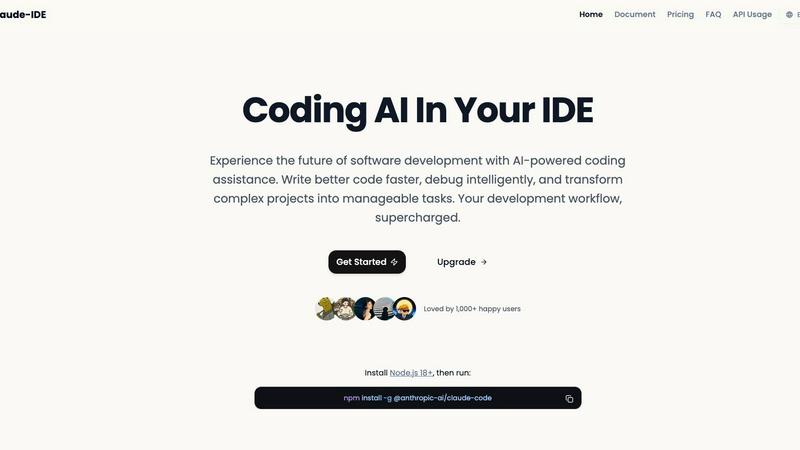
Claude IDE is an AI coding assistant that understands your entire codebase and works in your terminal.
Last updated: March 1, 2026

Prompt Builder
Create, optimize, and manage AI prompts effortlessly, saving time and ensuring quality across all major AI models.
Last updated: April 13, 2026
Visual Comparison
claude-ide
Prompt Builder
Feature Comparison
claude-ide
Deep Codebase Understanding
Claude IDE goes beyond single-file analysis to understand the full context of your project. It intelligently grasps project architecture, dependencies, and relationships across all files. This allows it to make accurate, coordinated edits and provide suggestions that are coherent with your entire codebase, ensuring functionality and consistency are maintained.
Seamless Terminal & IDE Integration
The tool is deeply embedded where you work, with no need for external browser tabs. It integrates directly into your terminal and popular IDEs like VS Code and JetBrains products. This native integration provides instant AI assistance without disrupting your workflow, allowing you to stay focused and productive within your primary development environment.
Intelligent Multi-File Editing
With its comprehensive understanding of your project, Claude IDE can execute powerful, coordinated edits across multiple files simultaneously. It can refactor code, update dependencies, implement features, and fix bugs that span several parts of your codebase, all while ensuring the changes work correctly together.
Integrated Development Workflow
Claude IDE connects with your entire toolchain. It deeply integrates with GitHub, GitLab, and command-line tools to manage a complete development workflow. You can read issues, write code, execute tests, and submit pull requests directly from your terminal, streamlining the process from task to deployment.
Prompt Builder
Prompt Generator
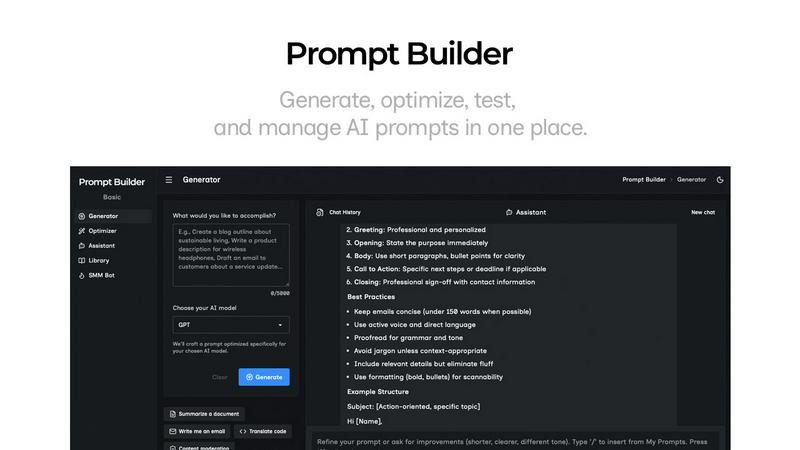
The Prompt Generator allows users to describe their ideas and select a target AI model to generate a professional-grade prompt. This feature ensures that the generated prompts are optimized specifically for models like Gemini, Claude, and GPT, making it easy to create effective prompts without starting from scratch.
Chat Refinement
With the integrated chat refinement feature, users can quickly refine their generated prompts through a built-in chat workspace. This allows for rapid iterations and modifications, ensuring the final prompt meets the specific needs of the chosen AI model and enhances the quality of outputs.
Prompt Library
The Prompt Library serves as a centralized hub for saving, organizing, and reusing the best prompts across various projects and teams. Users can easily search, filter, pin, edit, or delete prompts, making it an efficient tool for managing prompt assets and ensuring quick access to high-quality prompts.
Prompt Optimizer
The Prompt Optimizer enhances existing prompts by providing structured improvements in clarity, constraints, and output format. Users can paste their prompts into the Optimizer and receive clearer, better-structured versions almost instantly, allowing for quick adjustments and testing.
Use Cases
claude-ide
Rapid Codebase Familiarization
When joining a new project or returning to an old one, Claude IDE can analyze and explain the complete codebase in seconds. It automatically grasps the project's purpose, architecture, and key components, providing a high-level overview and answering specific questions to get you up to speed quickly.
End-to-End Feature Implementation
From a GitHub issue to a pull request, Claude IDE manages the entire feature development cycle. It can read issue descriptions, plan the necessary code changes across relevant files, write the implementation, run tests, and help submit the PR, all within an integrated workflow in your terminal.
Complex Debugging and Problem-Solving
When faced with a tricky bug or a complex problem, Claude IDE can intelligently debug by understanding the error in the context of your entire application. It traces through dependencies and data flow across files to identify the root cause and suggest precise, effective fixes.
Large-Scale Code Refactoring
For tasks like updating a library, renaming a component used throughout the project, or improving code structure, Claude IDE can safely execute widespread changes. It identifies all usages and dependencies across the codebase and performs coordinated multi-file edits to ensure the refactor is complete and functional.
Prompt Builder
Content Creation
Writers and marketers can utilize Prompt Builder to generate compelling content for blogs, social media, and marketing campaigns. By using the tailored prompts for different AI models, they can create engaging posts and articles that resonate with their target audience.
Customer Support Automation
Businesses can streamline their customer support processes by crafting AI prompts that guide virtual assistants. With Prompt Builder, support teams can create and refine prompts that ensure consistent and accurate responses to customer inquiries, improving overall service quality.
Educational Tools
Educators can leverage Prompt Builder to develop AI-driven educational content and quizzes. By generating prompts tailored to specific learning objectives, teachers can create engaging materials that enhance student learning experiences and foster interactive education.
Research and Development
Researchers can use Prompt Builder to formulate precise queries for AI models, facilitating data gathering and analysis. By generating optimized prompts, they can extract relevant information quickly, aiding in the efficiency and accuracy of their research projects.
Overview
About claude-ide
Claude IDE is a professional-grade AI coding assistant that integrates directly into your development environment, bringing the power of Claude Opus 4.6 to your terminal and VS Code. It is designed for developers who want to write better code faster, debug intelligently, and manage complex projects with seamless AI assistance. Unlike other services with opaque, usage-based pricing, Claude IDE offers a transparent and affordable alternative, making advanced AI support accessible to individual developers, students, and hobbyists. Its core value lies in deep contextual understanding; it analyzes your entire codebase instead of isolated snippets, enabling coordinated changes across multiple files and providing suggestions that truly fit your project's architecture. By living inside your terminal and IDE, it eliminates constant context switching and works seamlessly within your existing workflow, transforming complex development tasks into manageable processes.
About Prompt Builder
Prompt Builder is an advanced prompt engineering workspace designed for users who want to streamline the process of writing, testing, and saving AI prompts. It caters to a diverse audience, including writers, developers, and marketers, who require precise and effective prompts for various AI models. The platform simplifies the creation of tailored prompts by allowing users to start with a draft, refine it through an intuitive chat interface, and save or pin different versions for future use. Prompt Builder works seamlessly with popular AI models such as GPT, Claude, Gemini, Llama, Mistral, DeepSeek, Grok, and Perplexity, ensuring compatibility across the board. Its main value proposition lies in its ability to transform ideas into ready-to-use prompts in seconds, significantly reducing the time and effort typically involved in prompt crafting. With features like the Optimizer for enhancing existing prompts and a community library for reusable templates, Prompt Builder empowers users to achieve better results with fewer iterations.
Frequently Asked Questions
claude-ide FAQ
How do I install Claude IDE?
Installation is straightforward. First, ensure you have Node.js 18 or higher installed on your system. Then, open your terminal and run the command npm install -g @anthropic-ai/claude-code. This will install the Claude IDE package globally, making it available in your terminal and for integration with your IDE.
What makes Claude IDE different from other AI coding assistants?
Claude IDE distinguishes itself through its deep integration, full codebase context, and transparent pricing. It works directly inside your terminal and IDE without context switching, understands your entire project for more accurate suggestions, and offers a clear, affordable subscription model instead of opaque per-token costs.
Which IDEs and editors does Claude IDE support?
Claude IDE is designed for deep integration with the tools developers use most. It offers full integration with VS Code and JetBrains IDEs (like WebStorm, IntelliJ). Its core functionality is also accessible directly from your command-line terminal, providing flexibility regardless of your preferred editor.
Can Claude IDE work with private repositories and code?
Yes, Claude IDE is built to work with your real development projects. It operates locally within your environment, analyzing the code on your machine. This means it can work with private repositories, local projects, and proprietary code without sending your source code to external servers for processing.
Prompt Builder FAQ
How does Prompt Builder work?
Prompt Builder simplifies the prompt creation process by allowing users to start with an idea, choose a target AI model, generate a prompt, refine it in chat, and save or run it as needed. This streamlined workflow enhances productivity and effectiveness.
Can I use Prompt Builder with multiple AI models?
Yes, Prompt Builder is designed to work with various AI models, including GPT, Claude, Gemini, Llama, Mistral, DeepSeek, Grok, and Perplexity. Users can generate and optimize prompts specifically for each model to ensure compatibility and better results.
Is there a limit to how many prompts I can create?
With the free plan, users can make up to 25 assistant requests per month. This allows for ample opportunity to create, test, and refine prompts without the need for a credit card or additional fees.
What if I need help with crafting prompts?
Prompt Builder provides an integrated chat feature where users can refine their prompts in real-time. Additionally, the community library offers reusable prompts and templates that can serve as starting points or inspiration for crafting effective prompts.
Alternatives
claude-ide Alternatives
Claude IDE is an AI coding assistant that integrates directly into your terminal and IDE, offering intelligent codebase understanding and workflow automation. It belongs to the category of AI-powered development tools designed to help developers write, debug, and manage code more efficiently. Users often explore alternatives for various reasons. These can include seeking different pricing models, requiring specific features not available in one tool, needing compatibility with other platforms or IDEs, or simply wanting to compare the value and performance of different solutions in a competitive market. When evaluating alternatives, consider key factors like the depth of codebase understanding, the quality of AI suggestions, integration with your existing tools and workflow, overall cost transparency, and the tool's ability to handle your project's specific complexity without constant context switching.
Prompt Builder Alternatives
Prompt Builder is a comprehensive prompt engineering workspace designed for users who want to create, optimize, test, and manage AI prompts seamlessly. It supports a wide range of AI models, making it a versatile tool for anyone looking to enhance their interactions with AI technologies. Despite its robust features, users may seek alternatives for various reasons such as pricing, specific feature sets, or compatibility with preferred platforms. When searching for an alternative to Prompt Builder, consider factors like ease of use, available features, and integration capabilities with the AI models you utilize. Look for options that offer similar functionalities, such as prompt optimization and community resources, to ensure you can maintain efficiency in your AI prompt management.