
Changeflow vs SupaSidebar
Side-by-side comparison to help you choose the right AI tool.

Changeflow
Changeflow uses AI to track and summarize only the critical website changes that matter to your business.
Last updated: March 4, 2026

SupaSidebar
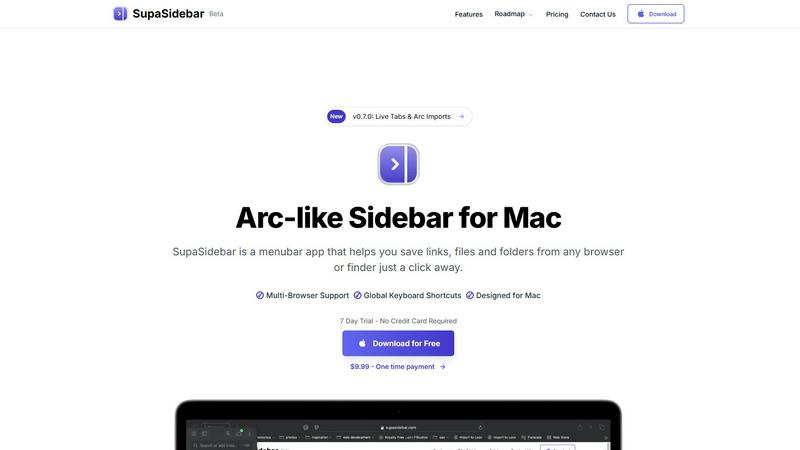
SupaSidebar is a Mac app that saves and organizes your links, files, and folders for instant access with keyboard.
Last updated: February 28, 2026
Visual Comparison
Changeflow

SupaSidebar
Feature Comparison
Changeflow
AI-Powered Change Intelligence
Our AI doesn't just detect that a page changed; it reads and understands the content to determine relevance. It filters out noise and false positives, delivering concise summaries that explain what changed and why it matters to your specific monitoring goals, saving you from manually deciphering screenshots.
Natural Language Setup & Smart Link Following
Describe what you want to track in plain English—no RSS feeds or complex configuration needed. Changeflow can also turn any page with links into an intelligent feed. It follows new links, reads the target pages, determines if the content is relevant to your description, and summarizes the key updates automatically.
Enterprise-Grade Reliability & Anti-Blocking
Built on over a decade of experience, Changeflow offers sophisticated anti-blocking technology that reliably monitors pages other tools cannot reach, including those behind logins or with complex JavaScript. This ensures a consistent 99.9% success rate for uninterrupted, critical intelligence.
Team Collaboration & Forensic Analysis
Shared workspaces keep entire teams aligned on the latest changes. The interactive Site Version Control allows you to navigate timestamped archives of any page to see a highlighted, forensic view of exactly what changed over time, providing complete auditability and deeper insight.
SupaSidebar
Universal Command Center
SupaSidebar serves as a universal command center where users can access all their essential files, folders, and browser tabs without switching between multiple applications. This feature streamlines workflow and enhances productivity by keeping everything organized in one easily accessible location.
Global Keyboard Shortcuts
With global keyboard shortcuts, users can quickly save links or copy URLs directly to the sidebar using simple commands. Pressing CMD CTRL S saves the current page, while CMD CTRL C copies the link, allowing for a seamless and efficient way to gather resources without interrupting your workflow.
Recents Tracking
The Recents feature automatically tracks your activity, showing every website you've visited in the last 48 hours. This functionality ensures that you can quickly find and revisit important resources without the hassle of remembering specific URLs or searching through browser history.
Fast Search Functionality
SupaSidebar includes a powerful search function that lets users find any file, folder, website, or app instantly. By pressing CMD CTRL K and typing your query, you can locate what you need without navigating through multiple menus or windows, significantly speeding up your workflow.
Use Cases
Changeflow
Competitive & Pricing Intelligence
Business teams automate the tracking of competitor websites for price changes, product launches, promotional offers, and strategic content updates. This provides real-time market intelligence without manual daily checks, enabling faster, data-driven business decisions.
Legal & Regulatory Monitoring
Legal librarians at top law firms and compliance officers at Fortune 500 companies use Changeflow to monitor court dockets, legal citations, FDA guidance documents, and SEC filings. They receive immediate alerts on relevant updates, ensuring they never miss a critical regulatory change or filing.
News & Brand Mention Tracking
Marketing and PR teams track news sites, blogs, and forums for brand mentions, industry news, or executive coverage. Changeflow filters out irrelevant articles, delivering a clean feed of only the mentions and stories that impact reputation and strategy.
Market & Supply Chain Monitoring
Procurement and operations teams monitor vendor sites, industry portals, and government sites for material availability, shipping status updates, tariff changes, and market movement reports. This helps in managing risk and optimizing supply chain logistics proactively.
SupaSidebar
For Students
Students can use SupaSidebar to keep track of research materials, important links, and study resources in one place. This organization enhances focus and ensures that they have quick access to all the materials needed for their academic success.
For Professionals
Professionals who juggle multiple projects will find SupaSidebar invaluable. It allows them to pin frequently used files and links, making it easy to switch between tasks without losing track of important resources or information.
For Researchers
Researchers can benefit from the Recents feature, which helps them revisit sources and articles they've recently accessed. This capability streamlines the research process and minimizes time wasted searching for previously viewed content.
For Content Creators
Content creators can utilize SupaSidebar to organize their favorite tools, websites, and research materials. By keeping everything accessible through a single interface, they can maintain their creative flow and focus on producing high-quality content.
Pricing Comparison
Changeflow
Changeflow offers simple, team-focused pricing. All plans include core features like AI-powered change detection, natural language setup, and expert support.
Plus Plan ($19/month)
- Ideal for getting started.
- Monitor up to 20 pages.
- Includes email & chat support, onboarding calls, and hourly/daily/weekly checks.
- Saves 10 page versions and allows 2 notification addresses.
Business Plan ($149/month)
- Ideal for teams needing broader monitoring.
- Monitor up to 500 pages.
- Includes everything in Plus, plus expert support, 20 saved versions, and 5 notification addresses.
- Adds bulk import from CSV/Excel, site crawl import, and premium page unblocking.
Annual billing is available for both plans. A 30-day free trial is offered.
SupaSidebar
- Free Forever: All major browsers supported, 3 spaces included, 7-day trial for Pro features.
- Pro Plan: $19.99/month or $13.99/year with unlimited spaces, priority support, and early access to new features.
- Lifetime License: One-time payment of $49.99, includes unlimited spaces and can be used across 5 devices.
Overview
About Changeflow
Changeflow is an AI-powered web monitoring platform that intelligently tracks changes on web pages. It goes beyond simple alerts to understand the context of updates, summarizing only the important changes that matter to your business. Users simply describe what they want to track in plain English and point the tool at a target page. Changeflow then handles the complex technical work, including navigating login walls and JavaScript-heavy sites with a 99.9% success rate, turning any webpage into a clean feed of relevant updates. It is built for business and enterprise teams who need reliable, actionable intelligence from the web. Core users include competitive intelligence teams tracking pricing, legal professionals monitoring court dockets, compliance officers following regulatory updates, and marketing teams tracking news and mentions. The platform saves thousands of manual hours by eliminating false alerts and providing clear, AI-generated summaries of critical changes as they happen.
About SupaSidebar
SupaSidebar is an elegantly designed menubar application for macOS that enhances digital workflow by providing a central hub for all your important links, files, folders, and browser tabs. Inspired by the sleek aesthetics of Arc, it is perfect for professionals, students, researchers, and multitaskers who need to manage various applications and browsers without the clutter typically associated with traditional workflows. The core value proposition of SupaSidebar is its ability to eliminate inefficiencies, allowing users to access everything they need with just a keyboard shortcut. No more searching through endless bookmarks or tabs; SupaSidebar organizes your digital life into a distraction-free sidebar. Compatible with all major browsers, including Safari, Chrome, Firefox, Arc, and Brave, it keeps your data private as everything is stored locally on your Mac. With features like a global command panel and live tab overview, SupaSidebar transforms how you interact with your Mac, making browsing faster, more efficient, and focused on what truly matters.
Frequently Asked Questions
Changeflow FAQ
How does Changeflow handle websites that require a login?
Changeflow employs advanced anti-blocking technology designed to navigate login walls and complex JavaScript. You can provide credentials securely, and our system will automate access with a 99.9% success rate, reliably monitoring pages that are typically inaccessible to other web scraping or monitoring tools.
What's the difference between Changeflow and traditional website monitoring tools?
Traditional tools often just alert you that "something changed" or provide side-by-side screenshots, forcing you to manually find the difference. Changeflow uses AI to read the page, understand context, filter out irrelevant changes, and deliver a plain-English summary of what actually changed and why it matters.
Can I monitor a large number of pages or an entire website?
Yes. Changeflow is built for scale, allowing you to organize thousands of web sources. For bulk imports, you can provide a list via CSV or Excel, or we can perform a site crawl. The platform then creates a unified, noise-free feed of key updates from all your monitored pages.
How are notifications delivered?
You receive concise, AI-generated notifications directly in your Changeflow dashboard and via email to specified addresses. For integration into other workflows, you can use the provided API or connect to thousands of other apps (like Slack or Teams) using Zapier for custom alerting.
SupaSidebar FAQ
Is SupaSidebar a browser extension?
No, SupaSidebar is a standalone menubar application designed for macOS. It integrates with multiple browsers but operates independently, ensuring a seamless experience without being limited to a single browser.
Which browsers does SupaSidebar work with?
SupaSidebar is compatible with all major browsers, including Safari, Chrome, Firefox, Arc, and Brave. This flexibility allows users to maintain their preferred browsing environment while enjoying the benefits of the sidebar application.
What macOS version do I need?
SupaSidebar requires macOS version 13 or later to ensure optimal performance and compatibility with the latest features and updates.
Where is my data stored?
All data associated with SupaSidebar is stored locally on your Mac, ensuring your privacy and security. No information is sent to external servers, allowing you to manage your resources safely and privately.
Alternatives
Changeflow Alternatives
Changeflow is an AI-driven market and competitor insights platform. It belongs to the category of web monitoring and change detection tools, designed to track updates across websites with high accuracy and contextual understanding. Users often explore alternatives to find a better fit for their specific needs. Common reasons include budget constraints, the need for different feature sets like integration capabilities, or platform requirements such as on-premise deployment versus cloud-based solutions. When evaluating alternatives, consider the tool's ability to handle complex pages, the intelligence behind its change summaries, and the reliability of its data capture. The right solution should align with your team's workflow and the specific types of content you need to monitor, from dynamic pricing pages to secure regulatory portals.
SupaSidebar Alternatives
SupaSidebar is an innovative Arc-style sidebar application designed for macOS, serving as a centralized hub for managing links, files, and folders. It falls under the productivity and management category, catering to professionals, students, and anyone who juggles multiple tasks across different applications and browsers. Users frequently seek alternatives to SupaSidebar for various reasons, including pricing, feature sets, and compatibility with different platforms. Finding the right alternative involves evaluating similar functionalities, ease of use, and how well an option integrates into your existing workflow. When choosing an alternative, it’s essential to consider factors such as the user interface, the ability to handle multiple browsers, and how effectively it helps streamline your digital organization. Additionally, look for features that enhance productivity, like quick access to resources, customizable settings, and privacy assurances. These elements will ensure that the alternative meets your specific needs while enhancing your overall experience.