
Caller vs Dokta
Side-by-side comparison to help you choose the right AI tool.

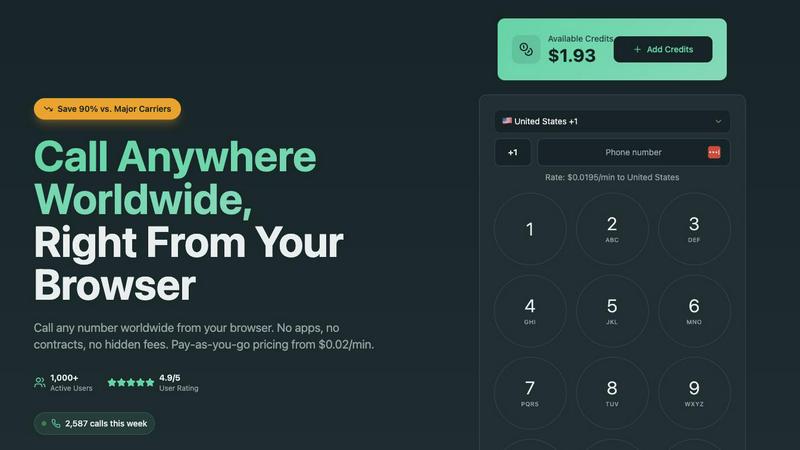
Call any number worldwide from your browser for just 2 cents per minute.
Last updated: March 1, 2026

Dokta automates document management for SMBs and freelancers, streamlining invoicing, contracts, and cash flow in just a few clicks.
Last updated: April 4, 2026
Visual Comparison
Caller
Dokta

Feature Comparison
Caller
Browser-Based Calling
Make calls instantly from any web browser on your computer, tablet, or smartphone. There is absolutely no software to download, install, or update. This eliminates compatibility issues and storage concerns, allowing you to connect from any device with an internet connection in mere seconds.
Transparent Pay-As-You-Go Pricing
Pay only for the call minutes you actually use, with no monthly subscriptions, contracts, or hidden fees. Rates start from $0.02 per minute, and your purchased credits never expire. This model provides complete cost control and transparency, with real-time usage tracking.
Global Coverage & HD Voice Quality
Call landlines and mobile phones in over 200 countries worldwide with crystal clear HD audio. The service is built on enterprise-grade telecommunications infrastructure, ensuring reliable connections and professional sound quality for every conversation, as if you were in the same room.
Dedicated Phone Numbers
Enhance your professional presence by purchasing a dedicated local, toll-free, or mobile number from countries like the US and UK. Use this number as your caller ID for outgoing calls, providing a local point of contact for business, clients, or personal use with instant activation.
Dokta
Automated Invoice Management
Dokta simplifies the invoice process by enabling users to upload any document type, which is then automatically analyzed and classified by the AI. This feature reduces the time spent on manual data entry and ensures accurate invoicing.
Real-Time Cash Flow Tracking
This feature provides users with a clear overview of their financial situation by displaying billed amounts, collected payments, outstanding invoices, and VAT. Users can visualize their cash flow trends over a 12-month period through interactive graphs.
Online Quotes and Acceptance
With Dokta, users can send quotes with a simple acceptance link. This feature allows for a seamless transition from quote to invoice in just one click, streamlining the sales process and improving client experience.
Anomaly Detection
Dokta's smart anomaly detection feature safeguards users by identifying issues such as modified IBANs, duplicate entries, inconsistent VAT, and missing numbering. This added layer of protection ensures document integrity and accuracy.
Use Cases
Caller
Freelancers & Remote Workers
Ideal for professionals managing international clients. Make business calls to any country directly from your laptop browser without needing a separate business phone line. Maintain a professional image with clear audio and dedicated numbers while keeping costs predictable and low.
Small Business Sales & Support Teams
Empower your team to call customers and leads worldwide affordably. The browser-based platform requires no IT setup, making it easy to onboard new team members. Use dedicated numbers to establish a local presence in key markets and improve customer trust and response rates.
Staying Connected with Family Abroad
A simple and cost-effective solution for individuals to regularly call friends and family overseas. Avoid expensive carrier international plans and calling cards. Top up with a small credit amount and enjoy high-quality, secure calls to mobile and landline numbers from any device at home.
Accessing International Services
Essential for calling banks, government offices, or customer service lines in other countries. Whether verifying accounts, resolving issues, or making appointments, Caller provides a reliable way to connect to essential services without incurring exorbitant traditional phone charges.
Dokta
Freelance IT Consultant
An IT consultant can use Dokta to automate their invoicing process. By generating invoices from their contracts automatically, they can save time and reduce the risk of errors, allowing them to focus more on coding and client work.
Creative Freelancers
Graphic designers and other creative professionals can manage their projects from start to finish using Dokta. From sending a quote to a client and receiving acceptance online, to generating a final invoice, everything is handled smoothly in one platform.
Auto-Entrepreneurs
Auto-entrepreneurs can utilize Dokta to create compliant invoices while keeping track of their cash flow. Alerts for URSSAF deadlines help them stay organized and compliant without unnecessary stress.
Small Business Owners
SMBs can benefit from Dokta's ability to manage client databases and financial data in real-time. By utilizing Dokta, they can ensure accurate cash flow tracking, automate reminders, and easily prepare for accounting needs.
Overview
About Caller
Caller is a modern, browser-based platform that revolutionizes international calling by eliminating traditional barriers. It enables instant, low-cost phone calls to any number worldwide directly from your web browser, with no need for app downloads, SIM cards, or complex hardware. The service operates on a transparent, pay-as-you-go model with rates starting as low as $0.02 per minute, offering savings of up to 90% compared to standard carrier rates. Designed for simplicity, users can sign up, add credits, and start calling in minutes from any device. With global coverage to over 200 countries and HD voice quality powered by enterprise infrastructure, Caller delivers reliable, secure, and professional-grade communication. It is built for a wide audience including freelancers, remote workers, small businesses, sales teams, customer support agents, and individuals needing to connect with family, clients, or services abroad. Its core value is providing affordable, high-quality international calling with zero long-term commitment and unparalleled ease of use.
About Dokta
Dokta is an AI-powered document management platform specifically designed for freelancers, solo entrepreneurs, auto-entrepreneurs, and small to medium-sized businesses (SMBs). With Dokta, users can effortlessly manage their documents by simply uploading invoices, quotes, or contracts. Within 60 seconds, Dokta's advanced AI engine reads, classifies, and extracts critical data from these documents, optimizing the entire document lifecycle. Users can create professional invoices and quotes, track payments, automate reminders for unpaid invoices, manage contracts and deadlines, and even generate tasks automatically from their documents. This eliminates the hassle of lost files and missed deadlines, allowing users to focus on their core business activities. Moreover, Dokta builds a client database from the uploaded documents, tracks cash flow in real-time, and offers easy CSV exports for accountants. Whether you are a freelance developer, a consultant, or a growing SMB, Dokta integrates document management seamlessly into your operations, supported by a free tier for up to 15 documents per month and paid plans starting at €9 per month. Data security is guaranteed with 100% GDPR compliance and hosting in Europe.
Frequently Asked Questions
Caller FAQ
How do I start making calls with Caller?
Simply sign up for a free account on the Caller website. Once registered, add credit to your account using a secure payment method. Then, navigate to the dialer in your browser, enter the international phone number you wish to call, and click the call button to connect instantly.
What devices and browsers are supported?
Caller works on any device with a modern web browser and an internet connection. This includes computers (Windows, Mac, Linux), tablets, and smartphones. Supported browsers include Chrome, Firefox, Safari, and Edge. No specific apps or hardware are required.
Are my calls secure and private?
Yes. All calls made through the Caller platform are secured with bank-level SSL encryption, ensuring your conversations are private. Furthermore, your payment transactions are processed securely, and the service adheres to strict data protection standards.
Do I need to get a dedicated phone number?
No, a dedicated number is an optional feature. You can use Caller immediately with your default account to make outbound calls. Purchasing a dedicated local or toll-free number is recommended for businesses or individuals who want a consistent, professional caller ID for their contacts.
Dokta FAQ
What types of documents can I manage with Dokta?
Dokta supports a wide range of documents including invoices, quotes, contracts, and any scanned files or PDFs. This versatility makes it a comprehensive solution for document management.
How quickly does Dokta process documents?
Dokta's AI engine analyzes and processes documents in under 60 seconds, providing users with instant insights and allowing them to take action without delay.
Is my data secure with Dokta?
Yes, Dokta is compliant with GDPR regulations and hosts data in Europe via AWS. All data is encrypted using AES-256, ensuring maximum security and privacy for users.
What is the pricing structure for Dokta?
Dokta offers a free tier allowing users to manage up to 15 documents per month. Paid plans start at €9 per month, with various tiers available to suit different business needs, ensuring flexibility and scalability.
Alternatives
Caller Alternatives
Caller is a browser-based platform for making low-cost international calls directly from your web browser. It falls into the productivity and communication category, offering a simple, pay-as-you-go alternative to traditional phone services. Users often explore alternatives for various reasons. They might seek different pricing models, such as unlimited monthly plans, or require specific features like call recording or team management tools. Others may need a dedicated mobile app or integration with their existing business software. When evaluating alternatives, consider your core needs. Key factors include total cost for your calling patterns, required call quality and reliability, platform compatibility (web, mobile, desktop), and any advanced features essential for your work or personal use.
Dokta Alternatives
Dokta is an AI-powered document management platform designed for freelancers, solo entrepreneurs, auto-entrepreneurs, and small to medium-sized businesses (SMBs). It automates the processing of various documents, including invoices, quotes, and contracts, streamlining their management for users. Many individuals and businesses seek alternatives to Dokta due to factors such as pricing, specific feature requirements, or the need for compatibility with other software platforms. When searching for an alternative, it's essential to evaluate the pricing structure, available features, user experience, customer support, and data security measures. Finding a solution that aligns with your specific document management needs can significantly enhance productivity and efficiency.