
AI FUTURE ADDA vs Dokta
Side-by-side comparison to help you choose the right AI tool.

AI FUTURE ADDA
Discover, compare, and master the best AI tools for your work and business growth.
Last updated: February 28, 2026

Dokta automates document management for SMBs and freelancers, streamlining invoicing, contracts, and cash flow in just a few clicks.
Last updated: April 4, 2026
Visual Comparison
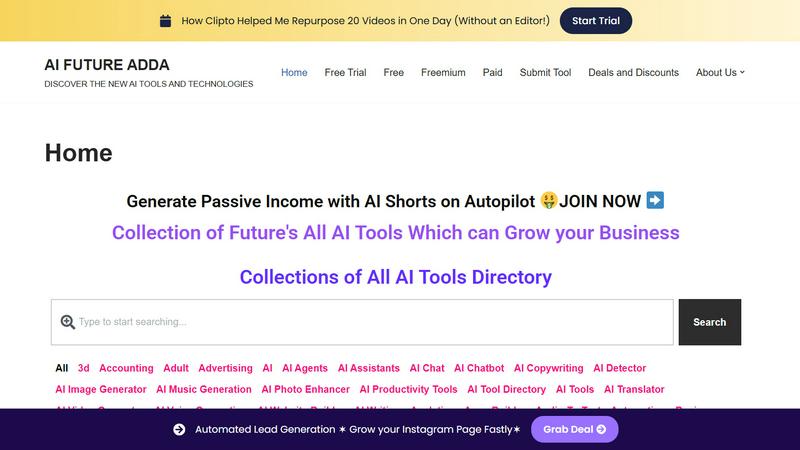
AI FUTURE ADDA
Dokta

Feature Comparison
AI FUTURE ADDA
Vast Curated AI Directory
The platform hosts an extensive, meticulously organized directory of thousands of AI tools across hundreds of specific categories. From AI Image Generators and SEO tools to niche areas like Cryptocurrency analytics and Interior Design, every tool is categorized for instant, relevant discovery, eliminating the need to scour the internet.
Clear Pricing & Model Filtering
Every tool listing clearly states its pricing model: Free, Freemium, Paid, or Free Trial. Users can filter and browse tools specifically by these cost structures, allowing for immediate budgeting and planning. This transparency helps professionals and businesses quickly shortlist tools that match their financial constraints.
Actionable Tool Listings
Listings go beyond basic links. Each provides a concise description of the tool's core functionality, its target audience, and practical use cases. This format delivers immediate context, helping users understand not just what a tool does, but how it can be applied to solve real-world problems in their domain.
Specialized Collections & Deals
AI FUTURE ADDA offers curated collections and special sections like "Deals and Discounts" to provide added value. It features guides and opportunities, such as generating passive income with AI, helping users not only find tools but also learn how to leverage them effectively for growth and monetization.
Dokta
Automated Invoice Management
Dokta simplifies the invoice process by enabling users to upload any document type, which is then automatically analyzed and classified by the AI. This feature reduces the time spent on manual data entry and ensures accurate invoicing.
Real-Time Cash Flow Tracking
This feature provides users with a clear overview of their financial situation by displaying billed amounts, collected payments, outstanding invoices, and VAT. Users can visualize their cash flow trends over a 12-month period through interactive graphs.
Online Quotes and Acceptance
With Dokta, users can send quotes with a simple acceptance link. This feature allows for a seamless transition from quote to invoice in just one click, streamlining the sales process and improving client experience.
Anomaly Detection
Dokta's smart anomaly detection feature safeguards users by identifying issues such as modified IBANs, duplicate entries, inconsistent VAT, and missing numbering. This added layer of protection ensures document integrity and accuracy.
Use Cases
AI FUTURE ADDA
Accelerating Business Tool Discovery
Entrepreneurs and business managers can rapidly find AI solutions for automation, marketing, sales, and operations. By filtering through categories like Business, Ecommerce, and Automation, they can identify tools that drive efficiency and growth without spending weeks on independent research and vetting.
Empowering Content Creators
Digital marketers, writers, and social media managers use the platform to discover the latest AI tools for content generation, video editing, image creation, and SEO. The organized categories like AI Writing, Video Generator, and Social Media help them stay ahead of trends and enhance their content output quality and speed.
Supporting Student & Learner Research
Students and individuals exploring AI capabilities use the directory as an educational resource. It provides a structured way to understand the AI landscape, explore tools in categories like Education Tools or Research, and see practical applications across industries, aiding in academic projects and skill development.
Streamlining Professional Productivity
Professionals across fields use the platform to find productivity-enhancing AI assistants, note-taking apps, project management software, and specialized utilities. The Productivity, AI Assistants, and Developer Tools categories help them integrate AI into their daily workflow to save time and automate routine tasks.
Dokta
Freelance IT Consultant
An IT consultant can use Dokta to automate their invoicing process. By generating invoices from their contracts automatically, they can save time and reduce the risk of errors, allowing them to focus more on coding and client work.
Creative Freelancers
Graphic designers and other creative professionals can manage their projects from start to finish using Dokta. From sending a quote to a client and receiving acceptance online, to generating a final invoice, everything is handled smoothly in one platform.
Auto-Entrepreneurs
Auto-entrepreneurs can utilize Dokta to create compliant invoices while keeping track of their cash flow. Alerts for URSSAF deadlines help them stay organized and compliant without unnecessary stress.
Small Business Owners
SMBs can benefit from Dokta's ability to manage client databases and financial data in real-time. By utilizing Dokta, they can ensure accurate cash flow tracking, automate reminders, and easily prepare for accounting needs.
Overview
About AI FUTURE ADDA
AI FUTURE ADDA is a centralized discovery and learning platform designed to simplify the overwhelming world of artificial intelligence. It acts as a comprehensive directory and resource hub, meticulously curating, reviewing, and explaining thousands of AI tools. The platform tackles the core problem of information overload by organizing tools into clear, practical categories such as productivity, content creation, marketing, design, and business automation. Each listing provides concise details on functionality, target audience, pricing models (Free, Freemium, Paid), and real-world applications. This enables users to quickly identify and evaluate the right AI solutions for their specific needs without endless searching. Built for a diverse audience, it serves professionals seeking efficiency, digital marketers and creators needing cutting-edge tools, entrepreneurs driving business growth, and learners exploring AI capabilities. Its core value is transforming chaotic choice into actionable insight, saving users significant time and research effort while connecting them with tools that can genuinely transform their work and projects.
About Dokta
Dokta is an AI-powered document management platform specifically designed for freelancers, solo entrepreneurs, auto-entrepreneurs, and small to medium-sized businesses (SMBs). With Dokta, users can effortlessly manage their documents by simply uploading invoices, quotes, or contracts. Within 60 seconds, Dokta's advanced AI engine reads, classifies, and extracts critical data from these documents, optimizing the entire document lifecycle. Users can create professional invoices and quotes, track payments, automate reminders for unpaid invoices, manage contracts and deadlines, and even generate tasks automatically from their documents. This eliminates the hassle of lost files and missed deadlines, allowing users to focus on their core business activities. Moreover, Dokta builds a client database from the uploaded documents, tracks cash flow in real-time, and offers easy CSV exports for accountants. Whether you are a freelance developer, a consultant, or a growing SMB, Dokta integrates document management seamlessly into your operations, supported by a free tier for up to 15 documents per month and paid plans starting at €9 per month. Data security is guaranteed with 100% GDPR compliance and hosting in Europe.
Frequently Asked Questions
AI FUTURE ADDA FAQ
What is AI FUTURE ADDA?
AI FUTURE ADDA is a comprehensive online directory and learning platform dedicated to artificial intelligence tools. It curates, categorizes, and reviews thousands of AI applications to help users discover, compare, and understand the right tools for their personal, professional, or business needs efficiently.
How are the AI tools categorized?
Tools are organized into intuitive, practical categories based on their primary function and industry. The platform features a wide range of categories from broad ones like Marketing, Design, and Productivity to very specific niches such as AI Music Generation, Cryptocurrency, Job Search, and Podcasting for precise discovery.
Is there a cost to use AI FUTURE ADDA directory?
The AI FUTURE ADDA platform itself appears to be a free resource for discovering and learning about tools. The costs associated are for the individual AI tools listed, which have their own pricing models (Free, Freemium, Paid) clearly indicated on each listing for user transparency.
Can I submit my own AI tool to the directory?
Yes, the platform has a "Submit Tool" section, allowing developers and companies to list their AI products. This helps grow the directory's ecosystem and ensures users have access to a wide and updated selection of tools across all categories and pricing models.
Dokta FAQ
What types of documents can I manage with Dokta?
Dokta supports a wide range of documents including invoices, quotes, contracts, and any scanned files or PDFs. This versatility makes it a comprehensive solution for document management.
How quickly does Dokta process documents?
Dokta's AI engine analyzes and processes documents in under 60 seconds, providing users with instant insights and allowing them to take action without delay.
Is my data secure with Dokta?
Yes, Dokta is compliant with GDPR regulations and hosts data in Europe via AWS. All data is encrypted using AES-256, ensuring maximum security and privacy for users.
What is the pricing structure for Dokta?
Dokta offers a free tier allowing users to manage up to 15 documents per month. Paid plans start at €9 per month, with various tiers available to suit different business needs, ensuring flexibility and scalability.
Alternatives
AI FUTURE ADDA Alternatives
AI FUTURE ADDA is a curated directory and learning platform for discovering AI tools. It belongs to the AI tool discovery and resource hub category, helping users navigate the vast landscape of artificial intelligence applications for work and business. Users often look for alternatives for various reasons. These can include seeking different pricing models, a more specialized focus on a particular niche, or a platform with a different user interface and discovery experience that better matches their personal workflow. When evaluating an alternative, consider the scope and depth of the tool directory, the quality of curation and reviews, and the efficiency of the search and filtering system. The goal is to find a platform that reliably connects you with the right AI solutions while saving you research time.
Dokta Alternatives
Dokta is an AI-powered document management platform designed for freelancers, solo entrepreneurs, auto-entrepreneurs, and small to medium-sized businesses (SMBs). It automates the processing of various documents, including invoices, quotes, and contracts, streamlining their management for users. Many individuals and businesses seek alternatives to Dokta due to factors such as pricing, specific feature requirements, or the need for compatibility with other software platforms. When searching for an alternative, it's essential to evaluate the pricing structure, available features, user experience, customer support, and data security measures. Finding a solution that aligns with your specific document management needs can significantly enhance productivity and efficiency.