
Admanage AI vs Crops
Side-by-side comparison to help you choose the right AI tool.

AdManage AI lets you launch ads 10x faster across major platforms with one-click templates and bulk tools.
Last updated: February 26, 2026

Crops
Crops uses AI to organize creative assets, catch errors, and streamline approvals for teams.
Last updated: March 1, 2026
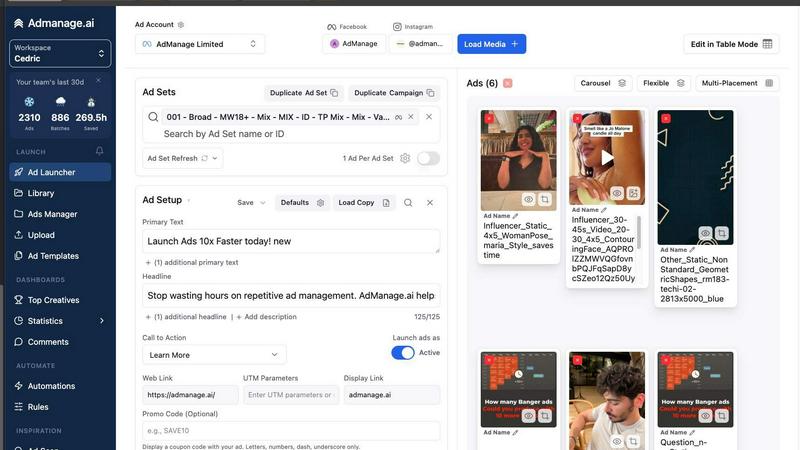
Visual Comparison
Admanage AI
Crops

Feature Comparison
Admanage AI
Purpose-built Interface
Admanage AI features a specialized interface designed to facilitate the rapid launch of ads. This user-friendly layout allows marketers to navigate easily and execute ad campaigns at exceptional speeds, ensuring efficiency in the workflow.
One-click Templates
The platform offers one-click ad templates based on your best-performing creatives. This feature allows users to standardize ad execution quickly, reducing the time spent on formatting and optimizing ads for various placements.
Automated Multi-format Grouping
Admanage AI automatically groups ads into various formats (9:16, 4:5, 1:1) without additional effort from the user. This automated process enhances organization and ensures that ads are optimized for each platform, improving overall campaign performance.
Google Sheets Integration
With a free Google Sheets plugin, Admanage AI allows for bulk ad launches directly from your spreadsheets. This integration simplifies the upload process, enabling marketers to manage multiple ad variations efficiently and effectively.
Crops
Smart Asset Organization
Your entire creative library is intelligently organized and instantly searchable. AI automatically tags and categorizes every upload, and assets can live in multiple boards without duplication. Complex searches take seconds, not hours, ensuring your team finds the right asset immediately, every time, ending the frustration of misplaced files and outdated versions.
Streamlined Approvals
Centralize all feedback and approvals in one place, directly on the asset itself. Stakeholders comment with visual annotations and track status via custom workflows. Share secure review links that require no login, accelerating the review cycle and enabling you to ship campaigns faster with clear, contextual feedback.
AI Quality Control
Catch every error before stakeholders see them. AI instantly scans for typos, accessibility issues, placeholder text, and dozens of other problems. Connect these automated checks to your workflow to run before client presentations or final approval, ensuring you ship flawless, on-brand work with confidence.
Secure, Simple Sharing
Get feedback faster without email friction. Generate secure, branded links for clients and stakeholders with full control over passwords, expiration dates, and download permissions. Recipients can review and comment without creating accounts, facilitating a professional and efficient external collaboration process.
Use Cases
Admanage AI
High-Volume Campaign Launches
Admanage AI is perfect for marketers running high-volume campaigns. It allows them to launch hundreds of ads in seconds, drastically reducing the time dedicated to manual uploads and repetitive tasks.
Creative Testing at Scale
For teams focused on creative testing, the platform’s capabilities enable rapid iteration and testing of multiple ad creatives. Marketers can quickly adjust campaigns based on performance data, enhancing their ability to find optimal creative strategies.
Streamlined Collaboration
Admanage AI enhances collaboration among marketing teams by integrating with tools like Google Drive and Dropbox. This feature allows team members to share assets and manage campaigns effortlessly, fostering a more coordinated approach to advertising.
Error Reduction in Campaign Management
By automating the ad launch process and using one-click templates, Admanage AI significantly reduces the likelihood of errors that commonly occur during manual ad management. This feature helps maintain consistency and reliability in ad execution.
Crops
Marketing Campaign Launch
Manage all assets for a multi-channel campaign from a single workspace. Organize final visuals, copy, and videos. Use AI review to catch errors before go-live and streamline stakeholder approvals with shared review links, ensuring a confident, error-free launch.
Brand Asset Management
Create a centralized, always-updated library of logos, fonts, templates, and brand guidelines. AI auto-tags new uploads for instant retrieval. Share secure links with external partners to ensure they always use the correct, approved brand materials.
Creative Production Workflow
Orchestrate the entire design-to-approval process. Designers upload work to organized boards. Automated AI checks run for quality, then stakeholders provide consolidated feedback directly on files. Eliminate version confusion and scattered comments across Slack and email.
Client and Agency Collaboration
Facilitate smooth collaboration with external clients. Share secure review links for specific projects. Clients comment directly on designs, and all feedback is tracked in one thread. AI ensures all shared work is error-free, maintaining a professional standard.
Overview
About Admanage AI
Admanage AI is an innovative platform designed specifically for performance marketers who require rapid and efficient ad creation and management. It optimizes the ad workflow by allowing users to launch a significant number of ads in a fraction of the time traditionally required. Whether you're managing campaigns for a large brand or a small business, Admanage AI streamlines the creative testing process, reducing errors and enhancing productivity. With the capability to launch nearly one million ads per month for notable clients, the platform supports high-velocity ad testing, enabling marketers to focus on strategy rather than getting bogged down in manual processes. The user-friendly interface integrates seamlessly with tools like Google Sheets and popular cloud services, making it a go-to solution for those looking to elevate their advertising game.
About Crops
Crops is an AI-powered Digital Asset Management (DAM) platform engineered specifically for creative and marketing teams. It directly tackles the chronic workflow chaos that plagues these teams: endless hours lost searching for files, feedback scattered across disjointed channels like email and Slack, costly errors that slip through to production, and perpetual version confusion. Crops consolidates the entire creative workflow into a single, intelligent workspace. It combines powerful asset organization with automated quality control and streamlined collaboration tools. The core value proposition is clear: give creative teams their time back. By automating manual, error-prone tasks and centralizing the review process, Crops enables teams to find any asset instantly, maintain brand consistency automatically, keep approvals moving swiftly, and ultimately ship campaigns with confidence, knowing nothing has been overlooked. It's the foundational system that turns creative chaos into a smooth, reliable, and efficient operational workflow.
Frequently Asked Questions
Admanage AI FAQ
How does Admanage AI improve ad launch speed?
Admanage AI utilizes a purpose-built interface and automated processes to enable the rapid launch of ads, allowing users to launch hundreds in seconds rather than manually creating each one.
Can I integrate Admanage AI with other tools?
Yes, Admanage AI integrates seamlessly with various cloud services, including Google Drive, Dropbox, and more, allowing for streamlined workflows and efficient asset management.
Is there a limit to how many ads I can launch at once?
While the platform is designed for high-volume ad launches, the exact limit may depend on your account type and specific campaign settings. However, it is capable of handling thousands of ads in a single session.
How does the Google Sheets plugin work?
The Google Sheets plugin allows users to manage and launch ads directly from their spreadsheets. Users can upload multiple ad variations simultaneously, making the bulk launch process straightforward and efficient.
Crops FAQ
Who is Crops designed for?
Crops is engineered specifically for creative and marketing teams, including designers, marketing managers, content creators, and brand managers. It is ideal for any team that deals with high volumes of digital assets and needs to streamline organization, collaboration, and quality assurance.
How does the AI Quality Control work?
The AI scans uploaded assets instantly for a range of common errors. This includes checking for spelling and grammar mistakes, detecting leftover placeholder text like "Lorem ipsum," and flagging potential accessibility issues such as poor color contrast or text size, acting as an automated final reviewer.
Can I control who sees and downloads shared assets?
Yes. When generating a shareable link, you have full control over permissions. You can set passwords, expiration dates for the link, and toggle download capabilities on or off. This ensures you can share assets widely for feedback while keeping sensitive files secure.
How does Crops handle different file versions?
Crops eliminates version confusion by centralizing all feedback on the asset itself within the platform. The system helps track the approval status, so it's always clear which file is the final, approved version ready for use or distribution, ending the "final-FINAL" email chains.
Alternatives
Admanage AI Alternatives
AdManage AI is an innovative tool designed for performance marketers, allowing them to launch ads across multiple platforms like Meta, TikTok, and Google at an accelerated pace. It streamlines the ad creation process, enabling users to test creatives at scale and manage high volumes of ads with ease. Users often seek alternatives to AdManage AI for various reasons, including pricing concerns, specific feature requirements, or compatibility with different advertising platforms. When looking for an alternative, consider factors such as user interface efficiency, integration capabilities, and the availability of automation features that can enhance your ad management workflow.
Crops Alternatives
Crops is an AI-powered Digital Asset Management (DAM) platform designed to streamline creative workflows for marketing and creative teams. It centralizes assets, automates quality checks, and simplifies the approval process to eliminate chaos and errors. Users may explore alternatives for various reasons. Common factors include budget constraints, the need for different feature sets, or specific platform requirements like deeper integrations with existing tools. The scale of a team or the complexity of its projects can also drive the search for a different solution. When evaluating alternatives, focus on core needs. Key considerations are robust asset organization, efficient collaboration tools, and automated quality assurance. The right platform should seamlessly integrate into your existing workflow, scale with your team, and provide clear value by saving time and reducing operational friction.