

Thank You Email AI
Turn interview notes into a polished, personalized thank you email in seconds to boost your chances of landing the job.
AI tool Details
Explore More
Alternatives
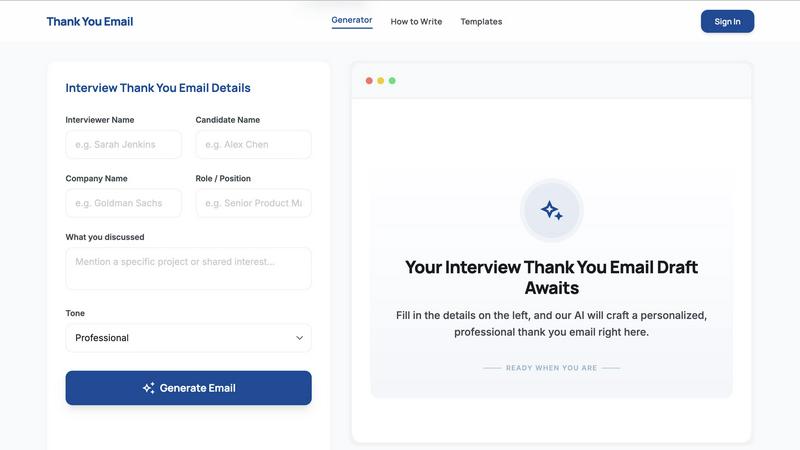
About Thank You Email AI
Thank You Email AI is a specialized tool designed to solve a specific, high-stakes problem: writing a personalized thank you email after a job interview. Generic templates feel impersonal, and general-purpose AI tools often require multiple prompts and careful editing to produce something that sounds natural and specific to your conversation. This tool eliminates that friction entirely. It turns your interview conversation into a clear, professional follow-up email in seconds, with no prompt engineering required and no risk of an awkward or robotic tone.
The product is built for anyone navigating the job market, from entry-level candidates to senior executives. It serves candidates across all industries, including consulting, finance, technology, healthcare, and creative fields. The core value proposition is speed and personalization. Users simply input the interviewer's name, the company, the role, and key discussion points. They select their preferred tone, and the AI generates a polished, tailored email draft instantly. The tool is trusted by over 10,000 successful candidates who use it to leave a lasting, positive impression after every interview round. It streamlines a critical step in the hiring process, ensuring you follow up professionally without the stress of writing from scratch or the risk of sounding generic. The platform also provides a comprehensive library of templates, guides, and resources to help users master every aspect of the interview follow-up process, from timing to subject lines.
Features
Instant Personalized Draft Generation
Input the interviewer's name, company name, role, and specific touchpoints from your conversation. Our specialized LLM curates a professional message tailored to the industry norms and the seniority of your target role. The result is a hyper-personalized draft that references your actual discussion, making it feel genuine and thoughtful rather than templated.
Tone Selection for Perfect Fit
Choose from three distinct tones: Professional, Warm, or Concise. This feature ensures your email matches the company culture and your relationship with the interviewer. Whether you need a formal note for a corporate finance role or a warmer message for a creative agency, the AI adjusts its language and structure accordingly.
Live Preview and One-Click Copy
Review your generated email in a live preview pane before sending. This allows you to see the final output instantly and make any minor tweaks. Once satisfied, copy the entire email to your clipboard with one click and paste it into your email client. This eliminates formatting errors and saves critical time during the post-interview window.
Comprehensive Resource Library
Beyond the generator, the platform offers a full suite of resources. This includes a complete guide on how to write a strong thank you email, templates organized by role and company, and scenario-specific guides. You can find advice on timing, subject lines, follow-ups with no response, and emails for phone interviews, final rounds, and internships.
Use Cases
Following Up After a Final Round Interview
After a final round, you need to express strong interest without sounding pushy. Use the generator to craft a thank you email that reiterates your enthusiasm for the role and the company. Input specific details from your final conversation with senior leaders to show you were engaged and are seriously considering the opportunity. The tool helps you strike the perfect balance between confidence and gratitude.
Sending a Quick Thank You After a Phone Screen
Phone screens are often brief, but a follow-up is still critical. The "Concise" tone option is ideal for this scenario. Input the recruiter's or hiring manager's name and a key takeaway from the call. The AI will generate a short, professional email that acknowledges their time and reinforces your interest, all while staying under control and sounding personalized.
Crafting a Follow-Up When You Have Not Heard Back
If you have not received a response after a week, it is appropriate to send a polite follow-up. The platform's resources guide you on when and how to check in without sounding impatient. Use the generator to create a brief, professional email that references your original interview date, reiterates your interest, and asks for a status update in a respectful manner.
Creating Industry-Specific Emails for Consulting or Finance
Different industries have different expectations for follow-up communication. Consulting and finance often require a more formal and structured approach. Use the "Professional" tone and input details about case studies or technical discussions you had. The AI is trained to understand these industry norms, ensuring your email aligns with what hiring managers in these fields expect.
Frequently Asked Questions
When is the best time to send a thank you email after an interview?
Ideally, within 24 hours of your interview. Sending it sooner shows enthusiasm and keeps you top of mind, but ensure the content is thoughtful and personalized. Sending it too quickly (within minutes) can seem rushed, while waiting more than 24 hours may appear disinterested. The same-day evening or the following morning is the sweet spot.
Should I send a thank you email to every person I interviewed with?
Yes, if possible. Each interviewer likely provided a different perspective on your candidacy. Sending a personalized email to each person shows you value their individual time and input. Be sure to reference a specific topic you discussed with them to make each email unique. If you have a panel interview, sending one email to the group can be acceptable, but individual emails are generally preferred.
How long should a thank you email after an interview be?
Keep it concise, typically between 3 to 5 short paragraphs. The email should be long enough to express gratitude, reiterate your interest, and reference a specific discussion point, but short enough to be read quickly. Aim for 100 to 200 words. The "Concise" tone option in the generator is perfect for achieving this length.
Is it okay to use an AI thank you email generator after an interview?
Yes, it is perfectly acceptable and increasingly common. The key is to use the generator as a starting point, not a final product. Input specific details from your conversation to ensure the output is personalized. Review and edit the draft to add your own voice before sending. Using an AI tool saves time and ensures professionalism, but your personal input is what makes the email authentic.
Similar to Thank You Email AI

amaze.directory
A directory of AI tools where every listing was opened and used by a person.
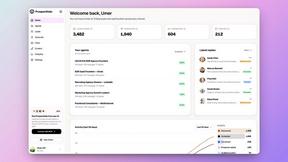
Speechyou
AI transcription for voice notes, meetings, and audio files in 1,700 languages, with AI summaries and subtitle export and unlimited chat ai usage.
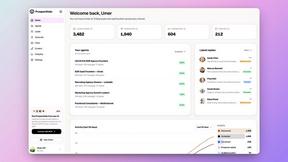
ProspectHalo
AI sales agent that finds qualified leads, runs outreach, follows up automatically, creates content, and helps book more meetings.
benchmark.directory
146 AI tools, grouped by the job you hire them to do. We paid for every one, used it on real work, and wrote down where it stops.
GROWNX
Real-time downloads, revenue, and reviews across your App Store portfolio, plus an AI copilot.
Tools Network
Tools Network is a curated directory of the best AI tools across 25+ categories — compare ratings, pricing, and features to find the right one fast.