

Square Face Generator
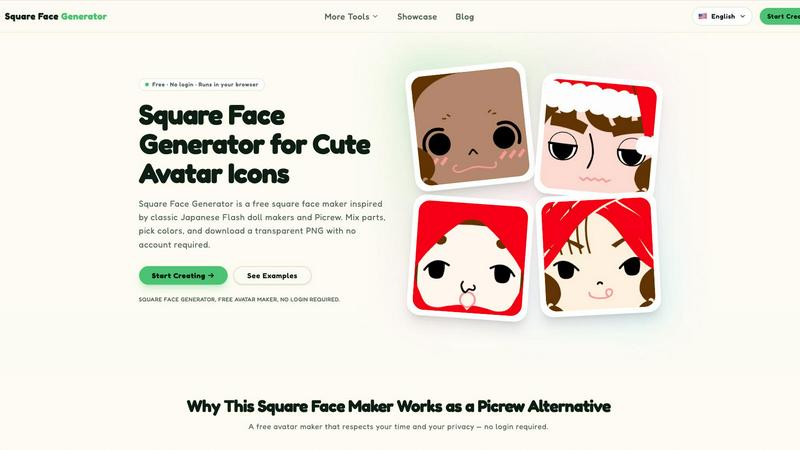
Square Face Generator is a free, browser-based avatar maker for creating cute square icons with no login required.
About Square Face Generator
Square Face Generator is a free, browser-based avatar maker that draws inspiration from classic Japanese Flash doll makers and Picrew. The tool focuses exclusively on creating charming, square-shaped character faces using a modular parts system. With 12 distinct categories and over 200 customizable pieces, users can assemble millions of unique combinations to create personalized avatar icons. The categories include skin tones, bangs, side hair, eyes, nose, mouth, brows, lashes, blush, glasses, hats, and outfits. Every part can be individually colored using an integrated color picker that supports HEX input for precise matching. The entire application runs locally in the user's browser, meaning no data ever leaves the device. There is no login required, no account creation, and no watermarks on exported images. The tool is fully responsive and touch-friendly, working seamlessly across desktop computers, tablets, and smartphones. Exports are transparent PNG files at 256x256 pixels, ideal for profile pictures on social media platforms like Discord, X/Twitter, Instagram, and TikTok. The tool also serves game developers needing quick NPC portraits, teams wanting unified avatar styles, and creators working on slides, stickers, or zines. Square Face Generator is built using Ruffle for Flash emulation, ensuring smooth operation without requiring any browser plugins or software installations. It is maintained by Z-Image and is part of a larger suite of free creative tools.
Features
12 Customizable Part Categories
The avatar maker provides 12 distinct categories for assembling a square face. These include skin tones, bangs, side hair, eyes, nose, mouth, brows, lashes, blush, glasses, hats, and outfits. Each category contains multiple options, allowing users to mix and match freely. This modular approach ensures that no two avatars need to look alike, with over 200 individual pieces available for selection.
Live Preview and Color Picker
Every change made to the avatar appears instantly in the live preview window. Users can adjust colors for skin, hair, and outfits using an integrated color picker that supports both visual selection and direct HEX code input. This feature allows for precise color matching, making it easy to create consistent character palettes or match brand colors for team avatars.
Zero Data Privacy
All rendering and processing happens entirely within the user's browser. No images, selections, or personal data are ever sent to external servers. This local processing ensures complete privacy and security, making the tool safe for users who are concerned about data collection or who need to create avatars for sensitive projects.
Instant Transparent PNG Export
Users can download their finished avatar as a transparent PNG file with a single click. The export size is fixed at 256x256 pixels, which is the standard dimension for most social media profile pictures and game avatar slots. There are no watermarks, no file size limits, and no restrictions on how many avatars can be downloaded.
Use Cases
Social Media Profile Pictures
Users can create unique, personalized profile pictures for platforms like Discord, X/Twitter, Instagram, and TikTok. The square format and transparent background make the exported PNG ready for immediate upload. With millions of possible combinations, users can express their personality or match a specific aesthetic without using a real photo.
Game Development Placeholder Art
Indie game developers and hobbyists can quickly generate NPC portraits and player avatar placeholders using Square Face Generator. The 256x256 PNG exports fit standard game UI slots, and the modular parts system allows for rapid creation of diverse characters. This saves time during prototyping when custom art assets are not yet available.
Team and Community Branding
Groups such as gaming guilds, school clubs, or workplace teams can create unified avatar styles while allowing individual personality. By agreeing on base colors or specific part categories, members can generate avatars that share a cohesive look. The free and no-login nature means anyone can participate without barriers.
Creative Projects and Digital Art
Artists, educators, and hobbyists can use the generated avatars for slides, posters, stickers, school projects, or zines. The transparent PNG format makes it easy to composite the avatar into other designs. The tool also serves as inspiration for character design, offering a quick way to visualize different face part combinations.
Frequently Asked Questions
Is it really free?
Yes, Square Face Generator is completely free to use. There are no paywalls, no hidden costs, and no premium parts locked behind payments. Every part, every color option, and every download is available at no charge. No account or credit card is required to use the tool.
What size are the exports?
All exported avatars are 256x256 pixel transparent PNG files. This size is standard for social media profile pictures, game avatar slots, and many other digital applications. The resolution is fixed and cannot be changed within the current tool.
Can I use my icon commercially?
Yes, you can use the avatars you create for commercial purposes. There are no restrictions on how the generated images can be used, whether for game development, marketing materials, merchandise, or any other commercial project. No attribution is required.
Do I need to install anything?
No installation is required. Square Face Generator runs entirely in your web browser. It uses Ruffle for Flash emulation, which is built into the webpage. No plugins, extensions, or software downloads are needed. The tool works on any modern browser.
Does it work on mobile?
Yes, the tool is fully responsive and touch-friendly. It works on smartphones and tablets in addition to desktop computers. All controls are designed to be usable with touch input, and the interface adapts to different screen sizes automatically.
Is there a limit on how many I can create?
There is no limit on the number of avatars you can create or download. You can generate as many unique combinations as you like, and download each one individually. The tool does not track usage or impose any quotas.
How is this different from Picrew?
Square Face Generator is a dedicated tool focused exclusively on square-shaped faces, whereas Picrew hosts many different avatar makers from various creators. This tool runs entirely in the browser with no login required, offers instant transparent PNG downloads, and ensures all processing stays local for privacy. It is also completely free with no premium content.
Similar to Square Face Generator

Design.com AI Image Generator
Turn text prompts into polished, copyright-safe visuals that plug directly into branded templates
Nano AI
Create and edit AI images, generate videos, and compare models in one creative workbench.
Low Quality Image
Make an image low quality on purpose: add blur, compression and pixelation to any picture right in your browser. No uploads, no accounts, no server.
OG Image Generator
Paste a URL and AI designs on-brand Open Graph images from your page's colours, fonts and logo. Free, no sign-up.
Tip Toe AI
Upload a Dancer photo and a Partner photo and get your own AI Tip Toe barn-dance video. Free 5s preview, 12s HD from $4.90. No subscription.
FreeVideoGenerator
Free AI video generator: turn text prompts and photos into video clips with Sora 2, Veo 3.1, Wan and more. Free starter credits, no watermark download
ImageAgent
Create and edit AI images through conversation, using text or reference images and refining results in chat.
sakuttoAI
A free suite of online tools for everyday tasks like PDF compression, image conversion, text diff and CSV to Excel.