

Seedream AI Studio
Generate images with Seedream 5.0 and turn selected results into short videos in one browser workflow.
AI tool Details
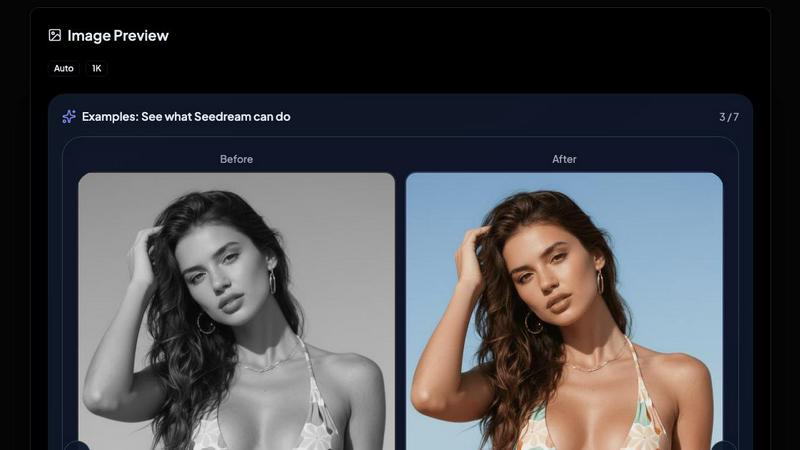
About Seedream AI Studio
Seedream AI Studio is an independent browser-based creative tool for generating images with current Seedream models, comparing outputs across versions, and turning selected images into short videos. It is built by ByteDance and wraps every current Seedream version: Seedream 5.0, Seedream 5.0 Lite, Seedream 4.5, and Seedream 4.0. The tool also integrates Kling 2.1 for image-to-video animation, allowing creators to move from prompt to image to video in one seamless workflow without leaving the page. Seedream AI Studio is designed for e-commerce brands, content creators, marketers, and artists who need fast, high-quality visual production. Its main value proposition is offering a single platform where users can draft quickly on Seedream 5.0 Lite, balance quality and cost on Seedream 4.5, render hero shots on Seedream 5.0, or keep Seedream 4.0 for stylized art. The tool provides a free tier with 20 welcome credits for new accounts, valid for 2 days, so users can test all capabilities before committing. Image generation takes 12 to 30 seconds, and video animation produces 5 to 15 second clips. Seedream AI Studio supports natural-language image editing, character consistency, and photo-realistic quality, making it a powerful all-in-one solution for visual AI creation.
Features
Multi-Model Image Generation
Choose from four distinct Seedream versions to match your creative needs. Seedream 5.0 delivers the highest fidelity for hero shots and production work. Seedream 5.0 Lite is the fastest and cheapest option, ideal for drafting and iteration. Seedream 4.5 offers the best balance of quality and cost, recommended for most production work with roughly 20-second generation times. Seedream 4.0 remains the favorite for stylized art and illustration. Each model generates images at 1K resolution by default, with support for multiple aspect ratios including 1:1, 16:9, 9:16, 3:2, 2:3, 5:4, 4:5, 4:3, and 3:4.
One-Click Image-to-Video Animation
Any generated image can be instantly animated into a 5 to 15 second video using Kling 2.1 technology. After generating an image, click the big "ANIMATE THIS" button to auto-fill the image into the video card on the right. Add a motion prompt and generate the video directly in the same interface. This eliminates the need to download, upload, or switch between different tools, saving time and keeping your creative flow uninterrupted.
Side-by-Side Version Comparison
Draft an image on Seedream 5.0 Lite, then re-run the same prompt on Seedream 4.5 or Seedream 4.0 to compare outputs directly. The browser-based interface allows you to see results from different models side by side, helping you choose the best version for your specific use case. This feature is particularly valuable for brands and creators who need to evaluate quality, style, and cost trade-offs before finalizing assets.
Image Editing and Variation Tools
After generating an image, you can edit the prompt, download in HD, or create variations with a single click. The tool supports natural-language image editing, meaning you can type instructions like "change the bikini to red" and the model applies the change intelligently. This makes it easy to refine visuals without starting from scratch, saving credits and time while maintaining character consistency and photo-realism.
Use Cases
E-Commerce Product Photography
E-commerce brands can generate high-fidelity product images using Seedream 5.0 for hero shots, then quickly animate them into short promotional videos with Kling 2.1. The ability to draft on Seedream 5.0 Lite and refine on Seedream 4.5 allows teams to iterate rapidly on product visuals, test different backgrounds, and create consistent image sets for listings, ads, and social media without hiring photographers or renting studios.
Social Media Content Creation
Content creators and social media managers can generate eye-catching images and animated clips in minutes. Use Seedream 4.0 for stylized art that stands out in feeds, or Seedream 4.5 for balanced quality on Instagram and TikTok. The one-click animation feature turns static posts into engaging short videos, increasing reach and engagement. The free tier with 20 credits lets creators test concepts before investing in paid credits.
Brand and Marketing Asset Production
Marketing teams can produce consistent visual assets across campaigns using the character consistency and natural-language editing features of Seedream models. Generate multiple variations of the same prompt across different Seedream versions to find the perfect style for each channel. Animate key images into video ads or social media stories directly in the tool, streamlining the entire asset creation pipeline from concept to final output.
Illustration and Concept Art
Artists and designers can leverage Seedream 4.0 for stylized illustration work, then use Seedream 5.0 for high-detail concept art. The ability to compare outputs across versions helps artists explore different aesthetic directions quickly. Image-to-video animation adds motion to static concepts, useful for storyboarding, presentation mockups, or portfolio pieces. The tool's resolution options and aspect ratio flexibility support various output formats for different projects.
Frequently Asked Questions
What Seedream models are available in Seedream AI Studio?
Seedream AI Studio includes four current Seedream models: Seedream 5.0 (highest fidelity, best for hero shots), Seedream 5.0 Lite (fastest and cheapest, ideal for drafting), Seedream 4.5 (best balance of quality and cost, recommended for most production work), and Seedream 4.0 (favorite for stylized art and illustration). Each model generates images in 12 to 30 seconds and supports multiple aspect ratios at 1K resolution.
How does the image-to-video animation feature work?
After generating an image using any Seedream model, click the "ANIMATE THIS" button on the result. The image auto-fills into the video card on the right side of the interface. You can add a motion prompt and generate a 5 to 15 second video using Kling 2.1 technology. The entire process happens within the same page without downloading or uploading files, making it fast and seamless.
What is the pricing and credit system?
Seedream AI Studio offers a free tier where new accounts receive 20 welcome credits, valid for 2 days. Image generation costs 2 credits per image. Video generation costs 15 credits per video. Users can buy additional credits as needed. There is no monthly subscription requirement, and you only pay for what you generate. The free credits allow you to test all models and the animation feature before purchasing.
Can I edit images after generation?
Yes, you can edit images after generation using natural-language commands. After generating an image, you have options to download in HD, edit the prompt, or create variations. The natural-language editing feature allows you to type instructions like "change the bikini to red" and the model applies the change intelligently. This enables quick refinements without regenerating from scratch, saving credits and time.
Similar to Seedream AI Studio
MotionVault
MotionVault: Motion Graphics, Video Templates & Overlays for Editors
Link to Song
Paste a TikTok, YouTube, Instagram, Facebook or X video link and get the song name, artist and official listening links.
RunwayAI
Independent Runway AI video generator for text and image-to-video workflows, with task tracking, previews, downloads, and API access.
Sprite Sheet Maker
Create pixel-art sprite sheets from text with AI, preview animations, and export PNG assets for game prototypes.
AIEnhancer
AI photo, image and video creation in one connected workspace.

Happy Horse AI
Create videos from text, images, or references with Happy Horse AI using flexible 720P/1080P output and API workflows.
Reelslaunch
AI-driven workflow for faceless Instagram Reels & YouTube Shorts: H3 Max text-to-video with native audio plus automated batch publishing.