

Picture Enhancer
Picture Enhancer uses AI to deblur, upscale, and restore photos instantly in your browser with no software install.
AI tool Details
Explore More
Alternatives
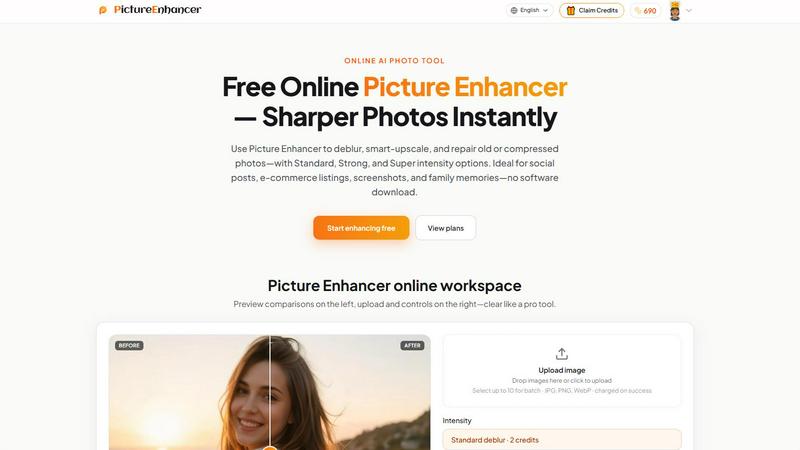
About Picture Enhancer
Picture Enhancer is a free online AI photo enhancement tool built for creators, sellers, and everyday users who need sharper images fast. No software download is required. The tool runs entirely in your browser, letting you upload a JPG, PNG, or WebP photo and instantly apply AI-powered improvements. You choose from three focused modes: Deblur, Upscale, or Restore. Each mode offers three intensity tiers: Standard, Strong, and Super. Before committing, you preview the result using a before-and-after slider. Once satisfied, download a watermark-free, high-quality output image.
The product is designed for accessibility. Guests receive three free lifetime tries per IP address with no signup required. After signing in, users receive starter credits to begin enhancing immediately. Credits are charged only on successful results, so you never pay for failed attempts. Standard enhancements cost 2 credits, Strong costs 4 credits, and Super costs 6 credits. Paid subscribers unlock Super intensity tiers and batch processing for up to 10 images at once. Monthly plans grant credits each billing cycle, while permanent credit packs never expire. This makes Picture Enhancer ideal for social media posts, e-commerce product listings, screenshots, UI captures, and family photo restoration. The tool processes images privately and securely, using your uploads only to complete your enhancement request. Results typically return in seconds.
Features
AI Deblur
Rebuilds edges and texture lost from camera shake, soft focus, and mild motion blur. The AI analyzes the image to identify blurred regions and reconstructs sharp detail. Standard deblur handles light blur. Strong deblur addresses moderate shake. Super deblur tackles heavy motion blur, making faces, text, and fine details readable again. This feature is especially useful for candid portraits, event photos, and screenshots where clarity matters most.
Smart Upscale
Enlarges images by 2x or 4x while adding realistic detail rather than simply stretching pixels. The AI predicts and generates missing texture, edges, and contrast. Standard upscale provides clean enlargement for social covers. Strong upscale works well for product hero shots. Super upscale delivers print-ready results from small source files. The tool maintains natural-looking results without the blocky artifacts typical of traditional upscaling methods.
Old Photo and Damage Restore
Reduces scratches, fade, color shifts, and compression artifacts from scanned prints or old digital files. Standard restore cleans up minor wear. Strong restore handles moderate damage like creases and discoloration. Super restore repairs heavy damage including large scratches, torn areas, and significant fading. This feature breathes new life into family archives and historical images, making them ready to share or print.
Batch Processing and Super Tiers
Paid users can process up to 10 images in a single batch, saving time on large projects. Super intensity tiers deliver the highest level of enhancement for each mode. Super deblur handles extreme motion blur. Super upscale produces maximum detail at 4x enlargement. Super restore repairs the most severe damage. Batch processing and Super tiers are exclusive to subscribers and permanent credit pack owners.
Use Cases
Social Media Content Creation
Enhance portraits, travel shots, and lifestyle photos before posting to Instagram, Facebook, or TikTok. Reduce blur from quick captures. Upscale low-resolution images for profile covers or story backgrounds. Restore old photos to share family memories. Cleaner images drive higher engagement and look professional on any platform. The tool works directly from your browser, so you can enhance and post in minutes.
E-commerce Product Listings
Upscale product photos to show fine detail on zoomed views. Deblur images taken with phone cameras in less-than-ideal lighting. Restore compression artifacts from resized images. Sharper listings increase buyer confidence and reduce return rates. Batch processing lets you enhance multiple product shots at once. Strong and Super tiers ensure your hero images stand out against competitors.
Screenshot and UI Documentation
Sharpen text edges in screenshots for tutorials, support articles, and documentation. Deblur captures of software interfaces, code snippets, or error messages. Upscale small UI screenshots for presentation slides or printed guides. Restore compressed images from screen recording software. Clear text improves readability and reduces confusion for readers and support teams.
Family Photo Preservation and Restoration
Restore old scanned prints by reducing scratches, fade, and discoloration. Upscale small family snapshots for printing or framing. Deblur candid photos from events and gatherings. Strong and Super restore modes handle heavy damage on aging photographs. Preserve memories digitally with watermark-free, high-quality outputs ready to share with relatives or upload to cloud storage.
Frequently Asked Questions
What is Picture Enhancer?
Picture Enhancer is a free online AI photo enhancement tool that deblurs, upscales, and restores images. It works entirely in your browser with no software download. You upload a JPG, PNG, or WebP file, choose a mode and intensity, preview the result, and download a watermark-free output. The tool is designed for creators, sellers, and everyday users who need sharper images quickly.
Can I try Picture Enhancer without signing in?
Yes. Guests receive three free lifetime tries per IP address with no signup required. You can upload an image, choose any mode and intensity, preview the result, and download the enhanced version. After using your three tries, you need to sign in to continue using credits. New accounts receive starter credits to begin enhancing immediately.
How does credit billing work after sign-in?
Credits are charged only on successful results. If an enhancement fails, no credits are deducted. Standard intensity costs 2 credits, Strong costs 4 credits, and Super costs 6 credits. Paid subscribers unlock Super tiers and batch processing for up to 10 images. Monthly plans grant credits each billing cycle. Permanent credit packs never expire. You can check your balance and history in the My Assets section.
Will downloads include a watermark?
No. All successful enhancements result in a watermark-free download. You receive the original enhanced image with no branding or watermarks. This applies to guest users, free signed-in users, and paid subscribers alike. You can use the output images for personal or commercial purposes without restrictions.
Similar to Picture Enhancer
ImageGenerator
Create and edit AI images online with multiple models, text-to-image, image-to-image, background removal, and upscaling.
Ideogram 4.5
Advanced AI image generation and editing: sharp typography, native 2K output, localized edits that preserve the rest of your image.
AIPetGen
AIPetGen turns a photo of your dog, cat, or other pet, or a written description, into a new picture or a short animation.

ZombieTrend AI
ZombieTrend AI turns two photos into a cinematic zombie love story video for TikTok, Reels and Shorts.

Genjutsu AI
Create cinematic AI videos, product ads, social shorts, and high-quality images from a prompt.

ImageGPT
ImageGPT is an all-in-one AI creative platform for generating, editing and transforming images and videos using AI.

AI Album Cover Maker
Create release-ready album covers from a prompt or photo. Generate, refine, and export art for singles, EPs, mixtapes, and playlists.

RunwayAI
Independent Runway AI video generator for text and image-to-video workflows, with task tracking, previews, downloads, and API access.