

Opal
Opal is a visual workspace that organizes all your projects and notes so you can find anything instantly.
AI tool Details
Explore More
Alternatives
About Opal
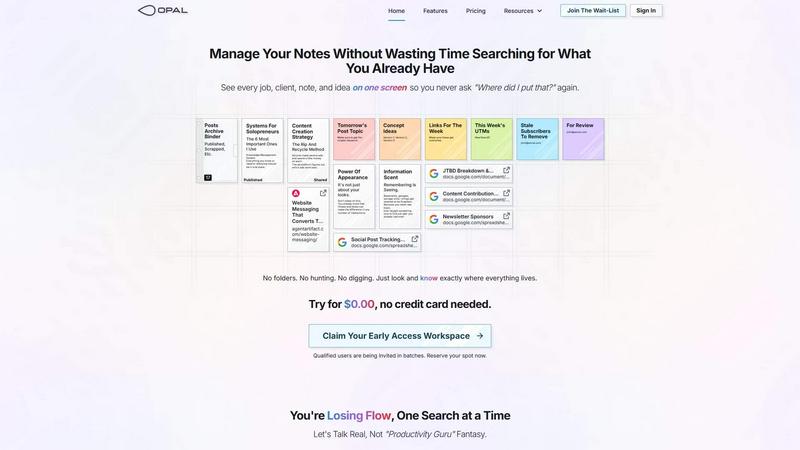
Opal is a visual knowledge and project management workspace designed for people who think spatially. It replaces the frustration of nested folders and buried notes with an infinite digital canvas. You organize by dragging and dropping notes, documents, files, and links visually, just like you would on a physical desk. This spatial memory approach means you remember where things are, not just what they're called, making information retrieval instant and intuitive. Opal is built for solopreneurs, consultants, agency owners, writers, and anyone whose business runs on conversations, details, and promises. It keeps your entire world of active projects, client details, and creative ideas visible and top-of-mind. The core value is simple: stop searching through disorganized tools and start doing your best work without breaking your flow. Opal ensures you never lose a brilliant idea or critical client note again by keeping everything in sight.
Features
The Infinite Visual Canvas
Opal provides a boundless digital workspace where you can lay out all your work elements. This canvas mimics a physical desk, allowing you to spatially arrange notes, projects, and documents. You group related items, stack elements, and create a visual map that your brain naturally remembers, eliminating the need for complex folder hierarchies and tedious searches.
Spatial Memory Organization
This feature leverages how your brain naturally works. By placing information in a specific location on your canvas, you create a strong memory association. You don't just file data; you place it. This means you instinctively know where to find that client quote or project brief because you remember its position, leading to near-instant retrieval and zero frustration.
Drag-and-Drop Everything
Opal's interface is built for intuitive manipulation. You can directly drag and drop notes, files, website links, and documents anywhere on your canvas. This fluid action allows for rapid organization, re-prioritization, and visual grouping of all your work materials without navigating complex menus or dialog boxes.
Multi-Pane Viewing
Open as many notes, documents, or links as you need side-by-side, limited only by your screen size. This allows you to reference client details, your content strategy, and task lists simultaneously without tab switching. It keeps all context visible, supporting deep work and preventing information from disappearing when you close a tab.
Use Cases
Content Creation & Management
Writers and creators can map out their entire content pipeline on one canvas. See your published archive, upcoming topics, keyword lists, version drafts, and tracking links all at once. Visually manage your editorial calendar and never lose a draft or forget a publishing task again.
Client & Project Management
Consultants and agency owners can dedicate canvas areas to each client. Keep meeting notes, project briefs, contracts, and deliverables visibly grouped. See all active jobs and their status on a single screen, ensuring no client detail or promise slips through the cracks.
Solopreneur Business Systems
Manage all the moving parts of a solo business in one visual hub. Keep your key systems—knowledge base, marketing links, operational SOPs, and financial trackers—laid out and accessible. This replaces a scattered collection of bookmarks and buried documents with a coherent, always-visible command center.
Creative Ideation & Strategy
Use the infinite canvas for brainstorming and strategic planning. Visually cluster ideas, research links, and concept versions. The spatial layout helps you see connections and patterns that are lost in linear lists, turning scattered thoughts into actionable plans and cohesive strategies.
Pricing
Opal offers a free trial to start with no credit card required. You can register to claim an Early Access workspace URL and begin using the platform at no initial cost. Specific paid plan tiers, features, and ongoing pricing details are available upon registration or by visiting the official Opal website.
Frequently Asked Questions
How is Opal different from tools like Notion or Google Docs?
Opal is fundamentally spatial, not hierarchical. Tools like Notion or Google Docs require you to file information into nested pages and folders, which hides it from view. Opal uses an infinite canvas where you place information visually. This leverages spatial memory, so you remember where things are, making retrieval faster and more natural for visual thinkers.
Is Opal suitable for team collaboration?
Opal is primarily architected for individual mastery and solopreneur workflow. Its core strength is giving a single user a powerful, visual command center for their knowledge and projects. It focuses on deep individual productivity rather than real-time multi-user editing and complex team permissions structures.
Can I import my existing notes and documents?
Yes, Opal is designed to be your central workspace. You can easily drag and drop files from your computer directly onto the canvas. For notes and documents from other apps, you can copy-paste content into new Opal notes or upload the files, allowing you to consolidate your scattered work into one visual environment.
What if my canvas gets too cluttered?
The infinite canvas is designed to scale with your work. You can zoom out for a high-level overview or zoom in to focus on a specific area. The key is to group related items logically, which your brain will map. This system prevents the "out of sight, out of mind" problem of folders while still allowing for organized, spacious layouts.
Similar to Opal
Novastart
Infinite canvas whiteboard OS where apps, files, teams and AI agents work together.

MD to Text
Convert Markdown to clean, readable plain text in your browser. Strip formatting, keep the content, and copy clean output for AI prompts and docs.

Panzoe
Panzoe is an all-in-one AI platform for personal productivity, business automation, AI assistants, content creation, and custom AI solutions.
AI Email Filter
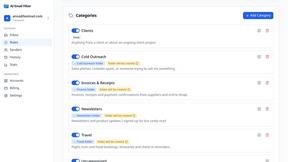
AI Email Filter sorts incoming mail into folders using plain-language prompts you write. Works with any IMAP mailbox; bring your own LLM if you want.

Partly
Snap the receipt, let AI read the items, and see who owes whom in your flat, trip or dinner group.
Product Launch Checklist
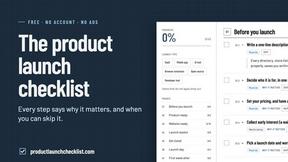
A free launch checklist for SaaS, apps, AI tools and more. Every step says why it matters and when you can skip it.
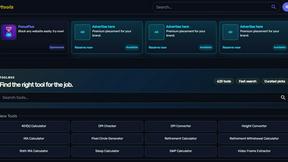
Kody Tools
Free collection of online developer utilities, code formatters, and digital converters designed to streamline your daily workflow.

What's on the menu
Smart translate any restaurant menu