

EditTextImage
Edit text in images online without Photoshop, keeping fonts, colors, and perspective intact in 30 seconds.
AI tool Details
Explore More
Alternatives
About EditTextImage
EditTextImage is an online AI tool that lets you change any text in an image while perfectly preserving the original font, color, size, perspective, and background. No Photoshop skills, no font files to install, and no subscription required. Simply upload your image, type the existing text and the replacement text, and the AI samples the typography straight from the pixels. The result is a pixel-perfect edit delivered in about 10 seconds at 2K resolution.
This tool solves a common problem: you need to change one word on a finished poster, screenshot, product photo, or document, but you have lost the original design file. Instead of recreating the entire image from scratch or paying a designer, EditTextImage handles the edit instantly. The AI works with any typeface, including paid fonts and hand-lettering, because it samples the font directly from the image pixels.
EditTextImage is designed for marketers, designers, content creators, e-commerce sellers, and anyone who frequently works with images. Whether you need to fix a typo, swap a date, update a price, localize an app screenshot into another language, or A/B test a headline, this tool delivers professional results without a steep learning curve. The first edit is free with no credit card required, and subsequent edits cost a one-time $9.90 for 30 credits that never expire. Commercial use is included, making it a practical solution for both individuals and businesses.
Features
Pixel-Perfect Text Replacement
The AI samples the typeface, color, size, drop shadow, and perspective directly from the image pixels. When you replace text, every surrounding pixel remains exactly where it should be. No smearing, no warping, no background artifacts. Paid fonts and hand-lettering work seamlessly because the tool does not rely on installed font files. Output resolution is 2K, ensuring the edited image is suitable for print, web, and social media.
Fast Processing in 10 Seconds
Average time to edit text in an image is approximately 12 seconds. Upload your file, enter the original and replacement text, and download the result. No waiting for rendering queues or manual adjustments. This speed makes EditTextImage ideal for batch workflows, last-minute fixes, and rapid A/B testing of ad creative or headlines.
No Subscription and No Credit Card Required
The first edit is completely free with no credit card required. Sign in with Google to claim your free credit. After that, purchase a one-time pack of 30 credits for $9.90. Credits never expire, and there is no monthly subscription. Commercial use is included in every credit pack, so you can use edited images for business purposes without additional licensing fees.
Supports Multiple Image Formats and Scenarios
EditTextImage accepts PNG, JPEG, and WebP files up to 10 MB. The tool handles a wide range of image types: posters, flyers, product labels, app screenshots, social media ads, event materials, documents, and more. Whether the text is horizontal, angled, or follows a perspective, the AI preserves the original layout and lighting. The tool also includes a translation feature to swap text between languages while maintaining the original design.
Use Cases
Document Fixes Without Source Files
Lost the original design file for a contract, invoice, or certificate? Only have a screenshot or scan? EditTextImage lets you update invoice numbers, fix typos in contracts, or correct dates in official documents directly on the image. No need to recreate the document from scratch or request a new version from the author. The font, color, and layout remain intact, so the edited document looks exactly like the original.
Poster and Flyer Updates for Last-Minute Changes
The date changed, the speaker dropped out, or the venue moved, but your designer is offline. EditTextImage lets you edit text directly on the finished poster without reopening the design file. Update event details, change headlines, or swap promotional copy in seconds. This saves hours of redesign time and avoids expensive rush fees from designers.
App Screenshot Localization for Multiple Languages
App Store and Google Play require screenshots in 10 or more languages for international listings. Instead of rebuilding every UI mockup in each language, EditTextImage lets you swap languages on existing screenshots. The AI preserves button styles, font sizes, and UI elements, delivering pixel-perfect localized screenshots every time. This dramatically reduces localization costs and turnaround time.
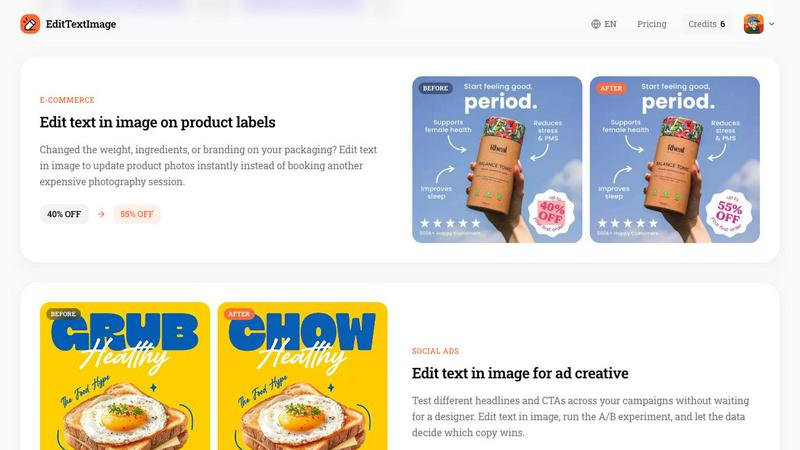
E-Commerce Product Label and Packaging Updates
Changed the weight, ingredients, pricing, or branding on your product packaging? EditTextImage updates product photos instantly without booking another expensive photography session. Update discount percentages, ingredient lists, or product names directly on existing images. This is especially useful for A/B testing different price points or promotional offers across your online store.
Pricing
EditTextImage offers a simple, no-subscription pricing model. The first edit is completely free with no credit card required. Simply sign in with Google to claim your free credit. After using the free credit, you can purchase a one-time pack of 30 credits for $9.90. Credits never expire, so you can use them at your own pace. There are no monthly fees, no hidden charges, and no tiered plans. Commercial use is included with every credit pack, making this a cost-effective solution for individuals and businesses alike.
Frequently Asked Questions
Is there a limit on image size or format?
EditTextImage accepts PNG, JPEG, and WebP files up to 10 MB. For best results, use images where the text is clearly legible and not heavily obscured. The tool works with most standard image resolutions and outputs the edited result at 2K resolution.
Do I need to install any fonts on my computer?
No. The AI samples the typeface directly from the image pixels. This means paid fonts, custom hand-lettering, and unusual typefaces all work perfectly without you needing to own or install the font file. The tool preserves the exact font style, weight, and color from the original image.
Can I use the edited images for commercial purposes?
Yes. Commercial use is included with every credit pack. You can use edited images for business marketing, product listings, advertisements, social media posts, and other commercial applications. There are no additional licensing fees or restrictions beyond the acceptable use policy.
What happens if my edit violates the acceptable use policy?
EditTextImage prohibits processing of IDs, passports, visa support letters, official seals, bank statements, or tampered receipts. Edits intended to deceive a third party, including visa or immigration submissions, fake refund or transaction proofs, or altered email/chat screenshots, are strictly forbidden. Violations result in account termination without refund, and request logs may be shared with law enforcement.
Similar to EditTextImage
RunwayAI
Independent Runway AI video generator for text and image-to-video workflows, with task tracking, previews, downloads, and API access.
Sprite Sheet Maker
Create pixel-art sprite sheets from text with AI, preview animations, and export PNG assets for game prototypes.
AIEnhancer
AI photo, image and video creation in one connected workspace.

Hailuo AI
Create high-quality videos from text or images with guided prompts, motion and camera controls, flexible settings, task tracking, and downloadable res
GPT Image 2 API
Generate and edit production-ready images with GPT Image 2 API, prompts, reference images, clear text, and developer workflows.
Vynzo
AI image and video studio. Generate from a prompt, animate stills, swap faces, restyle clips and edit — one credit pool, no subscription.

ProfileLoom
ProfileLoom turns one photo into platform-ready AI portraits for professional, social, and creator profiles, with presets and built-in editing.