
documentorium vs Vibrantsnap
Side-by-side comparison to help you choose the right AI tool.

documentorium
Generate professional contractor documents and PDFs in seconds with guided forms tailored for your trade, all for a simple annual fee.
Last updated: March 26, 2026

Vibrantsnap
Transform screen recordings into polished, high-converting videos with AI auto-editing and voiceovers in minutes.
Last updated: February 26, 2026
Visual Comparison
documentorium

Vibrantsnap
Feature Comparison
documentorium
Guided Forms
documentorium provides guided forms that simplify the document creation process. Each form is tailored to specific trades, allowing users to fill in necessary information without confusion. This feature ensures you create accurate documents quickly.
Instant PDF Generation
With documentorium, you can generate a professional PDF in seconds after completing a guided form. This feature eliminates formatting hassles, providing you with a ready-to-use document that looks polished and professional.
Comprehensive Document History
documentorium saves your document history, making it easy to access past documents. This feature allows you to quickly retrieve, view, and download previously created documents whenever needed, streamlining your workflow.
Simple Pricing Model
The platform offers a straightforward pricing model at $99 per year for full access to all documents and forms. This ensures that users know exactly what they are paying for without hidden costs, making budgeting easier for service professionals.
Vibrantsnap
Built-in Video Analytics
Vibrantsnap includes powerful built-in video analytics that provide insights into viewer engagement. You can track who watched your videos, how many times they were viewed, and where viewers lose interest. This data is crucial for refining your content strategy and optimizing future videos to better capture and retain audience attention.
Auto-Cut + Auto-Layout
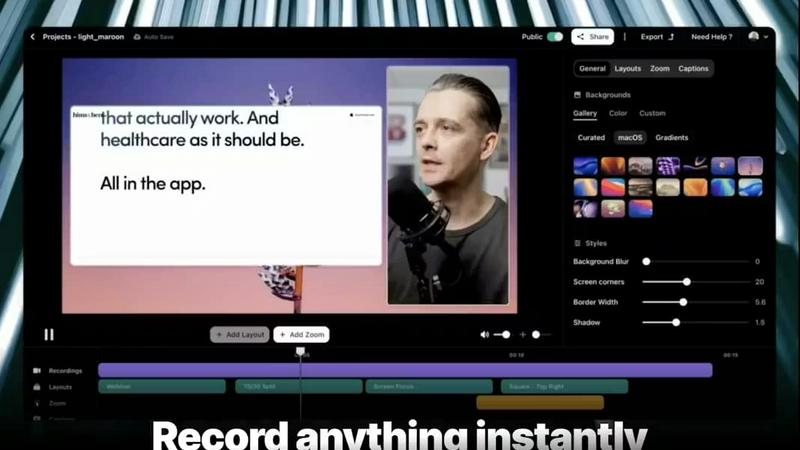
This feature significantly reduces the time spent on video editing. Vibrantsnap automatically trims silences and applies professional layouts with just a couple of clicks. This means you can produce polished, ready-to-share videos in seconds without needing extensive editing knowledge, allowing you to focus on your core business activities.
AI Voiceover
Enhance your videos with professional-grade AI voiceovers. Vibrantsnap’s AI voiceover feature allows you to add clear and engaging narration to your videos, making them more informative and compelling. This feature is designed to improve viewer retention and provide a professional touch to your product demonstrations.
Instant Sharing & Embedding
Once your video is created, sharing it with your audience is seamless. Vibrantsnap provides instant sharing options and easy embedding capabilities, allowing you to distribute your videos across various platforms and channels effortlessly. This feature ensures that your content reaches your target audience quickly and effectively.
Use Cases
documentorium
Creating Quotes and Estimates
As a contractor, you can quickly generate quotes and estimates for your clients using documentorium's guided templates. This saves time and improves client communication by providing clear, professional documentation.
Generating Invoices
Electricians can utilize documentorium to create invoices swiftly after completing a job. The instant PDF generation ensures that clients receive timely billing, improving cash flow and professional image.
Managing Work Orders
Plumbers can create detailed work orders using the platform, ensuring that all necessary information is documented. This helps in maintaining clear communication with clients and tracking job progress efficiently.
Preparing Proposals
HVAC technicians can use documentorium to craft proposals for new projects or services. The guided forms help ensure that all relevant details are included, making it easier to win new business and retain clients.
Vibrantsnap
Product Demos
Vibrantsnap is perfect for creating engaging product demos that highlight your software or service's key features. By transforming screen recordings into polished videos, you can showcase your product's value in a visually appealing manner, increasing the likelihood of viewer conversion.
Tutorials and How-To Videos
Educate your audience with quick and easy tutorials. Whether it's a step-by-step guide or a walkthrough of your product, Vibrantsnap's auto-editing capabilities make it simple to produce high-quality instructional content that enhances user understanding and satisfaction.
Marketing Campaigns
Incorporate Vibrantsnap videos into your marketing campaigns. Use compelling video content to capture attention on social media, websites, or email newsletters. This can lead to increased engagement and higher conversion rates, as videos often outperform static content in driving viewer action.
Sales Presentations
Transform your sales presentations with Vibrantsnap. Create professional videos that can be used in sales pitches or client meetings, making it easier to communicate your product’s benefits. With integrated analytics, you can also track viewer engagement to refine your sales approach.
Overview
About documentorium
documentorium is a streamlined document engine designed specifically for tradespeople such as electricians, plumbers, contractors, HVAC technicians, and roofers. It eliminates the hassle of starting from scratch by providing over 200 guided templates tailored to 26 trade categories. Whether you need quotes, estimates, invoices, work orders, bids, contracts, or service reports, documentorium offers a comprehensive solution for creating professional business documents in a matter of seconds. Each template is built with fields specific to your trade, ensuring that you capture all necessary information without the frustration of generic blanks. With documentorium, you can easily fill out a form and generate a clean, print-ready PDF, saving you valuable time and effort in your daily operations.
About Vibrantsnap
Vibrantsnap is an innovative video creation tool designed specifically for founders and creators who want to transform their screen recordings into high-impact, polished videos that convert viewers into customers. It addresses a common challenge faced by many businesses: potential customers visiting a site but leaving due to unclear or overly complex product information. Vibrantsnap allows users to create short, engaging product videos and tutorials quickly, without requiring extensive editing skills. With its AI-driven auto-editing features, Vibrantsnap not only simplifies the video creation process but also enhances the overall viewer experience, leading to higher conversion rates. Whether you are a solo entrepreneur, a growing startup, or an established business, Vibrantsnap provides the tools to effectively showcase your product’s value and drive signups, subscriptions, and sales.
Frequently Asked Questions
documentorium FAQ
Can I cancel anytime?
Yes, you can cancel your subscription at any time directly from your account. Your access remains active until the end of the billing period, and there are no penalties or lock-in periods.
What happens when my trial ends?
When your trial ends, all your existing documents remain accessible. To create new documents, you will need to activate your subscription, but no data is deleted upon trial expiration.
Do I lose my documents if I don't subscribe?
No, your documents will remain in your history, and you can view and download them anytime. Subscribing simply allows you to create and edit new documents.
What types of documents can I create?
documentorium offers a wide array of documents, including quotes, estimates, invoices, work orders, bids, contracts, service reports, inspection reports, proposals, warranties, change orders, and more, catering to various trades.
Vibrantsnap FAQ
How does Vibrantsnap improve video conversion rates?
Vibrantsnap creates short, engaging videos that communicate product value quickly and effectively. By using polished visuals and analytics to understand viewer behavior, businesses can significantly improve conversion rates compared to traditional methods like static screenshots.
Do I need any editing skills to use Vibrantsnap?
No, Vibrantsnap is designed for ease of use. Its auto-editing features allow users to create polished videos without any prior editing experience. The platform simplifies the video creation process with just a few clicks.
Can I track the performance of my videos?
Yes, Vibrantsnap includes built-in video analytics that allows you to track views, clicks, and viewer engagement. This data helps you understand how well your videos perform and where to make improvements.
What types of videos can I create with Vibrantsnap?
You can create a variety of videos, including product demos, tutorials, marketing content, and sales presentations. The tool is versatile and caters to different video needs, making it suitable for various business applications.
Alternatives
documentorium Alternatives
documentorium is a specialized document engine designed for tradespeople, enabling them to create various professional business documents quickly and efficiently. It falls under the category of productivity and management tools, catering specifically to the needs of electricians, plumbers, contractors, HVAC technicians, roofers, and other service professionals. Users often seek alternatives to documentorium for various reasons, including pricing considerations, the need for additional features, or compatibility with specific platforms. When choosing an alternative, it's crucial to assess the range of templates available, the level of customization offered, and the overall ease of use to ensure it aligns with your business needs.
Vibrantsnap Alternatives
Vibrantsnap is a screen recording tool designed to create polished product demos quickly. It belongs to the productivity and management category, focusing on enhancing user engagement through short, captivating videos. Users often seek alternatives to Vibrantsnap due to various reasons such as pricing structures, specific feature sets, or compatibility with different platforms. When searching for alternatives, it's essential to consider factors like ease of use, the quality of the output, available editing features, and any additional tools that can enhance the video creation process. Understanding your unique needs will help you find the best solution to effectively communicate your product's value.