
SeeDance Ai vs Tool.Video
Side-by-side comparison to help you choose the right AI tool.

Seedance AI transforms text, images, audio, and video into polished multi-shot videos with synchronized sound and seamless motion.
Last updated: April 13, 2026

Tool.Video
Tool.Video is your all-in-one AI toolkit for generating videos, images, and music.
Last updated: March 1, 2026
Visual Comparison
SeeDance Ai
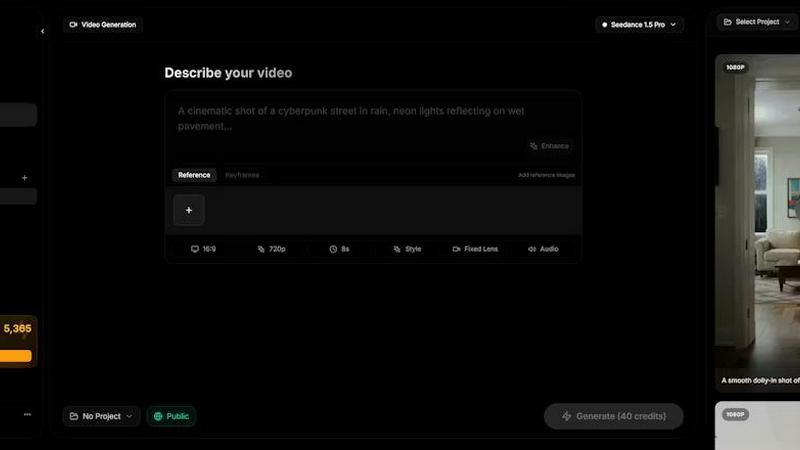
Tool.Video

Feature Comparison
SeeDance Ai
Multimodal Input System
SeeDance Ai allows users to upload up to 12 reference files, including images, videos, and audio clips. By tagging these references directly in prompts, creators can provide precise instructions rather than relying on vague descriptions, streamlining the creative process.
Simultaneous Audio and Video Generation
Unlike many tools that generate audio and video separately, SeeDance Ai produces both concurrently, ensuring perfect synchronization. This results in seamless timing where sound effects, footsteps, and dialogue align flawlessly with visual elements, reducing the need for post-production adjustments.
Consistent Character Representation
The platform employs a cross-attention reference system to maintain character continuity across different shots. This feature prevents character drift, ensuring that faces, clothing, and styles remain consistent, making it perfect for serialized content and branded campaigns.
Advanced Camera and Motion Control
Users can upload reference videos to replicate specific camera movements, such as tracking shots and dolly zooms. This capability extends to human motion, allowing complex choreography and sequences to be accurately captured and applied to generated characters.
Tool.Video
Sora 2 Video Generation
Generate realistic and stunning videos directly from text prompts using OpenAI's advanced Sora 2 model. This feature creates videos with natural motion and high-quality visuals, enabling users to produce cinematic scenes, product demos, or social media content without any video production equipment or complex editing software.
Nano Banana Pro AI Image Generation
Create high-quality images for storyboards, thumbnails, or video elements using the Nano Banana Pro model. It supports both text-to-image and image-to-image modes, allowing for the generation of unique, creative visuals in seconds to complement and enhance your video projects directly within the platform.
Suno 5 AI Music Generator
Compose professional background music and full soundtracks for your videos with AI. Suno 5 can generate songs with lyrics, melodies, and full arrangements in any genre. This tool provides customizable music options to perfectly match the tone and pacing of your video content, all without licensing concerns.
Video Thumbnail Generator
Automatically extract and generate eye-catching thumbnails from your videos at any timestamp. This utility includes an AI-powered option that intelligently selects the best frames for maximum viewer engagement. It supports multiple output formats like WebP, JPG, and PNG to optimize for different platforms.
Use Cases
SeeDance Ai
Marketing and Promotional Videos
Businesses can utilize SeeDance Ai to create engaging marketing clips that combine visuals and audio seamlessly. This can enhance brand storytelling and drive customer engagement through professional-quality video content.
Social Media Content Creation
Influencers and content creators can leverage SeeDance Ai to produce eye-catching social media videos quickly. With its easy-to-use interface, users can generate polished videos that stand out in crowded feeds.
Dance and Performance Videos
Choreographers can use SeeDance Ai to visualize dance routines by generating videos that replicate specific movements and styles. This allows for effective practice, showcasing, and sharing of choreography in a digital format.
Narrative and Storytelling Projects
Filmmakers and storytellers can harness SeeDance Ai to create compelling narratives with synchronized audio and visuals. This tool enables the production of short films and animations that captivate audiences without extensive resources.
Tool.Video
Social Media Content Creation
Ideal for marketers and influencers needing to produce a high volume of engaging short-form videos for platforms like TikTok, Instagram Reels, and YouTube Shorts. Quickly generate trendy visuals, add matching AI soundtracks, and create click-worthy thumbnails to boost engagement and grow your audience.
Professional TV Commercials (TVC)
Enable businesses and agencies to create high-quality advertisement videos and TV commercials rapidly. Use the AI TVC Generator to storyboard concepts, produce realistic video scenes, and score professional audio, significantly reducing production time and cost for professional marketing campaigns.
Educational and Explainer Videos
Perfect for educators, trainers, and companies creating tutorial or explainer content. Transform text-based scripts into visual storyboards, generate clear demonstration videos, and add instructive background music to enhance learning retention and create polished educational materials efficiently.
Content Repurposing and Editing
Assist video editors and content managers in trimming, watermarking, and refreshing existing video assets. Use the video trimmer to cut clips, add branding with the watermark tool, and generate new AI-powered thumbnails to repurpose long-form content into multiple shorter, platform-specific pieces.
Overview
About SeeDance Ai
SeeDance Ai is a cutting-edge AI video generation platform designed for creators seeking to transform text, images, audio, and video references into professional-quality multi-shot videos. With its advanced technology, SeeDance Ai enables users to craft cinematic experiences with director-level control, making it ideal for marketers, content creators, dancers, and storytellers. The platform offers four distinct models—Seedance 2.0, Seedance 1.5 Pro, Seedance 1.0, and Seedance 1.0 Pro—each tailored to meet different creative needs. By using SeeDance Ai, users gain access to high-fidelity output that maintains character continuity, realistic motion, and synchronized audio-visual elements, which significantly enhances the production quality of marketing clips, social media content, and narrative-driven videos. With no studio required, SeeDance Ai democratizes video production, allowing anyone to produce captivating visual stories effortlessly.
About Tool.Video
Tool.Video is an all-in-one AI video generation platform that consolidates the entire creative workflow into a single, unified interface. It is designed for creators, marketers, and developers who need to produce professional-grade video content efficiently. The platform integrates cutting-edge AI models like Sora 2 for video generation, Nano Banana Pro for images, and Suno 5 for music, eliminating the need to juggle multiple disparate services. Its core value proposition is simplicity and power, providing access to the latest generative AI technology alongside essential video processing utilities. Users can generate storyboards, create videos, compose soundtracks, and design thumbnails in one cohesive environment. This integrated approach saves significant time and technical hassle, making advanced AI content creation accessible and practical for professional use. Tool.Video streamlines the process from initial concept to final export, empowering users to bring their creative visions to life faster.
Frequently Asked Questions
SeeDance Ai FAQ
How does SeeDance Ai ensure audio and video synchronization?
SeeDance Ai generates audio and video simultaneously within the same model pass, ensuring that all elements are perfectly synchronized, which enhances the overall viewing experience.
Can I use SeeDance Ai for different types of videos?
Yes, SeeDance Ai is versatile and can be used for marketing clips, social media content, dance performances, and narratives, making it suitable for a wide range of video production needs.
What types of references can I upload to SeeDance Ai?
You can upload up to 12 reference files, including a combination of images, videos, and audio clips. This flexibility allows for detailed instructions and richer video outputs.
Is there a learning curve to using SeeDance Ai?
SeeDance Ai is designed to be user-friendly. Its intuitive interface and multimodal input system simplify the video creation process, making it accessible for both beginners and experienced users.
Tool.Video FAQ
What AI models does Tool.Video integrate?
Tool.Video integrates several leading AI models into one platform. This includes Sora 2 by OpenAI for text-to-video generation, Nano Banana Pro for high-quality image creation, and Suno 5 for AI music and soundtrack generation. This multi-model approach provides flexibility and access to best-in-class tools.
Can I use Tool.Video for commercial projects?
Yes, Tool.Video is built for professional use, including commercial projects like marketing videos, advertisements, and social media content. The platform is designed to help creators, marketers, and developers produce professional-grade video content efficiently for business and commercial purposes.
Does Tool.Video offer API access for developers?
Yes, Tool.Video provides API support for its video utilities, such as the thumbnail generator, watermark adder, and video trimmer. This allows developers to integrate these specific video processing functionalities directly into their own applications, workflows, or services for automated content creation.
How does the credit system work?
Tool.Video operates on a credit-based system for accessing its AI generation features. Users receive a set number of credits, which are consumed when generating videos, images, or music. The platform offers ways to earn more credits, such as through referral programs where you and a friend can each get bonus points.
Alternatives
SeeDance Ai Alternatives
SeeDance Ai is a cutting-edge AI video generation platform designed for creators seeking to transform text, images, audio, and video references into cinematic, multi-shot visuals. It falls under the category of AI cinematography, providing users with director-level control over their projects. Users often search for alternatives due to factors such as pricing, specific feature sets, or compatibility with their existing platforms and workflows. When selecting an alternative, consider aspects like output quality, ease of use, and the range of customizable options available to ensure it meets your specific needs.
Tool.Video Alternatives
Tool.Video is an all-in-one AI video generation platform. It consolidates the entire creative workflow, from video and image generation to music creation, into a single unified interface. This category of software is designed for creators who need to produce professional content efficiently without switching between multiple tools. Users often explore alternatives for various reasons. Common factors include pricing models, specific feature requirements, or the need for a different platform focus. Some may seek tools that specialize in a single aspect, like advanced video editing or a particular AI model, rather than an integrated suite. When evaluating alternatives, consider your primary use case. Key aspects to compare are the core AI models available, output quality, ease of use, and the overall cost for your required volume. The best choice depends on whether you prioritize a specialized tool or a comprehensive, all-in-one workflow solution.