
TemplateFox vs Yardyly
Side-by-side comparison to help you choose the right AI tool.

TemplateFox
Design PDF templates once and generate thousands automatically via API or Zapier.
Last updated: February 28, 2026

Yardyly is the all-in-one software to easily manage and grow your landscaping business.
Last updated: March 4, 2026
Visual Comparison
TemplateFox

Yardyly
Feature Comparison
TemplateFox
Intuitive Drag-and-Drop Editor
Create professional PDF templates without writing a single line of HTML or CSS. The visual WYSIWYG editor allows you to drag, drop, and customize every element on the page. A dedicated properties panel lets you fine-tune content, borders, colors, sizing, and positioning for complete design control, making template creation accessible to everyone.
Dynamic Data Binding & Expressions
Inject live data into your templates using simple placeholder syntax. Go beyond basic text replacement with powerful expressions. Use over 100 built-in functions to format dates, calculate totals, round numbers, and manipulate strings directly within your template logic, ensuring documents adapt intelligently to your specific data.
Smart Layout Components
Utilize components built for real-world documents. Create headers and footers that automatically repeat on every page. Implement tables where rows dynamically expand based on your data, seamlessly spanning multiple pages if needed. This ensures consistent, polished formatting regardless of data volume.
Built-in Barcodes & QR Codes
Generate scanner-ready codes directly within your PDFs. The platform supports Code128, EAN-13, QR codes, and more. These elements are created on-the-fly from your template data, perfect for adding tracking barcodes to shipping labels or dynamic QR codes to certificates and invoices.
Yardyly
Centralized Job Scheduling & Dispatch
Optimize your daily operations with an intuitive, drag-and-drop scheduling interface. Visually plan routes, assign jobs to crew members, and adjust schedules in real-time from the office or the field. This feature eliminates double-bookings and provides your team with clear, mobile-accessible daily plans, ensuring everyone knows where to be and what to do.
Integrated Customer Management (CRM) & Booking
Manage all client interactions and details in one secure place. The system stores customer profiles, service history, and notes. Clients can book services directly through an online portal, which automatically populates your schedule, reducing back-and-forth communication and capturing more business effortlessly.
Automated Invoicing & Payment Tracking
Streamline your financial workflow by generating and sending professional invoices directly from completed job tickets. Track payments, manage contracts, and monitor accounts receivable with precision. This integration ensures accurate billing, improves cash flow visibility, and reduces time spent on manual finance administration.
Real-Time Team Coordination & Task Management
Enhance field crew productivity with tools for seamless communication. Dispatch work orders digitally, allow crews to update job statuses, log hours, and submit notes or photos from the site. This provides managers with instant visibility into project progress and resource allocation, fostering better collaboration and accountability.
Use Cases
TemplateFox
Automated Business Invoicing
Automate your accounts receivable by generating and dispatching invoices directly from your CRM, database, or e-commerce platform. Connect via API or Zapier to create branded, itemized invoices with calculated totals and tax, then automatically email them to clients, saving hours of manual work.
Mass Certificate Generation
Ideal for educational institutions, training providers, and event organizers. Design a single certificate template with placeholders for names, dates, and achievements. Use the API to batch generate hundreds or thousands of personalized, professional-grade certificates in seconds, each with unique data.
E-commerce Order Fulfillment
Streamline logistics for online stores. Automatically generate packing slips, shipping labels, and commercial invoices for every order. Dynamically populated tables list all items, while built-in barcodes provide tracking information, ensuring accuracy and speeding up the packing and shipping process.
Operational & Compliance Reporting
Generate consistent, branded internal reports, compliance documents, or client statements on a scheduled basis. Pull data from various sources to create dynamic reports with automatic page numbering, headers, footers, and data summaries, ensuring timely and professional documentation.
Yardyly
Scaling a Solo Landscaping Operation
A solo entrepreneur uses Yardyly to transition from manual scheduling and paper invoices to a professional, automated system. The online booking feature captures new clients 24/7, while automated reminders and invoicing save hours per week, allowing the owner to take on more jobs without increasing administrative burden.
Managing a Multi-Crew Lawn Care Business
A business owner with several teams uses the centralized scheduling and GPS-enabled dispatch to efficiently assign jobs based on location and crew skill set. Real-time updates from the field provide instant insight into job completion and issues, enabling proactive customer communication and more accurate daily routing.
Streamlining Client Communication & Billing
A landscaping company implements Yardyly's client portal and integrated CRM. Clients can request services, view quotes, and pay invoices online, leading to higher satisfaction. The business benefits from organized client histories, streamlined feedback collection, and faster payment cycles, improving overall service quality and financial health.
Optimizing Seasonal Workflow & Resource Tracking
A seasonal outdoor service business uses Yardyly to plan and track peak-season projects. The software helps manage equipment allocation, supplier contracts for materials, and subcontractor coordination. This ensures resources are properly deployed, budgets are adhered to, and project timelines are met efficiently during high-demand periods.
Overview
About TemplateFox
TemplateFox is a powerful SaaS platform that automates the generation of professional PDF documents. It eliminates the complex coding traditionally required for PDF creation by providing an intuitive, drag-and-drop WYSIWYG (What You See Is What You Get) editor. Users can visually design dynamic templates for invoices, certificates, reports, packing slips, and more. Once a template is designed, it can be populated with live data and generated into a PDF thousands of times via a simple REST API or through no-code automation platforms like Zapier and Make. Built for speed and reliability, PDFs are typically generated in 1-3 seconds. TemplateFox is designed for indie hackers, developers, startups, and organizations of all sizes that need to scale their document workflows without sacrificing quality or developer time. Its core value proposition is "Design Once. Generate Thousands."—enabling users to create a template visually and then automate mass production seamlessly.
About Yardyly
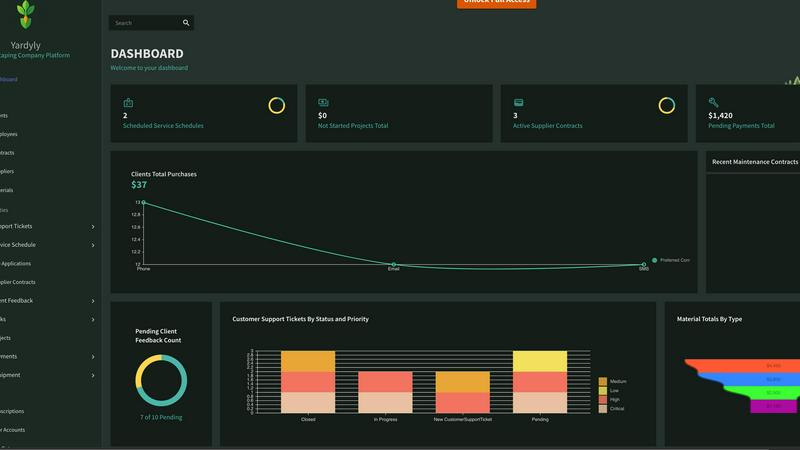
Yardyly is a comprehensive, cloud-based management platform built specifically for landscaping, lawn care, and outdoor service businesses. It replaces the chaos of spreadsheets, paper notes, and disconnected apps with a single, unified hub. The software is designed to automate repetitive administrative tasks, reduce manual work, and improve communication across your entire operation. Its core value proposition is providing clarity and control, allowing business owners and managers to focus on growth and service quality rather than logistical overhead. Yardyly is mobile-friendly, enabling users to manage schedules, update job statuses, and track revenue from anywhere. Suitable for solo operators and growing teams alike, it integrates essential tools like online booking, job scheduling, customer management (CRM), invoicing, and team coordination to cultivate a smarter, more efficient business.
Frequently Asked Questions
TemplateFox FAQ
Do I need coding skills to use TemplateFox?
No coding skills are required to design templates. The core strength of TemplateFox is its visual, drag-and-drop WYSIWYG editor that allows anyone to create professional PDF layouts. For automation, you can use no-code tools like Zapier. Developers can leverage the well-documented API for deeper integrations.
How fast is the PDF generation?
PDF generation is extremely fast and reliable. Typically, documents are generated and delivered within 1 to 3 seconds. This high performance is consistent even when generating thousands of documents in batch processes, making it suitable for high-volume, time-sensitive workflows.
Is there a free plan available?
Yes, TemplateFox offers a free tier to get started. It includes 60 PDF generations per month at no cost, allowing you to test the editor, build templates, and run initial integrations without requiring a credit card. Paid plans are available for higher volumes.
Can I integrate TemplateFox with other apps?
Absolutely. TemplateFox offers multiple integration paths. You can use the REST API for custom development. For no-code automation, it integrates directly with Zapier, Make (Integromat), Airtable, Bubble, and other popular platforms to connect your data sources and trigger PDF generation automatically.
Yardyly FAQ
Is Yardyly suitable for a one-person landscaping business?
Absolutely. Yardyly is designed to scale with you. For solo operators, it automates key tasks like booking, invoicing, and scheduling that typically consume valuable time. It helps you present a more professional image, reduce administrative chaos, and lay a strong operational foundation for future growth, all from day one.
Can my crew use Yardyly on their phones in the field?
Yes. Yardyly is built with a mobile-friendly design, allowing your field team to access their schedules, view job details, update task statuses, and log time from their smartphones or tablets. This ensures real-time information flow, eliminates paper-based processes, and keeps everyone connected from the truck or job site.
How does the online booking feature work?
Yardyly provides a customizable booking widget that you can embed on your website or share via a direct link. Potential clients can select available services, choose their preferred date and time, and submit their request. This booking instantly appears in your Yardyly schedule for review and confirmation, automating lead capture and reducing phone call volume.
Does Yardyly integrate with other software or accounting tools?
Yardyly focuses on being an all-in-one platform with built-in tools for CRM, scheduling, and invoicing to minimize the need for complex integrations. For financial reconciliation, key transaction data can be easily exported. The platform is designed to be your central hub, reducing dependency on multiple disparate systems.
Alternatives
TemplateFox Alternatives
TemplateFox is a SaaS productivity tool focused on PDF generation and template design. It allows users to create professional documents through a visual editor and automate their production via API or Zapier, catering to developers, indie hackers, and businesses. Users may seek alternatives for various reasons, such as specific feature requirements, different pricing structures, or the need for integration with other platforms in their tech stack. The search often stems from a desire to find a solution that aligns perfectly with their unique workflow and budget constraints. When evaluating alternatives, key considerations include the ease of the template design process, the robustness of automation and API capabilities, pricing transparency, and the quality and speed of the final PDF output. The ideal tool should streamline document creation without adding complexity.
Yardyly Alternatives
Yardyly is a comprehensive business management software designed specifically for landscaping, lawn care, and outdoor service companies. It falls into the productivity and management software category, helping owners streamline operations like scheduling, customer communication, invoicing, and team coordination from a single cloud-based platform. Users often explore alternatives for various reasons. Common factors include budget constraints, the need for different feature sets, or a preference for a platform that integrates with other specific tools they already use. The scale of a business, from a solo operator to a large team, also influences which software solution is the best fit. When evaluating alternatives, focus on your core operational needs. Key considerations should include the software's specialization for field service, its mobile functionality for on-the-go crews, the clarity of its pricing structure, and the quality of its customer support. The right tool should reduce administrative chaos and directly support business growth.