
SparkPix vs webp to gif
Side-by-side comparison to help you choose the right AI tool.

SparkPix
Edit photos effortlessly online by typing to remove backgrounds, enhance quality, restore old images, or transform styles with SparkPix.
Last updated: March 11, 2026

webp to gif
Convert WebP to GIFs with smart compression and full privacy in your browser.
Last updated: March 1, 2026
Visual Comparison
SparkPix

webp to gif
Feature Comparison
SparkPix
AI Photo Editor
The AI Photo Editor feature allows users to enter specific instructions like "remove background" or "enhance colors," and the AI executes these tasks swiftly, usually within 30 seconds. This feature is designed to cater to both novice and experienced users, making photo editing accessible to everyone.
Background Remover
With the one-click background remover, users can easily eliminate backgrounds from portraits, product photos, or any complex scenes. This feature is especially useful for e-commerce sellers looking to create clean and professional images without the hassle of manual editing.
Unblur Image
SparkPix's Unblur Image feature addresses common issues such as motion blur or out-of-focus shots. The AI deblurring technology restores clarity and sharpness to images, making it perfect for those who want to salvage otherwise unusable photos.
Photo Restoration
The Photo Restoration feature allows users to repair old, faded, scratched, or damaged photos. This is particularly beneficial for those wanting to preserve family memories or restore vintage photographs, ensuring that cherished images can be brought back to life.
webp to gif
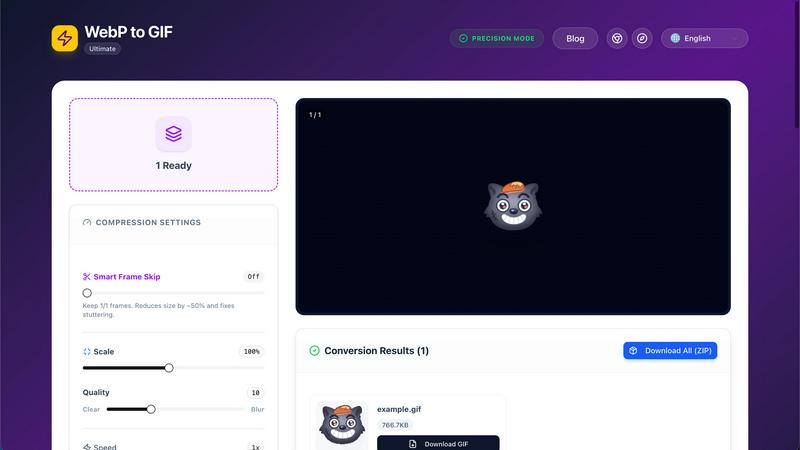
Smart Frame Skip
This intelligent feature automatically analyzes your animation to reduce the frame rate strategically. It cuts the final file size by approximately 50% while carefully preserving the core timing and essence of the motion, effectively fixing stuttering issues common in other converters. You maintain visual integrity while achieving significantly smaller, more shareable GIFs.
Ultra Compression
Leveraging advanced optimization algorithms, the tool ensures your GIF is as small as possible without sacrificing the visual quality you need. It meticulously compresses color data and optimizes the output, allowing for faster loading times on websites and easier sharing via email or messaging apps while keeping your animations looking sharp.
Privacy-First, Browser-Based Processing
Your security is paramount. Every conversion happens entirely within your web browser using local processing power. Your original WebP files and the resulting GIFs are never uploaded to any external server. This guarantees complete data privacy, unparalleled speed, and the ability to use the tool offline after the initial page load.
Batch Conversion & Customizable Settings
Efficiently convert dozens of WebP files to GIF simultaneously with full batch support. For precise control, adjust multiple settings per file: scale the output resolution, modify playback speed, adjust quality, apply blur, and choose a background color (including transparency). Download all results individually or conveniently packaged in a single ZIP file.
Use Cases
SparkPix
Family Photo Restoration
SparkPix is ideal for those looking to restore old family photos. Users can easily upload damaged images and utilize the AI Photo Restoration feature to repair scratches and fading, preserving valuable memories for future generations.
E-commerce Product Photography
For online sellers, SparkPix offers a reliable solution for creating high-quality product images. The Background Remover and AI Photo Editor features enable sellers to produce professional-grade photos that enhance their listings and attract potential buyers.
Social Media Content Creation
Content creators can leverage SparkPix to quickly edit and enhance images for social media platforms. Whether changing backgrounds or applying artistic styles, users can generate eye-catching content that stands out in feeds.
Artistic Transformations
With the Style Transfer feature, users can transform their photos into artistic renditions like paintings or sketches. This use case appeals to artists and hobbyists looking to add a creative touch to their work without needing extensive editing skills.
webp to gif
Social Media Content Creation
Social media managers and content creators can instantly convert engaging animated WebP graphics into GIF format for seamless posting on platforms like Twitter, Discord, or Reddit, which have excellent GIF support. This enables the use of modern, efficient assets while maximizing compatibility and audience engagement across all networks.
Website and Blog Enhancement
Web developers and bloggers can convert animated WebP illustrations or UI demonstrations into GIFs to embed in articles, documentation, or landing pages. This ensures the animations display correctly for all visitors, regardless of their browser's WebP support, improving user experience and visual communication without technical hurdles.
Email Marketing Campaigns
Marketing professionals can optimize animated content for email newsletters by converting WebP assets to GIFs. The tool's compression features help meet strict email size limits, ensuring the animations load quickly and display reliably across the vast array of email clients that universally support the GIF format for motion.
Presentation and Documentation
Educators, trainers, and professionals can convert instructional screen recordings or explainer animations from WebP to GIF for insertion into PowerPoint presentations, Google Slides, or PDF documents. This guarantees the animations will play back smoothly for any audience, on any device, during crucial meetings or lectures.
Overview
About SparkPix
SparkPix is an innovative AI-powered photo editing tool designed to simplify the image editing process for users of all skill levels. By leveraging advanced artificial intelligence, SparkPix allows users to edit photos simply by typing what they want to change, eliminating the need for complex software skills like those required for Photoshop. This makes it an ideal solution for anyone looking to enhance their photographs without the steep learning curve typically associated with traditional editing tools. Whether you are a casual user wanting to improve personal photos, a small business needing professional product images, or a creative professional seeking quick edits, SparkPix provides a seamless and efficient editing experience. With a wide range of features from background removal to style transfers, users can transform their images in under 30 seconds, making it a valuable asset for both personal and professional use.
About webp to gif
WebP to GIF Ultimate is a free, browser-based tool designed to convert WebP images, including animated WebP files, into the widely compatible GIF format. It serves a critical need for creators, marketers, and professionals who encounter the efficient WebP format but require GIFs for platforms, presentations, or workflows that do not yet support WebP animation. The tool eliminates the need for complex desktop software by providing a powerful, all-in-one online solution. Its core value proposition is a powerful combination of advanced compression, complete privacy, and exceptional ease of use. Users can batch convert multiple files, apply precise optimization settings like Smart Frame Skip and scaling, and download high-quality results instantly. All processing occurs locally on the user's device, ensuring data never leaves their computer, which guarantees speed and security. This makes it the ultimate go-to solution for anyone needing reliable, high-quality WebP to GIF conversion without cost, complexity, or privacy concerns.
Frequently Asked Questions
SparkPix FAQ
How does SparkPix work?
SparkPix uses advanced AI algorithms to process user instructions typed into the platform. By interpreting these commands, the AI executes edits efficiently, allowing users to see results in real-time.
Is SparkPix free to use?
Yes, SparkPix offers a free tier that provides users with 5 credits to start editing without the need for a credit card. This allows anyone to explore the platform before committing to a paid plan.
What types of images can I edit?
Users can edit a variety of image types, including portraits, landscapes, product photos, and old photographs. The platform is versatile, catering to both personal and professional editing needs.
Can I access SparkPix on multiple devices?
Absolutely. SparkPix is web-based and compatible with desktop, iPhone, and Android devices. This ensures that users can edit their photos anytime, anywhere, without needing to download software.
webp to gif FAQ
Is it free to use?
Yes, WebP to GIF Ultimate is completely free. There are no hidden fees, subscription plans, or usage limits. You can convert an unlimited number of WebP files to GIF format without any cost, accessing all advanced features like batch conversion and ultra compression at no charge.
Is my data safe during conversion?
Absolutely. The tool is designed with a privacy-first architecture. All file processing is executed locally within your web browser. Your images are never sent over the internet to our or any third-party servers, ensuring your original files and converted GIFs remain entirely on your computer and are completely secure.
Can I convert multiple files at once?
Yes, batch conversion is fully supported. You can upload and process dozens of WebP files simultaneously. After conversion, you have the option to download each GIF individually or download all converted files at once in a single, convenient ZIP archive for efficient file management.
How does the tool maintain GIF quality?
The tool uses advanced algorithms for Ultra Compression and Smart Frame Skip. These technologies intelligently optimize the GIF's color palette and frame data, reducing file size by removing redundant information without degrading the visible quality. You maintain the essential visual appeal while achieving optimal file sizes.
Alternatives
SparkPix Alternatives
SparkPix is an AI-powered online photo editor designed to simplify the editing process. Users can easily edit images by typing commands, making it accessible to those without any prior Photoshop skills. As users explore various editing tools, they may seek alternatives due to factors such as pricing, specific features, or platform compatibility. Identifying the right alternative involves considering ease of use, the breadth of editing options, and the ability to work seamlessly across different devices. When searching for an alternative, prioritize features that align with your needs, whether it's advanced editing capabilities, pricing flexibility, or support for multiple platforms. Additionally, look for user-friendly interfaces and robust customer support to ensure a smooth editing experience. Ultimately, the right choice will enhance your photo editing tasks and meet your creative goals.
webp to gif Alternatives
WebP to GIF is a specialized online tool in the design and image conversion category. It focuses on converting WebP images into animated GIFs with a strong emphasis on compression and user privacy. Users often seek alternatives for various reasons. Some may require desktop software for offline use, while others might need batch processing capabilities or different output formats. Pricing models, specific editing features, or integration with other platforms can also drive the search for other solutions. When evaluating an alternative, consider your core needs: the required output quality, acceptable file size, processing speed, and security of your data. Also, assess whether you need a one-time tool or a recurring service, and if advanced controls like custom frame rates or color palettes are necessary for your projects.