
Postproxy vs SimpleDraw
Side-by-side comparison to help you choose the right AI tool.

Postproxy
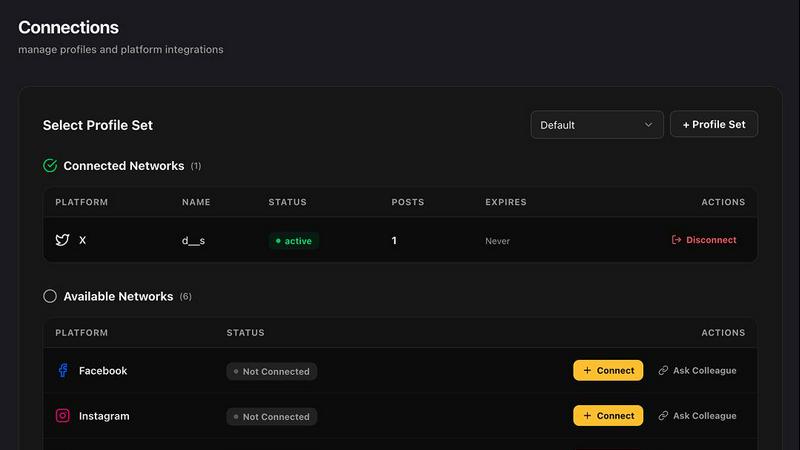
Postproxy simplifies social media publishing by unifying multiple networks into one seamless API integration.
Last updated: February 26, 2026

SimpleDraw
Create accurate floor plans and scale drawings for free in your browser.
Last updated: March 1, 2026
Visual Comparison
Postproxy
SimpleDraw
Feature Comparison
Postproxy
Unified API Integration
Postproxy provides a single API endpoint that replaces the need for individual platform integrations. This eliminates the chaos of managing multiple API calls, allowing users to publish content seamlessly across platforms without worrying about the unique requirements of each social network.
Automated Content Adaptation
This feature ensures that content is flawlessly transformed to meet the specific requirements of various platforms. Postproxy automatically adjusts formats, media limits, and text validation, saving users from the tedious task of manual adjustments for each platform.
Robust Error Handling
Postproxy is designed to manage operational failures gracefully. It incorporates automatic retries, rate limit handling, and quota awareness, ensuring that users experience minimal disruptions during the publishing process.
Clear Publish State Reporting
Users benefit from explicit publish states that provide detailed feedback on the success or failure of their content submissions. This transparency enables users to understand what worked, what didn’t, and why, without having to conduct manual checks.
SimpleDraw
Dedicated Floor Plan Mode
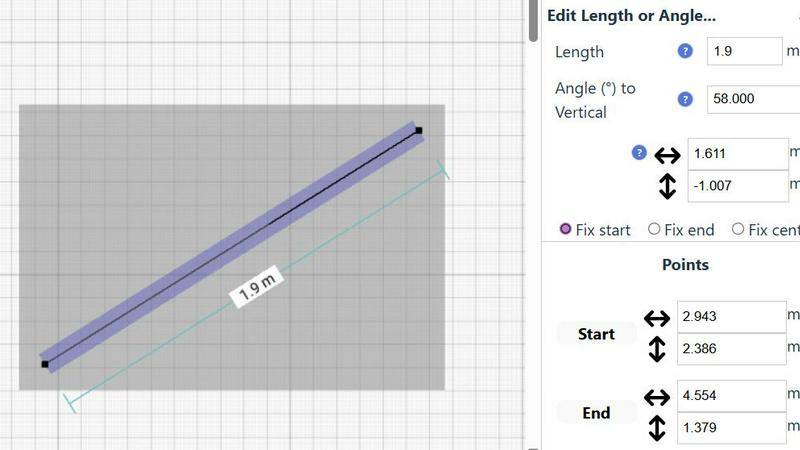
A specialized mode for creating accurate architectural layouts. Quickly draw walls and add doors or windows with single clicks. Access a library of interior fixtures for kitchens, bathrooms, and living spaces. View real-time measurements as you adjust your plan, making it ideal for detailed home project visualization without needing CAD expertise.
Smart Alignment & Precision Tools
An intelligent system that assists in placing points and lines with exact accuracy. Visual guides help align elements, and the tool automatically snaps to common angles. For full control, use keyboard shortcuts to lock movements to vertical or horizontal axes or zoom in for pixel-perfect placement, adapting the precision level to your needs.
Non-Destructive Editing & Full Control
Every element in your drawing can be modified, moved, or adjusted at any time. Utilize unlimited undo/redo functions and keyboard shortcuts to experiment freely. Edit numerically by inputting exact lengths, angles, and positions via keyboard for perfect iteration. Group elements to copy, paste, and move complex arrangements efficiently.
Comprehensive Measurement System
Work seamlessly in metric or US standard units (feet and inches). Contextual measurements display dynamically as you draw. You have fine-grained control over which dimensions are shown on the final plan, ensuring your drawings communicate the exact information needed for planning and execution.
Use Cases
Postproxy
Streamlined Content Distribution
Businesses can use Postproxy to streamline their content distribution process. By integrating the API into their existing workflows, they can publish across multiple social media platforms simultaneously, reducing the time and effort involved in managing separate accounts.
Automated Marketing Campaigns
Marketers can leverage Postproxy to automate their social media campaigns. By connecting their marketing automation tools like Zapier or n8n, they can trigger content publishing based on user engagement or other metrics, allowing for timely and relevant posts.
Efficient Content Management
Content creators can utilize Postproxy to manage their publishing schedules efficiently. With the ability to publish drafts and schedule posts across various platforms, creators can maintain a consistent online presence without the hassle of manual posting.
Scalable Publishing Solutions
As businesses grow, so do their publishing needs. Postproxy allows organizations to scale their publishing efforts effortlessly, enabling them to publish a high volume of content without adding unnecessary complexity to their workflows.
SimpleDraw
Home Renovation Planning
Plan kitchen or bathroom remodels with accurate scale drawings. Visualize new layouts, appliance placement, and fixture locations before starting construction. Ensure everything fits perfectly and avoid costly measurement mistakes by creating a precise digital blueprint of your renovation project.
Furniture & Room Layout Design
Arrange furniture in your bedroom, living room, or office. Test different layouts to see what fits and creates the best flow. Use the tool to check dimensions before purchasing new furniture, guaranteeing it will suit your space both in size and style.
Creating Real Estate Floor Plans
Generate clear, professional floor plans for apartment listings, house sales, or rental properties. Accurately represent room sizes, layouts, and features to provide potential buyers or tenants with a trustworthy visualization of the property's space.
DIY Project Visualization
Plan and design small construction projects, garden layouts, or workshop setups. Create scale drawings to calculate material needs, spatial relationships, and project feasibility. The tool's precision helps turn conceptual ideas into actionable, well-measured plans.
Overview
About Postproxy
Postproxy is an innovative API service designed to streamline social media publishing across multiple platforms, including Instagram, Facebook, YouTube, LinkedIn, and X. It serves developers, automators, and businesses that need a reliable solution for content distribution without the hassle of managing individual integrations. By automating OAuth, handling rate limits, managing retries, and adapting content to fit various platform specifications, Postproxy simplifies the complexities of social media publishing into one unified endpoint. This allows users to focus on content creation rather than the operational challenges that typically accompany social media management. With a free plan available, Postproxy enables users to scale their publishing efforts as their needs grow, making it an essential tool for any organization looking to enhance its digital presence.
About SimpleDraw
SimpleDraw is a free, browser-based tool that makes precise scale drawing and floor plan creation accessible to everyone. It strips away the complexity and cost of traditional CAD software, offering an intuitive interface that works directly in your web browser. Designed for casual users, DIY enthusiasts, homeowners, and small project planners, its core value is delivering professional-grade accuracy without the steep learning curve. You can start drawing immediately with no login, registration, or software download required. The tool focuses on a powerful yet minimal set of features, including a dedicated Floor Plan Mode, smart alignment aids, and a comprehensive measurement system. This approach transforms tasks like room renovations, furniture arrangement, and space planning from guesswork into a process of digital precision. SimpleDraw ensures your visualizations are accurate, to scale, and easy to create, providing the flexibility of digital editing with the straightforwardness of sketching on paper.
Frequently Asked Questions
Postproxy FAQ
What platforms does Postproxy support?
Postproxy supports multiple platforms including Instagram, Facebook, YouTube, LinkedIn, and X, allowing for seamless publishing across these networks through a single API.
How does Postproxy handle errors during publishing?
Postproxy incorporates robust error handling mechanisms, including automatic retries and rate limit management, ensuring that users face minimal disruptions when publishing their content.
Is there a free plan available?
Yes, Postproxy offers a free plan that allows users to get started without any financial commitment. As your publishing needs grow, you can scale to paid plans that offer additional features.
How do I integrate Postproxy into my existing systems?
Integrating Postproxy is simple. Users need to create an account, generate an API key, and connect their social media accounts. Once set up, publishing can be done via a unified API call.
SimpleDraw FAQ
Is SimpleDraw really free to use?
Yes, SimpleDraw is completely free. There is no cost to access the core scale drawing and floor plan creation tools. You can start using it immediately in your browser without any subscription, login, or download required.
Do I need to install any software?
No installation is needed. SimpleDraw is a 100% browser-based application. It works directly in your web browser on desktop computers, eliminating the hassle of software downloads, updates, or system compatibility checks.
Can I use it for professional architectural work?
SimpleDraw is designed for casual users, DIY projects, and basic space planning. While it offers professional-grade precision for its scope, it does not replace full-featured CAD software required for complex architectural, engineering, or commercial construction documentation.
How do I save or export my drawings?
Your drawings are automatically saved in your browser's local storage as you work. For exporting, use your browser's print function to save as a PDF or create an image screenshot. The tool focuses on in-browser creation and real-time planning.
Alternatives
Postproxy Alternatives
Postproxy is a design tool that simplifies social media publishing through a unified API. It allows users to publish content to multiple platforms, including Instagram, Facebook, YouTube, LinkedIn, and X, streamlining the process by automating various tasks such as OAuth management and analytics. Users often seek alternatives to Postproxy for various reasons, including budget constraints, specific feature requirements, or compatibility with different platforms. When choosing an alternative, consider factors such as ease of use, scalability, integration options, and overall value to ensure it meets your publishing needs effectively.
SimpleDraw Alternatives
SimpleDraw is a free, browser-based tool for creating accurate scale drawings and floor plans. It falls into the category of accessible design and technical drawing software, offering professional-grade precision without the complexity of traditional CAD programs. Users often seek alternatives for various reasons. Some may require advanced features like 3D modeling, extensive object libraries, or team collaboration tools. Others might need offline access, integration with specific platforms, or a different pricing model beyond a free tier. When evaluating alternatives, consider your primary use case, required feature depth, and budget. Key factors include the learning curve, export capabilities, platform availability, and whether the tool supports the specific types of projects you undertake, from simple room layouts to more detailed architectural plans.