
rfpaihub vs SupaSidebar
Side-by-side comparison to help you choose the right AI tool.

rfpaihub
rfpaihub helps teams streamline RFP and proposal writing with AI tools that automate responses and enhance efficiency.
Last updated: April 13, 2026

SupaSidebar
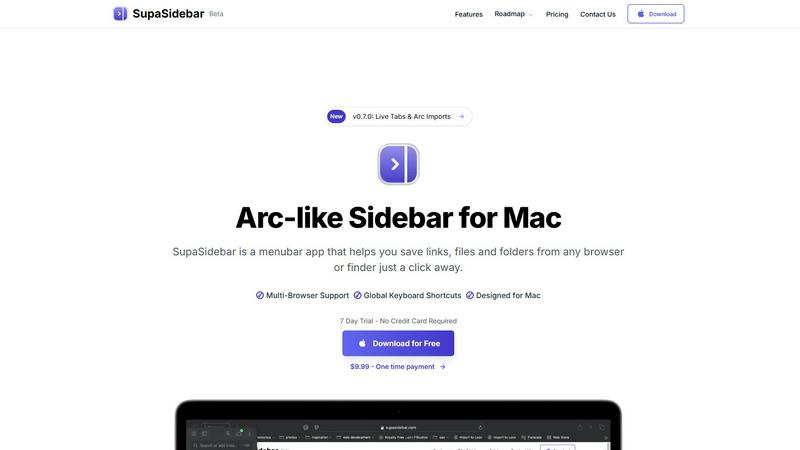
SupaSidebar is a Mac app that saves and organizes your links, files, and folders for instant access with keyboard.
Last updated: February 28, 2026
Visual Comparison
rfpaihub

SupaSidebar
Feature Comparison
rfpaihub
Advanced Content Matching
RFP AI Hub utilizes sophisticated algorithms to automatically match incoming questions with existing answers stored in a centralized knowledge base. This feature ensures that teams can quickly find relevant responses, significantly reducing the time spent searching for information.
AI-Driven Draft Generation
The platform offers AI-driven draft generation capabilities, allowing users to create first drafts of their responses automatically. This feature enables subject-matter experts to focus on refining content instead of starting from scratch, thereby increasing productivity.
Comprehensive Tool Comparison
Users can compare various AI-powered tools across multiple categories, such as RFP response, proposal writing, and security questionnaire automation. This feature helps teams select the right tool based on their specific workflow needs and budget.
Industry-Specific Filtering
RFP AI Hub allows users to filter tools by industry, making it easier to find solutions that cater to unique sector requirements. Whether in healthcare, technology, or finance, users can discover tools tailored to their industry's standards and practices.
SupaSidebar
Universal Command Center
SupaSidebar serves as a universal command center where users can access all their essential files, folders, and browser tabs without switching between multiple applications. This feature streamlines workflow and enhances productivity by keeping everything organized in one easily accessible location.
Global Keyboard Shortcuts
With global keyboard shortcuts, users can quickly save links or copy URLs directly to the sidebar using simple commands. Pressing CMD CTRL S saves the current page, while CMD CTRL C copies the link, allowing for a seamless and efficient way to gather resources without interrupting your workflow.
Recents Tracking
The Recents feature automatically tracks your activity, showing every website you've visited in the last 48 hours. This functionality ensures that you can quickly find and revisit important resources without the hassle of remembering specific URLs or searching through browser history.
Fast Search Functionality
SupaSidebar includes a powerful search function that lets users find any file, folder, website, or app instantly. By pressing CMD CTRL K and typing your query, you can locate what you need without navigating through multiple menus or windows, significantly speeding up your workflow.
Use Cases
rfpaihub
Streamlining RFP Responses
Sales teams can leverage RFP AI Hub to streamline their responses to RFPs by accessing a library of approved answers. This not only saves time but also enhances the quality and consistency of submissions.
Enhancing Proposal Management
Proposal managers can use the platform to find tools that improve their workflow, such as those with advanced document generation features. This helps in creating compelling proposals more efficiently, leading to higher win rates.
Automating Security Questionnaires
Compliance and risk management teams can find specialized tools to automate the completion of security questionnaires. This reduces the manual effort involved and ensures that all necessary information is accurately captured.
Improving Collaboration Among Teams
RFP AI Hub facilitates better collaboration among cross-functional teams by providing a centralized repository of information. This ensures that all team members are on the same page and can contribute effectively to proposal development.
SupaSidebar
For Students
Students can use SupaSidebar to keep track of research materials, important links, and study resources in one place. This organization enhances focus and ensures that they have quick access to all the materials needed for their academic success.
For Professionals
Professionals who juggle multiple projects will find SupaSidebar invaluable. It allows them to pin frequently used files and links, making it easy to switch between tasks without losing track of important resources or information.
For Researchers
Researchers can benefit from the Recents feature, which helps them revisit sources and articles they've recently accessed. This capability streamlines the research process and minimizes time wasted searching for previously viewed content.
For Content Creators
Content creators can utilize SupaSidebar to organize their favorite tools, websites, and research materials. By keeping everything accessible through a single interface, they can maintain their creative flow and focus on producing high-quality content.
Overview
About rfpaihub
RFP AI Hub is a comprehensive directory that specializes in AI-powered tools designed for RFP response, proposal management, and security questionnaire automation. It caters to sales and proposal teams across various industries, providing a platform to streamline the often tedious process of responding to Requests for Proposals (RFPs) and related documents. By offering a centralized hub for comparing different tools, RFP AI Hub enables users to filter options based on features, pricing, and specific industry needs. The main value proposition lies in its ability to reduce manual work, enhance consistency in responses, and speed up the overall proposal process. This is achieved through an AI-driven approach that automates content reuse and drafting, making it easier for teams to manage multiple submissions efficiently.
About SupaSidebar
SupaSidebar is an elegantly designed menubar application for macOS that enhances digital workflow by providing a central hub for all your important links, files, folders, and browser tabs. Inspired by the sleek aesthetics of Arc, it is perfect for professionals, students, researchers, and multitaskers who need to manage various applications and browsers without the clutter typically associated with traditional workflows. The core value proposition of SupaSidebar is its ability to eliminate inefficiencies, allowing users to access everything they need with just a keyboard shortcut. No more searching through endless bookmarks or tabs; SupaSidebar organizes your digital life into a distraction-free sidebar. Compatible with all major browsers, including Safari, Chrome, Firefox, Arc, and Brave, it keeps your data private as everything is stored locally on your Mac. With features like a global command panel and live tab overview, SupaSidebar transforms how you interact with your Mac, making browsing faster, more efficient, and focused on what truly matters.
Frequently Asked Questions
rfpaihub FAQ
What is RFP response software?
RFP response software is a tool designed to assist teams in answering Requests for Proposals efficiently. It centralizes past answers, automates content reuse, and employs AI for drafting and matching responses, reducing manual work.
How does AI improve the RFP process?
AI enhances the RFP process by auto-matching questions to an existing content library, generating first-draft answers, and suggesting improvements. This can lead to a reduction in response time by 40-60%.
What types of tools does RFP AI Hub compare?
RFP AI Hub compares AI-powered tools across six categories: RFP Response, Proposal Writing, Security Questionnaire Automation, Knowledge Base & Answer Library, Document Generation, and Contract & Bid Management.
Is RFP AI Hub free to use?
Yes, RFP AI Hub is a free directory. Users can browse, compare, and filter tools without needing to create an account. Vendors can also submit their products for review at no cost.
SupaSidebar FAQ
Is SupaSidebar a browser extension?
No, SupaSidebar is a standalone menubar application designed for macOS. It integrates with multiple browsers but operates independently, ensuring a seamless experience without being limited to a single browser.
Which browsers does SupaSidebar work with?
SupaSidebar is compatible with all major browsers, including Safari, Chrome, Firefox, Arc, and Brave. This flexibility allows users to maintain their preferred browsing environment while enjoying the benefits of the sidebar application.
What macOS version do I need?
SupaSidebar requires macOS version 13 or later to ensure optimal performance and compatibility with the latest features and updates.
Where is my data stored?
All data associated with SupaSidebar is stored locally on your Mac, ensuring your privacy and security. No information is sent to external servers, allowing you to manage your resources safely and privately.
Alternatives
rfpaihub Alternatives
RFP AI Hub is a specialized platform designed for streamlining RFP and proposal writing processes. As part of the productivity and management category, it offers tools that assist users in creating efficient responses to requests for proposals, managing proposals, and automating security questionnaires. Users often seek alternatives to RFP AI Hub due to various reasons such as pricing constraints, specific feature requirements, or compatibility with different platforms. When choosing an alternative, it is crucial to consider the features that best meet your needs, the overall cost-effectiveness, and how well the tool integrates with your existing systems.
SupaSidebar Alternatives
SupaSidebar is an innovative Arc-style sidebar application designed for macOS, serving as a centralized hub for managing links, files, and folders. It falls under the productivity and management category, catering to professionals, students, and anyone who juggles multiple tasks across different applications and browsers. Users frequently seek alternatives to SupaSidebar for various reasons, including pricing, feature sets, and compatibility with different platforms. Finding the right alternative involves evaluating similar functionalities, ease of use, and how well an option integrates into your existing workflow. When choosing an alternative, it’s essential to consider factors such as the user interface, the ability to handle multiple browsers, and how effectively it helps streamline your digital organization. Additionally, look for features that enhance productivity, like quick access to resources, customizable settings, and privacy assurances. These elements will ensure that the alternative meets your specific needs while enhancing your overall experience.