
Renderly vs SeeDance Ai
Side-by-side comparison to help you choose the right AI tool.

Renderly
Renderly automates video production at scale, generating thousands of personalized videos quickly via a powerful API.
Last updated: February 26, 2026

Seedance AI transforms text, images, audio, and video into polished multi-shot videos with synchronized sound and seamless motion.
Last updated: April 13, 2026
Visual Comparison
Renderly

SeeDance Ai
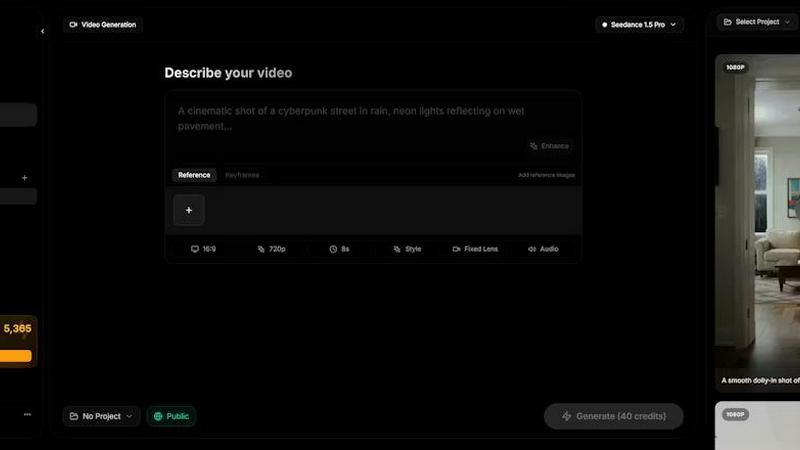
Feature Comparison
Renderly
Programmatic Video Generation
Renderly provides a powerful API that allows users to generate thousands of personalized videos programmatically. This feature leverages template-based automation and variable replacement, making it easy to create tailored content for different audiences.
Scalable Infrastructure
The cloud-native architecture of Renderly is designed to auto-scale, handling high-volume rendering workloads reliably. Whether you need to render one video or over 100,000, the platform adapts to your demands without compromising performance.
Template Management
Renderly offers a centralized template library that includes version control and JSON configuration for dynamic content. This feature streamlines the creation process, allowing users to manage and update templates easily, ensuring consistent branding and messaging.
Credit-Based Billing
With a transparent pay-per-render pricing model, Renderly allows users to only pay for what they render. This feature includes volume discounts, making it a cost-effective solution for enterprises needing extensive video production without hidden fees.
SeeDance Ai
Multimodal Input System
SeeDance Ai allows users to upload up to 12 reference files, including images, videos, and audio clips. By tagging these references directly in prompts, creators can provide precise instructions rather than relying on vague descriptions, streamlining the creative process.
Simultaneous Audio and Video Generation
Unlike many tools that generate audio and video separately, SeeDance Ai produces both concurrently, ensuring perfect synchronization. This results in seamless timing where sound effects, footsteps, and dialogue align flawlessly with visual elements, reducing the need for post-production adjustments.
Consistent Character Representation
The platform employs a cross-attention reference system to maintain character continuity across different shots. This feature prevents character drift, ensuring that faces, clothing, and styles remain consistent, making it perfect for serialized content and branded campaigns.
Advanced Camera and Motion Control
Users can upload reference videos to replicate specific camera movements, such as tracking shots and dolly zooms. This capability extends to human motion, allowing complex choreography and sequences to be accurately captured and applied to generated characters.
Use Cases
Renderly
Personalized Marketing Campaigns
Marketers can use Renderly to create personalized video content for targeted campaigns. By automating video generation, teams can quickly produce unique videos tailored to individual customer preferences, boosting engagement and conversion rates.
Bulk Social Media Content
Social media managers can leverage Renderly to generate bulk video content for various platforms, ensuring consistent posting schedules. By automating the process, they save time and resources while maintaining high-quality output.
Data-Driven Motion Graphics
Businesses can utilize Renderly for data-driven motion graphics that dynamically visualize important metrics. This capability helps in presenting complex information in an easily digestible format, enhancing audience understanding and retention.
Event Highlights and Recaps
Event organizers can use Renderly to create quick highlight reels or recap videos from events. This feature allows for rapid turnaround times, enabling teams to share memorable moments with attendees and on social media shortly after the event concludes.
SeeDance Ai
Marketing and Promotional Videos
Businesses can utilize SeeDance Ai to create engaging marketing clips that combine visuals and audio seamlessly. This can enhance brand storytelling and drive customer engagement through professional-quality video content.
Social Media Content Creation
Influencers and content creators can leverage SeeDance Ai to produce eye-catching social media videos quickly. With its easy-to-use interface, users can generate polished videos that stand out in crowded feeds.
Dance and Performance Videos
Choreographers can use SeeDance Ai to visualize dance routines by generating videos that replicate specific movements and styles. This allows for effective practice, showcasing, and sharing of choreography in a digital format.
Narrative and Storytelling Projects
Filmmakers and storytellers can harness SeeDance Ai to create compelling narratives with synchronized audio and visuals. This tool enables the production of short films and animations that captivate audiences without extensive resources.
Overview
About Renderly
Renderly is an advanced video infrastructure platform designed for developers and content creators looking to revolutionize their video production processes. By automating video generation at scale, Renderly eliminates the need for manual rendering, allowing users to generate personalized videos, bulk social media content, and dynamic motion graphics swiftly and efficiently. With its API-first design, Renderly caters to enterprises that require high-volume video outputs with reliability and cost-effectiveness. The platform supports thousands of concurrent renders and is built to scale seamlessly with your business needs. Key value propositions include significant cost savings, transparent billing, and a robust template-driven approach that enables easy customization and integration into existing workflows.
About SeeDance Ai
SeeDance Ai is a cutting-edge AI video generation platform designed for creators seeking to transform text, images, audio, and video references into professional-quality multi-shot videos. With its advanced technology, SeeDance Ai enables users to craft cinematic experiences with director-level control, making it ideal for marketers, content creators, dancers, and storytellers. The platform offers four distinct models—Seedance 2.0, Seedance 1.5 Pro, Seedance 1.0, and Seedance 1.0 Pro—each tailored to meet different creative needs. By using SeeDance Ai, users gain access to high-fidelity output that maintains character continuity, realistic motion, and synchronized audio-visual elements, which significantly enhances the production quality of marketing clips, social media content, and narrative-driven videos. With no studio required, SeeDance Ai democratizes video production, allowing anyone to produce captivating visual stories effortlessly.
Frequently Asked Questions
Renderly FAQ
What types of videos can I generate with Renderly?
Renderly allows users to generate a wide range of videos, including personalized marketing content, social media clips, motion graphics, and event recaps, all based on customizable templates.
How does the credit-based billing system work?
Renderly operates on a pay-per-render model, where users are charged based on the number of videos they generate. This system includes volume discounts, making it cost-effective for enterprises with high video production needs.
Is Renderly suitable for small businesses?
Yes, Renderly is designed to scale with your business. While it's ideal for enterprises, small businesses can also benefit from the platform's automation and cost savings, allowing them to produce high-quality videos efficiently.
What kind of support does Renderly provide for developers?
Renderly offers comprehensive documentation, including API references and SDKs, as well as webhooks for seamless integration. This support ensures that developers can easily implement Renderly's capabilities into their existing workflows.
SeeDance Ai FAQ
How does SeeDance Ai ensure audio and video synchronization?
SeeDance Ai generates audio and video simultaneously within the same model pass, ensuring that all elements are perfectly synchronized, which enhances the overall viewing experience.
Can I use SeeDance Ai for different types of videos?
Yes, SeeDance Ai is versatile and can be used for marketing clips, social media content, dance performances, and narratives, making it suitable for a wide range of video production needs.
What types of references can I upload to SeeDance Ai?
You can upload up to 12 reference files, including a combination of images, videos, and audio clips. This flexibility allows for detailed instructions and richer video outputs.
Is there a learning curve to using SeeDance Ai?
SeeDance Ai is designed to be user-friendly. Its intuitive interface and multimodal input system simplify the video creation process, making it accessible for both beginners and experienced users.
Alternatives
Renderly Alternatives
Renderly is a video infrastructure platform that automates video production, allowing developers and creators to generate thousands of videos quickly through a robust API or online editor. Its primary focus is on streamlining the video creation process, making it an essential tool for those needing bulk content, personalized videos, or data-driven motion graphics. Users often seek alternatives to Renderly for various reasons, including budget constraints, specific feature requirements, or the need for compatibility with different platforms. When searching for an alternative, consider aspects such as pricing structures, ease of use, available features, and the flexibility to integrate with your existing workflows to ensure the solution meets your unique needs.
SeeDance Ai Alternatives
SeeDance Ai is a cutting-edge AI video generation platform designed for creators seeking to transform text, images, audio, and video references into cinematic, multi-shot visuals. It falls under the category of AI cinematography, providing users with director-level control over their projects. Users often search for alternatives due to factors such as pricing, specific feature sets, or compatibility with their existing platforms and workflows. When selecting an alternative, consider aspects like output quality, ease of use, and the range of customizable options available to ensure it meets your specific needs.