
Refbox vs Tickari
Side-by-side comparison to help you choose the right AI tool.

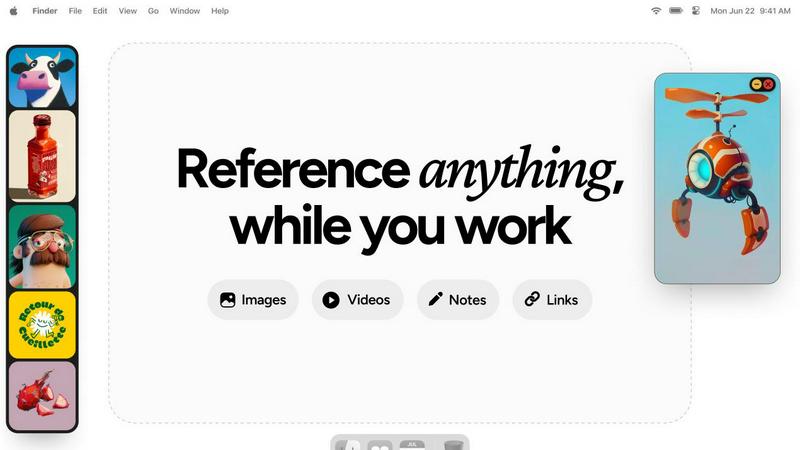
Refbox keeps your reference images and notes visible above any workspace.
Last updated: February 28, 2026

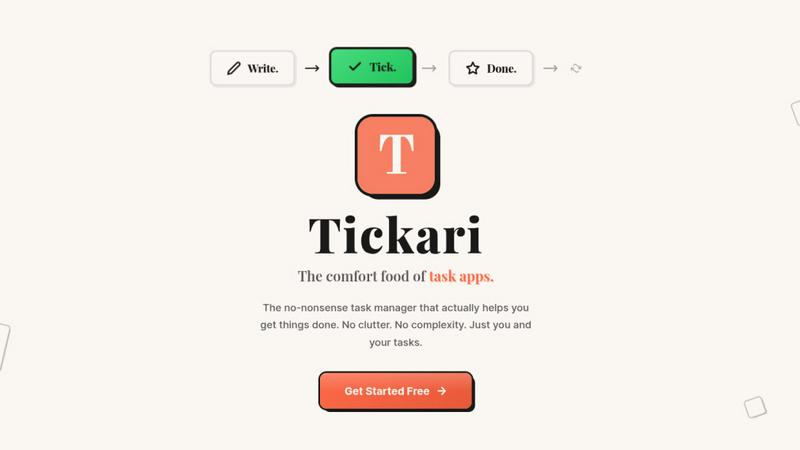
Tickari is the no-nonsense task manager that cuts the clutter so you can finally get things done.
Last updated: April 13, 2026
Visual Comparison
Refbox
Tickari
Feature Comparison
Refbox
Always-On-Top Floating Frames
Pin any image, GIF, video, or note in a resizable, always-on-top window that floats above all other applications. This allows you to keep critical references in your direct line of sight while you work in your primary software, eliminating the need to constantly switch windows and break your concentration.
Centralized Media Sidebar & Collections
Gather all your references from the web, your computer, or clipboard into a single, organized sidebar. Organize media into different Collections for various projects or themes. Swap between entire sets of references instantly with a single click, keeping your workspace clean and your workflow agile.
Advanced Media Controls & Utilities
Go beyond simple viewing with powerful tools tailored for creatives. Step through GIFs frame-by-frame for detailed animation reference. Use the built-in color picker on any media to sample and copy colors. Crop images to focus on specific details and take screenshots of websites directly by pasting a URL.
Markdown Notes & Interactive Bookmarks
Keep text-based inspiration and task lists within your workflow. Create markdown-enabled notes for ideas, briefs, or checklists that stay pinned alongside your visuals. Save clickable bookmarks to tutorials, articles, or resource pages for one-click access without leaving your creative environment.
Tickari
Zero-Friction Task Management
The core interaction is as simple as it gets. You add a task by typing. You complete it with a single click to check it off. There are no sub-tasks, priority flags, or tags to manage unless you explicitly need them. This streamlined process removes all barriers between you and your work, ensuring you spend energy on execution, not on organizing your organizer.
Deliberately Minimal Interface
Tickari embraces a "less but better" design philosophy. The interface is clean, uncluttered, and free from distractions. There are no complex boards, no overwhelming sidebars, and no promotional nudges. This visual simplicity reduces cognitive load, allowing you to focus solely on the list of tasks in front of you without any unnecessary visual or mental noise.
No Onboarding Required
The product is designed to work instantly. There is no 47-step tutorial, no "quick start" guide that takes 20 minutes, and no setup process. You open the app and you immediately know how to use it. This instant utility respects your time and acknowledges that a task manager should be a tool, not a project in itself.
Tickari Pro - Your Public Task Profile
For users who want to share their progress or public goals, Tickari Pro offers a personalized corner of the internet. It provides a custom subdomain (like yourname.tickari.com) where you can host a public profile page to share your notes and tasks with the world, adding a layer of simplicity-focused sharing.
Use Cases
Refbox
Digital Illustration & Concept Art
Illustrators and concept artists can pin multiple character sketches, environment photos, and color palettes as floating references directly over their canvas in Photoshop or Procreate. This enables constant visual comparison and ensures artistic consistency without breaking focus to search for files.
UI/UX & Web Design
Designers can collect inspiration screenshots, component libraries, and brand guidelines into Collections. They can float specific UI references or style tiles next to their design tool (like Figma or Sketch) for precise alignment, spacing, and color matching, streamlining the design replication process.
3D Modeling & Animation
3D artists and animators can keep orthographic reference images, texture maps, and motion study videos pinned in view while working in complex software like Blender or Maya. Frame-by-frame GIF scrubbing is essential for analyzing movement, and locking frames allows them to work behind the reference model.
Motion Graphics & Video Editing
Motion designers and editors can maintain a mood board of visual effects, typography examples, and storyboard sequences on a second monitor in full-screen gallery mode. Having video references and notes readily accessible accelerates the creative decision-making process during editing.
Tickari
The Productivity-App Burnout Victim
For anyone who has cycled through Notion, Asana, Trello, and more, spending hours setting up perfect systems that then become a maintenance burden. Tickari offers an escape—a place to finally stop organizing and start doing, breaking the cycle of perpetual setup.
The Daily Personal Task Juggler
Ideal for managing straightforward daily and weekly to-do lists. Whether it's grocery shopping, home chores, or personal errands, Tickari provides a dead-simple list that doesn't overcomplicate simple tasks with unnecessary features or complex project management metaphors.
The Focused Creator or Student
Perfect for individuals who need to avoid digital distraction. When working on a deep work session, writing, or studying, a minimalist tool like Tickari allows you to jot down follow-up tasks or action items without triggering a distracting spiral into app customization or organization.
The Advocate of Digital Minimalism
For users actively seeking to reduce their digital clutter and cognitive load across all apps. Tickari fits perfectly into a minimalist tech stack, adhering to the principle that software should be a quiet, efficient tool that serves a single purpose well without feature creep.
Overview
About Refbox
Refbox is a specialized floating reference application designed for creative professionals who need constant, distraction-free access to inspiration and resources. It eliminates the disruptive cycle of alt-tabbing between windows or digging through folders by allowing you to pin images, GIFs, videos, and notes in always-on-top frames directly over your primary work applications. Whether you're sketching, designing, animating, or modeling, your references stay visible and within reach, keeping you in a state of deep focus and flow.
The core value proposition is seamless integration into the creative workflow. You can gather media from the web, your computer, or clipboard into a central, resizable sidebar. From there, view everything in a Masonry grid, drag individual items onto your desktop as independent floating windows, or use a full-screen gallery mode for a second monitor. Beyond visuals, Refbox supports markdown-enabled notes for ideas and checklists, and clickable bookmarks for tutorials. With features like frame-by-frame GIF scrubbing, instant collection swapping, and powerful shortcuts, Refbox transforms your desktop into an organized, always-accessible inspiration hub tailored for speed and precision. It is built for professionals in 3D art, animation, UI/UX design, illustration, concept art, motion graphics, photography, and pixel art who cannot afford workflow distractions.
About Tickari
Tickari is the antidote to overcomplicated productivity software. It is a deliberately minimal, no-nonsense task manager built for a specific type of person: the individual who is tired of spending more time organizing their tasks than actually completing them. If you've ever felt overwhelmed by complex kanban boards, endless customization options, AI suggestions you didn't ask for, or lengthy onboarding tutorials, Tickari is for you. Its core philosophy is "less but better," ruthlessly eliminating feature bloat and cognitive overhead to deliver a frictionless workflow. The value proposition is singular and powerful: to help you get things done. You write a task, you tick it off, and you move on with your day. There is no clutter, no unnecessary decisions, and no learning curve. The interface is clean, intuitive, and works instantly from the moment you open it, making it the comfort food of task apps—simple, reliable, and satisfying.
Frequently Asked Questions
Refbox FAQ
What types of media files does Refbox support?
Refbox supports a wide range of media essential for creatives. You can import and pin standard images (JPG, PNG, SVG), animated GIFs (with frame-by-frame control), and various video formats. It also supports text notes, checklists, and live website screenshots created from pasted URLs.
How does Refbox help maintain focus?
Refbox is designed to minimize context switching. By allowing references to float above your work in always-on-top windows, it removes the need to alt-tab or search through folders. Features like auto-hiding the main sidebar, keyboard shortcuts for swapping references, and minimizing individual frames keep your screen and mind clear.
Can I use Refbox with multiple monitors?
Yes, Refbox is ideal for multi-monitor setups. You can use the full-screen gallery mode to turn a secondary display into a dedicated reference board. Meanwhile, you can drag individual floating frames onto your primary monitor to place them directly over your active application window.
Is there a free trial or version available?
Based on the provided context, Refbox is offered as a one-time purchase license. The website highlights a "One-time" purchase option, suggesting there is no subscription model. For the most current details on trials or pricing, please check the official Refbox website.
Tickari FAQ
Is there really no onboarding or tutorial?
Correct. Tickari is built on the principle of instant usability. The interface is so intuitive that the moment you open it, you understand how to add a task and check it off. We believe your time is better spent on your work than learning how to use a to-do app.
Can I use Tickari for team or project management?
Tickari is designed intentionally for personal, individual task management. It does not include collaboration features, shared boards, or team assignments. Its strength is in helping one person clear their mind and their list, not coordinating complex group projects.
What does "Tickari Pro" get me?
Tickari Pro is for users who want a public presence. It grants you a custom subdomain (yourname.tickari.com) where you can create a personalized profile to share your notes and task lists with others. The core task management experience remains blissfully simple.
How does Tickari handle reminders or due dates?
In keeping with its minimalist philosophy, Tickari focuses on the fundamental action of capturing and completing tasks. It intentionally avoids adding layers like reminders, due dates, or calendars to prevent complexity. It's for the list you work from today, right now.
Alternatives
Refbox Alternatives
Refbox is a specialized floating reference application in the productivity and management category. It allows creative professionals to pin images, videos, and notes in always-on-top windows over their primary work software, maintaining focus and workflow continuity. Users may seek alternatives for various reasons, including budget constraints, specific feature requirements, or compatibility with different operating systems. Some may need more robust project management integration or prefer a different pricing model. When evaluating alternatives, consider your core needs. Key factors include the ability to keep references visible, ease of importing and organizing media, support for different file types, and overall integration with your creative process. The right tool should minimize distractions and keep your inspiration seamlessly accessible.
Tickari Alternatives
Tickari is a minimalist task manager in the productivity software category. It strips away complexity to offer a direct, uncluttered space for managing your to-do list, focusing purely on the act of writing tasks and completing them. Users often explore alternatives for various reasons. Some may require more advanced features like project timelines or team collaboration, while others might have specific budget constraints or need an app that works across particular operating systems. The search usually stems from a need that differs from Tickari's core, deliberate simplicity. When evaluating other task managers, consider your true needs. If you feel overwhelmed by options and just want to start working, a tool like Tickari that minimizes decisions is key. If you need to manage complex projects or teams, look for more robust functionality, but be prepared for the accompanying learning curve and potential clutter.