
Looktara vs PhotoWeather
Side-by-side comparison to help you choose the right AI tool.
Looktara
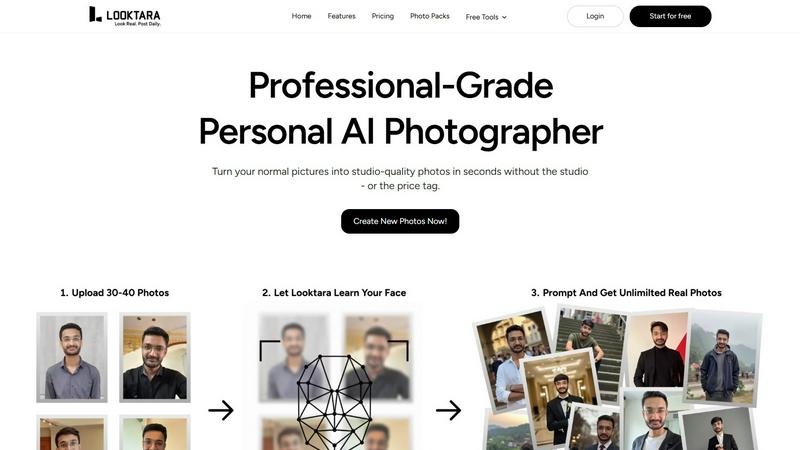
Looktara trains a private AI from your photos to create professional pictures anywhere.
Last updated: February 28, 2026

PhotoWeather
Get real-time alerts for ideal photo conditions tailored to your favorite locations and shooting styles.
Last updated: February 26, 2026
Visual Comparison
Looktara
PhotoWeather

Feature Comparison
Looktara
Private AI Model Training
Looktara creates a unique, private AI model just for you. You upload a set of your photos once, and the system trains on them in an encrypted, isolated environment. This ensures your biometric data is secure and the model learns your specific likeness, from facial features to expressions, forming the foundation for all your generated images.
Prompt-Based Photo Generation
Generate a completely new photo in roughly 5 seconds by typing a simple text description. You have full creative control to specify the style, setting, clothing, or mood you need, such as "professional headshot in a modern office" or "casual outdoor portrait with a warm smile." This puts the power of a photoshoot at your fingertips instantly.
Studio-Grade Realism & Authenticity
The technology is engineered to overcome the flaws of typical AI photos. It focuses on delivering natural skin textures, authentic body language, and realistic lighting, avoiding the over-smoothed, plastic-like appearance and awkward poses that plague other generators. The result is photos that look genuinely like you.
Platform-Specific Styling
Easily tailor your look for different social and professional platforms from one core model. Generate a formal headshot for LinkedIn, a relaxed and engaging photo for Instagram, and a friendly portrait for Twitter or Tinder. Maintain one consistent identity styled appropriately for each platform's unique vibe and audience.
PhotoWeather
Ready-Made Templates
PhotoWeather offers a selection of ready-made templates tailored for photographers. These templates cover various conditions such as fog and mist, golden hour, aurora visibility, and storm intensity. Users can quickly select their desired conditions, ensuring they are alerted when the perfect opportunities arise.
Powerful Rule Builder
The rule builder within PhotoWeather is a powerful feature that allows users to create highly specific alerts. With over 80 parameters, including clouds, visibility, and wind speed, photographers can customize alerts to fit their unique requirements. This flexibility ensures that users only receive notifications for conditions that matter to them.
Smart Notifications
PhotoWeather's smart notifications provide daily digests, reminders before opportunities start, and alerts when forecasts change. This feature allows photographers to stay informed without being overwhelmed, ensuring they are aware of the best times to shoot without constant checking.
Trusted Forecast Sources
PhotoWeather sources its data from reputable weather services, including ECMWF, DWD, NOAA, and more. This reliability ensures that users can trust the alerts they receive, making it easier to plan their photography sessions around accurate forecasts.
Use Cases
Looktara
Personal Branding for Professionals
Ideal for entrepreneurs, executives, and freelancers who need a library of high-quality, professional headshots. Keep your LinkedIn profile, company website, and speaker bios updated with fresh, authoritative images that reflect different aspects of your professional persona without scheduling a photographer.
Content Creation for Influencers
Social media creators and influencers can generate a vast array of on-brand photos to maintain a consistent and engaging feed. Quickly produce photos matching specific content themes, seasonal campaigns, or promotional needs, ensuring a steady stream of authentic visual content for followers.
Dating Profile Optimization
Create a variety of authentic and appealing photos for dating app profiles like Tinder. Generate different looks and settings—from casual coffee shop shots to active outdoor scenes—to present a well-rounded and genuine portrayal of yourself, increasing profile engagement.
Consistent Marketing Materials
Small business owners and marketers can ensure brand consistency by generating professional portraits of themselves or team members for websites, brochures, email newsletters, and advertisements. All materials feature the same high-quality, cohesive visual style.
PhotoWeather
Landscape Photography
Landscape photographers can use PhotoWeather to set alerts for specific conditions like fog or dramatic cloud formations. This allows them to capture breathtaking landscapes at the right moment, enhancing the quality of their work.
Astrophotography
For astrophotographers, PhotoWeather provides alerts for astronomical events, such as moon phases and milky way visibility. This ensures that users are aware of the best nights to capture celestial images, taking the guesswork out of planning.
Wildlife Photography
Wildlife photographers can set conditions based on weather patterns that influence animal behavior. For instance, alerts for changes in temperature or rainfall can indicate optimal times for capturing wildlife activity.
Event Photography
Event photographers can benefit from PhotoWeather by setting alerts for specific weather conditions relevant to outdoor events. Whether it's a wedding or a festival, photographers can ensure they are ready for the best lighting and weather scenarios.
Overview
About Looktara
Looktara is your personal AI photographer, designed to generate studio-grade solo photos on demand. It solves the core problem for professionals and creators who need a constant stream of fresh, authentic-looking photos for their personal brand without the recurring hassle and high cost of traditional photoshoots. The process is simple and private: you upload around 30 photos of yourself. In approximately 10 minutes, Looktara trains a secure, encrypted, and isolated AI model that learns your unique appearance. Once trained, you can generate a new, high-quality photo in about 5 seconds by simply typing a text prompt describing the desired style, setting, or mood. Built to avoid the common pitfalls of AI imagery, Looktara delivers results with natural skin texture, authentic expressions, and consistent quality, eliminating the uncanny valley effect. It is the essential tool for anyone needing to maintain a polished and consistent visual presence across platforms like LinkedIn, Instagram, and Twitter, ensuring you always have the perfect photo that matches your message.
About PhotoWeather
PhotoWeather is an innovative weather alerting tool designed specifically for outdoor photographers. It continuously monitors weather forecasts and notifies users only when conditions align with their photography goals. With PhotoWeather, photographers can optimize their shooting opportunities without the hassle of checking weather apps constantly. The app is ideal for landscape, astro, and wildlife photographers who need precise weather conditions to capture stunning images. By allowing users to set custom rules based on over 80 weather parameters, PhotoWeather ensures that photographers receive timely alerts about events like fog, dramatic storms, or golden-hour light. With real-time notifications and calendar integration, photographers can focus on their craft without missing out on the perfect moment.
Frequently Asked Questions
Looktara FAQ
How many photos do I need to upload to start?
You need to upload approximately 30 photos of yourself. This provides the AI with enough varied data to learn your unique appearance, expressions, and features from different angles and lighting conditions, ensuring high-quality and accurate results.
Is my data and photo privacy protected?
Yes. Looktara emphasizes security and privacy. Your uploaded photos are used to train a private, encrypted AI model that is isolated to your account. The company states it does not use your data or likeness for any other purpose, keeping your biometric information secure.
How long does it take to generate a photo?
Once your personal AI model is trained—which takes about 10 minutes—generating a new photo based on your text prompt is extremely fast. You can expect to receive your new, studio-grade image in roughly 5 seconds after submitting your description.
Can I control the style and background of the photos?
Absolutely. You have full creative control through text prompts. Simply describe the desired scene, such as "business casual in a library," "bright studio lighting with a grey backdrop," or "wearing a sweater in a cozy cafe." The AI interprets your prompt to generate a matching image.
PhotoWeather FAQ
How do I get started?
To get started with PhotoWeather, simply sign up for a free account. After creating your account, you can add your favorite shooting locations and set up alerts based on your preferred weather conditions.
How accurate are the forecasts?
PhotoWeather uses data from top weather services like NOAA and ECMWF, ensuring high accuracy in its forecasts. Users can rely on these forecasts to plan their photography sessions effectively.
Can I create my own rules?
Yes, PhotoWeather allows users to create custom rules based on over 80 weather parameters. This flexibility means you can tailor alerts to your specific photography needs and preferences.
Do you support calendar sync?
Absolutely! PhotoWeather integrates with your calendar, allowing you to receive real-time alerts and plan your photography sessions seamlessly. You can view upcoming opportunities directly on your calendar.
Alternatives
Looktara Alternatives
Looktara is a generative AI tool that creates professional solo photos by training a private model on your uploaded images. It belongs to the category of AI-powered personal photography and avatar generation. Users may seek alternatives for various reasons, including different pricing models, specific feature requirements, or a preference for other platforms or user interfaces. Needs can vary widely from person to person. When evaluating alternatives, key considerations should include the privacy and security of your data, the quality and authenticity of the generated images, the flexibility of the tool for different contexts, and the overall value for your specific use case.
PhotoWeather Alternatives
PhotoWeather is a specialized weather alert service designed for photographers, providing timely notifications about ideal conditions for capturing stunning images. By monitoring forecasts around the clock, it ensures that users are informed about opportunities such as golden hour lighting, dramatic weather changes, and other atmospheric phenomena. Users often seek alternatives to PhotoWeather for various reasons, including pricing, specific feature sets, or compatibility with their preferred platforms. When looking for an alternative, consider factors such as the comprehensiveness of weather parameters, ease of use, and the ability to customize alerts based on personal photography needs.