
Outbid vs SupaSidebar
Side-by-side comparison to help you choose the right AI tool.

Outbid sends instant Upwork job alerts and AI-written proposals to your Telegram so you can apply first and win more.
Last updated: March 19, 2026

SupaSidebar
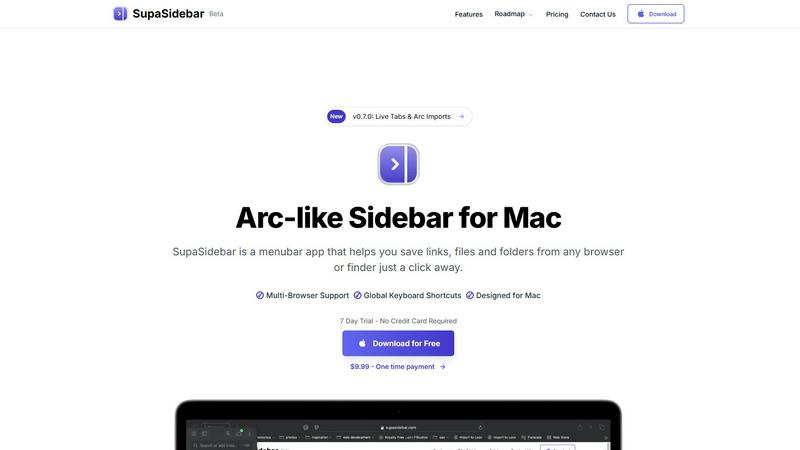
SupaSidebar is a Mac app that saves and organizes your links, files, and folders for instant access with keyboard.
Last updated: February 28, 2026
Visual Comparison
Outbid

SupaSidebar
Feature Comparison
Outbid
24/7 Real-Time Monitoring
Outbid scans the Upwork marketplace continuously, day and night. It checks for new job postings every 60 seconds, ensuring no opportunity slips through the cracks. You receive instant Telegram alerts the moment a relevant job is posted, allowing you to apply while the client is still actively reviewing proposals. This constant vigilance means you never have to manually refresh the job board again.
AI-Powered Proposal Drafts
Every job alert comes with a complete, tailored proposal draft generated by AI. The system analyzes the job description and cross-references it with your skills and bio to create a compelling, relevant application. This draft is formatted for easy copy-pasting, so you can submit a high-quality proposal in one tap, saving hours of writing time each week.
Smart Job Filtering
You only see jobs worth your time. Outbid allows you to set precise filters based on your skills, required client budget, project experience level, and even "quiet hours" to avoid notifications during off-times. This targeted filtering eliminates spam and irrelevant postings, focusing your efforts on high-potential opportunities that match your criteria.
War Room Strategy Mode
For highly competitive job listings, War Room Mode gives you a strategic edge. It allows you to add custom instructions to guide the AI, regenerate proposal drafts with different angles, and refine your approach to stand out from the crowd. This feature ensures your application is not just fast, but also strategically crafted to win.
SupaSidebar
Universal Command Center
SupaSidebar serves as a universal command center where users can access all their essential files, folders, and browser tabs without switching between multiple applications. This feature streamlines workflow and enhances productivity by keeping everything organized in one easily accessible location.
Global Keyboard Shortcuts
With global keyboard shortcuts, users can quickly save links or copy URLs directly to the sidebar using simple commands. Pressing CMD CTRL S saves the current page, while CMD CTRL C copies the link, allowing for a seamless and efficient way to gather resources without interrupting your workflow.
Recents Tracking
The Recents feature automatically tracks your activity, showing every website you've visited in the last 48 hours. This functionality ensures that you can quickly find and revisit important resources without the hassle of remembering specific URLs or searching through browser history.
Fast Search Functionality
SupaSidebar includes a powerful search function that lets users find any file, folder, website, or app instantly. By pressing CMD CTRL K and typing your query, you can locate what you need without navigating through multiple menus or windows, significantly speeding up your workflow.
Use Cases
Outbid
The Busy Professional
Freelancers with existing client work or packed schedules can't monitor Upwork constantly. Outbid acts as their personal assistant, delivering only the best-matched jobs in real-time. They can apply to high-value opportunities within minutes, without disrupting their workflow or sacrificing billable hours to job hunting.
The Upwork Newcomer
New freelancers often struggle with writing winning proposals and understanding the fast-paced Upwork environment. Outbid provides instant structure, sending ready-to-use proposal drafts that help them make a strong first impression. This builds confidence and accelerates their ability to land their first clients.
The Volume Applicant
Freelancers who rely on applying to many jobs to secure work need efficiency. Outbid automates the most time-consuming parts: finding new posts and drafting initial proposals. This allows them to submit 3x more applications in the same time, dramatically increasing their surface area for success.
The Strategic Bidder
Experienced freelancers targeting high-budget projects know that early, high-quality proposals are key. They use Outbid's speed to apply first and employ the War Room Mode to craft nuanced, strategic proposals that address specific client pain points, helping them win competitive contracts.
SupaSidebar
For Students
Students can use SupaSidebar to keep track of research materials, important links, and study resources in one place. This organization enhances focus and ensures that they have quick access to all the materials needed for their academic success.
For Professionals
Professionals who juggle multiple projects will find SupaSidebar invaluable. It allows them to pin frequently used files and links, making it easy to switch between tasks without losing track of important resources or information.
For Researchers
Researchers can benefit from the Recents feature, which helps them revisit sources and articles they've recently accessed. This capability streamlines the research process and minimizes time wasted searching for previously viewed content.
For Content Creators
Content creators can utilize SupaSidebar to organize their favorite tools, websites, and research materials. By keeping everything accessible through a single interface, they can maintain their creative flow and focus on producing high-quality content.
Pricing Comparison
Outbid
Outbid offers a simple, tiered pricing model. You can start with a free plan and upgrade as your needs grow.
Free Access ($0): Ideal for trying the service. Includes unlimited job alerts but with blurred proposal text and no direct job links. Comes with 3 lifetime "reveal" credits to unblur full proposals for select jobs.
Monthly Pro ($9.99/month): The professional standard. Includes unlimited job reveals with full AI proposals, direct application links to Upwork, access to War Room strategy mode, and priority support.
Elite ($19.99/month): For maximum advantage. Includes all Pro features plus advanced AI job matching, "Sniper Mode" for jobs with an 80%+ fit score, and other premium filters to target the most ideal opportunities.
SupaSidebar
- Free Forever: All major browsers supported, 3 spaces included, 7-day trial for Pro features.
- Pro Plan: $19.99/month or $13.99/year with unlimited spaces, priority support, and early access to new features.
- Lifetime License: One-time payment of $49.99, includes unlimited spaces and can be used across 5 devices.
Overview
About Outbid
Outbid is a specialized AI tool built for freelancers competing on Upwork. It solves two core problems: speed and proposal quality. The platform monitors the Upwork job board 24/7, scanning for new postings every 60 seconds. When a job matching your skills and filters is found, you receive an instant alert directly in Telegram. This ensures you can be among the very first to apply, often within 60 seconds of a job going live. Each alert includes a personalized, AI-generated proposal draft tailored to the specific job description and your profile. This eliminates hours of manual searching and writing, allowing you to apply faster and more effectively. Outbid is designed for freelancers at any level, from newcomers who struggle with proposals to busy professionals who can't constantly refresh job feeds. By combining real-time alerts with AI-powered proposals, Outbid significantly increases your chances of getting noticed, winning more clients, and maximizing your earning potential on Upwork.
About SupaSidebar
SupaSidebar is an elegantly designed menubar application for macOS that enhances digital workflow by providing a central hub for all your important links, files, folders, and browser tabs. Inspired by the sleek aesthetics of Arc, it is perfect for professionals, students, researchers, and multitaskers who need to manage various applications and browsers without the clutter typically associated with traditional workflows. The core value proposition of SupaSidebar is its ability to eliminate inefficiencies, allowing users to access everything they need with just a keyboard shortcut. No more searching through endless bookmarks or tabs; SupaSidebar organizes your digital life into a distraction-free sidebar. Compatible with all major browsers, including Safari, Chrome, Firefox, Arc, and Brave, it keeps your data private as everything is stored locally on your Mac. With features like a global command panel and live tab overview, SupaSidebar transforms how you interact with your Mac, making browsing faster, more efficient, and focused on what truly matters.
Frequently Asked Questions
Outbid FAQ
How fast are the alerts?
Alerts are delivered in real-time, typically within 60 seconds of a job being posted on Upwork. Our system scans the marketplace continuously to ensure you are among the first freelancers to be notified and can apply while client engagement is highest.
Do I need to be tech-savvy to use Outbid?
No. Setup is designed to be simple and takes under two minutes. You just need a Telegram account. You message the bot, add your skills and a short bio, and set your filters. No coding, complex software, or manual configuration is required.
Can I customize the AI-generated proposals?
Yes. Every proposal draft is a starting point. You can copy, edit, and tweak the text to add your personal touch before submitting. For advanced customization, the Pro and Elite plans offer "War Room Strategy Mode," which lets you guide the AI with specific instructions.
Is Outbid affiliated with Upwork?
No. Outbid is an independent tool built by freelancers for freelancers. It is not endorsed by, affiliated with, or connected to Upwork.com. It is a third-party service that helps users interact with the Upwork platform more efficiently.
SupaSidebar FAQ
Is SupaSidebar a browser extension?
No, SupaSidebar is a standalone menubar application designed for macOS. It integrates with multiple browsers but operates independently, ensuring a seamless experience without being limited to a single browser.
Which browsers does SupaSidebar work with?
SupaSidebar is compatible with all major browsers, including Safari, Chrome, Firefox, Arc, and Brave. This flexibility allows users to maintain their preferred browsing environment while enjoying the benefits of the sidebar application.
What macOS version do I need?
SupaSidebar requires macOS version 13 or later to ensure optimal performance and compatibility with the latest features and updates.
Where is my data stored?
All data associated with SupaSidebar is stored locally on your Mac, ensuring your privacy and security. No information is sent to external servers, allowing you to manage your resources safely and privately.
Alternatives
Outbid Alternatives
Outbid is a productivity tool for freelancers that automates the Upwork job search. It sends instant job alerts to Telegram and provides AI-generated proposal drafts, helping users apply faster and win more work. Users may seek alternatives for various reasons. Some need a different pricing model or budget-friendly option, while others require integration with platforms beyond Upwork or Telegram. Specific feature needs, like different notification methods or proposal customization levels, also drive the search for other tools. When evaluating an alternative, consider core functionality like real-time alerts and proposal assistance. Ensure it supports your preferred platforms and offers the right balance of automation and control. Finally, assess the value relative to cost and the tool's ability to save you time while improving your proposal quality.
SupaSidebar Alternatives
SupaSidebar is an innovative Arc-style sidebar application designed for macOS, serving as a centralized hub for managing links, files, and folders. It falls under the productivity and management category, catering to professionals, students, and anyone who juggles multiple tasks across different applications and browsers. Users frequently seek alternatives to SupaSidebar for various reasons, including pricing, feature sets, and compatibility with different platforms. Finding the right alternative involves evaluating similar functionalities, ease of use, and how well an option integrates into your existing workflow. When choosing an alternative, it’s essential to consider factors such as the user interface, the ability to handle multiple browsers, and how effectively it helps streamline your digital organization. Additionally, look for features that enhance productivity, like quick access to resources, customizable settings, and privacy assurances. These elements will ensure that the alternative meets your specific needs while enhancing your overall experience.