
Outbid vs Refbox
Side-by-side comparison to help you choose the right AI tool.

Outbid sends instant Upwork job alerts and AI-written proposals to your Telegram so you can apply first and win more.
Last updated: March 19, 2026

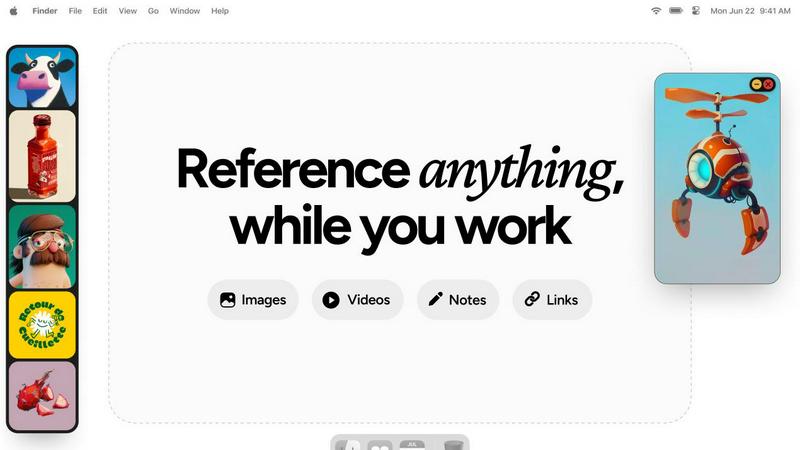
Refbox keeps your reference images and notes visible above any workspace.
Last updated: February 28, 2026
Visual Comparison
Outbid

Refbox
Feature Comparison
Outbid
24/7 Real-Time Monitoring
Outbid scans the Upwork marketplace continuously, day and night. It checks for new job postings every 60 seconds, ensuring no opportunity slips through the cracks. You receive instant Telegram alerts the moment a relevant job is posted, allowing you to apply while the client is still actively reviewing proposals. This constant vigilance means you never have to manually refresh the job board again.
AI-Powered Proposal Drafts
Every job alert comes with a complete, tailored proposal draft generated by AI. The system analyzes the job description and cross-references it with your skills and bio to create a compelling, relevant application. This draft is formatted for easy copy-pasting, so you can submit a high-quality proposal in one tap, saving hours of writing time each week.
Smart Job Filtering
You only see jobs worth your time. Outbid allows you to set precise filters based on your skills, required client budget, project experience level, and even "quiet hours" to avoid notifications during off-times. This targeted filtering eliminates spam and irrelevant postings, focusing your efforts on high-potential opportunities that match your criteria.
War Room Strategy Mode
For highly competitive job listings, War Room Mode gives you a strategic edge. It allows you to add custom instructions to guide the AI, regenerate proposal drafts with different angles, and refine your approach to stand out from the crowd. This feature ensures your application is not just fast, but also strategically crafted to win.
Refbox
Always-On-Top Floating Frames
Pin any image, GIF, video, or note in a resizable, always-on-top window that floats above all other applications. This allows you to keep critical references in your direct line of sight while you work in your primary software, eliminating the need to constantly switch windows and break your concentration.
Centralized Media Sidebar & Collections
Gather all your references from the web, your computer, or clipboard into a single, organized sidebar. Organize media into different Collections for various projects or themes. Swap between entire sets of references instantly with a single click, keeping your workspace clean and your workflow agile.
Advanced Media Controls & Utilities
Go beyond simple viewing with powerful tools tailored for creatives. Step through GIFs frame-by-frame for detailed animation reference. Use the built-in color picker on any media to sample and copy colors. Crop images to focus on specific details and take screenshots of websites directly by pasting a URL.
Markdown Notes & Interactive Bookmarks
Keep text-based inspiration and task lists within your workflow. Create markdown-enabled notes for ideas, briefs, or checklists that stay pinned alongside your visuals. Save clickable bookmarks to tutorials, articles, or resource pages for one-click access without leaving your creative environment.
Use Cases
Outbid
The Busy Professional
Freelancers with existing client work or packed schedules can't monitor Upwork constantly. Outbid acts as their personal assistant, delivering only the best-matched jobs in real-time. They can apply to high-value opportunities within minutes, without disrupting their workflow or sacrificing billable hours to job hunting.
The Upwork Newcomer
New freelancers often struggle with writing winning proposals and understanding the fast-paced Upwork environment. Outbid provides instant structure, sending ready-to-use proposal drafts that help them make a strong first impression. This builds confidence and accelerates their ability to land their first clients.
The Volume Applicant
Freelancers who rely on applying to many jobs to secure work need efficiency. Outbid automates the most time-consuming parts: finding new posts and drafting initial proposals. This allows them to submit 3x more applications in the same time, dramatically increasing their surface area for success.
The Strategic Bidder
Experienced freelancers targeting high-budget projects know that early, high-quality proposals are key. They use Outbid's speed to apply first and employ the War Room Mode to craft nuanced, strategic proposals that address specific client pain points, helping them win competitive contracts.
Refbox
Digital Illustration & Concept Art
Illustrators and concept artists can pin multiple character sketches, environment photos, and color palettes as floating references directly over their canvas in Photoshop or Procreate. This enables constant visual comparison and ensures artistic consistency without breaking focus to search for files.
UI/UX & Web Design
Designers can collect inspiration screenshots, component libraries, and brand guidelines into Collections. They can float specific UI references or style tiles next to their design tool (like Figma or Sketch) for precise alignment, spacing, and color matching, streamlining the design replication process.
3D Modeling & Animation
3D artists and animators can keep orthographic reference images, texture maps, and motion study videos pinned in view while working in complex software like Blender or Maya. Frame-by-frame GIF scrubbing is essential for analyzing movement, and locking frames allows them to work behind the reference model.
Motion Graphics & Video Editing
Motion designers and editors can maintain a mood board of visual effects, typography examples, and storyboard sequences on a second monitor in full-screen gallery mode. Having video references and notes readily accessible accelerates the creative decision-making process during editing.
Pricing Comparison
Outbid
Outbid offers a simple, tiered pricing model. You can start with a free plan and upgrade as your needs grow.
Free Access ($0): Ideal for trying the service. Includes unlimited job alerts but with blurred proposal text and no direct job links. Comes with 3 lifetime "reveal" credits to unblur full proposals for select jobs.
Monthly Pro ($9.99/month): The professional standard. Includes unlimited job reveals with full AI proposals, direct application links to Upwork, access to War Room strategy mode, and priority support.
Elite ($19.99/month): For maximum advantage. Includes all Pro features plus advanced AI job matching, "Sniper Mode" for jobs with an 80%+ fit score, and other premium filters to target the most ideal opportunities.
Refbox
Refbox is available for a one-time purchase license. This model provides permanent access to the application with all its current features and future updates, without any recurring subscription fees. For the exact price and purchase options, visit the official Refbox website.
Overview
About Outbid
Outbid is a specialized AI tool built for freelancers competing on Upwork. It solves two core problems: speed and proposal quality. The platform monitors the Upwork job board 24/7, scanning for new postings every 60 seconds. When a job matching your skills and filters is found, you receive an instant alert directly in Telegram. This ensures you can be among the very first to apply, often within 60 seconds of a job going live. Each alert includes a personalized, AI-generated proposal draft tailored to the specific job description and your profile. This eliminates hours of manual searching and writing, allowing you to apply faster and more effectively. Outbid is designed for freelancers at any level, from newcomers who struggle with proposals to busy professionals who can't constantly refresh job feeds. By combining real-time alerts with AI-powered proposals, Outbid significantly increases your chances of getting noticed, winning more clients, and maximizing your earning potential on Upwork.
About Refbox
Refbox is a specialized floating reference application designed for creative professionals who need constant, distraction-free access to inspiration and resources. It eliminates the disruptive cycle of alt-tabbing between windows or digging through folders by allowing you to pin images, GIFs, videos, and notes in always-on-top frames directly over your primary work applications. Whether you're sketching, designing, animating, or modeling, your references stay visible and within reach, keeping you in a state of deep focus and flow.
The core value proposition is seamless integration into the creative workflow. You can gather media from the web, your computer, or clipboard into a central, resizable sidebar. From there, view everything in a Masonry grid, drag individual items onto your desktop as independent floating windows, or use a full-screen gallery mode for a second monitor. Beyond visuals, Refbox supports markdown-enabled notes for ideas and checklists, and clickable bookmarks for tutorials. With features like frame-by-frame GIF scrubbing, instant collection swapping, and powerful shortcuts, Refbox transforms your desktop into an organized, always-accessible inspiration hub tailored for speed and precision. It is built for professionals in 3D art, animation, UI/UX design, illustration, concept art, motion graphics, photography, and pixel art who cannot afford workflow distractions.
Frequently Asked Questions
Outbid FAQ
How fast are the alerts?
Alerts are delivered in real-time, typically within 60 seconds of a job being posted on Upwork. Our system scans the marketplace continuously to ensure you are among the first freelancers to be notified and can apply while client engagement is highest.
Do I need to be tech-savvy to use Outbid?
No. Setup is designed to be simple and takes under two minutes. You just need a Telegram account. You message the bot, add your skills and a short bio, and set your filters. No coding, complex software, or manual configuration is required.
Can I customize the AI-generated proposals?
Yes. Every proposal draft is a starting point. You can copy, edit, and tweak the text to add your personal touch before submitting. For advanced customization, the Pro and Elite plans offer "War Room Strategy Mode," which lets you guide the AI with specific instructions.
Is Outbid affiliated with Upwork?
No. Outbid is an independent tool built by freelancers for freelancers. It is not endorsed by, affiliated with, or connected to Upwork.com. It is a third-party service that helps users interact with the Upwork platform more efficiently.
Refbox FAQ
What types of media files does Refbox support?
Refbox supports a wide range of media essential for creatives. You can import and pin standard images (JPG, PNG, SVG), animated GIFs (with frame-by-frame control), and various video formats. It also supports text notes, checklists, and live website screenshots created from pasted URLs.
How does Refbox help maintain focus?
Refbox is designed to minimize context switching. By allowing references to float above your work in always-on-top windows, it removes the need to alt-tab or search through folders. Features like auto-hiding the main sidebar, keyboard shortcuts for swapping references, and minimizing individual frames keep your screen and mind clear.
Can I use Refbox with multiple monitors?
Yes, Refbox is ideal for multi-monitor setups. You can use the full-screen gallery mode to turn a secondary display into a dedicated reference board. Meanwhile, you can drag individual floating frames onto your primary monitor to place them directly over your active application window.
Is there a free trial or version available?
Based on the provided context, Refbox is offered as a one-time purchase license. The website highlights a "One-time" purchase option, suggesting there is no subscription model. For the most current details on trials or pricing, please check the official Refbox website.
Alternatives
Outbid Alternatives
Outbid is a productivity tool for freelancers that automates the Upwork job search. It sends instant job alerts to Telegram and provides AI-generated proposal drafts, helping users apply faster and win more work. Users may seek alternatives for various reasons. Some need a different pricing model or budget-friendly option, while others require integration with platforms beyond Upwork or Telegram. Specific feature needs, like different notification methods or proposal customization levels, also drive the search for other tools. When evaluating an alternative, consider core functionality like real-time alerts and proposal assistance. Ensure it supports your preferred platforms and offers the right balance of automation and control. Finally, assess the value relative to cost and the tool's ability to save you time while improving your proposal quality.
Refbox Alternatives
Refbox is a specialized floating reference application in the productivity and management category. It allows creative professionals to pin images, videos, and notes in always-on-top windows over their primary work software, maintaining focus and workflow continuity. Users may seek alternatives for various reasons, including budget constraints, specific feature requirements, or compatibility with different operating systems. Some may need more robust project management integration or prefer a different pricing model. When evaluating alternatives, consider your core needs. Key factors include the ability to keep references visible, ease of importing and organizing media, support for different file types, and overall integration with your creative process. The right tool should minimize distractions and keep your inspiration seamlessly accessible.