
Opal44 vs Proofapp
Side-by-side comparison to help you choose the right AI tool.

Opal44 delivers clear, AI-powered insights from your website traffic data in plain English, making analytics accessible.
Last updated: March 4, 2026

Proofapp
Pin visual feedback directly on any webpage to stop endless email revisions.
Last updated: March 4, 2026
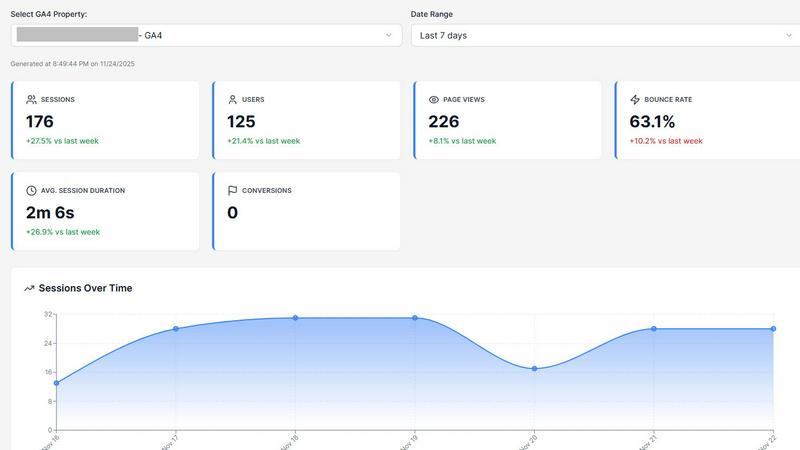
Visual Comparison
Opal44
Proofapp

Feature Comparison
Opal44
Plain English Insights
Opal44 connects seamlessly with your GA4 data to provide insights articulated in simple, everyday language. Users no longer have to spend hours deciphering complex analytics; instead, they receive straightforward explanations of their website traffic and performance.
Conversation-Style Reports
Experience updates that feel like a friendly chat with your personal analytics guide. Opal44 generates easy-to-read reports that help users grasp their data without getting lost in technical jargon, making analytics more approachable for everyone.
Smart, Data-Driven Tips
With tailored tips based on real-time GA4 data, Opal44 empowers users to enhance their website traffic and improve conversion rates. These actionable recommendations help make smarter business decisions that are grounded in data.
Real-Time Alerts
Stay informed with instant notifications about significant changes in your website performance. Opal44's real-time alerts notify users of traffic spikes, drops, or any unusual activity, enabling proactive management of their online presence.
Proofapp
Visual Commenting
Click directly on any part of a live website screenshot to leave a pinned comment. This eliminates vague descriptions like "top left, under the nav" by providing exact, visual context for every piece of feedback. Team members and clients can reply in threads and attach supporting files, keeping all discussion centralized and clear.
Multi-Breakpoint Testing
Proofapp automatically captures and presents screenshots of your website at both desktop and mobile breakpoints. This allows for comprehensive review across different device views in one place, ensuring design and functionality issues are caught no matter how a user accesses the site.
Secure Share Links
Collaborate seamlessly with clients and external stakeholders by sharing projects via secure, expirable links. Reviewers can view and comment without needing to sign up for an account, simplifying the feedback process while maintaining control over project access and security.
Real-time Collaboration & Dashboard
See comments from your team and clients as they are posted, in real-time. A central dashboard organizes all feedback across projects, allowing you to track, reply to, and resolve comments efficiently. This ensures everyone is aligned and prevents feedback from getting lost in scattered communication channels.
Use Cases
Opal44
Small Business Growth
Small business owners can leverage Opal44 to gain critical insights into their website traffic, allowing them to identify effective marketing strategies and optimize their online presence without needing advanced analytical skills.
E-commerce Optimization
E-commerce managers can utilize Opal44 to understand customer behavior on their sites. The platform's AI-driven recommendations help boost conversion rates and enhance user experience, ultimately driving sales.
Agency Collaboration
Digital agencies can benefit from Opal44 by providing clear analytics reports to clients. The user-friendly insights foster productive strategy meetings and enable agencies to showcase their value effectively.
Content Strategy Enhancement
Content creators can use Opal44 to analyze which articles or posts perform best. By understanding audience engagement metrics in simple terms, they can tailor their content strategy to maximize impact and reach.
Proofapp
Freelancer Client Approvals
Freelancers can present website designs or updates to clients using Proofapp. Clients click to leave precise, visual feedback directly on the mockup, which drastically reduces back-and-forth emails and misinterpretation. This professional workflow saves hours per project and accelerates final approvals.
Agency Project Management
Marketing and design agencies managing multiple client projects use Proofapp to consolidate all feedback. Internal teams and clients collaborate on the same visual canvas, streamlining review cycles, reducing revision rounds, and providing a clear audit trail of all comments and decisions.
In-House Development Teams
Internal product and development teams use Proofapp for internal website and application reviews. Designers, developers, and product managers can pin bugs, suggest UI changes, and discuss features directly on the staging site, leading to clearer technical specifications and faster iteration.
Marketing Campaign Reviews
Marketing teams launching new landing pages or campaign assets share a Proofapp link for cross-departmental review. Colleagues from content, design, and leadership can leave contextual comments on the live page, ensuring all feedback is gathered visually and organized before launch.
Overview
About Opal44
Opal44 is a revolutionary AI-powered tool designed to simplify website analytics, specifically tailored for users of Google Analytics 4 (GA4). This innovative platform transforms complex data into clear, actionable insights that are easy to understand, making it accessible to everyone, regardless of their technical expertise. Whether you are a small business owner, a digital marketer, or a content creator, Opal44 provides the clarity you need to make informed decisions about your website traffic. By leveraging advanced AI technology, Opal44 eliminates the jargon typically associated with analytics, allowing users to ask simple questions and receive straightforward answers. Its main value proposition lies in delivering real-time insights and personalized recommendations that help users optimize their online presence, ultimately driving better results without the steep learning curve.
About Proofapp
Proofapp is a visual feedback and website review platform designed to eliminate the chaos of traditional feedback loops. It streamlines collaboration between designers, developers, and their clients by moving conversations out of endless email chains and onto the actual design. Users simply paste any website URL, and Proofapp automatically captures both desktop and mobile screenshots. Reviewers can then click directly on the screenshot to pin comments, creating visual, contextual feedback that is impossible to misinterpret. The platform supports threaded replies, file attachments, and resolution tracking, all without requiring reviewers to create an account. With features like real-time notifications, Slack integration, and multi-page support, Proofapp keeps all feedback organized and actionable. It is built for freelancers, agencies, and in-house teams who need a simple, efficient, and professional way to collect precise feedback, reduce revision cycles, and ship projects faster.
Frequently Asked Questions
Opal44 FAQ
How does Opal44 simplify analytics?
Opal44 simplifies analytics by translating complex data from Google Analytics 4 into plain English, allowing users to understand their website performance without technical jargon.
Can I try Opal44 for free?
Yes, new users can start with a 7-day free trial, which includes 50 actions, enabling them to explore all features without any credit card requirement.
What kind of support does Opal44 offer?
Opal44 provides email support, and users can access priority support and onboarding depending on their chosen plan, ensuring they have assistance whenever needed.
Is my data secure with Opal44?
Absolutely. Opal44 prioritizes user privacy and security, ensuring that your GA4 data remains safe and is never sold or shared with third parties. Your information is yours, always.
Proofapp FAQ
How do reviewers leave feedback without an account?
You generate a secure, shareable link from your Proofapp project dashboard and send it to your clients or team members. When they open the link, they can immediately click on the website screenshot to leave comments, attach files, and participate in threads without any sign-up process.
What websites can I review with Proofapp?
You can paste any publicly accessible website URL into Proofapp. The platform will automatically capture screenshots of that page. It works on live sites, staging environments, and password-protected sites if you provide the login credentials during the capture setup.
Is there a free plan available?
Yes, Proofapp offers a generous free tier to get started. This allows you to test the core functionality, including visual commenting and secure sharing, on a limited number of projects. You can upgrade to a paid plan for more projects, pages, and advanced features.
How does Proofapp compare to sending screenshots via email?
Email feedback is slow, fragmented, and prone to miscommunication. Proofapp centralizes all feedback visually on the actual design, provides real-time updates, and keeps a structured record of all conversations. This typically reduces revision cycles by 60% and saves teams over 5 hours per week.
Alternatives
Opal44 Alternatives
Opal44 is an innovative tool in the business intelligence category, offering AI-powered insights into website traffic through user-friendly, jargon-free language. Users can extract meaningful data from Google Analytics 4 by asking straightforward questions, making it accessible for individuals without technical expertise. However, many users seek alternatives due to various reasons such as pricing, specific feature requirements, or the need for integration with different platforms. When choosing an alternative, it is essential to consider factors like ease of use, the range of features offered, compatibility with existing systems, and overall value for your specific business needs.
Proofapp Alternatives
Proofapp is a visual feedback and website review platform in the design tools category. It streamlines collaboration by letting teams and clients pin comments directly on live website screenshots, eliminating scattered feedback. Users often seek alternatives for various reasons. These can include budget constraints, the need for specific integrations, or requiring more advanced features like video review or in-depth project management tools beyond simple feedback collection. When evaluating alternatives, consider your team's core needs. Key factors include the ease of use for clients, the range of supported file types, integration capabilities with your existing workflow, and the overall pricing structure for your team size and project volume.