
Nano Banana Pro vs SimpleDraw
Side-by-side comparison to help you choose the right AI tool.

Nano Banana Pro
Nano Banana Pro is an AI image generator that creates stunning 4K visuals with advanced editing tools and fast results.
Last updated: February 28, 2026

SimpleDraw
Create accurate floor plans and scale drawings for free in your browser.
Last updated: March 1, 2026
Visual Comparison
Nano Banana Pro

SimpleDraw
Feature Comparison
Nano Banana Pro
Character Consistency
Nano Banana Pro excels in maintaining character features across multiple images. This is crucial for projects requiring character design, such as animation or comic series, ensuring continuity in visual storytelling.
15% Faster Generation
With the integration of Gemini 3 Pro technology, image generation is 15% quicker than previous models. This speed enhancement allows users to produce high-quality visuals in less time, meeting tight deadlines without sacrificing quality.
Image-to-Image Editing
Users can transform existing images seamlessly with the Nano Banana Edit feature. By uploading up to 10 images, creators can utilize AI prompts to reimagine them, adding new elements or entirely altering scenes while preserving key features.
Enhanced Text Rendering
Nano Banana Pro offers high-fidelity text rendering capabilities, making it ideal for creating posters, logos, and other typographic designs. Users can expect crystal-clear text in their images, eliminating issues with distortion or garbled letters.
SimpleDraw
Dedicated Floor Plan Mode
A specialized mode for creating accurate architectural layouts. Quickly draw walls and add doors or windows with single clicks. Access a library of interior fixtures for kitchens, bathrooms, and living spaces. View real-time measurements as you adjust your plan, making it ideal for detailed home project visualization without needing CAD expertise.
Smart Alignment & Precision Tools
An intelligent system that assists in placing points and lines with exact accuracy. Visual guides help align elements, and the tool automatically snaps to common angles. For full control, use keyboard shortcuts to lock movements to vertical or horizontal axes or zoom in for pixel-perfect placement, adapting the precision level to your needs.
Non-Destructive Editing & Full Control
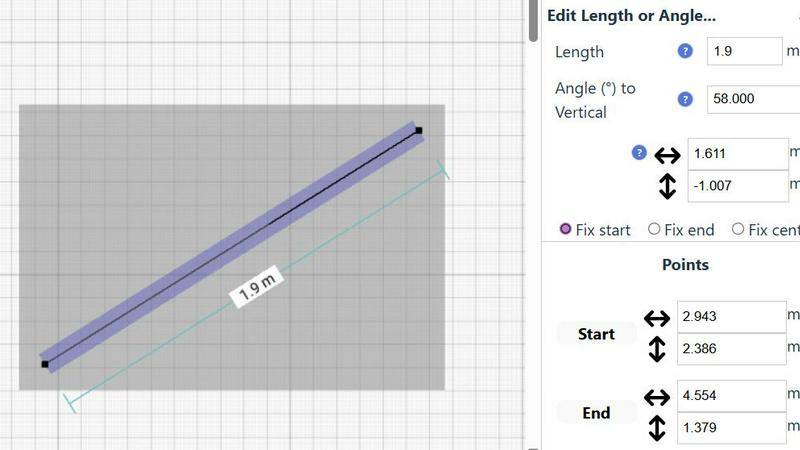
Every element in your drawing can be modified, moved, or adjusted at any time. Utilize unlimited undo/redo functions and keyboard shortcuts to experiment freely. Edit numerically by inputting exact lengths, angles, and positions via keyboard for perfect iteration. Group elements to copy, paste, and move complex arrangements efficiently.
Comprehensive Measurement System
Work seamlessly in metric or US standard units (feet and inches). Contextual measurements display dynamically as you draw. You have fine-grained control over which dimensions are shown on the final plan, ensuring your drawings communicate the exact information needed for planning and execution.
Use Cases
Nano Banana Pro
Marketing Material Creation
Marketers can leverage Nano Banana Pro to generate eye-catching graphics for campaigns. With its rapid image generation and customization options, brands can produce tailored visuals that resonate with their target audience.
Game Character Design
Game developers can use Nano Banana Pro to design unique characters with consistent features across various iterations. The tool’s character consistency ensures that designs remain coherent throughout the game development process.
Social Media Content
Content creators can utilize Nano Banana Pro to craft stunning visuals for social media platforms. With various aspect ratios supported, users can create images optimized for different formats, enhancing their online presence.
Artwork and Illustration
Artists can use this tool for producing original artwork or enhancing existing pieces. The AI's capabilities allow for intricate designs and creative edits, enabling artists to explore new styles and concepts effortlessly.
SimpleDraw
Home Renovation Planning
Plan kitchen or bathroom remodels with accurate scale drawings. Visualize new layouts, appliance placement, and fixture locations before starting construction. Ensure everything fits perfectly and avoid costly measurement mistakes by creating a precise digital blueprint of your renovation project.
Furniture & Room Layout Design
Arrange furniture in your bedroom, living room, or office. Test different layouts to see what fits and creates the best flow. Use the tool to check dimensions before purchasing new furniture, guaranteeing it will suit your space both in size and style.
Creating Real Estate Floor Plans
Generate clear, professional floor plans for apartment listings, house sales, or rental properties. Accurately represent room sizes, layouts, and features to provide potential buyers or tenants with a trustworthy visualization of the property's space.
DIY Project Visualization
Plan and design small construction projects, garden layouts, or workshop setups. Create scale drawings to calculate material needs, spatial relationships, and project feasibility. The tool's precision helps turn conceptual ideas into actionable, well-measured plans.
Overview
About Nano Banana Pro
Nano Banana Pro is a state-of-the-art AI image generator tailored for creatives, developers, and designers seeking high-quality visuals efficiently. Utilizing the advanced Gemini 3 Pro image preview technology, it produces striking 4K-ready images with remarkable character consistency. The tool supports both Text-to-Image and Image-to-Image editing, allowing users to generate images from detailed prompts or enhance existing visuals. Its multi-step error correction ensures precision in every output, while the generation speed is accelerated by 15% compared to earlier models. From marketing materials to character design for games, Nano Banana Pro equips users with versatile tools to express their creativity effortlessly, making it an essential asset for any artistic endeavor.
About SimpleDraw
SimpleDraw is a free, browser-based tool that makes precise scale drawing and floor plan creation accessible to everyone. It strips away the complexity and cost of traditional CAD software, offering an intuitive interface that works directly in your web browser. Designed for casual users, DIY enthusiasts, homeowners, and small project planners, its core value is delivering professional-grade accuracy without the steep learning curve. You can start drawing immediately with no login, registration, or software download required. The tool focuses on a powerful yet minimal set of features, including a dedicated Floor Plan Mode, smart alignment aids, and a comprehensive measurement system. This approach transforms tasks like room renovations, furniture arrangement, and space planning from guesswork into a process of digital precision. SimpleDraw ensures your visualizations are accurate, to scale, and easy to create, providing the flexibility of digital editing with the straightforwardness of sketching on paper.
Frequently Asked Questions
Nano Banana Pro FAQ
How does Nano Banana Pro maintain character consistency across images?
Nano Banana Pro uses advanced multi-image understanding technology to ensure that character features remain consistent across multiple images, making it perfect for projects with ongoing visual storytelling.
Can I edit existing images with Nano Banana Pro?
Yes, Nano Banana Pro includes an Image-to-Image editing feature that allows users to upload and transform up to 10 images. You can reimagine photos or artwork while retaining essential characteristics.
What types of formats does Nano Banana Pro support?
Nano Banana Pro supports a wide range of aspect ratios, from square (1:1) to ultrawide (21:9). This flexibility allows users to create images tailored for various applications, including social media and presentations.
Is there a free trial available for new users?
New users can take advantage of 8 free credits upon signing up for Nano Banana Pro. This allows them to explore the platform and experience its capabilities before committing to a paid plan.
SimpleDraw FAQ
Is SimpleDraw really free to use?
Yes, SimpleDraw is completely free. There is no cost to access the core scale drawing and floor plan creation tools. You can start using it immediately in your browser without any subscription, login, or download required.
Do I need to install any software?
No installation is needed. SimpleDraw is a 100% browser-based application. It works directly in your web browser on desktop computers, eliminating the hassle of software downloads, updates, or system compatibility checks.
Can I use it for professional architectural work?
SimpleDraw is designed for casual users, DIY projects, and basic space planning. While it offers professional-grade precision for its scope, it does not replace full-featured CAD software required for complex architectural, engineering, or commercial construction documentation.
How do I save or export my drawings?
Your drawings are automatically saved in your browser's local storage as you work. For exporting, use your browser's print function to save as a PDF or create an image screenshot. The tool focuses on in-browser creation and real-time planning.
Alternatives
Nano Banana Pro Alternatives
Nano Banana Pro is an advanced AI image generator that caters to creatives, developers, and designers seeking high-quality visuals efficiently. It excels in producing stunning 4K images and offers robust editing tools, making it a versatile choice for a wide range of artistic applications. Users often explore alternatives to Nano Banana Pro due to factors such as pricing, specific feature availability, or compatibility with different platforms and workflows. When choosing an alternative, consider aspects like image quality, generation speed, ease of use, and the range of editing features offered. Ensure that the alternative aligns with your unique creative needs and provides the tools necessary for your projects.
SimpleDraw Alternatives
SimpleDraw is a free, browser-based tool for creating accurate scale drawings and floor plans. It falls into the category of accessible design and technical drawing software, offering professional-grade precision without the complexity of traditional CAD programs. Users often seek alternatives for various reasons. Some may require advanced features like 3D modeling, extensive object libraries, or team collaboration tools. Others might need offline access, integration with specific platforms, or a different pricing model beyond a free tier. When evaluating alternatives, consider your primary use case, required feature depth, and budget. Key factors include the learning curve, export capabilities, platform availability, and whether the tool supports the specific types of projects you undertake, from simple room layouts to more detailed architectural plans.