
Nano AI vs Remove Handwriting
Side-by-side comparison to help you choose the right AI tool.

Nano AI is a fast, all-in-one platform for seamless AI image generation, editing, and sharing creative projects.
Last updated: February 28, 2026

Remove Handwriting
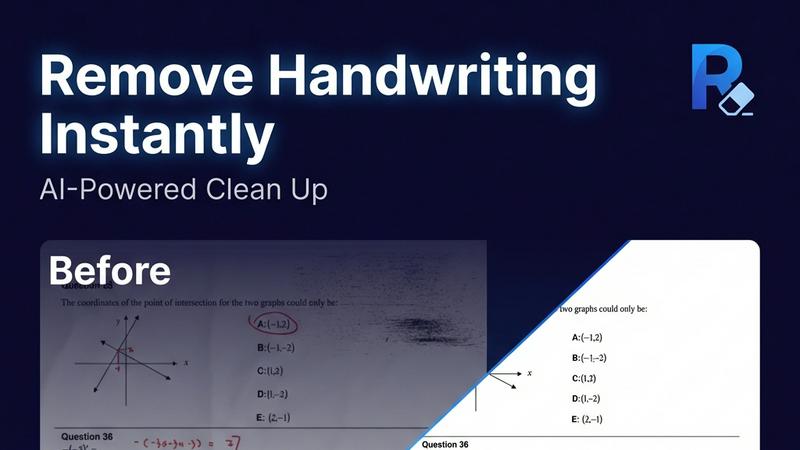
Remove handwriting from images and PDFs with AI while preserving your original printed text and layout.
Last updated: March 26, 2026
Visual Comparison
Nano AI

Remove Handwriting
Feature Comparison
Nano AI
Nano Banana Model
The core of Nano AI, the Nano Banana model, enables exceptionally fast image generation, delivering results in under ten seconds. It supports both text-to-image and image-to-image functions, streamlining the creative process by allowing users to generate visuals quickly and efficiently.
Advanced Editing Tools
Nano AI features sophisticated editing capabilities that include background removal and inpainting/outpainting. Users can effortlessly refine their images by isolating subjects or modifying specific regions using natural language commands, enhancing productivity without needing extensive design skills.
Granular Style Control
With the Nano Banana style model, users gain fine control over visual aesthetics. This feature allows for detailed customization of lighting, texture, and composition simply by describing the desired look, enabling creators to achieve unique styles that align with their vision.
Collaborative Galleries
Nano AI promotes teamwork through shared galleries, allowing users to collaborate seamlessly on projects. Teams can review, edit, and share their creations in one centralized space, fostering effective communication and accelerating the workflow from concept to completion.
Remove Handwriting
AI-Powered Handwriting Detection & Removal
Our advanced AI engine accurately distinguishes between handwritten content and printed text or graphics. It intelligently erases scribbles, notes, answers, and annotations while ensuring all original printed material, complex tables, and detailed diagrams remain completely intact and unaltered in the final cleaned document.
Comprehensive Document Restoration
The tool goes beyond erasure to fix a wide range of document imperfections automatically. It corrects geometric distortions like skew and curled page edges, removes shadows, wrinkles, and stains, and cleans up cluttered backgrounds. This ensures every processed page is returned to a flat, balanced, and noise-free canvas.
Multi-Format & Multi-Page Support
Process single images (JPG, PNG) or entire multi-page PDF documents with ease. For PDFs, the tool preserves the original layout and formatting, allows for selective page processing, and exports back to a clean PDF file. This flexibility handles everything from a quick phone photo to complex multi-page reports.
Batch Processing & API Access
Efficiently handle large volumes of documents through automated batch processing, saving significant time and effort. For seamless integration into existing business workflows, developer-friendly API access is available, enabling automated document cleanup within other software applications and systems.
Use Cases
Nano AI
Rapid Prototyping
Designers and marketers can utilize Nano AI for rapid prototyping of visual concepts. The platform's quick image generation allows teams to brainstorm and create mockups efficiently, facilitating faster decision-making and creative iterations.
Content Creation for Social Media
Social media managers can leverage Nano AI to produce eye-catching visuals tailored for various platforms. With its advanced editing tools and style customization, users can create compelling graphics that capture audience attention and drive engagement.
Advertising Campaign Development
Advertisers can benefit from Nano AI's fast image generation and editing capabilities to develop high-quality assets for campaigns. The platform supports the quick turnaround of visuals, ensuring that marketing materials are ready for deployment in a timely manner.
Educational Materials Production
Educators and instructional designers can use Nano AI to create engaging educational content. The flexibility of the platform allows for the generation of illustrations, infographics, and other visual aids, enhancing the learning experience for students.
Remove Handwriting
Cleaning Educational Worksheets & Exam Papers
Teachers and tutors can quickly remove handwritten answers, student notes, and grading marks from worksheets, practice sets, and old exam papers. This creates a pristine, reusable master copy for new classes or practice sessions, saving hours of manual recreation.
Preparing Professional Documents & Contracts
Legal, real estate, and business professionals can erase handwritten signatures, initials, notes, and markups from contract drafts, forms, and archival documents. This generates a clean, shareable version for final review, printing, or digital distribution without sensitive annotations.
Restoring Archives & Historical Documents
Librarians, archivists, and historians can repair and restore scanned historical documents, letters, and records. The tool removes stains, fold marks, shadows, and handwritten marginalia, enhancing readability and preserving content for digital archives while maintaining historical integrity.
Enhancing Scanned Personal Documents
Individuals can improve personal document scans, such as tax forms, application sheets, or handwritten notes. It fixes poor scan quality issues like blurriness, shadows from phone cameras, and curled page edges, resulting in a crisp, professional-looking digital file for records or submission.
Overview
About Nano AI
Nano AI is an innovative all-in-one creative platform tailored for today’s fast-paced digital content creators. It combines powerful AI-driven tools into a single, user-friendly workspace, significantly enhancing efficiency in generating, editing, and sharing visual assets. At the heart of Nano AI is the proprietary Nano Banana model, which facilitates rapid image generation in under ten seconds from both text prompts and existing images. This platform is ideal for creators, marketers, designers, and teams looking to quickly translate ideas into high-quality visuals without the hassle of switching between multiple applications. With features such as advanced editing tools, granular style control, collaborative galleries, and upcoming integrations like 4K neural upscaling, Nano AI empowers users to maintain creative momentum while ensuring professional-quality outputs. The platform also offers commercial usage rights on higher-tier plans, making it a comprehensive solution for all visual content needs.
About Remove Handwriting
Remove Handwriting is an AI-powered document cleanup tool designed to intelligently erase handwritten text, notes, and annotations from digital files. It works on images, PDFs, and scanned documents, delivering clean, professional results in seconds. The core value lies in its precision: it removes only the handwritten marks while meticulously preserving all underlying printed text, tables, diagrams, and the original document layout. This makes it an essential tool for educators needing clean worksheets, professionals preparing contracts, archivists restoring documents, and students repurposing exam papers. Beyond simple erasure, the tool performs comprehensive document restoration, automatically fixing common scan issues like shadows, skew, curled edges, and background noise. Accessible directly in your web browser or via mobile apps, it supports popular file formats (JPG, PNG, JPEG, PDF) and offers batch processing and API access for scalable workflows. You can start using its powerful features for free with no credit card required.
Frequently Asked Questions
Nano AI FAQ
How does Nano AI generate images so quickly?
Nano AI utilizes the proprietary Nano Banana model, which optimizes the image generation process to deliver results in under ten seconds. This fast inference capability allows users to focus on creativity rather than waiting for renders.
What types of editing can I perform with Nano AI?
Nano AI offers advanced editing features such as background removal and inpainting/outpainting. Users can modify specific areas of an image using natural language, making it easy to adjust designs without extensive editing skills.
Is Nano AI suitable for commercial use?
Yes, Nano AI provides commercial usage rights on its higher-tier plans, ensuring that users can utilize generated visuals in their business projects without concerns about licensing issues.
Will there be more features added to Nano AI?
Absolutely. Nano AI is continuously evolving, with upcoming features like 4K neural upscaling and additional collaborative tools in development. These enhancements will further improve the user experience and expand creative possibilities.
Remove Handwriting FAQ
What file formats does Remove Handwriting support?
The tool supports common image formats including JPG, JPEG, and PNG for single-page processing. It also fully supports multi-page PDF documents for both input and output, preserving the original layout and allowing you to export a clean, editable PDF.
Does it work on both images and PDFs?
Yes. You can use the single-image remover for photos and scanned images. For documents with multiple pages or those that require layout preservation, use the dedicated PDF remover tool. It allows page selection and exports a cleaned PDF.
Is my data secure when using the tool?
Yes. We prioritize data security. Uploaded documents are processed securely and are not used to train our AI models without consent. For specific details on data handling and privacy, please refer to our comprehensive privacy policy available on our website.
Is there a free version available?
Absolutely. You can try Remove Handwriting for free with no credit card required. The free plan offers access to core features, allowing you to process documents and experience the tool's capabilities before choosing a paid plan for higher volume or advanced features.
Alternatives
Nano AI Alternatives
Nano AI is an all-in-one creative platform that specializes in ultra-fast AI image generation and editing. It caters to creators, marketers, designers, and teams who require efficient tools to produce high-quality visual assets quickly. Users often seek alternatives due to factors such as pricing, specific feature sets, or compatibility with their existing workflows. When looking for an alternative, consider aspects like speed, ease of use, the range of editing capabilities, and whether the platform supports your required image formats and commercial usage rights.
Remove Handwriting Alternatives
Remove Handwriting is an AI-powered document cleanup tool that specializes in erasing handwritten text, notes, and annotations from images, PDFs, and scans. It falls into the category of AI image processing and document enhancement tools, designed to restore documents to a clean, professional state by preserving printed text and layouts. Users often explore alternatives for various reasons. These can include budget constraints, the need for different feature sets like advanced batch processing or specific integrations, or platform compatibility requirements beyond web and mobile apps. Some may seek tools with different pricing models or those that handle other types of document edits beyond just handwriting removal. When evaluating other options, key considerations should be the tool's accuracy in distinguishing handwriting from printed material, the quality of its background cleanup for shadows and noise, supported file formats, and workflow efficiency features. Security of your documents and the overall value for your specific use case are also critical factors to weigh.