
LuxSign vs Tinyart.io
Side-by-side comparison to help you choose the right AI tool.

LuxSign lets you securely sign and manage documents online in minutes, ensuring legal validity across the EU.
Last updated: February 26, 2026

Tinyart.io
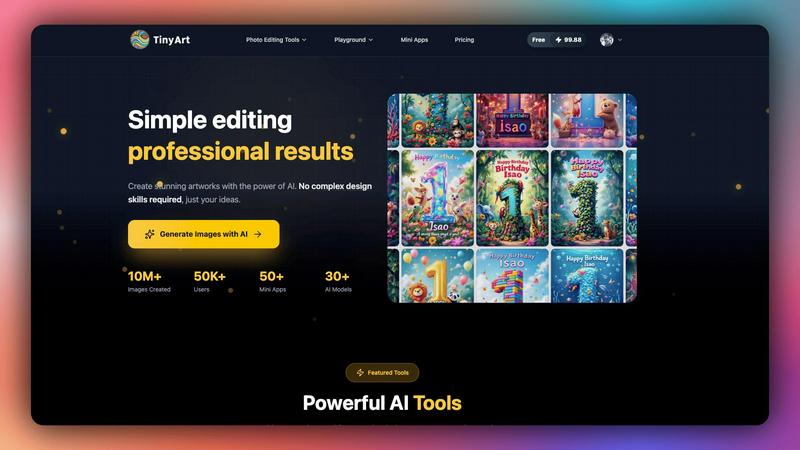
Tinyart.io instantly creates professional AI images with no design skills required.
Last updated: March 1, 2026
Visual Comparison
LuxSign

Tinyart.io
Feature Comparison
LuxSign
Multiple Signature Methods
LuxSign supports various signature methods, allowing users to draw their signature, type their name, or upload an image. This flexibility makes it simple for signers to complete documents quickly and according to their preferences.
Advanced Security
The platform employs industry-standard encryption to secure documents during upload, storage, and transmission. With secure hosting in Luxembourg, LuxSign guarantees compliance with GDPR and local data protection laws, providing peace of mind for businesses.
Collaboration Workspaces
LuxSign enables teams to create shared workspaces for better collaboration. Users can organize documents in folders, manage member access, and work together seamlessly on signing workflows, enhancing productivity and teamwork.
Complete Audit Trail
Every action taken within LuxSign is logged with detailed timestamps, IP addresses, and signer information. This comprehensive audit trail aids in compliance and verification, ensuring that organizations can maintain transparency and accountability in their signing processes.
Tinyart.io
AI Image Generator
Generate high-quality, unique images directly from text descriptions. Access over 30 different AI models to create stunning artworks, marketing visuals, or conceptual images without any design expertise. This feature turns your ideas into reality with just a few clicks.
Smart Mini Apps
A library of over 50 specialized utility applications designed for specific editing tasks. These include tools for creating professional ID photos, restoring old and damaged images, swapping faces, and much more. Each Mini App targets a precise need for efficient, high-quality results.
Professional Editing Suite
A comprehensive set of tools for complete image control. Features include a background remover, upscaler for enhancing resolution, watermark remover, and a clean-up tool to erase unwanted objects. Edit and customize any image to meet professional standards effortlessly.
Developer-First Design Editor
Simplify professional customization with smart, automated features. This editor includes intelligent templates, automatic brand color detection from uploaded assets, and one-click resizing for all major social media and advertising platforms, streamlining the entire design workflow.
Use Cases
LuxSign
Contract Signing for Remote Teams
LuxSign allows remote teams to sign contracts quickly and securely. By using its cloud-based platform, team members can sign documents from anywhere, ensuring that workflows remain uninterrupted despite geographical barriers.
Compliance Documentation
Businesses in regulated industries can use LuxSign to manage compliance documentation requiring multiple signatures. The platform's advanced security features and audit trails help organizations stay compliant while efficiently processing necessary paperwork.
Real Estate Transactions
Real estate professionals can leverage LuxSign to facilitate the signing of purchase agreements and lease contracts. With its easy-to-use interface and multiple signing options, agents can ensure timely signatures, speeding up the closing process.
Human Resources Onboarding
HR departments can utilize LuxSign to streamline the onboarding process. By digitizing the signing of employment contracts and policy documents, organizations can enhance their onboarding efficiency while maintaining security and compliance.
Tinyart.io
E-commerce Product Photography
Create stunning, isolated product photos instantly. Use the background remover and upscaling tools to produce high-resolution, professional images for online stores. Cut photoshoot and editing costs by up to 90% while maintaining quality that drives conversions.
Social Media Content Creation
Quickly produce polished, platform-optimized visuals for marketing campaigns. Leverage the design editor's one-click resizing and smart templates to generate consistent, brand-aligned content for Facebook, Instagram, TikTok, and more in minutes.
Photo Restoration and Enhancement
Breathe new life into old, damaged, or low-quality personal photos. Utilize the Photo Restoration Mini App and AI enhancement tools to repair tears, fix colors, and improve resolution, preserving precious memories with modern clarity.
Professional Marketing Materials
Empower marketing teams and agencies to produce high-volume visual assets rapidly. From ad creatives to branded graphics, the combination of AI generation, Mini Apps, and the professional editor accelerates production without sacrificing a professional finish.
Overview
About LuxSign
LuxSign is a cutting-edge electronic signature platform designed for businesses that prioritize security and compliance. Built in Luxembourg, it offers a reliable, cloud-based solution that ensures all documents are encrypted end-to-end and stored locally, thereby maintaining full compliance with GDPR regulations. LuxSign is tailored for organizations that require a legally valid signature solution across the European Union, supporting eIDAS SES standards. Its user-friendly interface allows for quick document signing and management, making it ideal for professionals and teams who need an efficient way to handle contracts and agreements. With features such as automated notifications, advanced audit trails, and collaborative workspaces, LuxSign empowers businesses to streamline their signing processes while ensuring maximum security and compliance.
About Tinyart.io
Tinyart.io is an AI-powered visual creation and editing platform designed to empower developers, marketers, and creators. It moves beyond simple AI image generation to focus on the complete creation and editing workflow. The core mission is to enable users to transform raw ideas into polished, ready-to-publish marketing images and visuals within minutes, without requiring complex design skills or software expertise. Its standout feature is a developer-first design editor that simplifies professional customization. This includes smart templates, automatic brand color detection, and one-click resizing for multiple social media and advertising platforms. With a suite of powerful AI tools and specialized "Mini Apps," Tinyart.io helps individuals and businesses cut production costs by up to 90% while maintaining high-quality, conversion-ready results. It's built for anyone needing professional visuals quickly, from e-commerce product photos to social media content and restored personal memories. The platform is trusted by thousands of users and offers a vast library of over 50 specialized Mini Apps and 30+ AI models to bring any creative vision to life.
Frequently Asked Questions
LuxSign FAQ
What documents can I sign with LuxSign?
LuxSign supports PDF, DOC, and DOCX formats, allowing users to upload files up to 10MB. The platform automatically converts documents as needed, simplifying the signing process.
Is LuxSign GDPR compliant?
Yes, LuxSign is fully compliant with GDPR and Luxembourg data protection laws. All documents are encrypted and stored securely within the country, ensuring your data privacy is maintained.
Can I track the signing process?
Absolutely. LuxSign provides real-time tracking of document status, including when documents are sent, viewed, and signed. Users receive automatic email notifications to stay informed throughout the process.
How does LuxSign ensure security?
LuxSign employs end-to-end encryption for documents during upload, storage, and transmission. Additionally, all actions are logged with tamper-proof audit trails, ensuring transparency and security for all signed documents.
Tinyart.io FAQ
Who is Tinyart.io for?
Tinyart.io is built for developers, marketers, content creators, small business owners, and anyone who needs to create professional-quality visuals quickly. It is ideal for users who want to cut production time and costs without needing advanced design skills or software like Photoshop.
What are Mini Apps?
Mini Apps are small, specialized utility applications within Tinyart.io designed for specific tasks. They provide focused functionality for needs like creating ID photos, restoring old pictures, swapping faces, or removing objects, making complex edits simple and accessible.
How does Tinyart.io save costs?
The platform automates labor-intensive parts of the design and editing process. By replacing manual work with AI tools for generation, background removal, resizing, and enhancement, businesses can reduce reliance on expensive software and freelancers, cutting production costs by up to 90%.
Is there a free plan to start?
Yes, you can start using Tinyart.io for free. The platform offers a free tier to begin creating, with no credit card required. You can explore core features and start transforming your creative vision immediately, with the option to upgrade for more advanced capabilities.
Alternatives
LuxSign Alternatives
LuxSign is a cloud-based electronic signature platform based in Luxembourg, designed for businesses that require secure and compliant signing solutions. As an eIDAS SES compliant service, it ensures that signatures are legally valid across all EU member states. With features like end-to-end encryption and GDPR compliance, it caters to organizations focused on document security and regulatory adherence. Users often seek alternatives to LuxSign for various reasons, including cost considerations, specific feature requirements, and integration capabilities with existing systems. When evaluating alternatives, it's essential to prioritize factors such as ease of use, compliance with legal standards, and the ability to customize workflows and branding to suit business needs.
Tinyart.io Alternatives
Tinyart.io is an AI-powered visual creation and editing platform in the productivity and management category. It focuses on the complete workflow, enabling users to transform ideas into polished marketing images and visuals quickly, without needing design expertise. Users may look for alternatives for various reasons, such as budget constraints, specific feature requirements, or different platform integrations. Some may need a simpler tool, while others might seek more advanced capabilities or a different pricing model. When evaluating alternatives, consider your primary use case, required AI features, ease of use, and output quality. Assess the editing workflow, customization options, and whether the tool offers specialized functions like batch processing or template libraries that fit your projects.