
IMsupporting Hybrid Live Chat vs Interhubz
Side-by-side comparison to help you choose the right AI tool.

IMsupporting Hybrid Live Chat
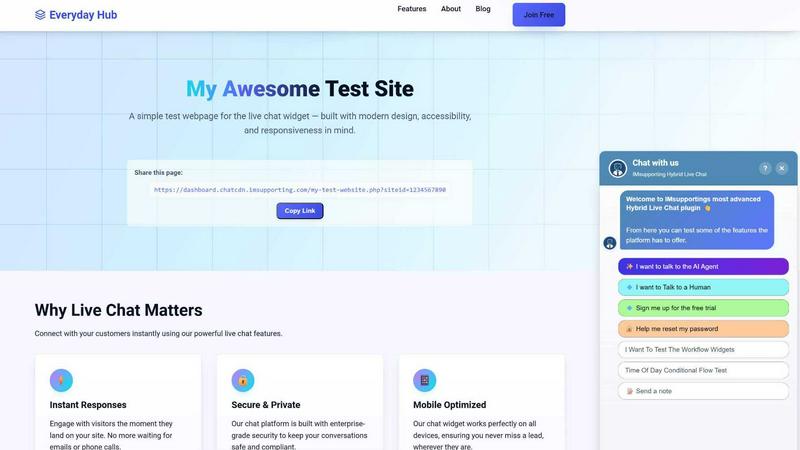
IMsupporting Hybrid Live Chat adds AI-driven support to your website, seamlessly transitioning to human agents when needed for optimal customer.
Last updated: March 11, 2026

Interhubz
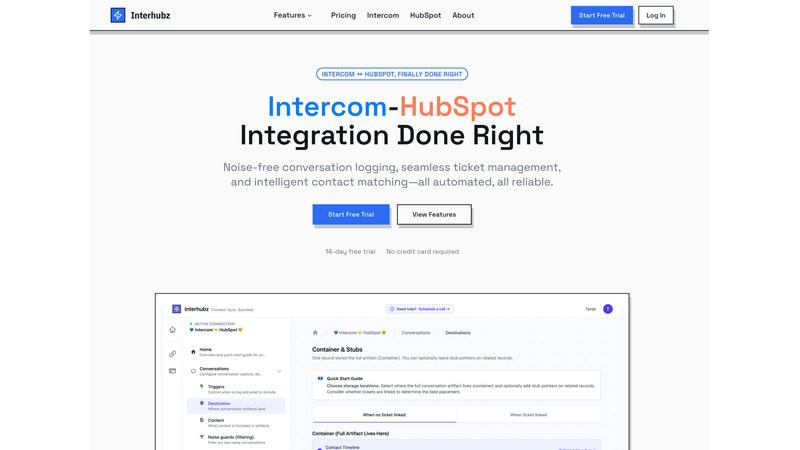
Interhubz seamlessly syncs Intercom chats to HubSpot as organized, single entries for streamlined communication and.
Last updated: February 26, 2026
Visual Comparison
IMsupporting Hybrid Live Chat
Interhubz
Feature Comparison
IMsupporting Hybrid Live Chat
Hybrid AI + Human Chat Conversations
The platform expertly blends AI-driven automation with human support, ensuring that routine queries are handled efficiently while complex issues are escalated to human agents seamlessly. This hybrid model enhances user experience by minimizing wait times and maintaining conversation continuity.
AI-Powered Automated Responses and Workflows
IMsupporting utilizes advanced AI algorithms to automate responses to frequently asked questions, streamlining workflows and reducing the workload on human agents. This feature ensures that customers receive accurate information quickly, improving overall service efficiency.
Intelligent Chat Routing Workflows
The platform features intelligent chat routing that directs inquiries to the appropriate human operator based on predefined criteria. This ensures that customers are connected with the right agents, enhancing the resolution process and boosting customer satisfaction.
Real-Time Chat Dashboards and Analytics
IMsupporting provides real-time analytics and dashboards that allow businesses to monitor chat performance, visitor engagement, and operator efficiency. This data-driven approach enables organizations to continuously improve their support strategies based on actionable insights.
Interhubz
One Note Per Conversation
Interhubz transforms the way conversations are logged by creating a single, formatted note for each Intercom conversation in HubSpot. This eliminates the chaos of multiple entries, allowing teams to quickly access a complete transcript, summary, and any relevant attachments, all in one place.
Intelligent Contact Matching
This feature utilizes advanced algorithms to match contacts and companies based on email, phone number, and custom properties, ensuring there are no duplicates. It streamlines the process of identifying and linking the right customer records, making data management more efficient.
One-Click Ticket Creation
With Interhubz, users can create HubSpot tickets directly from Intercom with just one click. This feature includes bi-directional status sync, ensuring that updates in one platform are reflected in the other, reducing the risk of discrepancies and manual updates.
Noise Guards
Interhubz includes intelligent noise guards that automatically filter out low-value interactions, such as bot conversations and spam. This keeps the HubSpot timeline clean and focused on meaningful communications, allowing teams to prioritize customer interactions that matter most.
Use Cases
IMsupporting Hybrid Live Chat
E-Commerce Customer Support
E-commerce businesses can leverage IMsupporting to handle product inquiries, order tracking, and customer feedback efficiently. The platform allows for immediate responses, improving the shopping experience and reducing cart abandonment rates.
Healthcare Patient Engagement
Healthcare providers can utilize IMsupporting to manage patient inquiries, appointment scheduling, and follow-up communications. The hybrid model ensures that patients receive timely information while allowing staff to focus on more complex cases.
Real Estate Inquiries
Real estate agencies can implement IMsupporting to handle inquiries about property listings, schedule viewings, and provide general information. The platform can automate initial conversations and connect potential buyers with agents for personalized service.
Educational Institution Support
Schools and universities can use IMsupporting to assist students and parents with enrollment questions, course information, and event details. The AI-driven responses free up administrative staff to focus on more critical tasks, enhancing overall operational efficiency.
Interhubz
Streamlined Customer Support
Support teams can use Interhubz to manage customer interactions more effectively by having all relevant conversation data logged in HubSpot. This allows sales and customer success teams to access complete context and history, improving response times and service quality.
Efficient Ticket Management
Sales and support teams can create and manage tickets seamlessly with Interhubz. The one-click ticket creation feature allows support agents to convert conversations into actionable tickets without switching between platforms, ensuring that customer issues are addressed promptly.
Enhanced Data Integrity
With intelligent contact matching, Interhubz ensures that all customer data is accurate and up-to-date. This is particularly valuable for sales teams that rely on precise information to follow up with prospects and maintain relationships without encountering duplicate records.
Reduced Manual Workload
Interhubz automates many of the repetitive tasks associated with managing customer interactions between Intercom and HubSpot. By synchronizing conversations and ticket statuses automatically, teams can focus on higher-value activities rather than manual data entry and updates.
Overview
About IMsupporting Hybrid Live Chat
IMsupporting Hybrid Live Chat is an innovative customer support platform that integrates both AI and human agents to enhance communication on websites. Designed for organizations of all sizes, it empowers businesses to deliver efficient customer service by automating responses to common inquiries and seamlessly transitioning complex issues to human agents. The platform's AI capabilities allow it to handle FAQs, retrieve order information, and create support tickets, ensuring customers receive timely assistance. With its hybrid approach, IMsupporting not only reduces response times but also boosts customer satisfaction and conversion rates by engaging visitors promptly. This solution is ideal for businesses looking to improve their customer support processes while maintaining a personal touch.
About Interhubz
Interhubz is a powerful integration tool designed specifically to connect Intercom and HubSpot seamlessly. It addresses the critical challenges that arise when managing customer interactions across these two platforms. By consolidating multiple Intercom conversations into a single, clean note in HubSpot, Interhubz eliminates timeline clutter, ensuring that sales and customer support teams have access to the full context of conversations without the noise. This tool is ideal for businesses that rely on Intercom for support and HubSpot for sales and customer success, allowing teams to maintain accurate records and streamline communication. With features such as intelligent contact matching and automated ticket creation, Interhubz offers a reliable solution for organizations seeking to enhance their customer relationship management process while reducing manual efforts and improving efficiency.
Frequently Asked Questions
IMsupporting Hybrid Live Chat FAQ
How quickly can I set up IMsupporting Hybrid Live Chat?
Setting up IMsupporting is incredibly quick and easy. You can add the live chat feature to your website in under 5 minutes without requiring any technical expertise.
Is IMsupporting compliant with data protection regulations?
Yes, IMsupporting is GDPR-friendly, ensuring that all customer data is securely handled and compliant with global data protection standards, providing peace of mind for businesses and their customers.
Can I customize the chat widget to match my brand?
Absolutely! IMsupporting allows you to customize chat widgets to reflect your brand's identity, including colors, logos, and messaging, ensuring a cohesive customer experience.
What kind of analytics does IMsupporting provide?
IMsupporting offers comprehensive analytics that track chat trends, visitor intelligence, operator performance, and workflow paths, enabling businesses to optimize their customer support strategies effectively.
Interhubz FAQ
How does Interhubz improve my team's workflow?
Interhubz consolidates multiple conversation entries into a single note, reducing clutter and making it easier for teams to find essential information quickly. It also automates ticket creation and updates, minimizing manual workload.
Can Interhubz filter out unwanted conversations?
Yes, Interhubz features intelligent noise guards that automatically filter out low-value interactions such as bot chats and spam, ensuring that only meaningful conversations are logged in HubSpot.
Is it easy to set up Interhubz?
Absolutely. Interhubz can be set up in just a few minutes with a straightforward OAuth connection. There is no need for complex API configurations, making it accessible for all team members.
What happens if a contact exists in both systems?
Interhubz uses advanced algorithms to intelligently match contacts across both platforms based on email, phone, and custom properties, preventing duplicates and ensuring data integrity throughout the integration process.
Alternatives
IMsupporting Hybrid Live Chat Alternatives
IMsupporting Hybrid Live Chat is an advanced customer support solution that fuses AI technology with human interaction to enhance website engagement. This hybrid live chat platform is designed for businesses seeking to deliver rapid and effective customer assistance through automated responses and live operator support when necessary. Users often search for alternatives to IMsupporting due to a variety of factors such as pricing, specific feature sets, or compatibility with their existing systems. When evaluating alternatives, it’s essential to consider aspects like scalability, ease of use, integration capabilities, and overall customer experience to ensure the chosen platform meets organizational needs.
Interhubz Alternatives
Interhubz is a powerful integration tool that syncs Intercom chats to HubSpot, streamlining customer support and sales processes. It falls within the customer support category, designed to eliminate the clutter often associated with connecting these two platforms. Users commonly seek alternatives due to factors such as pricing concerns, feature limitations, or specific platform requirements that may not align with their needs. When choosing an alternative, consider the ease of use, integration capabilities, and whether it offers the necessary features to enhance your workflow. Look for solutions that provide clear data organization, minimize duplicate entries, and offer robust filtering options to maintain a clean and efficient CRM experience.