
Img Editor vs Remove Handwriting
Side-by-side comparison to help you choose the right AI tool.

Img Editor
Img Editor instantly creates stunning AI-generated images from your text descriptions.
Last updated: February 28, 2026

Remove Handwriting
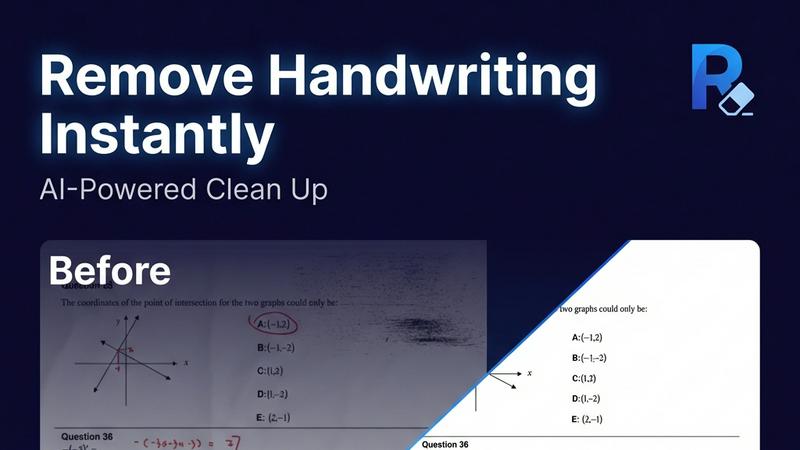
Remove handwriting from images and PDFs with AI while preserving your original printed text and layout.
Last updated: March 26, 2026
Visual Comparison
Img Editor

Remove Handwriting
Feature Comparison
Img Editor
Free Daily AI Generations
Users receive 10 free image generations every day, providing consistent access to the core AI technology without any subscription or payment. This model allows for regular experimentation and creation, making advanced AI art tools available to anyone starting their creative journey.
Advanced Prompt Generator & Gallery
The platform includes a built-in prompt generator to help formulate effective ideas and a public gallery featuring popular prompts from other users. This feature serves as both inspiration and a practical tool, allowing you to click on any gallery prompt to generate a similar image instantly, streamlining the creative process.
High-Quality Output Options
Img Editor offers multiple resolution and quality settings, including Standard (1K), High Quality (2K), and Ultra Quality (4K) outputs. The higher 2K and 4K resolutions are available through the Nano Photo tier, enabling the creation of images suitable for professional prints, detailed digital art, and high-definition marketing materials.
Community Engagement Rewards
Users can submit their generated images to the public gallery for review. Once approved, each submission earns 10 extra generations. This system rewards active participation, fosters a community of creators, and provides a pathway to effectively unlimited free image creation.
Remove Handwriting
AI-Powered Handwriting Detection & Removal
Our advanced AI engine accurately distinguishes between handwritten content and printed text or graphics. It intelligently erases scribbles, notes, answers, and annotations while ensuring all original printed material, complex tables, and detailed diagrams remain completely intact and unaltered in the final cleaned document.
Comprehensive Document Restoration
The tool goes beyond erasure to fix a wide range of document imperfections automatically. It corrects geometric distortions like skew and curled page edges, removes shadows, wrinkles, and stains, and cleans up cluttered backgrounds. This ensures every processed page is returned to a flat, balanced, and noise-free canvas.
Multi-Format & Multi-Page Support
Process single images (JPG, PNG) or entire multi-page PDF documents with ease. For PDFs, the tool preserves the original layout and formatting, allows for selective page processing, and exports back to a clean PDF file. This flexibility handles everything from a quick phone photo to complex multi-page reports.
Batch Processing & API Access
Efficiently handle large volumes of documents through automated batch processing, saving significant time and effort. For seamless integration into existing business workflows, developer-friendly API access is available, enabling automated document cleanup within other software applications and systems.
Use Cases
Img Editor
Digital Art & Concept Creation
Artists and illustrators can use Img Editor to rapidly visualize concepts, create unique digital artwork, and explore styles from photorealistic landscapes to abstract compositions. It acts as a powerful brainstorming and prototyping tool for creative projects.
Marketing & Social Media Content
Marketers and small business owners can generate custom visuals for ads, blog posts, social media graphics, and promotional materials. The ability to create professional-looking images on-demand helps maintain a consistent and engaging brand presence without a design budget.
Personal Project Visualization
Individuals can bring personal ideas to life, such as designing a dream room, creating fantasy book characters, visualizing story scenes, or generating unique gifts and artwork. It turns imagination into a tangible visual asset for any hobbyist or storyteller.
Professional Design & Mockups
Designers can use the platform to quickly generate background elements, textures, or thematic visuals to incorporate into larger projects. The detailed prompt controls allow for the creation of specific scenes or objects that can be used in mockups, presentations, and client pitches.
Remove Handwriting
Cleaning Educational Worksheets & Exam Papers
Teachers and tutors can quickly remove handwritten answers, student notes, and grading marks from worksheets, practice sets, and old exam papers. This creates a pristine, reusable master copy for new classes or practice sessions, saving hours of manual recreation.
Preparing Professional Documents & Contracts
Legal, real estate, and business professionals can erase handwritten signatures, initials, notes, and markups from contract drafts, forms, and archival documents. This generates a clean, shareable version for final review, printing, or digital distribution without sensitive annotations.
Restoring Archives & Historical Documents
Librarians, archivists, and historians can repair and restore scanned historical documents, letters, and records. The tool removes stains, fold marks, shadows, and handwritten marginalia, enhancing readability and preserving content for digital archives while maintaining historical integrity.
Enhancing Scanned Personal Documents
Individuals can improve personal document scans, such as tax forms, application sheets, or handwritten notes. It fixes poor scan quality issues like blurriness, shadows from phone cameras, and curled page edges, resulting in a crisp, professional-looking digital file for records or submission.
Overview
About Img Editor
Img Editor is a free, AI-powered platform designed to make professional-grade image creation accessible to everyone. It transforms text descriptions into stunning, high-quality visuals in seconds, removing traditional cost and skill barriers. The platform is built for a wide audience, including digital artists, graphic designers, content marketers, social media managers, and casual creators looking to bring their ideas to life. Its core value proposition is a powerful, user-friendly AI image generator that offers 10 free generations daily, with opportunities to earn unlimited bonus credits through community participation. Beyond simple text-to-image generation, Img Editor provides tools for image editing, prompt generation, and a public gallery for inspiration. By combining cutting-edge AI technology with a straightforward interface, it empowers users to produce everything from abstract art and photorealistic scenes to marketing materials and personal projects effortlessly.
About Remove Handwriting
Remove Handwriting is an AI-powered document cleanup tool designed to intelligently erase handwritten text, notes, and annotations from digital files. It works on images, PDFs, and scanned documents, delivering clean, professional results in seconds. The core value lies in its precision: it removes only the handwritten marks while meticulously preserving all underlying printed text, tables, diagrams, and the original document layout. This makes it an essential tool for educators needing clean worksheets, professionals preparing contracts, archivists restoring documents, and students repurposing exam papers. Beyond simple erasure, the tool performs comprehensive document restoration, automatically fixing common scan issues like shadows, skew, curled edges, and background noise. Accessible directly in your web browser or via mobile apps, it supports popular file formats (JPG, PNG, JPEG, PDF) and offers batch processing and API access for scalable workflows. You can start using its powerful features for free with no credit card required.
Frequently Asked Questions
Img Editor FAQ
How many free images can I create?
You receive 10 free image generations every 24 hours. You can earn an additional 10 generations for each image you submit to the public gallery that gets approved, providing a way to significantly increase your daily creation limit.
What is Nano Photo?
Nano Photo is a sponsor or tier within Img Editor that provides access to higher-resolution image outputs. It enables the generation of images in 2K (High Quality) and 4K (Ultra Quality) resolutions, which are essential for detailed work and professional printing.
Can I edit or describe existing images?
Yes, Img Editor is not just a text-to-image generator. The platform also includes dedicated tools for image editing and an "Describe Your Image" feature, which can analyze an uploaded photo and create a descriptive text prompt from it.
How does the prompt generator work?
The prompt generator assists you in crafting effective text descriptions for the AI. By providing guidance and structure, it helps you communicate your creative vision more clearly to the AI model, resulting in more accurate and satisfying generated images.
Remove Handwriting FAQ
What file formats does Remove Handwriting support?
The tool supports common image formats including JPG, JPEG, and PNG for single-page processing. It also fully supports multi-page PDF documents for both input and output, preserving the original layout and allowing you to export a clean, editable PDF.
Does it work on both images and PDFs?
Yes. You can use the single-image remover for photos and scanned images. For documents with multiple pages or those that require layout preservation, use the dedicated PDF remover tool. It allows page selection and exports a cleaned PDF.
Is my data secure when using the tool?
Yes. We prioritize data security. Uploaded documents are processed securely and are not used to train our AI models without consent. For specific details on data handling and privacy, please refer to our comprehensive privacy policy available on our website.
Is there a free version available?
Absolutely. You can try Remove Handwriting for free with no credit card required. The free plan offers access to core features, allowing you to process documents and experience the tool's capabilities before choosing a paid plan for higher volume or advanced features.
Alternatives
Img Editor Alternatives
Img Editor is a free AI image generation platform in the image and photo category. It allows users to create and edit visuals using text prompts, making advanced creative tools accessible to everyone. Users often explore alternatives for various reasons. Some may need different pricing models, more specialized features, or a platform that integrates with their existing workflow. Others might seek tools with higher generation limits or different artistic styles. When evaluating alternatives, consider your primary needs. Key factors include the cost structure, the quality and style of AI output, daily usage limits, and the specific editing capabilities offered. The right tool balances these elements with your creative goals.
Remove Handwriting Alternatives
Remove Handwriting is an AI-powered document cleanup tool that specializes in erasing handwritten text, notes, and annotations from images, PDFs, and scans. It falls into the category of AI image processing and document enhancement tools, designed to restore documents to a clean, professional state by preserving printed text and layouts. Users often explore alternatives for various reasons. These can include budget constraints, the need for different feature sets like advanced batch processing or specific integrations, or platform compatibility requirements beyond web and mobile apps. Some may seek tools with different pricing models or those that handle other types of document edits beyond just handwriting removal. When evaluating other options, key considerations should be the tool's accuracy in distinguishing handwriting from printed material, the quality of its background cleanup for shadows and noise, supported file formats, and workflow efficiency features. Security of your documents and the overall value for your specific use case are also critical factors to weigh.