
Hush Touch | Voice-to-Text for MacOS vs Prompt Builder
Side-by-side comparison to help you choose the right AI tool.

Hush Touch | Voice-to-Text for MacOS
Hush Touch is offline voice-to-text software for Mac that learns your vocabulary and delivers precise dictation.
Last updated: February 26, 2026

Prompt Builder
Create, optimize, and manage AI prompts effortlessly, saving time and ensuring quality across all major AI models.
Last updated: April 13, 2026
Visual Comparison
Hush Touch | Voice-to-Text for MacOS

Prompt Builder
Feature Comparison
Hush Touch | Voice-to-Text for MacOS
Dual-Engine Recognition
Hush Touch combines two Apple dictation engines to optimize performance. The DictationTranscriber engine ensures natural flow and punctuation, while SFSpeechRecognizer enhances custom vocabulary recognition. This powerful duo guarantees that your dictations are accurate and contextually relevant.
Custom Vocabulary Learning
Hush Touch can recognize up to 500 custom terms and learns from your corrections. This feature is particularly beneficial for users with specialized jargon, such as medical or technical terms, ensuring that the app adapts to your unique language needs over time.
Smart Text Processing
The app excels in smart text processing, which includes removing filler words and auto-correcting common mistakes in real-time. It can also format lists and recognize voice snippets for repeated phrases, making your writing process efficient and polished.
100% On-Device Privacy
Hush Touch prioritizes user privacy by processing all voice data locally on your Mac. There is zero reliance on cloud services, meaning your data remains secure and confidential. This makes it an ideal choice for users who are concerned about privacy.
Prompt Builder
Prompt Generator
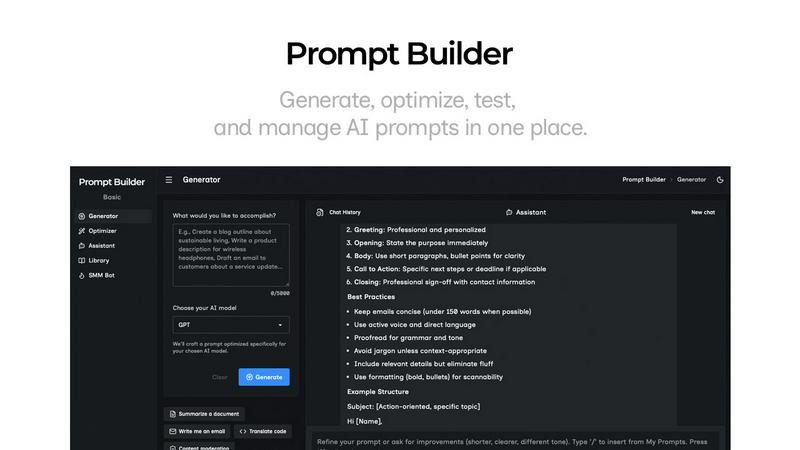
The Prompt Generator allows users to describe their ideas and select a target AI model to generate a professional-grade prompt. This feature ensures that the generated prompts are optimized specifically for models like Gemini, Claude, and GPT, making it easy to create effective prompts without starting from scratch.
Chat Refinement
With the integrated chat refinement feature, users can quickly refine their generated prompts through a built-in chat workspace. This allows for rapid iterations and modifications, ensuring the final prompt meets the specific needs of the chosen AI model and enhances the quality of outputs.
Prompt Library
The Prompt Library serves as a centralized hub for saving, organizing, and reusing the best prompts across various projects and teams. Users can easily search, filter, pin, edit, or delete prompts, making it an efficient tool for managing prompt assets and ensuring quick access to high-quality prompts.
Prompt Optimizer
The Prompt Optimizer enhances existing prompts by providing structured improvements in clarity, constraints, and output format. Users can paste their prompts into the Optimizer and receive clearer, better-structured versions almost instantly, allowing for quick adjustments and testing.
Use Cases
Hush Touch | Voice-to-Text for MacOS
Hands-Free Email Drafting
Use Hush Touch to compose emails without typing. Simply start dictating your message, and the app will auto-insert text after a short pause, allowing you to focus on your thoughts without distraction.
Note Taking in Meetings
During meetings or lectures, Hush Touch allows you to take notes hands-free. You can dictate important points and ideas, ensuring you capture everything without fumbling with pen and paper.
Content Creation for Writers
Freelance writers can leverage Hush Touch to draft articles and documents effortlessly. The app's accuracy and vocabulary learning capabilities make it easier to express ideas quickly and effectively.
Medical and Technical Documentation
Professionals in specialized fields can use Hush Touch to dictate complex terminology and detailed notes. The app's ability to learn specific vocabulary helps ensure that critical terms are recorded accurately.
Prompt Builder
Content Creation
Writers and marketers can utilize Prompt Builder to generate compelling content for blogs, social media, and marketing campaigns. By using the tailored prompts for different AI models, they can create engaging posts and articles that resonate with their target audience.
Customer Support Automation
Businesses can streamline their customer support processes by crafting AI prompts that guide virtual assistants. With Prompt Builder, support teams can create and refine prompts that ensure consistent and accurate responses to customer inquiries, improving overall service quality.
Educational Tools
Educators can leverage Prompt Builder to develop AI-driven educational content and quizzes. By generating prompts tailored to specific learning objectives, teachers can create engaging materials that enhance student learning experiences and foster interactive education.
Research and Development
Researchers can use Prompt Builder to formulate precise queries for AI models, facilitating data gathering and analysis. By generating optimized prompts, they can extract relevant information quickly, aiding in the efficiency and accuracy of their research projects.
Overview
About Hush Touch | Voice-to-Text for MacOS
Hush Touch is an innovative voice-to-text application designed exclusively for macOS users. It transforms dictation into a seamless and natural experience, prioritizing both speed and privacy. Unlike many dictation tools that rely on cloud processing, Hush Touch operates fully on-device, ensuring that users can dictate their thoughts offline without compromising their data security. By integrating two advanced Apple transcription engines along with an Apple Intelligence final pass, Hush Touch delivers exceptionally accurate text outputs. Ideal for professionals, students, and anyone who prefers hands-free writing, this app allows users to draft emails, messages, notes, and documents effortlessly. With a lightweight footprint of only 5.5 MB and a straightforward setup, Hush Touch easily integrates into daily writing routines. Users can initiate dictation with a simple hotkey or through Siri, making it a versatile tool for diverse writing needs.
About Prompt Builder
Prompt Builder is an advanced prompt engineering workspace designed for users who want to streamline the process of writing, testing, and saving AI prompts. It caters to a diverse audience, including writers, developers, and marketers, who require precise and effective prompts for various AI models. The platform simplifies the creation of tailored prompts by allowing users to start with a draft, refine it through an intuitive chat interface, and save or pin different versions for future use. Prompt Builder works seamlessly with popular AI models such as GPT, Claude, Gemini, Llama, Mistral, DeepSeek, Grok, and Perplexity, ensuring compatibility across the board. Its main value proposition lies in its ability to transform ideas into ready-to-use prompts in seconds, significantly reducing the time and effort typically involved in prompt crafting. With features like the Optimizer for enhancing existing prompts and a community library for reusable templates, Prompt Builder empowers users to achieve better results with fewer iterations.
Frequently Asked Questions
Hush Touch | Voice-to-Text for MacOS FAQ
How does Hush Touch ensure privacy?
Hush Touch processes all data on-device, which means your voice recordings and transcriptions are never sent to the cloud. This guarantees complete privacy and security for your dictation.
Can I use Hush Touch offline?
Yes, Hush Touch is designed for offline use. You can dictate your text anywhere without needing an internet connection, making it incredibly convenient.
What platforms is Hush Touch compatible with?
Hush Touch is exclusively designed for macOS, providing tailored features and performance for Apple users.
Is there a trial version available?
Yes, Hush Touch offers a 7-day free trial with no credit card required, allowing users to explore its features before making a purchase decision.
Prompt Builder FAQ
How does Prompt Builder work?
Prompt Builder simplifies the prompt creation process by allowing users to start with an idea, choose a target AI model, generate a prompt, refine it in chat, and save or run it as needed. This streamlined workflow enhances productivity and effectiveness.
Can I use Prompt Builder with multiple AI models?
Yes, Prompt Builder is designed to work with various AI models, including GPT, Claude, Gemini, Llama, Mistral, DeepSeek, Grok, and Perplexity. Users can generate and optimize prompts specifically for each model to ensure compatibility and better results.
Is there a limit to how many prompts I can create?
With the free plan, users can make up to 25 assistant requests per month. This allows for ample opportunity to create, test, and refine prompts without the need for a credit card or additional fees.
What if I need help with crafting prompts?
Prompt Builder provides an integrated chat feature where users can refine their prompts in real-time. Additionally, the community library offers reusable prompts and templates that can serve as starting points or inspiration for crafting effective prompts.
Alternatives
Hush Touch | Voice-to-Text for MacOS Alternatives
Hush Touch | Voice-to-Text for MacOS is an innovative dictation app designed to enhance productivity by converting spoken words into text. As part of the AI Assistants category, it offers users a seamless offline experience with high accuracy through advanced Apple transcription engines. Users often seek alternatives to Hush Touch due to a variety of reasons, including pricing, feature sets, or specific platform requirements. When choosing an alternative, it’s important to consider factors such as the accuracy of transcription, ease of use, offline capabilities, and how well the app integrates with existing workflows to ensure a smooth dictation experience.
Prompt Builder Alternatives
Prompt Builder is a comprehensive prompt engineering workspace designed for users who want to create, optimize, test, and manage AI prompts seamlessly. It supports a wide range of AI models, making it a versatile tool for anyone looking to enhance their interactions with AI technologies. Despite its robust features, users may seek alternatives for various reasons such as pricing, specific feature sets, or compatibility with preferred platforms. When searching for an alternative to Prompt Builder, consider factors like ease of use, available features, and integration capabilities with the AI models you utilize. Look for options that offer similar functionalities, such as prompt optimization and community resources, to ensure you can maintain efficiency in your AI prompt management.