
AIWriteBook vs Hush Touch | Voice-to-Text for MacOS
Side-by-side comparison to help you choose the right AI tool.

AIWriteBook
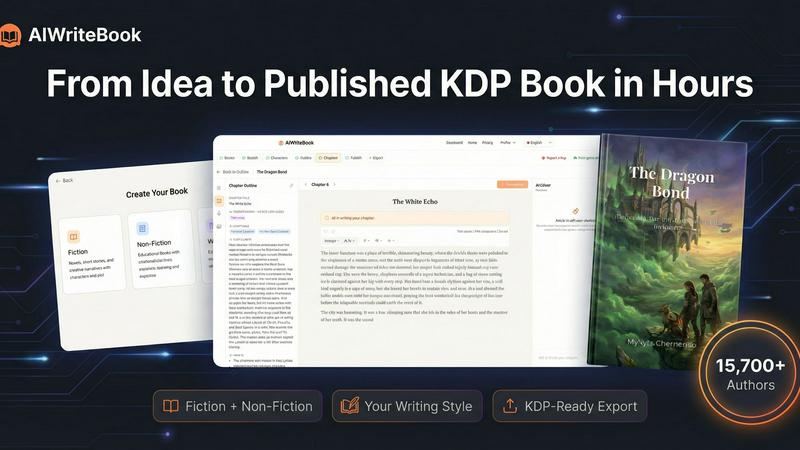
AIWriteBook lets you quickly turn your ideas into a polished book, from concept to KDP-ready, in just hours.
Last updated: April 13, 2026

Hush Touch | Voice-to-Text for MacOS
Hush Touch is offline voice-to-text software for Mac that learns your vocabulary and delivers precise dictation.
Last updated: February 26, 2026
Visual Comparison
AIWriteBook
Hush Touch | Voice-to-Text for MacOS

Feature Comparison
AIWriteBook
AI Outline Generation
AIWriteBook’s AI outline generation feature creates detailed outlines based on your book idea. It is customizable for fiction or non-fiction, helping you organize characters, plot arcs, and chapter structures effectively.
Character Builder
The character builder generates rich, multidimensional characters complete with personalities, arcs, and motivations. This feature ensures that each character drives the story forward, enhancing the narrative's depth.
Voice-Matched Chapter Writing
This feature allows the AI to produce chapters that reflect your unique writing style. By analyzing your past writings, the AI generates content that sounds like you, maintaining your voice throughout your book.
Integrated Audiobook Generation
AIWriteBook offers professional audiobook narration in over 30 languages. This feature enables authors to reach wider audiences by providing an audio format of their work seamlessly integrated into the publishing process.
Hush Touch | Voice-to-Text for MacOS
Dual-Engine Recognition
Hush Touch combines two Apple dictation engines to optimize performance. The DictationTranscriber engine ensures natural flow and punctuation, while SFSpeechRecognizer enhances custom vocabulary recognition. This powerful duo guarantees that your dictations are accurate and contextually relevant.
Custom Vocabulary Learning
Hush Touch can recognize up to 500 custom terms and learns from your corrections. This feature is particularly beneficial for users with specialized jargon, such as medical or technical terms, ensuring that the app adapts to your unique language needs over time.
Smart Text Processing
The app excels in smart text processing, which includes removing filler words and auto-correcting common mistakes in real-time. It can also format lists and recognize voice snippets for repeated phrases, making your writing process efficient and polished.
100% On-Device Privacy
Hush Touch prioritizes user privacy by processing all voice data locally on your Mac. There is zero reliance on cloud services, meaning your data remains secure and confidential. This makes it an ideal choice for users who are concerned about privacy.
Use Cases
AIWriteBook
Fiction Writing
Fiction authors can leverage AIWriteBook to create intricate plots with well-developed characters, ensuring a compelling narrative. The AI assists in brainstorming ideas and generating chapters that resonate with readers.
Non-Fiction Manuscripts
Non-fiction authors can upload research and reference materials to create structured content, complete with citations and actionable insights. This feature streamlines the process of organizing complex information into digestible chapters.
Audiobook Production
With integrated audiobook generation, authors can easily convert their written content into audio format, making it accessible to a broader audience. This enhances market reach and caters to diverse reading preferences.
Comprehensive Publishing
Authors looking to publish can manage every aspect of the writing process in one platform, from outline generation to final export. This all-in-one solution eliminates the need for multiple tools, simplifying the publishing journey.
Hush Touch | Voice-to-Text for MacOS
Hands-Free Email Drafting
Use Hush Touch to compose emails without typing. Simply start dictating your message, and the app will auto-insert text after a short pause, allowing you to focus on your thoughts without distraction.
Note Taking in Meetings
During meetings or lectures, Hush Touch allows you to take notes hands-free. You can dictate important points and ideas, ensuring you capture everything without fumbling with pen and paper.
Content Creation for Writers
Freelance writers can leverage Hush Touch to draft articles and documents effortlessly. The app's accuracy and vocabulary learning capabilities make it easier to express ideas quickly and effectively.
Medical and Technical Documentation
Professionals in specialized fields can use Hush Touch to dictate complex terminology and detailed notes. The app's ability to learn specific vocabulary helps ensure that critical terms are recorded accurately.
Overview
About AIWriteBook
AIWriteBook is a comprehensive AI-driven book creation platform designed for authors looking to streamline the writing and publishing process. With over 15,700 authors using the tool, it transforms ideas into fully realized books in a matter of hours instead of months. It allows users to start from scratch or import existing manuscripts in various formats, including .docx, .pdf, and .epub. The AI analyzes your writing style, ensuring that generated chapters reflect your unique voice rather than sounding generic. The platform supports both fiction and non-fiction authors, offering deep character development, structured outlines, and a cohesive story bible for plot consistency. Authors can also utilize a built-in editor for seamless writing, editing, and illustration generation, all without switching tools. Upon completion, users can create professional book covers, optimize KDP keywords, and export their work in multiple formats, ready for publishing on major platforms like Amazon, Apple Books, and Google Play.
About Hush Touch | Voice-to-Text for MacOS
Hush Touch is an innovative voice-to-text application designed exclusively for macOS users. It transforms dictation into a seamless and natural experience, prioritizing both speed and privacy. Unlike many dictation tools that rely on cloud processing, Hush Touch operates fully on-device, ensuring that users can dictate their thoughts offline without compromising their data security. By integrating two advanced Apple transcription engines along with an Apple Intelligence final pass, Hush Touch delivers exceptionally accurate text outputs. Ideal for professionals, students, and anyone who prefers hands-free writing, this app allows users to draft emails, messages, notes, and documents effortlessly. With a lightweight footprint of only 5.5 MB and a straightforward setup, Hush Touch easily integrates into daily writing routines. Users can initiate dictation with a simple hotkey or through Siri, making it a versatile tool for diverse writing needs.
Frequently Asked Questions
AIWriteBook FAQ
How does AIWriteBook learn my writing style?
AIWriteBook learns your writing style by analyzing previous works you upload to the platform. This enables the AI to generate content that reflects your unique voice and style throughout the book.
Can I edit the content generated by AIWriteBook?
Yes, the built-in editor allows you to edit any generated content inline. You can refine paragraphs, regenerate sections, and add illustrations all within the same platform, ensuring a smooth editing process.
What formats can I export my book to?
AIWriteBook supports multiple export formats, including KDP-ready EPUB, print PDF (in various trim sizes), DOCX, and audiobook formats. This versatility allows you to publish across major platforms easily.
Is there a free version of AIWriteBook?
Yes, AIWriteBook offers a free tier that allows you to create an outline and generate the first chapter of your book. This lets potential users explore the platform's capabilities without any financial commitment.
Hush Touch | Voice-to-Text for MacOS FAQ
How does Hush Touch ensure privacy?
Hush Touch processes all data on-device, which means your voice recordings and transcriptions are never sent to the cloud. This guarantees complete privacy and security for your dictation.
Can I use Hush Touch offline?
Yes, Hush Touch is designed for offline use. You can dictate your text anywhere without needing an internet connection, making it incredibly convenient.
What platforms is Hush Touch compatible with?
Hush Touch is exclusively designed for macOS, providing tailored features and performance for Apple users.
Is there a trial version available?
Yes, Hush Touch offers a 7-day free trial with no credit card required, allowing users to explore its features before making a purchase decision.
Alternatives
AIWriteBook Alternatives
AIWriteBook is an innovative AI book creation platform designed to streamline the writing, designing, and publishing process for authors. It caters to both fiction and non-fiction writers by providing tools that enable users to develop characters, generate outlines, and produce professional-quality books in a fraction of the time typically required. With over 15,700 authors already utilizing the platform, it's clear that AIWriteBook is a popular choice for those serious about getting their work published efficiently. Users often seek alternatives to AIWriteBook due to various reasons such as pricing, specific features, or compatibility with different platforms and workflows. When considering an alternative, it’s important to evaluate factors like usability, the quality of AI-generated content, available support, and integration with other writing tools. A good alternative should ideally meet the unique needs of your writing style and project requirements while offering a seamless user experience.
Hush Touch | Voice-to-Text for MacOS Alternatives
Hush Touch | Voice-to-Text for MacOS is an innovative dictation app designed to enhance productivity by converting spoken words into text. As part of the AI Assistants category, it offers users a seamless offline experience with high accuracy through advanced Apple transcription engines. Users often seek alternatives to Hush Touch due to a variety of reasons, including pricing, feature sets, or specific platform requirements. When choosing an alternative, it’s important to consider factors such as the accuracy of transcription, ease of use, offline capabilities, and how well the app integrates with existing workflows to ensure a smooth dictation experience.