
CoPilly vs HuntingPad
Side-by-side comparison to help you choose the right AI tool.

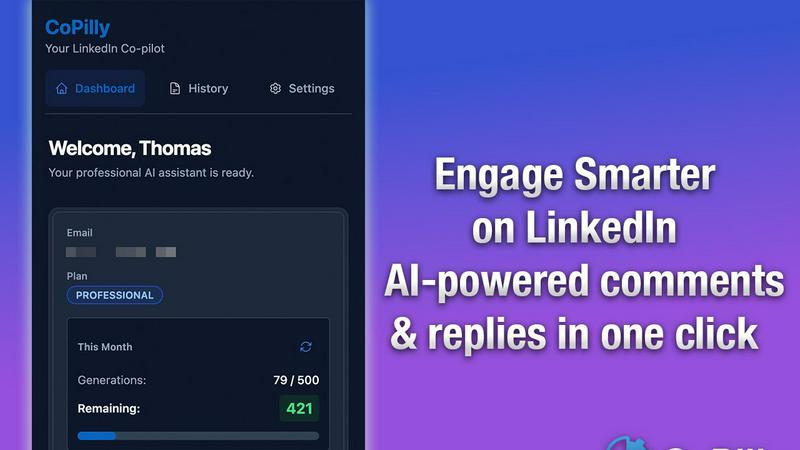
CoPilly is a free AI Chrome extension that generates LinkedIn comments and replies in 2 seconds, ensuring user safety.
Last updated: February 26, 2026

HuntingPad
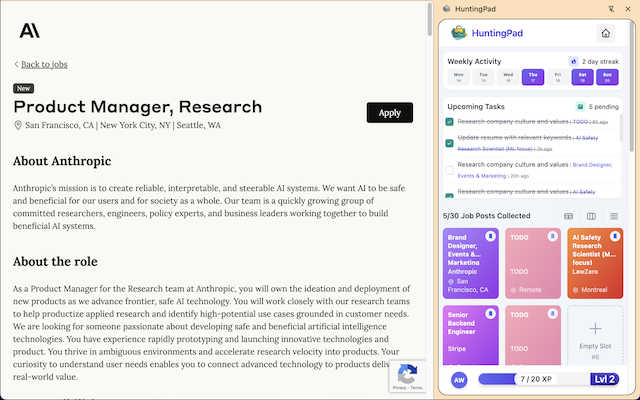
Capture jobs instantly and match them to your resume with AI to land interviews faster.
Last updated: March 1, 2026
Visual Comparison
CoPilly
HuntingPad
Feature Comparison
CoPilly
Context-Aware Comment Generation
CoPilly generates human-like comments based on the context of LinkedIn posts. This ensures your interactions are relevant, engaging, and tailored to your unique voice, making your engagement feel authentic.
Manual Trigger Workflow
Unlike many tools that rely on automation, CoPilly operates on a 100% manual trigger workflow. This approach minimizes risks associated with account bans, maintaining compliance with LinkedIn's Terms of Service and safeguarding your account.
Quick Reply Suggestions
Get instant suggestions for direct messages and replies, allowing you to respond to connections swiftly. This feature saves time while ensuring your responses remain professional and personalized.
Customizable Tones
Choose from various tones—professional, casual, or friendly—to match your communication style. This customization allows for genuine interactions that resonate with your audience.
HuntingPad
One-Click Job Capture
Instantly save any job posting from any website with a single click. The extension automatically captures key details like job title, company, and link, organizing them neatly in your personal dashboard. This eliminates the need for manual copying, bookmarking, or frantic searches through your browser history.
AI-Powered Application Insights
Get intelligent, data-driven suggestions to strengthen your applications. HuntingPad can analyze a job description, match it against your resume, and provide tailored advice on customizing your materials. It also offers smart insights on optimal times to follow up, helping you stand out in a crowded applicant pool.
Smart Autofill & Tracking
Automatically populate repetitive application fields to save time and reduce fatigue. HuntingPad keeps all your applications meticulously organized in one place, tracking statuses, deadlines, and notes. You get smart reminders so you never miss a follow-up or interview, turning your search into a manageable pipeline.
Local Data Storage & Privacy
Your job search data remains entirely private and secure. All information is stored locally on your computer, not on external servers. This ensures complete confidentiality for your applications, resumes, and notes, giving you peace of mind while managing a sensitive career transition.
Use Cases
CoPilly
Enhancing Networking Opportunities
Sales professionals can use CoPilly to send personalized connection invites with context-aware messages. This approach increases the likelihood of connection acceptance and fosters meaningful relationships.
Streamlining Engagement for Recruiters
Recruiters can generate thoughtful comments on potential candidates' posts, showcasing their interest and enhancing engagement. This demonstrates a genuine connection, making candidates feel valued.
Boosting Content Interaction for Founders
Founders can rapidly respond to comments on their posts, maintaining an active presence on LinkedIn. CoPilly helps them engage with followers, showcasing their expertise and building credibility.
Improving Brand Awareness for Marketers
Marketers can utilize CoPilly to comment on relevant industry posts, increasing their visibility. By engaging thoughtfully, they can position themselves as thought leaders and amplify their brand's reach.
HuntingPad
Scaling a High-Volume Job Search
For professionals needing to send 100-150 applications to secure an offer, HuntingPad provides the system to manage this scale without chaos. It automates tracking and organization, turning a overwhelming numbers game into a structured, strategic campaign you can control and analyze.
Transitioning Between Industries
When pivoting careers, you likely tailor applications heavily. HuntingPad helps by storing different resume versions and using AI to match your skills to new roles. It keeps all research and applications for various paths organized in one central command center.
Managing Multiple Recruiter Conversations
Juggling communications with several recruiters from different companies is complex. The tool tracks every interaction, call, and email note linked to specific job applications, ensuring you never confuse details and always follow up professionally and on time.
Re-Entering the Job Market
Returning to a job search after time away can be daunting. HuntingPad simplifies the process by rebuilding an organized search habit directly in your browser. It guides you with reminders and insights, helping you efficiently navigate modern application systems and timelines.
Overview
About CoPilly
CoPilly is an innovative Chrome extension designed to enhance your LinkedIn presence while ensuring the safety of your account. It differs from other LinkedIn tools by utilizing a manual trigger workflow rather than risky automation, allowing users to generate engaging, high-quality content in line with LinkedIn's Terms of Service. This tool is ideal for professionals including sales teams, founders, recruiters, and anyone looking to grow their network authentically. CoPilly offers context-aware comments, quick reply suggestions, and personalized connection invites, streamlining engagement and saving valuable time. Its unique value proposition lies in boosting your LinkedIn interactions while prioritizing account security, making it a reliable choice for enhancing your professional brand.
About HuntingPad
HuntingPad is a Chrome extension designed for ambitious professionals who are serious about their job search. It transforms the chaotic, time-consuming process of applying to dozens or even hundreds of roles into an organized, efficient, and strategic system. Built for those managing 50+ applications, it eliminates the administrative burnout caused by manual spreadsheets, constant app-switching, and browser tab overload. The tool integrates directly into your browser, enhancing your existing workflow on sites like LinkedIn, Indeed, and company career pages. Its core value proposition is providing a strategic advantage by automating tracking, offering AI-powered insights for stronger applications, and keeping all your job search data private and locally stored on your device. Instead of learning a new platform, HuntingPad turns hours of manual organization into one-click actions, allowing you to focus your energy on networking and interview preparation to ultimately get more interviews with less effort.
Frequently Asked Questions
CoPilly FAQ
How does CoPilly ensure account safety?
CoPilly employs a manual trigger workflow, completely avoiding automation that could violate LinkedIn's Terms of Service. This design minimizes the risk of account bans or suspensions.
Is CoPilly suitable for all professionals?
Yes, CoPilly is designed for a wide range of professionals, including sales teams, recruiters, founders, and marketers. Its features are tailored to enhance networking and engagement for anyone on LinkedIn.
How quickly can I generate comments with CoPilly?
CoPilly allows users to generate comments in under two seconds. This speed ensures you can engage promptly and effectively, boosting your LinkedIn presence.
Can I customize the tone of the messages generated?
Absolutely! CoPilly offers customizable tones—professional, casual, or friendly—which allows you to maintain your unique voice in all your interactions on LinkedIn.
HuntingPad FAQ
How does HuntingPad handle my privacy?
HuntingPad is built with privacy as a core principle. All your data--saved jobs, resumes, notes, and application details--is stored locally on your own computer. Nothing is sent to or stored on external servers, ensuring your confidential job search remains completely private.
Do I need to switch between different websites or apps?
No. HuntingPad operates entirely within your Chrome browser as an extension. There is no separate platform to log into or learn. You capture jobs and manage your search directly on the sites you already use, like LinkedIn and company career pages, creating a seamless workflow.
Can I use HuntingPad on multiple job boards?
Yes. The one-click capture feature is designed to work on virtually any website that lists job postings. This includes major boards like Indeed and Glassdoor, as well as individual company career sites, giving you a universal tool for your entire search.
Is there a free version available?
Yes, you can install the HuntingPad Chrome extension and start using it for free. This allows you to experience its core organization and tracking capabilities without a credit card, helping you transform your job search process immediately.
Alternatives
CoPilly Alternatives
CoPilly is an AI-driven Chrome extension designed to enhance your LinkedIn engagement by generating comments, DM replies, and connection invites in a matter of seconds. As a tool categorized under marketing and professional networking, CoPilly caters to sales teams, recruiters, founders, and anyone looking to elevate their presence on LinkedIn while maintaining account safety. Users often seek alternatives to CoPilly for various reasons, including pricing, additional features, or specific platform compatibility. When searching for an alternative, it’s important to consider factors such as ease of use, customization options, and the ability to maintain compliance with platform guidelines. Prioritizing these aspects can help ensure a seamless experience while enhancing your LinkedIn interactions.
HuntingPad Alternatives
HuntingPad is a Chrome extension that serves as a job search organizer and AI application assistant. It falls into the category of productivity tools designed to streamline the modern job hunt by capturing listings, tracking applications, and providing AI-driven insights directly in your browser. Users may seek alternatives for various reasons, such as budget constraints, a need for different features, or a preference for a standalone platform instead of a browser extension. Some may require mobile access or integration with specific job boards that a different tool might offer. When evaluating alternatives, consider your primary needs. Look for core functionality like job capture and tracking, but also assess the quality of AI features, data privacy policies, and overall ease of use. The right tool should fit seamlessly into your existing workflow to save time and reduce administrative tasks.