
Admanage AI vs Gleem.AI Studio
Side-by-side comparison to help you choose the right AI tool.

AdManage AI lets you launch ads 10x faster across major platforms with one-click templates and bulk tools.
Last updated: February 26, 2026

Gleem.AI Studio is a seamless all-in-one platform for generating, editing, and personalizing images effortlessly.
Last updated: February 26, 2026
Visual Comparison
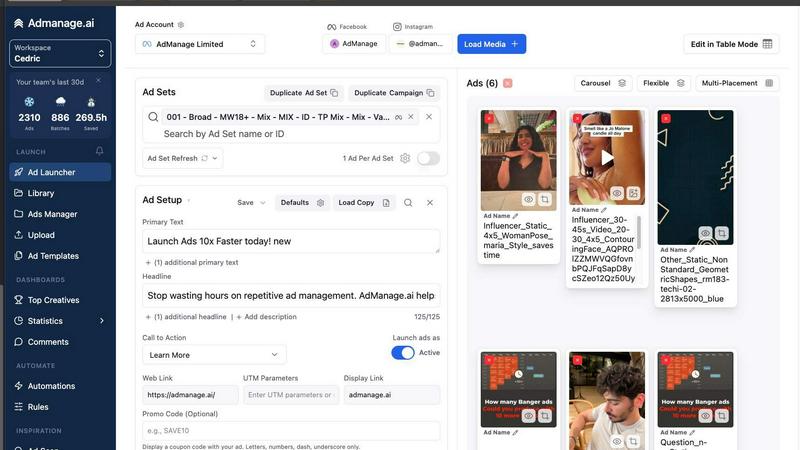
Admanage AI
Gleem.AI Studio

Feature Comparison
Admanage AI
Purpose-built Interface
Admanage AI features a specialized interface designed to facilitate the rapid launch of ads. This user-friendly layout allows marketers to navigate easily and execute ad campaigns at exceptional speeds, ensuring efficiency in the workflow.
One-click Templates
The platform offers one-click ad templates based on your best-performing creatives. This feature allows users to standardize ad execution quickly, reducing the time spent on formatting and optimizing ads for various placements.
Automated Multi-format Grouping
Admanage AI automatically groups ads into various formats (9:16, 4:5, 1:1) without additional effort from the user. This automated process enhances organization and ensures that ads are optimized for each platform, improving overall campaign performance.
Google Sheets Integration
With a free Google Sheets plugin, Admanage AI allows for bulk ad launches directly from your spreadsheets. This integration simplifies the upload process, enabling marketers to manage multiple ad variations efficiently and effectively.
Gleem.AI Studio
Text-to-Image Generator
The text-to-image generator transforms your ideas into captivating visuals. Simply input your concept, choose your desired size, and let Gleem's Prompt Enhance feature refine your descriptions for optimal results. This intuitive tool takes the hassle out of creating stunning graphics from scratch.
AI Image Editing
Edit images effortlessly in one cohesive environment using simple and natural prompts. With Gleem.AI Studio's AI image editing capabilities, you can add or remove objects, adjust poses, apply filters, and restore old photos, all while maintaining an intuitive editing workflow for best results.
AI Avatars
Create, personalize, and integrate your own AI avatars into any scene with ease. This feature allows you to appear in photos, adjust your avatar's poses, or try on various outfits without the need for additional photoshoots, making it perfect for social media and marketing campaigns.
Project Organization
Gleem.AI Studio offers dedicated spaces for each project, keeping your saved prompts, edits, and versions organized and accessible. This feature enables easy reuse and iteration, making it simple to build on previous work and maintain project continuity without losing context.
Use Cases
Admanage AI
High-Volume Campaign Launches
Admanage AI is perfect for marketers running high-volume campaigns. It allows them to launch hundreds of ads in seconds, drastically reducing the time dedicated to manual uploads and repetitive tasks.
Creative Testing at Scale
For teams focused on creative testing, the platform’s capabilities enable rapid iteration and testing of multiple ad creatives. Marketers can quickly adjust campaigns based on performance data, enhancing their ability to find optimal creative strategies.
Streamlined Collaboration
Admanage AI enhances collaboration among marketing teams by integrating with tools like Google Drive and Dropbox. This feature allows team members to share assets and manage campaigns effortlessly, fostering a more coordinated approach to advertising.
Error Reduction in Campaign Management
By automating the ad launch process and using one-click templates, Admanage AI significantly reduces the likelihood of errors that commonly occur during manual ad management. This feature helps maintain consistency and reliability in ad execution.
Gleem.AI Studio
Marketing Assets Creation
Marketers can leverage Gleem.AI Studio to generate eye-catching visuals for campaigns, advertisements, and social media posts. The streamlined workflow allows for quick iterations, ensuring that marketing materials remain fresh and relevant.
Social Media Content
Content creators can produce consistent and engaging visuals for various social media platforms. With tools for image generation and editing, users can easily create and modify graphics to match their brand's aesthetic, enhancing their online presence.
Product Imagery
E-commerce businesses can utilize Gleem.AI Studio to create high-quality product images without the need for extensive photography. The AI capabilities allow for the generation of appealing visuals that showcase products effectively, boosting sales potential.
Creative Variations Testing
Designers can experiment with different visual concepts quickly and efficiently. By generating multiple variations of an image, users can test and identify the most effective designs for their projects, leading to better outcomes and more successful campaigns.
Overview
About Admanage AI
Admanage AI is an innovative platform designed specifically for performance marketers who require rapid and efficient ad creation and management. It optimizes the ad workflow by allowing users to launch a significant number of ads in a fraction of the time traditionally required. Whether you're managing campaigns for a large brand or a small business, Admanage AI streamlines the creative testing process, reducing errors and enhancing productivity. With the capability to launch nearly one million ads per month for notable clients, the platform supports high-velocity ad testing, enabling marketers to focus on strategy rather than getting bogged down in manual processes. The user-friendly interface integrates seamlessly with tools like Google Sheets and popular cloud services, making it a go-to solution for those looking to elevate their advertising game.
About Gleem.AI Studio
Gleem.AI Studio is a cutting-edge unified AI image workspace that empowers creators to focus on their artistic vision rather than the intricacies of software configuration. Designed for marketers, content creators, and small teams, this platform simplifies the process of generating, editing, and remixing images in an integrated environment. Users can seamlessly transition between image generation and editing, allowing for a more fluid creative process. The studio eliminates the need for multiple tools and complex settings, enabling users to iterate quickly and efficiently. With features like text-to-image generation, AI image editing, and avatar customization, Gleem.AI Studio is built for those seeking consistent visuals and rapid output without being bogged down by technical hurdles.
Frequently Asked Questions
Admanage AI FAQ
How does Admanage AI improve ad launch speed?
Admanage AI utilizes a purpose-built interface and automated processes to enable the rapid launch of ads, allowing users to launch hundreds in seconds rather than manually creating each one.
Can I integrate Admanage AI with other tools?
Yes, Admanage AI integrates seamlessly with various cloud services, including Google Drive, Dropbox, and more, allowing for streamlined workflows and efficient asset management.
Is there a limit to how many ads I can launch at once?
While the platform is designed for high-volume ad launches, the exact limit may depend on your account type and specific campaign settings. However, it is capable of handling thousands of ads in a single session.
How does the Google Sheets plugin work?
The Google Sheets plugin allows users to manage and launch ads directly from their spreadsheets. Users can upload multiple ad variations simultaneously, making the bulk launch process straightforward and efficient.
Gleem.AI Studio FAQ
What types of images can I create with Gleem.AI Studio?
You can create a wide variety of images, including marketing assets, social media graphics, product images, and more. The platform supports both text-to-image generation and comprehensive editing features.
Is Gleem.AI Studio suitable for beginners?
Yes, Gleem.AI Studio is designed with simplicity in mind. Its intuitive interface and natural language prompts allow beginners to create professional-quality visuals without needing advanced technical skills.
Can I save my projects in Gleem.AI Studio?
Absolutely. Each project has its own dedicated space where you can save prompts, edits, and versions, ensuring everything is organized and easily accessible for future iterations.
How does the Prompt Enhance feature work?
The Prompt Enhance feature intelligently refines your image prompts to yield better results. This means you can write naturally, and the system will optimize your input for improved visual outcomes.
Alternatives
Admanage AI Alternatives
AdManage AI is an innovative tool designed for performance marketers, allowing them to launch ads across multiple platforms like Meta, TikTok, and Google at an accelerated pace. It streamlines the ad creation process, enabling users to test creatives at scale and manage high volumes of ads with ease. Users often seek alternatives to AdManage AI for various reasons, including pricing concerns, specific feature requirements, or compatibility with different advertising platforms. When looking for an alternative, consider factors such as user interface efficiency, integration capabilities, and the availability of automation features that can enhance your ad management workflow.
Gleem.AI Studio Alternatives
Gleem.AI Studio is an all-in-one AI image workspace tailored for creators who prioritize simplicity and efficiency in visual content creation. It allows users to generate and edit images seamlessly within a single platform, eliminating the need to switch between multiple tools. This streamlined approach is especially beneficial for marketers, small teams, and content creators who require quick iterations without the burden of complex configurations. Users often seek alternatives to Gleem.AI Studio for various reasons, including pricing concerns, feature sets, or specific platform compatibility needs. When searching for an alternative, it's essential to consider factors such as ease of use, the comprehensiveness of features, and how well the tool integrates into existing workflows. Identifying a solution that enhances creativity while maintaining intuitive usability is crucial for maximizing productivity.