
FilexHost vs SupaSidebar
Side-by-side comparison to help you choose the right AI tool.

FilexHost
Effortlessly host and share any file with instant URLs using FilexHost's simple drag-and-drop interface.
Last updated: February 26, 2026

SupaSidebar
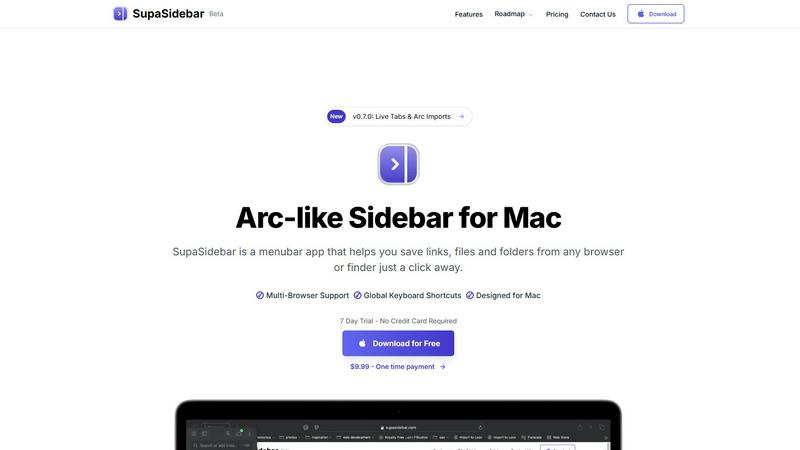
SupaSidebar is a Mac app that saves and organizes your links, files, and folders for instant access with keyboard.
Last updated: February 28, 2026
Visual Comparison
FilexHost

SupaSidebar
Feature Comparison
FilexHost
Instant Subdomains
FileXhost provides instant subdomains (your-file.filex.host) for each uploaded file, eliminating the need for any setup. Users can quickly access their files via a unique link that is generated upon upload, making sharing straightforward and efficient.
Free SSL Encryption
Every link generated by FileXhost is secured with free SSL encryption, ensuring that files are transmitted securely. This feature not only protects sensitive information but also builds trust with recipients, knowing their data is safe during transit.
Smart View Modes
FileXhost offers smart view modes that allow users to choose between direct rendering or a dedicated download page. This flexibility means that whether recipients need to view a file online or download it directly, they can do so based on their preferences.
Optional Password Protection
For users needing an extra layer of security, FileXhost offers optional password protection and settings for link expiry. Users can set passwords for their links and determine how long they remain active, ensuring that sensitive files remain confidential.
SupaSidebar
Universal Command Center
SupaSidebar serves as a universal command center where users can access all their essential files, folders, and browser tabs without switching between multiple applications. This feature streamlines workflow and enhances productivity by keeping everything organized in one easily accessible location.
Global Keyboard Shortcuts
With global keyboard shortcuts, users can quickly save links or copy URLs directly to the sidebar using simple commands. Pressing CMD CTRL S saves the current page, while CMD CTRL C copies the link, allowing for a seamless and efficient way to gather resources without interrupting your workflow.
Recents Tracking
The Recents feature automatically tracks your activity, showing every website you've visited in the last 48 hours. This functionality ensures that you can quickly find and revisit important resources without the hassle of remembering specific URLs or searching through browser history.
Fast Search Functionality
SupaSidebar includes a powerful search function that lets users find any file, folder, website, or app instantly. By pressing CMD CTRL K and typing your query, you can locate what you need without navigating through multiple menus or windows, significantly speeding up your workflow.
Use Cases
FilexHost
Professional Report Sharing
Professionals can easily share client reports and presentations using FileXhost's secure links. The platform's ability to host various file types, including PDFs and PowerPoint presentations, ensures that recipients can view files effortlessly without additional software.
Web Development Hosting
Developers can utilize FileXhost to host landing pages or mock APIs quickly. By uploading ZIP files containing their projects, developers can generate shareable links in seconds, facilitating easy collaboration and feedback.
Digital Product Distribution
Creators and digital marketers can distribute their products, such as e-books or software, using FileXhost. The platform allows them to share files without worrying about email attachment limits, ensuring customers receive their purchases smoothly.
Educational Resource Sharing
Educators can use FileXhost to share educational materials and resources with students. Whether it's lecture notes, assignments, or multimedia content, the platform makes it easy to disseminate files securely and efficiently.
SupaSidebar
For Students
Students can use SupaSidebar to keep track of research materials, important links, and study resources in one place. This organization enhances focus and ensures that they have quick access to all the materials needed for their academic success.
For Professionals
Professionals who juggle multiple projects will find SupaSidebar invaluable. It allows them to pin frequently used files and links, making it easy to switch between tasks without losing track of important resources or information.
For Researchers
Researchers can benefit from the Recents feature, which helps them revisit sources and articles they've recently accessed. This capability streamlines the research process and minimizes time wasted searching for previously viewed content.
For Content Creators
Content creators can utilize SupaSidebar to organize their favorite tools, websites, and research materials. By keeping everything accessible through a single interface, they can maintain their creative flow and focus on producing high-quality content.
Overview
About FilexHost
FileXhost is a powerful file hosting and sharing solution designed for individuals and professionals seeking a seamless way to manage their files online. It supports a wide range of file types, including documents, media, and even entire websites, allowing users to upload and share files effortlessly. The platform's unique "Drop & Share" workflow enables users to simply drag their files into the interface, instantly receive a secure URL, and share it without any need for server configuration or user registration. Ideal for professionals, developers, and creators, FileXhost ensures a frictionless experience for file delivery, eliminating the hassle of access requests and attachment limits. With a focus on user experience, recipients can view files exactly as intended, making FileXhost the go-to choice for anyone needing reliable and efficient file hosting.
About SupaSidebar
SupaSidebar is an elegantly designed menubar application for macOS that enhances digital workflow by providing a central hub for all your important links, files, folders, and browser tabs. Inspired by the sleek aesthetics of Arc, it is perfect for professionals, students, researchers, and multitaskers who need to manage various applications and browsers without the clutter typically associated with traditional workflows. The core value proposition of SupaSidebar is its ability to eliminate inefficiencies, allowing users to access everything they need with just a keyboard shortcut. No more searching through endless bookmarks or tabs; SupaSidebar organizes your digital life into a distraction-free sidebar. Compatible with all major browsers, including Safari, Chrome, Firefox, Arc, and Brave, it keeps your data private as everything is stored locally on your Mac. With features like a global command panel and live tab overview, SupaSidebar transforms how you interact with your Mac, making browsing faster, more efficient, and focused on what truly matters.
Frequently Asked Questions
FilexHost FAQ
What is FileXhost?
FileXhost is a file hosting platform that allows users to upload and share files easily. It supports various file types and provides instant links for sharing without the need for complex setups.
Is it really free?
Yes, FileXhost offers a free plan that allows users to host up to 1,000 files with a maximum size of 25MB each. This plan includes ads and a 7-day expiry for hosted files.
What file types are supported?
FileXhost supports a wide range of file types, including documents (PDF, TXT), media (MP4, MP3), images (JPG, PNG), data files (CSV, XLSX), and even HTML projects, ensuring versatility in file sharing.
How do I update my site?
To update your hosted site, simply upload a new version of your file using the drag-and-drop interface. The previous link will automatically redirect to the latest version, making updates hassle-free.
SupaSidebar FAQ
Is SupaSidebar a browser extension?
No, SupaSidebar is a standalone menubar application designed for macOS. It integrates with multiple browsers but operates independently, ensuring a seamless experience without being limited to a single browser.
Which browsers does SupaSidebar work with?
SupaSidebar is compatible with all major browsers, including Safari, Chrome, Firefox, Arc, and Brave. This flexibility allows users to maintain their preferred browsing environment while enjoying the benefits of the sidebar application.
What macOS version do I need?
SupaSidebar requires macOS version 13 or later to ensure optimal performance and compatibility with the latest features and updates.
Where is my data stored?
All data associated with SupaSidebar is stored locally on your Mac, ensuring your privacy and security. No information is sent to external servers, allowing you to manage your resources safely and privately.
Alternatives
FilexHost Alternatives
FilexHost is an efficient file hosting and sharing platform designed to simplify the process of sharing any type of file, from documents to entire websites. It operates in the productivity and management category, providing users with instant file hosting capabilities through a straightforward drag-and-drop interface. Users often seek alternatives to FilexHost for various reasons, including pricing, specific features, or unique platform requirements that may better fit their needs. When choosing an alternative, it is essential to consider factors such as file size limits, storage capacity, security options, and the overall user experience to ensure the selected service aligns with specific use cases and preferences.
SupaSidebar Alternatives
SupaSidebar is an innovative Arc-style sidebar application designed for macOS, serving as a centralized hub for managing links, files, and folders. It falls under the productivity and management category, catering to professionals, students, and anyone who juggles multiple tasks across different applications and browsers. Users frequently seek alternatives to SupaSidebar for various reasons, including pricing, feature sets, and compatibility with different platforms. Finding the right alternative involves evaluating similar functionalities, ease of use, and how well an option integrates into your existing workflow. When choosing an alternative, it’s essential to consider factors such as the user interface, the ability to handle multiple browsers, and how effectively it helps streamline your digital organization. Additionally, look for features that enhance productivity, like quick access to resources, customizable settings, and privacy assurances. These elements will ensure that the alternative meets your specific needs while enhancing your overall experience.