
dmaya vs Refbox
Side-by-side comparison to help you choose the right AI tool.

dmaya
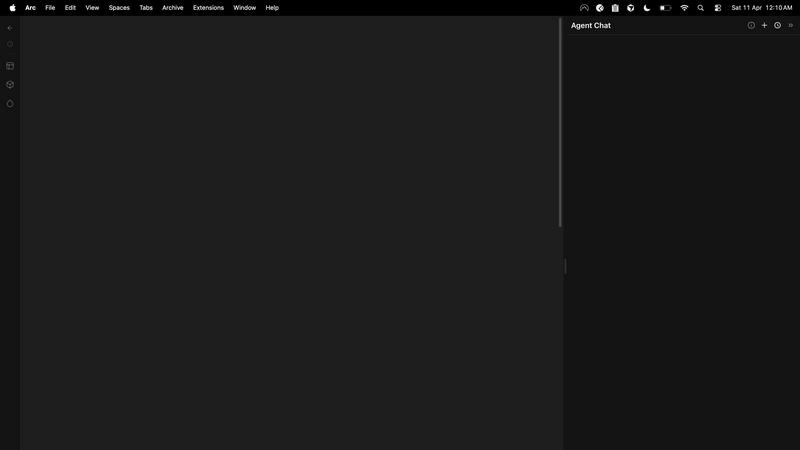
dMaya is an AI design platform for agencies to generate UI, get client approval, and export to code.
Last updated: April 13, 2026

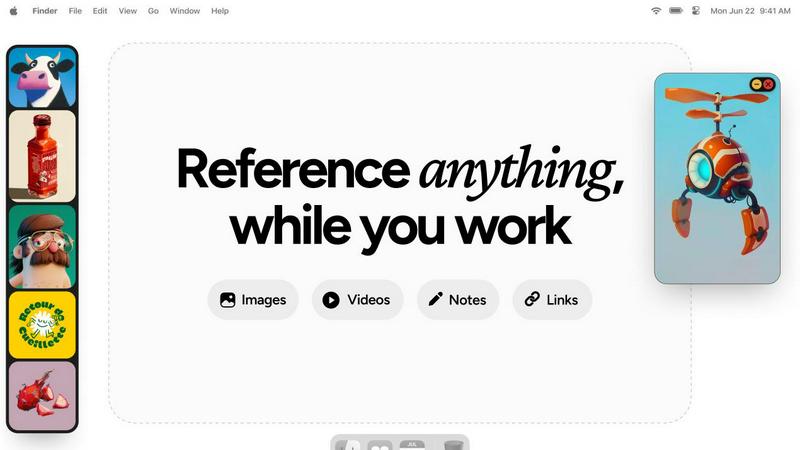
Refbox keeps your reference images and notes visible above any workspace.
Last updated: February 28, 2026
Visual Comparison
dmaya
Refbox
Feature Comparison
dmaya
Conversational AI Design Generation
Describe your vision in plain text, such as "a minimalist SaaS dashboard for analytics," and dmaya's AI agent generates complete, professional UI screens instantly. It creates coherent layouts, component systems, and responsive variants, providing a solid foundation for any project within seconds, eliminating the blank canvas problem.
Real-Time Iterative Refinement
Communicate directly with the AI to evolve your designs through natural language. Ask to "change the primary color to blue," "swap to a sidebar layout," or "increase the font size." Every requested change is applied precisely and instantly, allowing for rapid exploration of visual directions without manual dragging or styling.
Client Presentation & Feedback Links
Generate a secure, shareable preview link for any project. Clients and stakeholders can view the interactive design directly in their browser, leave feedback, and give approval without needing an account. This streamlines the review cycle from days to minutes, centralizing all communication.
Design-to-Code Export
Export your finalized and approved designs as production-ready, clean HTML, CSS, and JavaScript code. This semantic code is perfectly structured for AI coding assistants like Claude Code or Cursor to pick up and convert into your preferred framework, such as React, Next.js, or Flutter, ensuring a seamless handoff to development.
Refbox
Always-On-Top Floating Frames
Pin any image, GIF, video, or note in a resizable, always-on-top window that floats above all other applications. This allows you to keep critical references in your direct line of sight while you work in your primary software, eliminating the need to constantly switch windows and break your concentration.
Centralized Media Sidebar & Collections
Gather all your references from the web, your computer, or clipboard into a single, organized sidebar. Organize media into different Collections for various projects or themes. Swap between entire sets of references instantly with a single click, keeping your workspace clean and your workflow agile.
Advanced Media Controls & Utilities
Go beyond simple viewing with powerful tools tailored for creatives. Step through GIFs frame-by-frame for detailed animation reference. Use the built-in color picker on any media to sample and copy colors. Crop images to focus on specific details and take screenshots of websites directly by pasting a URL.
Markdown Notes & Interactive Bookmarks
Keep text-based inspiration and task lists within your workflow. Create markdown-enabled notes for ideas, briefs, or checklists that stay pinned alongside your visuals. Save clickable bookmarks to tutorials, articles, or resource pages for one-click access without leaving your creative environment.
Use Cases
dmaya
Agency Pitch & Concept Development
Agencies can use dmaya to generate multiple high-fidelity design concepts during initial client discovery calls. This enables them to present tangible visual directions in hours instead of weeks, significantly improving pitch success rates and project kickoff speed.
Product Team Prototyping & Validation
Product teams can rapidly prototype different UI approaches for new features or products before committing engineering resources. This allows for early stakeholder alignment, user testing with realistic designs, and confident decision-making, reducing costly late-stage changes.
Freelancer Project Delivery
Freelancers and solo designers can describe a client's brief and generate a complete first draft in moments. They can then iterate collaboratively with the client via shareable links, enabling them to handle more projects, deliver higher quality, and improve their service offering without increasing hours worked.
Design System Exploration
Teams can use dmaya to quickly explore and define visual foundations. By generating screens and iterating on colors, typography, and spacing through conversation, they can establish consistent design tokens and a cohesive component library before scaling a project.
Refbox
Digital Illustration & Concept Art
Illustrators and concept artists can pin multiple character sketches, environment photos, and color palettes as floating references directly over their canvas in Photoshop or Procreate. This enables constant visual comparison and ensures artistic consistency without breaking focus to search for files.
UI/UX & Web Design
Designers can collect inspiration screenshots, component libraries, and brand guidelines into Collections. They can float specific UI references or style tiles next to their design tool (like Figma or Sketch) for precise alignment, spacing, and color matching, streamlining the design replication process.
3D Modeling & Animation
3D artists and animators can keep orthographic reference images, texture maps, and motion study videos pinned in view while working in complex software like Blender or Maya. Frame-by-frame GIF scrubbing is essential for analyzing movement, and locking frames allows them to work behind the reference model.
Motion Graphics & Video Editing
Motion designers and editors can maintain a mood board of visual effects, typography examples, and storyboard sequences on a second monitor in full-screen gallery mode. Having video references and notes readily accessible accelerates the creative decision-making process during editing.
Overview
About dmaya
dmaya is an AI-powered design platform engineered for professional workflows where visual design and client approval must precede development. It serves agencies, product teams, and freelancers who need to move rapidly from concept to client-ready presentations. Unlike AI tools that generate code directly, dmaya focuses on the critical design-first phase. Users describe an interface—like a SaaS dashboard or e-commerce flow—in plain language, and the AI generates polished, multi-screen UI designs in seconds. The core value is iterative, conversational refinement: you chat with the AI to adjust colors, layouts, and typography in real time. This process ensures intentional visual decisions and team alignment before any code is written. Once a design is approved via shareable client links, dmaya exports clean HTML, CSS, and JS. This output is ready to be handed to AI coding agents like Cursor or Claude Code for implementation in frameworks like React, Next.js, or Flutter. By bridging the gap between ideation and execution, dmaya accelerates the entire design-to-development cycle, turning what used to take days into a process of minutes.
About Refbox
Refbox is a specialized floating reference application designed for creative professionals who need constant, distraction-free access to inspiration and resources. It eliminates the disruptive cycle of alt-tabbing between windows or digging through folders by allowing you to pin images, GIFs, videos, and notes in always-on-top frames directly over your primary work applications. Whether you're sketching, designing, animating, or modeling, your references stay visible and within reach, keeping you in a state of deep focus and flow.
The core value proposition is seamless integration into the creative workflow. You can gather media from the web, your computer, or clipboard into a central, resizable sidebar. From there, view everything in a Masonry grid, drag individual items onto your desktop as independent floating windows, or use a full-screen gallery mode for a second monitor. Beyond visuals, Refbox supports markdown-enabled notes for ideas and checklists, and clickable bookmarks for tutorials. With features like frame-by-frame GIF scrubbing, instant collection swapping, and powerful shortcuts, Refbox transforms your desktop into an organized, always-accessible inspiration hub tailored for speed and precision. It is built for professionals in 3D art, animation, UI/UX design, illustration, concept art, motion graphics, photography, and pixel art who cannot afford workflow distractions.
Frequently Asked Questions
dmaya FAQ
How is dmaya different from other AI design tools?
Most AI tools skip the visual design phase and generate code directly, which bypasses the necessary client presentation and approval process. dmaya is built specifically for professional workflows where design comes first. It focuses on generating and iterating high-quality visual designs through conversation, ensuring team alignment and client sign-off before any code is exported.
What kind of designs can I create with dmaya?
dmaya is built to handle a wide range of professional UI/UX projects. You can generate designs for web applications like SaaS dashboards, e-commerce user flows, landing pages, and mobile app screens. The AI understands complex descriptions and can produce multi-screen, responsive layouts with consistent styling.
How does the collaboration with clients work?
You simply generate a shareable preview link from any dmaya project. You send this link to your client or stakeholder. They can view the interactive design in their web browser, leave comments directly on the design, and approve it—all without needing to create an account or install any software.
What code does dmaya export, and how do I use it?
dmaya exports clean, semantic HTML, CSS, and JavaScript. This code is not framework-specific but is structured to be easily interpreted by AI coding agents like Cursor, Claude Code, or GitHub Copilot. You instruct your coding agent to convert this clean code into your desired framework, such as React, Next.js, or Flutter, for final development.
Refbox FAQ
What types of media files does Refbox support?
Refbox supports a wide range of media essential for creatives. You can import and pin standard images (JPG, PNG, SVG), animated GIFs (with frame-by-frame control), and various video formats. It also supports text notes, checklists, and live website screenshots created from pasted URLs.
How does Refbox help maintain focus?
Refbox is designed to minimize context switching. By allowing references to float above your work in always-on-top windows, it removes the need to alt-tab or search through folders. Features like auto-hiding the main sidebar, keyboard shortcuts for swapping references, and minimizing individual frames keep your screen and mind clear.
Can I use Refbox with multiple monitors?
Yes, Refbox is ideal for multi-monitor setups. You can use the full-screen gallery mode to turn a secondary display into a dedicated reference board. Meanwhile, you can drag individual floating frames onto your primary monitor to place them directly over your active application window.
Is there a free trial or version available?
Based on the provided context, Refbox is offered as a one-time purchase license. The website highlights a "One-time" purchase option, suggesting there is no subscription model. For the most current details on trials or pricing, please check the official Refbox website.
Alternatives
dmaya Alternatives
dmaya is an AI-powered vibe design platform for agencies, teams, and freelancers. It operates in the design tools category, specifically focusing on the visual design and client approval phase that occurs before coding begins. Users can generate and iterate on UI designs through conversation with an AI agent. People often look for alternatives to a tool like dmaya for various reasons. This can include budget constraints, a need for different feature sets like more advanced prototyping or native integrations, or platform-specific requirements such as a preference for desktop applications over web-based tools. Team size and existing workflow compatibility are also key factors. When evaluating alternatives, consider your core needs. Look for a solution that effectively bridges the gap between idea and code, offers a collaborative client review process, and provides output that integrates smoothly with your development stack. The ideal tool should streamline your specific design-to-development workflow.
Refbox Alternatives
Refbox is a specialized floating reference application in the productivity and management category. It allows creative professionals to pin images, videos, and notes in always-on-top windows over their primary work software, maintaining focus and workflow continuity. Users may seek alternatives for various reasons, including budget constraints, specific feature requirements, or compatibility with different operating systems. Some may need more robust project management integration or prefer a different pricing model. When evaluating alternatives, consider your core needs. Key factors include the ability to keep references visible, ease of importing and organizing media, support for different file types, and overall integration with your creative process. The right tool should minimize distractions and keep your inspiration seamlessly accessible.