
Daily vs Tickari
Side-by-side comparison to help you choose the right AI tool.

Daily is a simple planner to unload your thoughts and move forward with clarity.

Tickari is the no-nonsense task manager that cuts the clutter so you can finally get things done.
Last updated: April 13, 2026
Visual Comparison
Daily
Tickari
Feature Comparison
Daily
The Mind Dump Inbox
This is your unrestricted capture zone. The moment a task, idea, or reminder pops into your head, you can instantly add it to your Daily inbox. There is no need to categorize, prioritize, or file it immediately. This feature liberates you from the mental burden of holding onto everything, effectively clearing your mind and reducing anxiety. You can trust that nothing will be lost, allowing you to return to your current work with full focus.
The Focused Today View
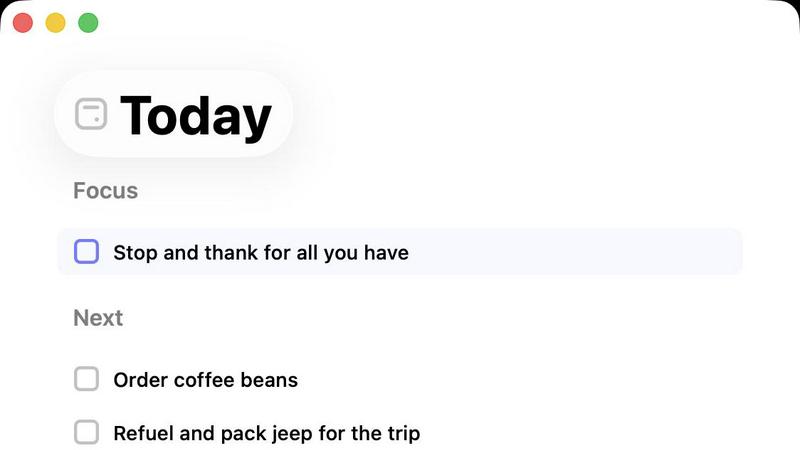
Your Today view is a deliberately curated list. It shows only the tasks you have consciously decided are important for this specific day. This creates a clean, manageable workspace free from the clutter of future deadlines or lingering past items. By limiting your visible scope, this feature helps combat overwhelm, directs your attention to immediate priorities, and provides a clear starting point each morning, fostering a sense of calm and control.
Gentle Task Carry-Over
At the end of the day, unfinished tasks are not marked as failures. Instead, Daily provides a simple review. You can choose to let go of items that no longer serve you or effortlessly carry them forward to tomorrow's list. This non-judgmental system removes the guilt and pressure associated with incomplete to-dos. It encourages mindful reprioritization and supports a sustainable, forgiving approach to daily planning.
Intentional Simplicity
Daily is built with a strict "less is more" ethos. The interface is clean and distraction-free, with just enough structure to be helpful without becoming complex. There are no complicated tags, nested projects, or overwhelming analytics. This purposeful design minimizes friction and learning curves, ensuring the tool reduces mental load rather than adding to it. It’s a supportive tool that gets out of your way.
Tickari
Zero-Friction Task Management
The core interaction is as simple as it gets. You add a task by typing. You complete it with a single click to check it off. There are no sub-tasks, priority flags, or tags to manage unless you explicitly need them. This streamlined process removes all barriers between you and your work, ensuring you spend energy on execution, not on organizing your organizer.
Deliberately Minimal Interface
Tickari embraces a "less but better" design philosophy. The interface is clean, uncluttered, and free from distractions. There are no complex boards, no overwhelming sidebars, and no promotional nudges. This visual simplicity reduces cognitive load, allowing you to focus solely on the list of tasks in front of you without any unnecessary visual or mental noise.
No Onboarding Required
The product is designed to work instantly. There is no 47-step tutorial, no "quick start" guide that takes 20 minutes, and no setup process. You open the app and you immediately know how to use it. This instant utility respects your time and acknowledges that a task manager should be a tool, not a project in itself.
Tickari Pro - Your Public Task Profile
For users who want to share their progress or public goals, Tickari Pro offers a personalized corner of the internet. It provides a custom subdomain (like yourname.tickari.com) where you can host a public profile page to share your notes and tasks with the world, adding a layer of simplicity-focused sharing.
Use Cases
Daily
For the Overwhelmed Professional
Professionals juggling multiple projects and constant interruptions can use Daily as a mental reset button. By quickly dumping all incoming requests and ideas into the inbox, they can maintain focus on their current deep work. The Today view then provides a clear, actionable plan for the day, helping to manage workload anxiety and prevent burnout by focusing only on immediate, high-impact tasks.
For the Creative with a Scattered Mind
Artists, writers, and thinkers often have bursts of ideas that can disrupt their flow. Daily acts as a reliable external brain. They can capture creative thoughts and logistical to-dos instantly without breaking their creative state. Later, they can sift through their inbox to organize and schedule these sparks, ensuring good ideas are never lost while maintaining a clear headspace for the creative process itself.
For Someone Building Better Habits
Individuals looking to establish routines or reduce procrastination benefit from Daily's gentle structure. By committing to a small, realistic Today list, users can build momentum and a sense of accomplishment. The non-punitive carry-over system helps maintain consistency without self-criticism, making it easier to form lasting habits around planning and personal accountability one day at a time.
For Managing Personal Life Admin
Managing household chores, appointments, and personal errands can be mentally taxing. Daily provides a single, simple place to track all these tasks outside of a busy brain. Reviewing the inbox weekly to populate the Today view ensures nothing falls through the cracks, reducing the "I forgot something" stress and bringing calm organization to personal life management.
Tickari
The Productivity-App Burnout Victim
For anyone who has cycled through Notion, Asana, Trello, and more, spending hours setting up perfect systems that then become a maintenance burden. Tickari offers an escape—a place to finally stop organizing and start doing, breaking the cycle of perpetual setup.
The Daily Personal Task Juggler
Ideal for managing straightforward daily and weekly to-do lists. Whether it's grocery shopping, home chores, or personal errands, Tickari provides a dead-simple list that doesn't overcomplicate simple tasks with unnecessary features or complex project management metaphors.
The Focused Creator or Student
Perfect for individuals who need to avoid digital distraction. When working on a deep work session, writing, or studying, a minimalist tool like Tickari allows you to jot down follow-up tasks or action items without triggering a distracting spiral into app customization or organization.
The Advocate of Digital Minimalism
For users actively seeking to reduce their digital clutter and cognitive load across all apps. Tickari fits perfectly into a minimalist tech stack, adhering to the principle that software should be a quiet, efficient tool that serves a single purpose well without feature creep.
Overview
About Daily
Daily is a minimalist to-do list and daily planner designed for individuals who feel overwhelmed by the constant pressure to do more. It serves as a quiet, digital space to declutter your mind, offering a gentle alternative to complex productivity systems. The core philosophy of Daily is not to push you to accomplish an endless list of tasks, but to help you find clarity and focus by letting you put things down without immediate judgment or organization. It is built for anyone who struggles with mental overload, procrastination, or anxiety about their responsibilities, providing a structured yet flexible way to manage daily intentions.
The primary value of Daily lies in its intentional simplicity and focus on the present moment. It allows you to capture tasks, reminders, and thoughts as they arise in a central "inbox." Later, you can review everything with a clear mind and deliberately choose only what truly matters for "Today." This Today view acts as a sacred, focused list, shielding you from the noise of future obligations and past undone items. By encouraging you to let go of what's no longer important and gently carry forward what is, Daily fosters a calm, grounded approach to productivity that reduces stress and helps you move forward meaningfully, one day at a time.
About Tickari
Tickari is the antidote to overcomplicated productivity software. It is a deliberately minimal, no-nonsense task manager built for a specific type of person: the individual who is tired of spending more time organizing their tasks than actually completing them. If you've ever felt overwhelmed by complex kanban boards, endless customization options, AI suggestions you didn't ask for, or lengthy onboarding tutorials, Tickari is for you. Its core philosophy is "less but better," ruthlessly eliminating feature bloat and cognitive overhead to deliver a frictionless workflow. The value proposition is singular and powerful: to help you get things done. You write a task, you tick it off, and you move on with your day. There is no clutter, no unnecessary decisions, and no learning curve. The interface is clean, intuitive, and works instantly from the moment you open it, making it the comfort food of task apps—simple, reliable, and satisfying.
Frequently Asked Questions
Daily FAQ
How is Daily different from other to-do list apps?
Most productivity apps are designed to help you do more, often adding complexity with labels, deadlines, and project structures. Daily is designed to help you focus and feel less overwhelmed. Its core difference is the separation between a stress-free capture inbox and a deliberately minimal Today list. It emphasizes clarity and calm over sheer output and complexity.
What happens to tasks I don't complete today?
Tasks you don't complete are not treated as failures. At your daily review, you will be prompted to decide on each unfinished item: you can choose to let it go if it's no longer relevant, or you can simply carry it forward to appear on tomorrow's list. This process is intentional and guilt-free, encouraging mindful prioritization.
Can I use Daily for long-term project planning?
Daily is purpose-built for daily planning and present-moment focus, not for detailed project management. It is excellent for capturing project-related tasks into your inbox and then pulling the next actionable steps into your Today view. For complex project timelines and collaboration, it's best used alongside other tools, with Daily serving as your daily action guide.
Is my data stored securely?
While specific technical details require checking the official Daily website or privacy policy, applications like Daily typically use secure cloud storage to sync your data across devices. It is always recommended to review the developer's privacy policy for explicit details on data encryption, storage, and usage practices.
Tickari FAQ
Is there really no onboarding or tutorial?
Correct. Tickari is built on the principle of instant usability. The interface is so intuitive that the moment you open it, you understand how to add a task and check it off. We believe your time is better spent on your work than learning how to use a to-do app.
Can I use Tickari for team or project management?
Tickari is designed intentionally for personal, individual task management. It does not include collaboration features, shared boards, or team assignments. Its strength is in helping one person clear their mind and their list, not coordinating complex group projects.
What does "Tickari Pro" get me?
Tickari Pro is for users who want a public presence. It grants you a custom subdomain (yourname.tickari.com) where you can create a personalized profile to share your notes and task lists with others. The core task management experience remains blissfully simple.
How does Tickari handle reminders or due dates?
In keeping with its minimalist philosophy, Tickari focuses on the fundamental action of capturing and completing tasks. It intentionally avoids adding layers like reminders, due dates, or calendars to prevent complexity. It's for the list you work from today, right now.