
Customer Connect CRM vs Yardyly
Side-by-side comparison to help you choose the right AI tool.

Customer Connect CRM
Customer Connect CRM uses AI to centralize leads and automate follow-ups for faster sales.
Last updated: February 28, 2026

Yardyly is the all-in-one software to easily manage and grow your landscaping business.
Last updated: March 4, 2026
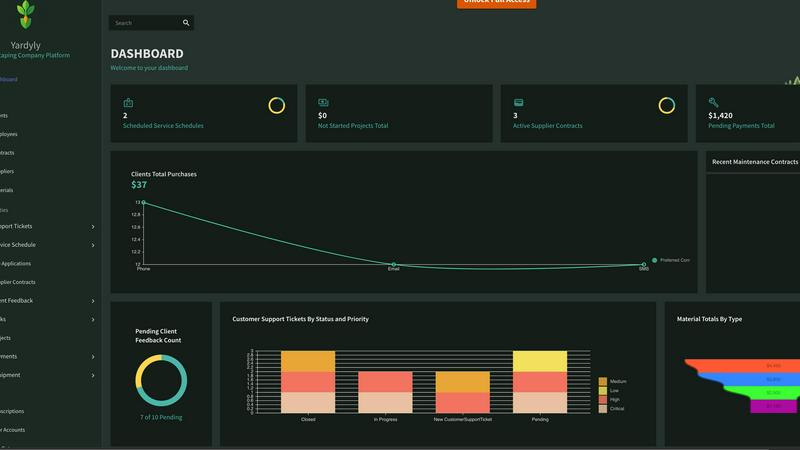
Visual Comparison
Customer Connect CRM

Yardyly
Feature Comparison
Customer Connect CRM
Centralized Lead Management
All customer inquiries are automatically gathered into one visual dashboard, eliminating scattered information across email inboxes and spreadsheets. Connect website forms, email accounts like Gmail and Office 365, and manually added leads for a complete, unified view of every opportunity in one place.
Visual Sales Pipeline Boards
Manage your sales process with clear, customizable pipeline boards that fit your business. Visually track each lead's progress from initial contact to closed deal using intuitive lead cards that display source, estimated value, and next steps, ensuring clarity and momentum.
Smart AI Automation
Leverage built-in AI features to save time and work smarter. The AI assists with lead prioritization and deal management, helping teams focus on the most promising opportunities and automate repetitive tasks, which accelerates follow-up and increases conversion rates.
Customizable Fields & Automations
Tailor the CRM to your specific workflow with custom tags, fields, and automated rules. Create automations for notifications and task assignments, and define custom stages for different services or customer types, ensuring the system adapts to your business, not the other way around.
Yardyly
Centralized Job Scheduling & Dispatch
Optimize your daily operations with an intuitive, drag-and-drop scheduling interface. Visually plan routes, assign jobs to crew members, and adjust schedules in real-time from the office or the field. This feature eliminates double-bookings and provides your team with clear, mobile-accessible daily plans, ensuring everyone knows where to be and what to do.
Integrated Customer Management (CRM) & Booking
Manage all client interactions and details in one secure place. The system stores customer profiles, service history, and notes. Clients can book services directly through an online portal, which automatically populates your schedule, reducing back-and-forth communication and capturing more business effortlessly.
Automated Invoicing & Payment Tracking
Streamline your financial workflow by generating and sending professional invoices directly from completed job tickets. Track payments, manage contracts, and monitor accounts receivable with precision. This integration ensures accurate billing, improves cash flow visibility, and reduces time spent on manual finance administration.
Real-Time Team Coordination & Task Management
Enhance field crew productivity with tools for seamless communication. Dispatch work orders digitally, allow crews to update job statuses, log hours, and submit notes or photos from the site. This provides managers with instant visibility into project progress and resource allocation, fostering better collaboration and accountability.
Use Cases
Customer Connect CRM
Small Business Sales Teams
Ideal for small teams needing structure without complexity. It provides an affordable, easy-to-adopt system to track leads, manage follow-ups, and close deals faster, replacing inefficient methods like spreadsheets and multiple inboxes that cause leads to be lost.
Service-Based Consultants & Freelancers
Perfect for independent professionals like consultants or agencies. It offers a simple way to manage incoming client inquiries, track project opportunities, and maintain a professional follow-up process from a single dashboard, ensuring no potential client is overlooked.
Hospitality & Event Management
Suited for hotels, venues, and event planners managing high volumes of inquiries for bookings and events. The CRM centralizes requests from email, web forms, and phone calls into a clear pipeline, streamlining communication and improving conversion rates for experiences and conferences.
Growing Companies Scaling Operations
Supports businesses transitioning from startup to scale-up. As teams grow and processes become more complex, Customer Connect provides the necessary structure with advanced dashboards, role permissions, and multiple pipelines without the bloat and high cost of enterprise CRMs.
Yardyly
Scaling a Solo Landscaping Operation
A solo entrepreneur uses Yardyly to transition from manual scheduling and paper invoices to a professional, automated system. The online booking feature captures new clients 24/7, while automated reminders and invoicing save hours per week, allowing the owner to take on more jobs without increasing administrative burden.
Managing a Multi-Crew Lawn Care Business
A business owner with several teams uses the centralized scheduling and GPS-enabled dispatch to efficiently assign jobs based on location and crew skill set. Real-time updates from the field provide instant insight into job completion and issues, enabling proactive customer communication and more accurate daily routing.
Streamlining Client Communication & Billing
A landscaping company implements Yardyly's client portal and integrated CRM. Clients can request services, view quotes, and pay invoices online, leading to higher satisfaction. The business benefits from organized client histories, streamlined feedback collection, and faster payment cycles, improving overall service quality and financial health.
Optimizing Seasonal Workflow & Resource Tracking
A seasonal outdoor service business uses Yardyly to plan and track peak-season projects. The software helps manage equipment allocation, supplier contracts for materials, and subcontractor coordination. This ensures resources are properly deployed, budgets are adhered to, and project timelines are met efficiently during high-demand periods.
Overview
About Customer Connect CRM
Customer Connect CRM is an AI-powered customer relationship management platform built specifically for small to medium-sized businesses. It eliminates the complexity and high cost of traditional CRM systems by offering a streamlined, intuitive solution. The core mission is simple: less administrative hassle and more sales. It centralizes all customer inquiries from channels like website forms, email inboxes, and direct messages into a single, visual dashboard. Designed for teams that need efficiency without a steep learning curve, it provides smart automation and clear sales pipelines to ensure no lead is forgotten. With its user-friendly interface and affordable pricing, Customer Connect makes powerful sales management accessible. It helps businesses reduce friction, accelerate follow-up, and drive sustainable growth by keeping the entire sales process organized and actionable from first contact to closed deal.
About Yardyly
Yardyly is a comprehensive, cloud-based management platform built specifically for landscaping, lawn care, and outdoor service businesses. It replaces the chaos of spreadsheets, paper notes, and disconnected apps with a single, unified hub. The software is designed to automate repetitive administrative tasks, reduce manual work, and improve communication across your entire operation. Its core value proposition is providing clarity and control, allowing business owners and managers to focus on growth and service quality rather than logistical overhead. Yardyly is mobile-friendly, enabling users to manage schedules, update job statuses, and track revenue from anywhere. Suitable for solo operators and growing teams alike, it integrates essential tools like online booking, job scheduling, customer management (CRM), invoicing, and team coordination to cultivate a smarter, more efficient business.
Frequently Asked Questions
Customer Connect CRM FAQ
What is Customer Connect CRM?
Customer Connect is a simple, AI-powered CRM system designed to help small and medium-sized businesses manage incoming customer inquiries and sales deals efficiently. It focuses on core functionality without unnecessary complexity, providing a visual overview to track leads from first contact to closed deal.
How does Customer Connect differ from other CRM systems?
It is built exclusively for simplicity and ease of use. Unlike expensive, feature-heavy traditional CRMs, it requires no training and has no technical barriers. The platform prioritizes a clean, visual interface and affordable pricing, making powerful sales management accessible to teams that need to move fast.
What channels can I use to capture leads?
You can capture leads from multiple channels automatically. The system integrates with website contact forms, email inboxes (including Gmail and Office 365), and allows for manual addition of leads from direct messages or other sources. All inquiries are centralized into the single CRM dashboard.
Can I customize the CRM for my specific sales process?
Yes, Customer Connect is highly customizable. You can create your own sales pipeline stages, add custom tags and fields for different customer types or services, and set up automated notifications and tasks. This ensures the system molds to your unique business workflow.
Yardyly FAQ
Is Yardyly suitable for a one-person landscaping business?
Absolutely. Yardyly is designed to scale with you. For solo operators, it automates key tasks like booking, invoicing, and scheduling that typically consume valuable time. It helps you present a more professional image, reduce administrative chaos, and lay a strong operational foundation for future growth, all from day one.
Can my crew use Yardyly on their phones in the field?
Yes. Yardyly is built with a mobile-friendly design, allowing your field team to access their schedules, view job details, update task statuses, and log time from their smartphones or tablets. This ensures real-time information flow, eliminates paper-based processes, and keeps everyone connected from the truck or job site.
How does the online booking feature work?
Yardyly provides a customizable booking widget that you can embed on your website or share via a direct link. Potential clients can select available services, choose their preferred date and time, and submit their request. This booking instantly appears in your Yardyly schedule for review and confirmation, automating lead capture and reducing phone call volume.
Does Yardyly integrate with other software or accounting tools?
Yardyly focuses on being an all-in-one platform with built-in tools for CRM, scheduling, and invoicing to minimize the need for complex integrations. For financial reconciliation, key transaction data can be easily exported. The platform is designed to be your central hub, reducing dependency on multiple disparate systems.
Alternatives
Customer Connect CRM Alternatives
Customer Connect CRM is an AI-powered customer relationship management platform designed to centralize leads and automate follow-ups for small to medium-sized businesses. It simplifies sales management with a visual, user-friendly interface. Users often explore alternatives for various reasons, such as needing more advanced features, different pricing structures, or specific integrations not offered by their current solution. Others may seek platforms better suited for larger teams or more complex sales processes. When evaluating alternatives, consider your core needs: the required level of automation, essential integrations, team size, budget, and the overall ease of use. The right CRM should align with your specific sales workflow without unnecessary complexity or cost.
Yardyly Alternatives
Yardyly is a comprehensive business management software designed specifically for landscaping, lawn care, and outdoor service companies. It falls into the productivity and management software category, helping owners streamline operations like scheduling, customer communication, invoicing, and team coordination from a single cloud-based platform. Users often explore alternatives for various reasons. Common factors include budget constraints, the need for different feature sets, or a preference for a platform that integrates with other specific tools they already use. The scale of a business, from a solo operator to a large team, also influences which software solution is the best fit. When evaluating alternatives, focus on your core operational needs. Key considerations should include the software's specialization for field service, its mobile functionality for on-the-go crews, the clarity of its pricing structure, and the quality of its customer support. The right tool should reduce administrative chaos and directly support business growth.