
ColoringFam vs Shrinkpad
Side-by-side comparison to help you choose the right AI tool.

ColoringFam is an AI tool that transforms photos and text into unique, printable coloring pages for all ages.
Last updated: February 26, 2026

Shrinkpad
Shrinkpad quickly batch compresses images and videos on your Mac, saving time and disk space effortlessly.
Last updated: February 28, 2026
Visual Comparison
ColoringFam
Shrinkpad

Feature Comparison
ColoringFam
Photo to Coloring Page
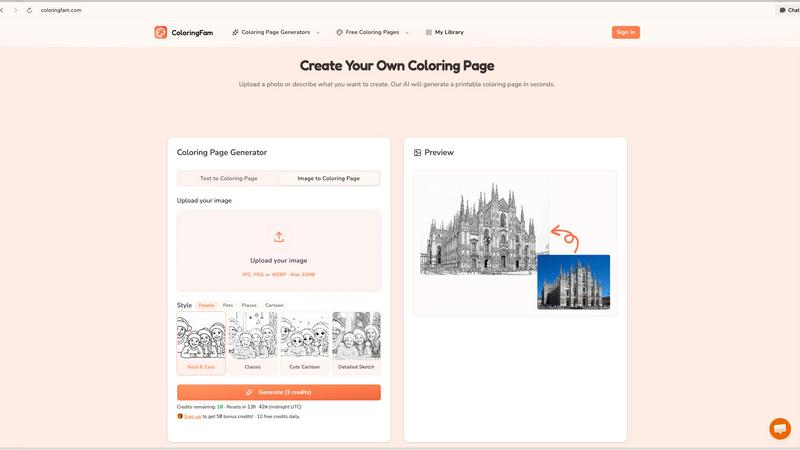
Transform any photo into a stunning, printable coloring page effortlessly. Whether it’s a family portrait, a cherished pet, or a memorable landscape, upload your image and allow the AI to produce clean line art, preserving the essence of your original photo.
Text to Coloring Page
Unleash your creativity by generating unique coloring pages from text descriptions. Describe what you envision, and the AI will create a distinctive design that matches your idea, making it perfect for artists, hobbyists, and educators.
10+ Art Styles
Choose from over 10 different artistic styles to suit your preferences. Options like Bold & Easy, Classic, Cute Cartoon, and Detailed Sketch allow you to tailor the complexity and look of your coloring pages, ensuring a personalized experience for every user.
Studio-quality Output
Enjoy high-resolution outputs with a studio-quality 300 DPI, ensuring your coloring pages are perfect for printing on US Letter or A4 paper. This guarantee of quality makes your creations suitable for both personal use and commercial endeavors.
Shrinkpad
Batch Processing
Shrinkpad allows users to process thousands of images and videos simultaneously without crashing. This unlimited batching feature is a game-changer, enabling creatives to save significant time when optimizing their media assets.
Smart Compression
This feature automatically analyzes the visual complexity of each file to determine the optimal compression ratio. Users can expect high-quality results without artifacts, ensuring their media retains its visual appeal.
One-Drop Import
With Shrinkpad, users can simply drag and drop entire folders containing media files. The application automatically detects and adds all supported images and videos to the batch list, making the compression process effortless.
Privacy Focused
All processing is done locally on the user's device, which means no files are uploaded to the cloud. This commitment to privacy ensures that sensitive assets remain secure and under the user's control at all times.
Use Cases
ColoringFam
Family Activities
Create engaging, custom coloring pages from family photos to keep children entertained. Parents can easily turn special moments into fun activities, enhancing family bonding through creativity.
Classroom Materials
Teachers can generate unique coloring sheets tailored to their lesson plans or themes, making learning more interactive and enjoyable for students. Custom designs can help reinforce concepts in a fun way.
Personalized Gifts
Craft thoughtful and personalized coloring pages for birthdays, holidays, or special occasions. By turning meaningful photos into coloring activities, you provide a unique gift that adds a personal touch.
Commercial Creations
Content creators can leverage ColoringFam's features to produce high-quality coloring books for sale on platforms like Amazon KDP or Etsy. With commercial rights available, these creators can expand their product offerings effortlessly.
Shrinkpad
Optimizing Website Assets
Web developers and designers can use Shrinkpad to compress images and videos for their websites, significantly reducing load times and improving user experience. Faster loading pages can enhance search engine rankings and user engagement.
Streamlining Creative Projects
Photographers and graphic designers can save valuable time by batch compressing images and videos from projects in tools like Photoshop or Figma. This eliminates the need for manual exports, allowing for a more efficient workflow.
Preparing Media for Social Media
Content creators can quickly prepare and optimize media files for various social media platforms. By ensuring that files are compressed, users can maintain visual quality while meeting file size requirements for uploads.
Managing Storage Space
Anyone dealing with large volumes of media files can benefit from Shrinkpad's ability to reclaim significant storage space. By compressing files effectively, users can manage their disk space more efficiently, extending the lifespan of their devices.
Overview
About ColoringFam
ColoringFam is an innovative AI-powered platform designed to transform your creative ideas into high-quality, printable line art and coloring pages. Whether you’re looking to convert cherished photos into beautiful coloring pages or generate unique designs from simple text descriptions, ColoringFam makes it easy and enjoyable. The platform serves a wide range of users, including parents wanting to engage their children with custom activities, teachers creating tailored classroom materials, and content creators developing personalized coloring books. With features that cater to both individual enjoyment and commercial use, ColoringFam stands out as the go-to solution for anyone looking to explore their artistic side or create meaningful gifts. Get started for free with 10 daily credits—no signup necessary—and discover the joy of coloring like never before.
About Shrinkpad
Shrinkpad is a powerful native macOS application tailored for anyone who needs to efficiently compress images and videos directly on their Mac. This innovative tool eliminates the need for cloud uploads, ensuring that all processing occurs locally, which guarantees complete privacy and security for users' files. With Shrinkpad, users can easily drag and drop hundreds of files or entire folders, applying custom compression settings that reduce file sizes by up to 90% in mere seconds while maintaining visual quality. It supports over 50 media formats including JPG, PNG, HEIC, WebP, MP4, and MOV, making it a versatile choice for photographers, designers, content creators, and anyone looking to reclaim valuable storage space. With its user-friendly interface, Shrinkpad streamlines the workflow of creatives, enabling them to optimize their media files without sacrificing efficiency or data integrity.
Frequently Asked Questions
ColoringFam FAQ
How does ColoringFam work?
ColoringFam uses advanced AI technology to convert photos or text descriptions into printable coloring pages. Users simply upload an image or describe their idea, select a style, and receive a downloadable PDF.
What types of images can I upload?
You can upload various image formats, including JPG, PNG, and WEBP, with a maximum file size of 20MB. This flexibility allows users to work with most common digital images.
Can I use ColoringFam for commercial purposes?
Yes, ColoringFam offers commercial rights that allow users to sell their coloring page creations on platforms like Amazon KDP and Etsy. This feature is ideal for entrepreneurs and content creators.
Are there any costs involved?
ColoringFam offers a free tier with 10 daily credits for users to experiment with the platform. Upgrades are available for those who need additional features, including batch generation and watermark-free downloads.
Shrinkpad FAQ
Can I use Shrinkpad for free?
Yes, Shrinkpad offers a Free Starter plan that includes essential tools for casual use with some limitations, such as a maximum of 10 files per batch and limited formats.
What file formats does Shrinkpad support?
Shrinkpad supports over 50 media formats, including popular ones like JPG, PNG, HEIC, WebP, MP4, and MOV, ensuring compatibility with various types of files.
Does Shrinkpad support video compression?
Absolutely. Shrinkpad can compress both images and videos, making it a versatile tool for anyone needing to manage multimedia files efficiently.
How many files can I process at once?
With the Personal and Team plans, users can process unlimited files at once, while the Free Starter plan restricts users to 10 files per batch.
Alternatives
ColoringFam Alternatives
ColoringFam is an innovative AI-powered platform that generates high-quality line art and coloring pages tailored for families, educators, and content creators. By allowing users to convert photos into printable line art or generate designs from text descriptions, it falls under content creation, education and learning, and generative art categories. Users often seek alternatives due to factors such as pricing, specific feature sets, or platform compatibility. When exploring alternatives, consider aspects like ease of use, variety of art styles, output quality, and any commercial rights that may be essential for your projects.
Shrinkpad Alternatives
Shrinkpad is a native macOS application designed for batch processing and compression of images and videos. It appeals to users in fields such as photography, design, and content creation, who require efficient ways to handle large media files while maintaining quality. Users often seek alternatives due to factors like pricing, specific feature sets, or compatibility with different operating systems. When searching for alternatives, consider aspects such as local processing capabilities, support for various media formats, user interface simplicity, and the ability to customize compression settings. These features can significantly impact your productivity and overall satisfaction with the software.