
AI Formatter vs CleanPaste.org
Side-by-side comparison to help you choose the right AI tool.
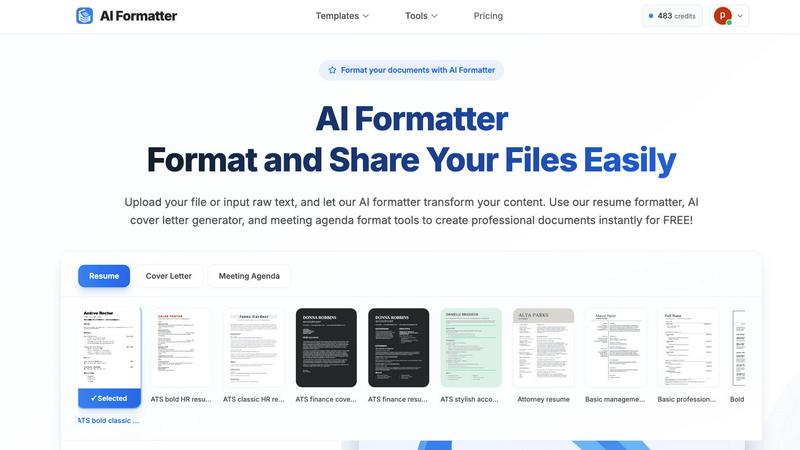
AI Formatter instantly creates professional documents from your raw text or files.
Last updated: March 1, 2026

CleanPaste.org
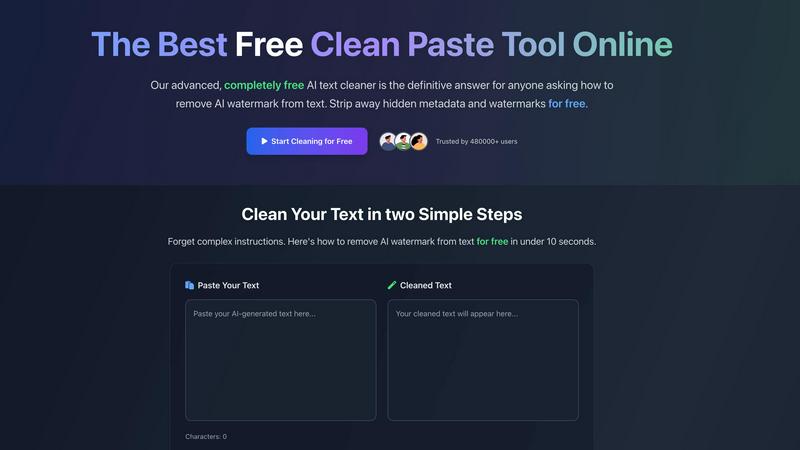
CleanPaste.org instantly removes AI watermarks and hidden characters from your text for free and without limits.
Last updated: March 1, 2026
Visual Comparison
AI Formatter
CleanPaste.org
Feature Comparison
AI Formatter
AI-Powered Formatting Engine
The core AI engine intelligently analyzes uploaded text or documents, understanding context and content hierarchy. It then automatically applies perfect professional formatting, aligning text, adjusting fonts, creating consistent spacing, and structuring layouts according to the chosen template, all without manual intervention.
Extensive Professional Template Library
Access over 162 ATS-optimized and professionally designed templates for various document types. The library includes modern resume formats, compelling cover letter designs, structured meeting agendas, polished invoices, and business reports, providing a perfect starting point for any professional need.
Real-Time Editing & Customization
After the AI formats your document, take full control with the built-in intuitive editor. Make adjustments to text, fonts, colors, and layout in real-time. This allows for personalization and fine-tuning to ensure the final document meets your exact specifications before sharing or downloading.
Multi-Format Export & Sharing
Download your perfectly formatted document in the format you need, including Microsoft Word (.docx), PDF, and plain text. The platform also facilitates easy sharing directly from the editor, enabling you to send professional documents to clients, recruiters, or team members instantly and securely.
CleanPaste.org
Instant Processing
CleanPaste.org delivers immediate results. Users can paste their content and click clean, with the tool automatically removing invisible characters and hidden formatting from AI-generated text.
Watermark Removal Mode
This feature enables real-time removal of AI watermarks and invisible characters while preserving the original content. Users can ensure their text remains intact while eliminating traces of AI assistance.
Comprehensive Character Stripping
The tool employs advanced algorithms to deep-scan and eliminate invisible characters, zero-width spaces, hidden metadata, and AI watermarks, providing a thorough cleansing of text for free.
User-Friendly Interface
CleanPaste.org offers an intuitive interface that makes it easy for users to clean their text in just two simple steps, promoting a hassle-free experience without any sign-up requirements.
Use Cases
AI Formatter
Job Seekers Optimizing Application Materials
Job applicants can upload their existing resume or raw career history. AI Formatter's resume formatter and AI cover letter generator transform this content into ATS-friendly, visually striking documents designed to pass automated screenings and impress hiring managers, significantly improving interview callback rates.
Professionals Standardizing Business Documents
Business professionals, freelancers, and teams use the tool to quickly create consistent, on-brand documents. From transforming meeting notes into a formal agenda format to generating polished invoices and client reports, it ensures all external and internal communications maintain a high standard of professionalism.
Academics and Students Formatting Papers
Students, researchers, and academics can input draft text or upload documents to adhere to specific formatting guidelines for essays, research papers, or thesis documents. The AI applies consistent citation styles, margins, headings, and structure, saving hours of manual formatting work.
Career Changers Revamping Their Profile
Individuals transitioning to a new industry can overhaul their existing documents to align with new standards. By using relevant templates and the AI's formatting intelligence, they can effectively rebrand their experience into a format that resonates with recruiters in their target field.
CleanPaste.org
For Students
Students can confidently submit their essays and assignments using CleanPaste.org to strip invisible characters and hidden metadata from AI-assisted drafts, ensuring originality and adherence to academic integrity.
For Content Creators & Bloggers
Content creators can maintain their brand's authentic voice by using CleanPaste.org to remove AI watermarks and invisible characters from their drafts, ensuring their content resonates naturally with their audience.
For SEO Specialists
SEO professionals can utilize CleanPaste.org to ensure their content is free of AI detection markers, allowing them to deliver high-quality, undetectable articles that adhere to search engine guidelines.
For Professionals
Project managers and business professionals can rely on CleanPaste.org to refine AI-generated emails, reports, and documents, enhancing their natural tone and making them sound more polished and human-like.
Overview
About AI Formatter
AI Formatter is a cloud-based, AI-powered platform designed to eliminate the tedious and time-consuming task of manual document formatting. It transforms unformatted text and raw documents into polished, professional files in seconds, saving users an average of over two hours per document. The tool's core value is its ability to instantly apply industry-standard formatting and structural best practices, ensuring every document is not only visually appealing but also functionally optimized for its purpose. This is especially critical for job seekers, as AI Formatter's templates are engineered for a 95%+ pass rate on Applicant Tracking Systems (ATS), dramatically increasing the chances of a resume being seen by a human recruiter. Users simply upload existing files (Word, PDF, TXT) or input raw text, and the AI intelligently processes the content. With a vast library of over 100 professional templates for resumes, cover letters, meeting agendas, invoices, and more, it serves a wide audience including professionals standardizing business documents, academics, teams boosting productivity, and anyone in a career transition. The platform completes the workflow with a real-time editor for fine-tuning and secure export in multiple formats, delivering a complete, efficient solution for creating impressive and effective documents.
About CleanPaste.org
CleanPaste.org is the premier free online tool designed to instantly cleanse text of all artificial traces, ensuring it appears 100% human-written. As AI-generated content becomes increasingly prevalent, the demand for authenticity and originality has never been higher. CleanPaste.org effectively addresses this need by specializing in erasing statistical AI watermarks, stripping hidden metadata, and eliminating invisible formatting characters. The platform is tailored for a diverse audience, including students, content creators, bloggers, SEO specialists, and professionals who rely on AI writing assistants but require a polished final output that goes undetected. Its core value proposition lies in powerful, instant processing with a completely free model—no sign-ups, no usage limits, and no paywalls. Trusted by over 480,000 users, CleanPaste.org promises a seamless experience where users can simply paste their text and receive clean, human-like content in seconds, ensuring their work maintains integrity and passes rigorous scrutiny.
Frequently Asked Questions
AI Formatter FAQ
What file formats can I upload to AI Formatter?
AI Formatter supports a range of common file formats for upload, including PDF, DOC, DOCX, and TXT files. This allows you to start from an existing document you already have. There is a maximum file size limit of 10MB per upload.
How does AI Formatter help with ATS compatibility?
The platform's resume and cover letter templates are specifically designed and tested for Applicant Tracking System compatibility. They use clean layouts, standard headings, and correct parsing structures that ATS software can read accurately, leading to a documented 95%+ pass rate.
Can I edit the document after the AI formats it?
Yes, absolutely. Once the AI processes your content into the selected template, it opens in a full-featured, real-time editor. You can freely customize all text, adjust formatting, rearrange sections, and personalize the design to your liking before finalizing your document.
Is there a free version of AI Formatter?
Yes, you can start using AI Formatter for free. The platform offers free access to its core formatting tools, including the ability to upload files, use AI formatting, and access templates to create professional documents instantly without an initial cost.
CleanPaste.org FAQ
How does CleanPaste remove invisible characters?
CleanPaste uses advanced algorithms to detect and eliminate invisible characters, zero-width spaces, hidden metadata, and AI watermarks from your text. Simply paste your content and click clean, with all processing happening instantly.
Is CleanPaste truly free? What's the catch?
Yes, CleanPaste.org is completely free with no hidden costs. There are no usage limits, premium features, or sign-ups required, as the tool aims to provide the best service for removing invisible characters and AI watermarks for everyone.
What types of hidden characters does CleanPaste remove?
The tool effectively removes various types of invisible characters, including zero-width spaces, hidden metadata, AI watermarks, and any formatting artifacts, ensuring a thorough cleansing of your text at no charge.
Can CleanPaste handle large volumes of text?
Yes, CleanPaste.org is designed to process text efficiently, allowing users to paste large volumes of content without any limits, ensuring that you can clean multiple pieces of text swiftly and effectively.
Alternatives
AI Formatter Alternatives
AI Formatter is a cloud-based productivity tool that uses artificial intelligence to instantly format raw text and documents into professional, polished files. It automates the tedious process of applying structure and style, saving users significant time and effort. Users may seek alternatives for various reasons, such as budget constraints, a need for different features, or a preference for a different platform or workflow. Some may require more advanced design control, while others prioritize simplicity or a one-time purchase over a subscription model. When evaluating alternatives, consider your primary needs. Key factors include the quality and range of templates, the level of automation versus manual control, export options, security of your data, and overall value for the price. The right tool should efficiently solve your specific document formatting challenges.
CleanPaste.org Alternatives
CleanPaste.org is a leading online tool that specializes in removing AI watermarks and invisible characters from text, ensuring it reads as entirely human-written. As AI-generated content becomes more prevalent, users often seek alternatives to meet varying needs, such as specific features, pricing structures, or platform compatibility. The demand for these alternatives stems from the desire for unique functionalities that cater to different writing styles or content requirements, as well as a quest for tools that can seamlessly integrate into existing workflows. When choosing an alternative, users should consider key factors such as ease of use, processing speed, the extent of text cleansing capabilities, and whether the tool offers any additional features like text humanization. Evaluating the security and privacy policies of the platform is also essential to ensure user data remains protected while achieving high-quality content outcomes.