
Chibi Pics vs Img Editor
Side-by-side comparison to help you choose the right AI tool.

Chibi Pics
Chibi Pics instantly transforms your photos into customizable chibi art, creating adorable characters in seconds with just one click.
Last updated: April 13, 2026

Img Editor
Img Editor instantly creates stunning AI-generated images from your text descriptions.
Last updated: February 28, 2026
Visual Comparison
Chibi Pics
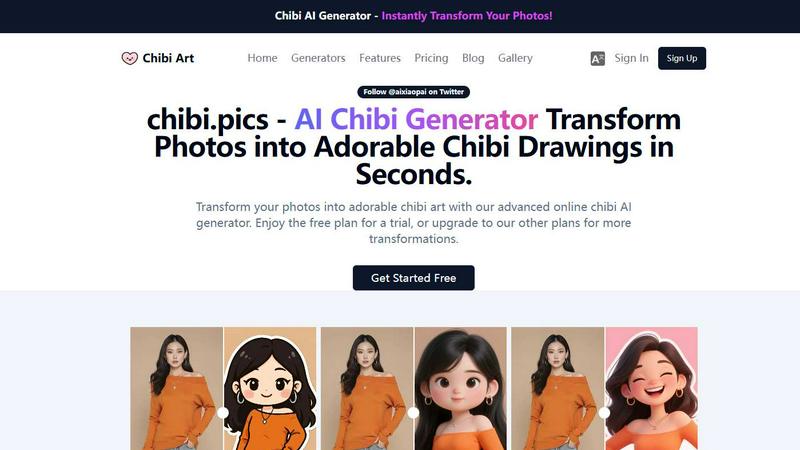
Img Editor

Feature Comparison
Chibi Pics
AI Custom Chibi
The AI Custom Chibi generator allows users to create unique chibi characters from their photos in just one click. With endless customization options, users can choose different styles, poses, and expressions, creating personalized avatars perfect for social media or personal use.
AI Couple Merge
This feature enables users to combine two photos into a single, enchanting chibi couple portrait. It is ideal for couples looking to celebrate their relationship with a unique piece of art, making it an excellent gift or keepsake.
AI Emoji Pack
With the AI Emoji Pack generator, users can create a custom 16-piece emoji set from any photo. This feature is perfect for enhancing online communication, allowing users to share personalized emojis on social media and messaging platforms without needing design expertise.
AI Photo Animator
The AI Photo Animator brings still images to life by adding movement to them. Users can animate their chibi creations, making them dance, wave, or react to music rhythms, perfect for creating engaging content for videos and social media.
Img Editor
Free Daily AI Generations
Users receive 10 free image generations every day, providing consistent access to the core AI technology without any subscription or payment. This model allows for regular experimentation and creation, making advanced AI art tools available to anyone starting their creative journey.
Advanced Prompt Generator & Gallery
The platform includes a built-in prompt generator to help formulate effective ideas and a public gallery featuring popular prompts from other users. This feature serves as both inspiration and a practical tool, allowing you to click on any gallery prompt to generate a similar image instantly, streamlining the creative process.
High-Quality Output Options
Img Editor offers multiple resolution and quality settings, including Standard (1K), High Quality (2K), and Ultra Quality (4K) outputs. The higher 2K and 4K resolutions are available through the Nano Photo tier, enabling the creation of images suitable for professional prints, detailed digital art, and high-definition marketing materials.
Community Engagement Rewards
Users can submit their generated images to the public gallery for review. Once approved, each submission earns 10 extra generations. This system rewards active participation, fosters a community of creators, and provides a pathway to effectively unlimited free image creation.
Use Cases
Chibi Pics
Social Media Avatars
Chibi Pics is perfect for users who want to stand out on social media. By creating adorable chibi avatars, users can express their personality and aesthetics, garnering attention and engagement on their profiles.
Personalized Gifts
Transforming photos into chibi art makes for a thoughtful and unique gift. Whether for birthdays, anniversaries, or special occasions, chibi portraits can be a cherished keepsake for loved ones.
Creative Projects
Artists and content creators can utilize Chibi Pics to enhance their projects with custom chibi art. From illustrations to merchandise, the platform provides a fun way to generate visuals that resonate with their audience.
Pet Portraits
Pet owners can immortalize their furry friends as adorable chibi characters. This feature allows pet parents to create playful and memorable art pieces that celebrate their beloved pets in a unique way.
Img Editor
Digital Art & Concept Creation
Artists and illustrators can use Img Editor to rapidly visualize concepts, create unique digital artwork, and explore styles from photorealistic landscapes to abstract compositions. It acts as a powerful brainstorming and prototyping tool for creative projects.
Marketing & Social Media Content
Marketers and small business owners can generate custom visuals for ads, blog posts, social media graphics, and promotional materials. The ability to create professional-looking images on-demand helps maintain a consistent and engaging brand presence without a design budget.
Personal Project Visualization
Individuals can bring personal ideas to life, such as designing a dream room, creating fantasy book characters, visualizing story scenes, or generating unique gifts and artwork. It turns imagination into a tangible visual asset for any hobbyist or storyteller.
Professional Design & Mockups
Designers can use the platform to quickly generate background elements, textures, or thematic visuals to incorporate into larger projects. The detailed prompt controls allow for the creation of specific scenes or objects that can be used in mockups, presentations, and client pitches.
Overview
About Chibi Pics
Chibi Pics is an innovative AI platform designed to convert ordinary photographs into charming chibi art effortlessly. Users can transform selfies into cute anime avatars, create pixel-perfect chibi portraits of pets, or combine couple photos into delightful animated chibi duos, all in mere seconds. The platform requires no drawing skills or complex prompts, making it accessible for everyone, from casual users to seasoned creators. With 12 specialized AI generators, Chibi Pics empowers users to create a variety of artworks, including themed sticker sets and animated videos. The advanced Nano Banana Pro AI engine facilitates real-time editing, allowing users to modify poses, expressions, and styles using intuitive drag-and-drop controls. Available in six languages, Chibi Pics caters to a global audience, appealing to social media enthusiasts and pet owners looking to express themselves creatively through playful, shareable art. Upload your photo, click once, and watch as your chibi self comes to life.
About Img Editor
Img Editor is a free, AI-powered platform designed to make professional-grade image creation accessible to everyone. It transforms text descriptions into stunning, high-quality visuals in seconds, removing traditional cost and skill barriers. The platform is built for a wide audience, including digital artists, graphic designers, content marketers, social media managers, and casual creators looking to bring their ideas to life. Its core value proposition is a powerful, user-friendly AI image generator that offers 10 free generations daily, with opportunities to earn unlimited bonus credits through community participation. Beyond simple text-to-image generation, Img Editor provides tools for image editing, prompt generation, and a public gallery for inspiration. By combining cutting-edge AI technology with a straightforward interface, it empowers users to produce everything from abstract art and photorealistic scenes to marketing materials and personal projects effortlessly.
Frequently Asked Questions
Chibi Pics FAQ
How does Chibi Pics work?
Chibi Pics utilizes advanced AI technology to transform photos into chibi art with just one click. Users upload their images, select styles, and the AI generates personalized chibi versions in seconds.
Is there a free version of Chibi Pics?
Yes, Chibi Pics offers a free plan that allows users to try out various features and generate limited chibi art. For more transformations and advanced options, users can upgrade to premium plans.
What types of styles can I choose from?
Chibi Pics provides hundreds of curated templates, allowing users to create chibi art in diverse styles, including 3D, anime, watercolor, and more, catering to various moods and preferences.
Can I animate my chibi creations?
Absolutely! The AI Photo Animator feature allows users to add motion to their chibi art, creating dynamic animations that can be used for videos, social media posts, or simply for fun.
Img Editor FAQ
How many free images can I create?
You receive 10 free image generations every 24 hours. You can earn an additional 10 generations for each image you submit to the public gallery that gets approved, providing a way to significantly increase your daily creation limit.
What is Nano Photo?
Nano Photo is a sponsor or tier within Img Editor that provides access to higher-resolution image outputs. It enables the generation of images in 2K (High Quality) and 4K (Ultra Quality) resolutions, which are essential for detailed work and professional printing.
Can I edit or describe existing images?
Yes, Img Editor is not just a text-to-image generator. The platform also includes dedicated tools for image editing and an "Describe Your Image" feature, which can analyze an uploaded photo and create a descriptive text prompt from it.
How does the prompt generator work?
The prompt generator assists you in crafting effective text descriptions for the AI. By providing guidance and structure, it helps you communicate your creative vision more clearly to the AI model, resulting in more accurate and satisfying generated images.
Alternatives
Chibi Pics Alternatives
Chibi Pics is an innovative AI platform that specializes in transforming ordinary photos into cute, customizable chibi art. As part of the image generation category, it offers users a seamless experience in creating delightful avatars, portraits, and animated creations without the need for drawing skills or detailed prompts. Users often seek alternatives to Chibi Pics for various reasons, including pricing, feature sets, or specific platform compatibility. When searching for a suitable alternative, it's essential to consider aspects such as ease of use, customization options, available styles, and whether the platform supports multiple languages or devices. An ideal alternative should also provide a balance of free and premium features to cater to different user needs.
Img Editor Alternatives
Img Editor is a free AI image generation platform in the image and photo category. It allows users to create and edit visuals using text prompts, making advanced creative tools accessible to everyone. Users often explore alternatives for various reasons. Some may need different pricing models, more specialized features, or a platform that integrates with their existing workflow. Others might seek tools with higher generation limits or different artistic styles. When evaluating alternatives, consider your primary needs. Key factors include the cost structure, the quality and style of AI output, daily usage limits, and the specific editing capabilities offered. The right tool balances these elements with your creative goals.