
Caller vs Tickari
Side-by-side comparison to help you choose the right AI tool.

Call any number worldwide from your browser for just 2 cents per minute.
Last updated: March 1, 2026

Tickari is the no-nonsense task manager that cuts the clutter so you can finally get things done.
Last updated: April 13, 2026
Visual Comparison
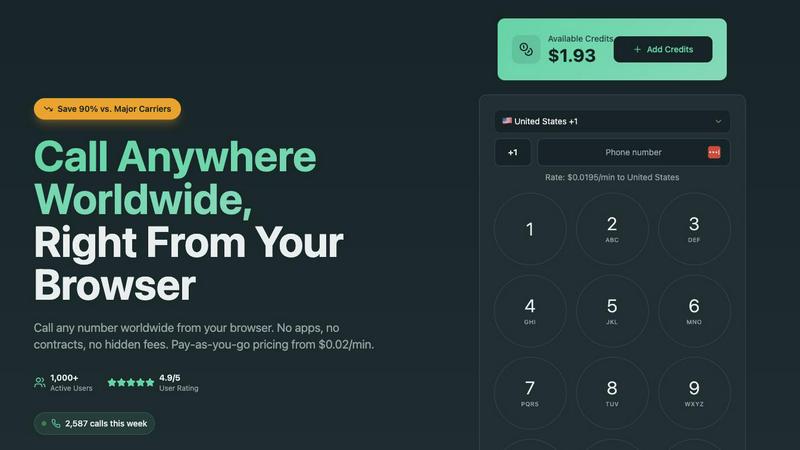
Caller
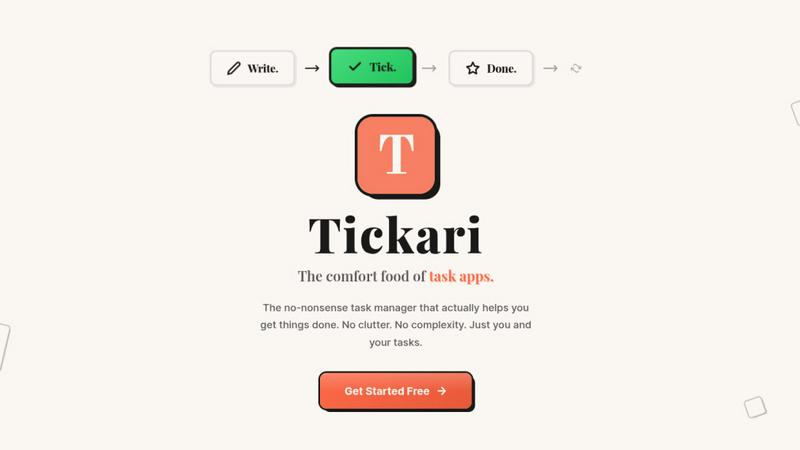
Tickari
Feature Comparison
Caller
Browser-Based Calling
Make calls instantly from any web browser on your computer, tablet, or smartphone. There is absolutely no software to download, install, or update. This eliminates compatibility issues and storage concerns, allowing you to connect from any device with an internet connection in mere seconds.
Transparent Pay-As-You-Go Pricing
Pay only for the call minutes you actually use, with no monthly subscriptions, contracts, or hidden fees. Rates start from $0.02 per minute, and your purchased credits never expire. This model provides complete cost control and transparency, with real-time usage tracking.
Global Coverage & HD Voice Quality
Call landlines and mobile phones in over 200 countries worldwide with crystal clear HD audio. The service is built on enterprise-grade telecommunications infrastructure, ensuring reliable connections and professional sound quality for every conversation, as if you were in the same room.
Dedicated Phone Numbers
Enhance your professional presence by purchasing a dedicated local, toll-free, or mobile number from countries like the US and UK. Use this number as your caller ID for outgoing calls, providing a local point of contact for business, clients, or personal use with instant activation.
Tickari
Zero-Friction Task Management
The core interaction is as simple as it gets. You add a task by typing. You complete it with a single click to check it off. There are no sub-tasks, priority flags, or tags to manage unless you explicitly need them. This streamlined process removes all barriers between you and your work, ensuring you spend energy on execution, not on organizing your organizer.
Deliberately Minimal Interface
Tickari embraces a "less but better" design philosophy. The interface is clean, uncluttered, and free from distractions. There are no complex boards, no overwhelming sidebars, and no promotional nudges. This visual simplicity reduces cognitive load, allowing you to focus solely on the list of tasks in front of you without any unnecessary visual or mental noise.
No Onboarding Required
The product is designed to work instantly. There is no 47-step tutorial, no "quick start" guide that takes 20 minutes, and no setup process. You open the app and you immediately know how to use it. This instant utility respects your time and acknowledges that a task manager should be a tool, not a project in itself.
Tickari Pro - Your Public Task Profile
For users who want to share their progress or public goals, Tickari Pro offers a personalized corner of the internet. It provides a custom subdomain (like yourname.tickari.com) where you can host a public profile page to share your notes and tasks with the world, adding a layer of simplicity-focused sharing.
Use Cases
Caller
Freelancers & Remote Workers
Ideal for professionals managing international clients. Make business calls to any country directly from your laptop browser without needing a separate business phone line. Maintain a professional image with clear audio and dedicated numbers while keeping costs predictable and low.
Small Business Sales & Support Teams
Empower your team to call customers and leads worldwide affordably. The browser-based platform requires no IT setup, making it easy to onboard new team members. Use dedicated numbers to establish a local presence in key markets and improve customer trust and response rates.
Staying Connected with Family Abroad
A simple and cost-effective solution for individuals to regularly call friends and family overseas. Avoid expensive carrier international plans and calling cards. Top up with a small credit amount and enjoy high-quality, secure calls to mobile and landline numbers from any device at home.
Accessing International Services
Essential for calling banks, government offices, or customer service lines in other countries. Whether verifying accounts, resolving issues, or making appointments, Caller provides a reliable way to connect to essential services without incurring exorbitant traditional phone charges.
Tickari
The Productivity-App Burnout Victim
For anyone who has cycled through Notion, Asana, Trello, and more, spending hours setting up perfect systems that then become a maintenance burden. Tickari offers an escape—a place to finally stop organizing and start doing, breaking the cycle of perpetual setup.
The Daily Personal Task Juggler
Ideal for managing straightforward daily and weekly to-do lists. Whether it's grocery shopping, home chores, or personal errands, Tickari provides a dead-simple list that doesn't overcomplicate simple tasks with unnecessary features or complex project management metaphors.
The Focused Creator or Student
Perfect for individuals who need to avoid digital distraction. When working on a deep work session, writing, or studying, a minimalist tool like Tickari allows you to jot down follow-up tasks or action items without triggering a distracting spiral into app customization or organization.
The Advocate of Digital Minimalism
For users actively seeking to reduce their digital clutter and cognitive load across all apps. Tickari fits perfectly into a minimalist tech stack, adhering to the principle that software should be a quiet, efficient tool that serves a single purpose well without feature creep.
Overview
About Caller
Caller is a modern, browser-based platform that revolutionizes international calling by eliminating traditional barriers. It enables instant, low-cost phone calls to any number worldwide directly from your web browser, with no need for app downloads, SIM cards, or complex hardware. The service operates on a transparent, pay-as-you-go model with rates starting as low as $0.02 per minute, offering savings of up to 90% compared to standard carrier rates. Designed for simplicity, users can sign up, add credits, and start calling in minutes from any device. With global coverage to over 200 countries and HD voice quality powered by enterprise infrastructure, Caller delivers reliable, secure, and professional-grade communication. It is built for a wide audience including freelancers, remote workers, small businesses, sales teams, customer support agents, and individuals needing to connect with family, clients, or services abroad. Its core value is providing affordable, high-quality international calling with zero long-term commitment and unparalleled ease of use.
About Tickari
Tickari is the antidote to overcomplicated productivity software. It is a deliberately minimal, no-nonsense task manager built for a specific type of person: the individual who is tired of spending more time organizing their tasks than actually completing them. If you've ever felt overwhelmed by complex kanban boards, endless customization options, AI suggestions you didn't ask for, or lengthy onboarding tutorials, Tickari is for you. Its core philosophy is "less but better," ruthlessly eliminating feature bloat and cognitive overhead to deliver a frictionless workflow. The value proposition is singular and powerful: to help you get things done. You write a task, you tick it off, and you move on with your day. There is no clutter, no unnecessary decisions, and no learning curve. The interface is clean, intuitive, and works instantly from the moment you open it, making it the comfort food of task apps—simple, reliable, and satisfying.
Frequently Asked Questions
Caller FAQ
How do I start making calls with Caller?
Simply sign up for a free account on the Caller website. Once registered, add credit to your account using a secure payment method. Then, navigate to the dialer in your browser, enter the international phone number you wish to call, and click the call button to connect instantly.
What devices and browsers are supported?
Caller works on any device with a modern web browser and an internet connection. This includes computers (Windows, Mac, Linux), tablets, and smartphones. Supported browsers include Chrome, Firefox, Safari, and Edge. No specific apps or hardware are required.
Are my calls secure and private?
Yes. All calls made through the Caller platform are secured with bank-level SSL encryption, ensuring your conversations are private. Furthermore, your payment transactions are processed securely, and the service adheres to strict data protection standards.
Do I need to get a dedicated phone number?
No, a dedicated number is an optional feature. You can use Caller immediately with your default account to make outbound calls. Purchasing a dedicated local or toll-free number is recommended for businesses or individuals who want a consistent, professional caller ID for their contacts.
Tickari FAQ
Is there really no onboarding or tutorial?
Correct. Tickari is built on the principle of instant usability. The interface is so intuitive that the moment you open it, you understand how to add a task and check it off. We believe your time is better spent on your work than learning how to use a to-do app.
Can I use Tickari for team or project management?
Tickari is designed intentionally for personal, individual task management. It does not include collaboration features, shared boards, or team assignments. Its strength is in helping one person clear their mind and their list, not coordinating complex group projects.
What does "Tickari Pro" get me?
Tickari Pro is for users who want a public presence. It grants you a custom subdomain (yourname.tickari.com) where you can create a personalized profile to share your notes and task lists with others. The core task management experience remains blissfully simple.
How does Tickari handle reminders or due dates?
In keeping with its minimalist philosophy, Tickari focuses on the fundamental action of capturing and completing tasks. It intentionally avoids adding layers like reminders, due dates, or calendars to prevent complexity. It's for the list you work from today, right now.
Alternatives
Caller Alternatives
Caller is a browser-based platform for making low-cost international calls directly from your web browser. It falls into the productivity and communication category, offering a simple, pay-as-you-go alternative to traditional phone services. Users often explore alternatives for various reasons. They might seek different pricing models, such as unlimited monthly plans, or require specific features like call recording or team management tools. Others may need a dedicated mobile app or integration with their existing business software. When evaluating alternatives, consider your core needs. Key factors include total cost for your calling patterns, required call quality and reliability, platform compatibility (web, mobile, desktop), and any advanced features essential for your work or personal use.
Tickari Alternatives
Tickari is a minimalist task manager in the productivity software category. It strips away complexity to offer a direct, uncluttered space for managing your to-do list, focusing purely on the act of writing tasks and completing them. Users often explore alternatives for various reasons. Some may require more advanced features like project timelines or team collaboration, while others might have specific budget constraints or need an app that works across particular operating systems. The search usually stems from a need that differs from Tickari's core, deliberate simplicity. When evaluating other task managers, consider your true needs. If you feel overwhelmed by options and just want to start working, a tool like Tickari that minimizes decisions is key. If you need to manage complex projects or teams, look for more robust functionality, but be prepared for the accompanying learning curve and potential clutter.