
Caller vs FilexHost
Side-by-side comparison to help you choose the right AI tool.

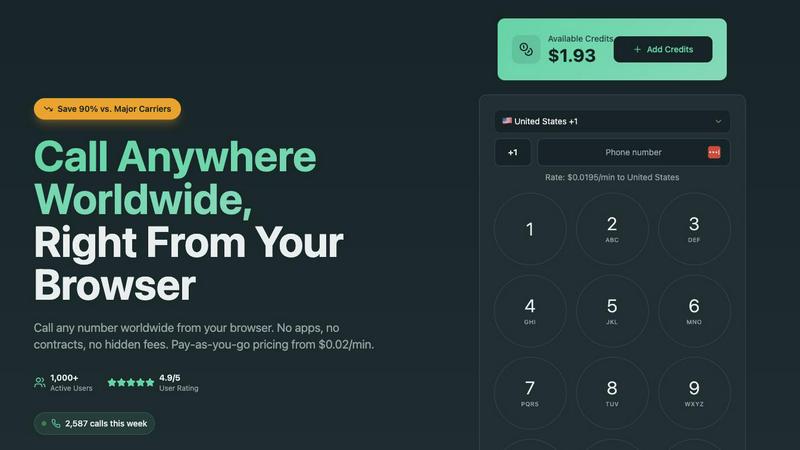
Call any number worldwide from your browser for just 2 cents per minute.
Last updated: March 1, 2026

FilexHost
Effortlessly host and share any file with instant URLs using FilexHost's simple drag-and-drop interface.
Last updated: February 26, 2026
Visual Comparison
Caller
FilexHost

Feature Comparison
Caller
Browser-Based Calling
Make calls instantly from any web browser on your computer, tablet, or smartphone. There is absolutely no software to download, install, or update. This eliminates compatibility issues and storage concerns, allowing you to connect from any device with an internet connection in mere seconds.
Transparent Pay-As-You-Go Pricing
Pay only for the call minutes you actually use, with no monthly subscriptions, contracts, or hidden fees. Rates start from $0.02 per minute, and your purchased credits never expire. This model provides complete cost control and transparency, with real-time usage tracking.
Global Coverage & HD Voice Quality
Call landlines and mobile phones in over 200 countries worldwide with crystal clear HD audio. The service is built on enterprise-grade telecommunications infrastructure, ensuring reliable connections and professional sound quality for every conversation, as if you were in the same room.
Dedicated Phone Numbers
Enhance your professional presence by purchasing a dedicated local, toll-free, or mobile number from countries like the US and UK. Use this number as your caller ID for outgoing calls, providing a local point of contact for business, clients, or personal use with instant activation.
FilexHost
Instant Subdomains
FileXhost provides instant subdomains (your-file.filex.host) for each uploaded file, eliminating the need for any setup. Users can quickly access their files via a unique link that is generated upon upload, making sharing straightforward and efficient.
Free SSL Encryption
Every link generated by FileXhost is secured with free SSL encryption, ensuring that files are transmitted securely. This feature not only protects sensitive information but also builds trust with recipients, knowing their data is safe during transit.
Smart View Modes
FileXhost offers smart view modes that allow users to choose between direct rendering or a dedicated download page. This flexibility means that whether recipients need to view a file online or download it directly, they can do so based on their preferences.
Optional Password Protection
For users needing an extra layer of security, FileXhost offers optional password protection and settings for link expiry. Users can set passwords for their links and determine how long they remain active, ensuring that sensitive files remain confidential.
Use Cases
Caller
Freelancers & Remote Workers
Ideal for professionals managing international clients. Make business calls to any country directly from your laptop browser without needing a separate business phone line. Maintain a professional image with clear audio and dedicated numbers while keeping costs predictable and low.
Small Business Sales & Support Teams
Empower your team to call customers and leads worldwide affordably. The browser-based platform requires no IT setup, making it easy to onboard new team members. Use dedicated numbers to establish a local presence in key markets and improve customer trust and response rates.
Staying Connected with Family Abroad
A simple and cost-effective solution for individuals to regularly call friends and family overseas. Avoid expensive carrier international plans and calling cards. Top up with a small credit amount and enjoy high-quality, secure calls to mobile and landline numbers from any device at home.
Accessing International Services
Essential for calling banks, government offices, or customer service lines in other countries. Whether verifying accounts, resolving issues, or making appointments, Caller provides a reliable way to connect to essential services without incurring exorbitant traditional phone charges.
FilexHost
Professional Report Sharing
Professionals can easily share client reports and presentations using FileXhost's secure links. The platform's ability to host various file types, including PDFs and PowerPoint presentations, ensures that recipients can view files effortlessly without additional software.
Web Development Hosting
Developers can utilize FileXhost to host landing pages or mock APIs quickly. By uploading ZIP files containing their projects, developers can generate shareable links in seconds, facilitating easy collaboration and feedback.
Digital Product Distribution
Creators and digital marketers can distribute their products, such as e-books or software, using FileXhost. The platform allows them to share files without worrying about email attachment limits, ensuring customers receive their purchases smoothly.
Educational Resource Sharing
Educators can use FileXhost to share educational materials and resources with students. Whether it's lecture notes, assignments, or multimedia content, the platform makes it easy to disseminate files securely and efficiently.
Overview
About Caller
Caller is a modern, browser-based platform that revolutionizes international calling by eliminating traditional barriers. It enables instant, low-cost phone calls to any number worldwide directly from your web browser, with no need for app downloads, SIM cards, or complex hardware. The service operates on a transparent, pay-as-you-go model with rates starting as low as $0.02 per minute, offering savings of up to 90% compared to standard carrier rates. Designed for simplicity, users can sign up, add credits, and start calling in minutes from any device. With global coverage to over 200 countries and HD voice quality powered by enterprise infrastructure, Caller delivers reliable, secure, and professional-grade communication. It is built for a wide audience including freelancers, remote workers, small businesses, sales teams, customer support agents, and individuals needing to connect with family, clients, or services abroad. Its core value is providing affordable, high-quality international calling with zero long-term commitment and unparalleled ease of use.
About FilexHost
FileXhost is a powerful file hosting and sharing solution designed for individuals and professionals seeking a seamless way to manage their files online. It supports a wide range of file types, including documents, media, and even entire websites, allowing users to upload and share files effortlessly. The platform's unique "Drop & Share" workflow enables users to simply drag their files into the interface, instantly receive a secure URL, and share it without any need for server configuration or user registration. Ideal for professionals, developers, and creators, FileXhost ensures a frictionless experience for file delivery, eliminating the hassle of access requests and attachment limits. With a focus on user experience, recipients can view files exactly as intended, making FileXhost the go-to choice for anyone needing reliable and efficient file hosting.
Frequently Asked Questions
Caller FAQ
How do I start making calls with Caller?
Simply sign up for a free account on the Caller website. Once registered, add credit to your account using a secure payment method. Then, navigate to the dialer in your browser, enter the international phone number you wish to call, and click the call button to connect instantly.
What devices and browsers are supported?
Caller works on any device with a modern web browser and an internet connection. This includes computers (Windows, Mac, Linux), tablets, and smartphones. Supported browsers include Chrome, Firefox, Safari, and Edge. No specific apps or hardware are required.
Are my calls secure and private?
Yes. All calls made through the Caller platform are secured with bank-level SSL encryption, ensuring your conversations are private. Furthermore, your payment transactions are processed securely, and the service adheres to strict data protection standards.
Do I need to get a dedicated phone number?
No, a dedicated number is an optional feature. You can use Caller immediately with your default account to make outbound calls. Purchasing a dedicated local or toll-free number is recommended for businesses or individuals who want a consistent, professional caller ID for their contacts.
FilexHost FAQ
What is FileXhost?
FileXhost is a file hosting platform that allows users to upload and share files easily. It supports various file types and provides instant links for sharing without the need for complex setups.
Is it really free?
Yes, FileXhost offers a free plan that allows users to host up to 1,000 files with a maximum size of 25MB each. This plan includes ads and a 7-day expiry for hosted files.
What file types are supported?
FileXhost supports a wide range of file types, including documents (PDF, TXT), media (MP4, MP3), images (JPG, PNG), data files (CSV, XLSX), and even HTML projects, ensuring versatility in file sharing.
How do I update my site?
To update your hosted site, simply upload a new version of your file using the drag-and-drop interface. The previous link will automatically redirect to the latest version, making updates hassle-free.
Alternatives
Caller Alternatives
Caller is a browser-based platform for making low-cost international calls directly from your web browser. It falls into the productivity and communication category, offering a simple, pay-as-you-go alternative to traditional phone services. Users often explore alternatives for various reasons. They might seek different pricing models, such as unlimited monthly plans, or require specific features like call recording or team management tools. Others may need a dedicated mobile app or integration with their existing business software. When evaluating alternatives, consider your core needs. Key factors include total cost for your calling patterns, required call quality and reliability, platform compatibility (web, mobile, desktop), and any advanced features essential for your work or personal use.
FilexHost Alternatives
FilexHost is an efficient file hosting and sharing platform designed to simplify the process of sharing any type of file, from documents to entire websites. It operates in the productivity and management category, providing users with instant file hosting capabilities through a straightforward drag-and-drop interface. Users often seek alternatives to FilexHost for various reasons, including pricing, specific features, or unique platform requirements that may better fit their needs. When choosing an alternative, it is essential to consider factors such as file size limits, storage capacity, security options, and the overall user experience to ensure the selected service aligns with specific use cases and preferences.