
CalcFi vs ConvertBankToExcel
Side-by-side comparison to help you choose the right AI tool.

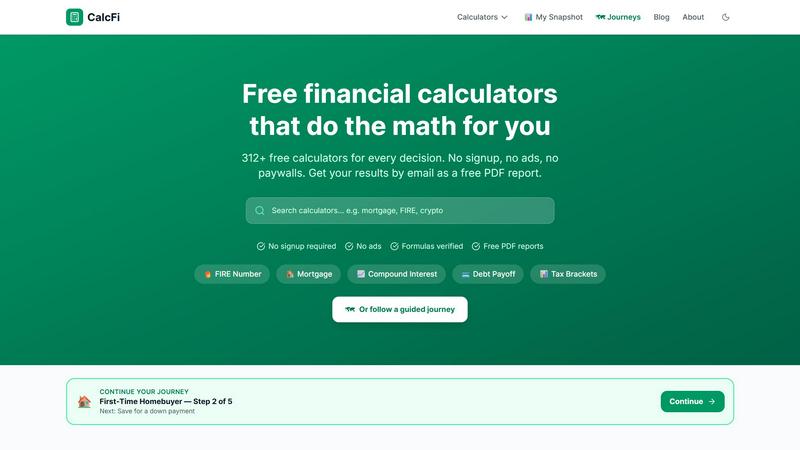
CalcFi offers 500+ free financial calculators for mortgages, retirement, taxes, and investing with instant results and no signup required.
Last updated: April 13, 2026

ConvertBankToExcel
ConvertBankToExcel instantly transforms PDF bank statements to Excel, CSV, and more with 99% accuracy in under 30.
Last updated: February 26, 2026
Visual Comparison
CalcFi
ConvertBankToExcel

Feature Comparison
CalcFi
Comprehensive Calculator Library
CalcFi boasts a collection of over 500 calculators across 16 distinct categories. Users can explore tools for personal finance, mortgages, investing, taxes, and more, ensuring they find the right solution for any financial question.
Real-Time Results
Each calculator provides instant feedback as users input their data. Results update in real-time, eliminating the need for a separate calculate button and allowing for a seamless and efficient user experience.
Detailed PDF Reports
Users can receive comprehensive PDF reports of their calculations via email. These reports include results, charts, and actionable steps, providing a valuable resource for financial planning and decision-making.
Guided Financial Journeys
For those unsure of where to start, CalcFi offers guided journeys through various financial topics. Users can follow step-by-step plans tailored to different financial goals, such as buying a home, getting out of debt, or planning for retirement.
ConvertBankToExcel
99%+ Accuracy Rate
ConvertBankToExcel guarantees an accuracy rate exceeding 99%, validated by CPAs. This high level of precision ensures that users can rely on the data extracted from their bank statements, reducing errors in financial reporting and analysis.
Fast Processing Time
The platform allows users to convert bank statements in under 30 seconds on average. This rapid processing speed means that accounting professionals can quickly access and organize their financial data, streamlining their workflow and enhancing productivity.
Comprehensive Export Formats
With support for 9 different export formats, ConvertBankToExcel accommodates various accounting needs. Users can export their data to QuickBooks (QBO/QFX/OFX/IIF), Excel, CSV, JSON, and XML, providing flexibility in how they manage and analyze financial information.
Automatic Bank Detection
ConvertBankToExcel features an automatic bank detection capability, simplifying the conversion process. Users no longer need to manually configure settings for different banks, as the platform intelligently identifies the bank and formats the data accordingly.
Use Cases
CalcFi
First-Time Homebuyer
First-time homebuyers can utilize CalcFi's calculators to assess affordability, compare rent vs. buy scenarios, and understand mortgage payments. This helps them make informed decisions about their housing options.
Retirement Planning
Individuals planning for retirement can use CalcFi to calculate their retirement savings needs, assess various investment strategies, and ensure their nest egg will last throughout their retirement years.
Debt Management
Users grappling with debt can leverage CalcFi's debt payoff planners to explore different strategies, such as the snowball or avalanche methods, to determine the most effective way to achieve financial freedom.
Investment Strategy Comparison
New and seasoned investors alike can benefit from CalcFi's tools to evaluate different investment approaches, analyze compound interest, and assess potential investment returns, enabling them to build a robust portfolio.
ConvertBankToExcel
Mortgage Applications
Professionals can prepare organized bank statements for mortgage lenders and approval processes. ConvertBankToExcel simplifies the documentation required for mortgage applications, ensuring that all financial data is accurate and readily available.
Tax Preparation
The platform is ideal for organizing financial statements for tax filing and IRS compliance. By converting bank statements quickly and accurately, users can ensure they meet all necessary tax requirements without the hassle of manual data entry.
Visa Applications
ConvertBankToExcel streamlines the process of converting bank statements for visa, immigration, and embassy financial requirements. Accurate financial documentation is crucial for visa applications, and this tool makes it easy to prepare the necessary statements.
Financial Analysis
Accounting professionals can leverage ConvertBankToExcel for comprehensive financial analysis. By converting and organizing bank statements into easily manageable formats, users can quickly analyze trends and patterns in their financial data.
Overview
About CalcFi
CalcFi is an extensive library of over 500 free financial calculators designed to assist users in making informed financial decisions. Covering a diverse array of topics such as retirement planning, taxes, mortgages, debt payoff, and investment strategies, CalcFi is tailored for individuals seeking clarity in their financial journeys. Each calculator is built to be fast and accurate, operating entirely client-side to ensure that user data remains private and secure.
What distinguishes CalcFi from other financial tools is its commitment to transparency and education. Every calculator is accompanied by a detailed guide and real-world scenarios, enabling users to grasp the underlying math behind their calculations. With no ads, no email capture, and no upselling, users can access clear, unbiased financial tools instantly. Whether users are planning for retirement, comparing purchasing options, or managing debt, CalcFi empowers them to visualize the real numbers and make confident financial choices.
About ConvertBankToExcel
ConvertBankToExcel is an innovative AI-powered platform designed to revolutionize bank statement conversion for accounting professionals. By leveraging advanced optical character recognition (OCR) technology, it automates the tedious task of data entry, allowing users to extract transaction details from PDF bank statements with remarkable efficiency. This tool is specifically tailored for CPAs, bookkeepers, and financial analysts who require quick and accurate data processing. With support for over 20 major banks in the United States and Canada, ConvertBankToExcel ensures a seamless transition of financial data into various formats such as Excel, CSV, and QuickBooks. The platform boasts a verified accuracy rate of over 99%, significantly reducing the time spent on manual data entry. With ConvertBankToExcel, professionals can process statements in under 30 seconds, making it an essential tool for those looking to enhance productivity and accuracy in their financial documentation.
Frequently Asked Questions
CalcFi FAQ
Are CalcFi calculators really free?
Yes, all calculators on CalcFi are completely free to use. There are no hidden fees or subscription costs involved.
How accurate are the results?
CalcFi calculators are designed to provide fast and accurate results based on verified formulas. Users can trust the calculations for their financial planning.
Can I get my results by email?
Absolutely! Users can enter their email address to receive detailed PDF reports of their results, including charts and actionable insights.
Do you store my financial data?
No, CalcFi prioritizes user privacy. All calculations are performed client-side, meaning none of your data is stored or transmitted to external servers.
ConvertBankToExcel FAQ
How does ConvertBankToExcel ensure data security?
ConvertBankToExcel employs bank-grade encryption to protect user data during the conversion process. Additionally, files are automatically deleted after 24 hours to ensure privacy and security.
What types of documents can I convert using ConvertBankToExcel?
You can convert PDF bank statements, including both digital and scanned formats, into various output formats such as Excel, CSV, and QuickBooks-compatible files.
Is there a limit to how many pages I can convert for free?
Yes, the free tier of ConvertBankToExcel allows you to convert up to 7 pages daily without requiring a credit card. This provides a risk-free opportunity to test the service.
Can I process statements from multiple banks simultaneously?
Yes, ConvertBankToExcel supports batch processing, allowing you to convert multiple bank statements at once. This feature significantly reduces processing time and enhances efficiency.
Alternatives
CalcFi Alternatives
CalcFi is a robust platform offering a suite of over 160 free financial calculators designed to assist users with various financial decisions, including retirement planning, tax optimization, and debt management. As an invaluable resource in the Business & Finance category, it prioritizes user education and transparency by providing detailed guides alongside each calculator. Users often seek alternatives to CalcFi for reasons such as specific features, pricing structures, or platform compatibility. When selecting an alternative, it's essential to consider the range of tools offered, the clarity of educational content, and the overall user experience, ensuring it aligns with personal financial needs and preferences.
ConvertBankToExcel Alternatives
ConvertBankToExcel is an AI-powered bank statement conversion platform designed specifically for accounting professionals. This tool streamlines the process of converting PDF bank statements into usable formats like Excel, CSV, and QuickBooks, enhancing productivity and accuracy for accountants and bookkeepers. Users often seek alternatives due to factors such as pricing, specific feature requirements, or compatibility with their existing systems. When choosing an alternative, it’s essential to consider the accuracy of data extraction, processing speed, supported file formats, and security measures in place to protect sensitive financial information.