BlitzCut vs Sora 3 Video Generator

Side-by-side comparison to help you choose the right AI tool.

BlitzCut is an AI video editor that quickly removes silence and adds captions, turning raw clips into engaging posts in.

Last updated: February 26, 2026

Sora 3 Video Generator logo

Sora 3 Video Generator

Sora 3 transforms imagination into stunning, studio-quality videos in seconds with realistic motion and cinematic detail.

Last updated: March 11, 2026

Visual Comparison

BlitzCut

BlitzCut screenshot

Sora 3 Video Generator

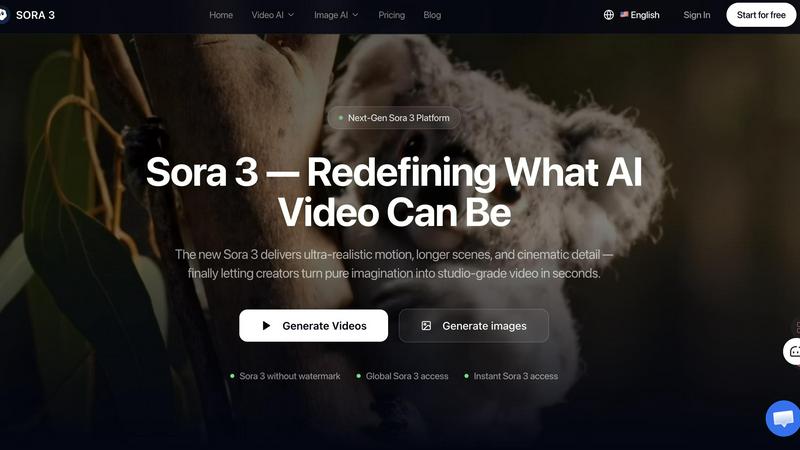
Sora 3 Video Generator screenshot

Feature Comparison

BlitzCut

Automatic Silence Removal

BlitzCut utilizes advanced AI technology to automatically detect and remove unwanted pauses in video clips. This feature significantly reduces editing time, allowing creators to focus on the content rather than tedious manual cutting. In just 30 seconds, the app can process a video to eliminate silence, ensuring a more engaging final product.

AI Captions

With over 95% accuracy, BlitzCut's AI captioning feature generates styled captions that enhance viewer engagement. This not only saves time but also ensures that content is accessible to a wider audience, including those who watch videos without sound. The stylish captions can be customized to fit the creator's brand, making them a vital tool for social media success.

Text-Based Editing

BlitzCut introduces a unique text-based editing feature that allows users to edit their videos by simply deleting sentences from the transcription. This intuitive approach makes it easier for creators to refine their content quickly and efficiently, as they can see the text representation of their video and make adjustments in real time.

Mobile-First Design

BlitzCut is designed with a mobile-first approach, meaning it is fully optimized for iPhone, iPad, and Mac devices. This ensures that creators can edit videos anytime and anywhere, making it ideal for those who need to produce content on the go. The seamless integration with mobile devices allows for quick importing, editing, and exporting.

Sora 3 Video Generator

Film-Grade Quality

Sora 3 delivers studio-level visuals, ensuring every video maintains a high standard without artifacts. This feature is crucial for creating impactful marketing materials and brand stories that resonate with audiences.

Smart Camera Control

With Sora 3's smart camera control, users can easily manipulate camera angles and movements to enhance the storytelling aspect of their videos. This feature allows for dynamic shots that keep viewers engaged and interested.

Extended Duration

Sora 3 supports longer video outputs, allowing creators to craft more elaborate narratives without the constraints typical of other platforms. This feature is ideal for storytelling that requires more time to develop.

Integrated Audio

Sora 3 includes integrated audio capabilities, enabling users to add soundtracks and sound effects seamlessly within their videos. This feature enhances the overall production quality and emotional impact of the content.

Use Cases

BlitzCut

Social Media Content Creation

BlitzCut is perfect for social media influencers and marketers who need to produce high-quality video content quickly. By automating the editing process, users can maintain a consistent posting schedule without sacrificing quality, ensuring they stay relevant in a fast-paced digital landscape.

Vlog Editing

Vloggers can significantly streamline their editing workflow using BlitzCut. The automatic silence removal and captioning features help to create engaging vlogs without the lengthy editing sessions typically required, allowing creators to focus on storytelling and creativity.

Promotional Videos

Businesses looking to create promotional content can leverage BlitzCut's quick editing capabilities. The app allows for the rapid production of engaging videos that capture the essence of a brand while ensuring that marketing campaigns can be executed swiftly.

Educational Content

Educators and trainers can benefit from BlitzCut by creating instructional videos that are concise and engaging. The text-based editing feature allows for quick updates to content, ensuring that learners receive up-to-date information in a timely manner.

Sora 3 Video Generator

Product Launch Videos

Sora 3 can be utilized to create captivating product launch videos that highlight features and benefits, capturing audience attention and driving engagement.

Brand Storytelling

Businesses can leverage Sora 3 to narrate their brand stories through compelling visual content, helping to connect emotionally with customers and build brand loyalty.

Advertising Campaigns

Marketers can generate high-quality ads using Sora 3 to promote their products or services effectively, ensuring that the visual elements align with their campaign objectives.

Social Media Content

Content creators can harness Sora 3 to produce eye-catching videos for social media platforms, making it easier to stand out in crowded feeds and attract more followers.

Overview

About BlitzCut

BlitzCut is a revolutionary AI-powered video editing tool designed specifically for content creators, particularly those focused on social media platforms like TikTok, Instagram, and YouTube Shorts. Its mission is to make professional video editing accessible to everyone by prioritizing speed over an overwhelming array of features. With BlitzCut, creators can transform their raw video clips into polished, post-ready content in under two minutes. The application is mobile-first, meaning it is optimized for use on iPhones, iPads, and Macs, allowing creators to edit videos on the go. By automating tedious tasks like silence removal and captioning, BlitzCut empowers creators to focus on their craft rather than getting bogged down by the editing process. With its user-friendly interface and robust AI capabilities, BlitzCut is a game-changer for anyone looking to streamline their video production workflow.

About Sora 3 Video Generator

Sora 3 Video Generator is an advanced AI-driven platform designed for creators, brands, and advertisers seeking to produce high-quality video content quickly and efficiently. This next-generation tool allows users to transform their ideas into visually stunning videos in just a few minutes. Sora 3 leverages cutting-edge technology to deliver ultra-realistic motion, extended scene durations, and cinematic details, making it ideal for both marketing campaigns and creative projects. Whether you are a small business owner looking to enhance your brand's visual storytelling or a content creator aiming to produce engaging videos without the need for extensive technical skills, Sora 3 offers the perfect solution. With features like smart camera control and integrated audio, you can create professional-grade videos that captivate audiences and effectively convey your message.

Frequently Asked Questions

BlitzCut FAQ

How does BlitzCut remove silence from videos?

BlitzCut employs advanced AI algorithms to detect silent gaps in video recordings and automatically removes them, significantly reducing editing time.

Can I use BlitzCut on devices other than iPhone and Mac?

Currently, BlitzCut is optimized for iPhone, iPad, and Mac devices. Future updates may expand compatibility to other platforms.

Do I need to create an account to use BlitzCut?

No, BlitzCut is designed for ease of use, allowing users to download and start editing without the need for account creation.

How accurate are the AI-generated captions?

BlitzCut boasts over 95% accuracy in its AI-generated captions, making them reliable and effective for engaging audiences across social media platforms.

Sora 3 Video Generator FAQ

What sets Sora 3 apart from other video generation platforms?

Sora 3 stands out due to its film-grade quality, smart camera control, and ability to produce longer scenes, all while maintaining character consistency and offering integrated audio.

How does Sora 3 maintain character consistency across scenes?

Sora 3 utilizes advanced algorithms that ensure characters remain visually and contextually consistent throughout different scenes, enhancing storytelling continuity.

Can Sora 3 generate videos longer than 10 seconds?

Yes, Sora 3 allows users to create videos of longer durations, making it suitable for more complex narratives and promotional content that requires extended engagement.

Are Sora 3 videos suitable for commercial advertising?

Absolutely, Sora 3 videos are designed for commercial use, providing high-quality outputs that meet the standards required for advertising and marketing campaigns.

Alternatives

BlitzCut Alternatives

BlitzCut is an AI-powered video editor designed to simplify the video editing process for content creators. It excels in automating tedious tasks, such as removing silences and adding captions, making it ideal for social media content. Users often seek alternatives due to factors like pricing, specific feature sets, or compatibility with different platforms. When choosing an alternative, consider aspects such as ease of use, editing speed, and the ability to cater to your specific content needs. --- [{"question": "What is BlitzCut?", "answer": "BlitzCut is an AI-powered video editor that automates tasks like silence removal and captioning, allowing for quick video creation."},{"question": "Who is BlitzCut for?", "answer": "BlitzCut is designed for content creators looking to streamline their video editing process and produce engaging social media content swiftly."},{"question": "Is BlitzCut free?", "answer": "The provided content does not specify if BlitzCut is free; users should check the official website for pricing details."}]

Sora 3 Video Generator Alternatives

Sora 3 Video Generator is a cutting-edge tool in the video creation category, designed to produce ultra-realistic, longer scenes with cinematic detail. This next-generation AI video generator caters to a wide range of users, including creators, brands, and advertisers, all seeking to enhance their visual storytelling. Users often explore alternatives due to various reasons such as pricing constraints, specific feature sets, or compatibility with different platforms. When choosing an alternative, it's crucial to consider factors like ease of use, quality of output, flexibility in scene control, and overall value for money. By assessing these elements, users can find a suitable video generator that meets their unique needs.

Continue exploring