
BarBrain vs SupaSidebar
Side-by-side comparison to help you choose the right AI tool.

BarBrain
BarBrain streamlines inventory management for hospitality, reducing counting time by over 75% and ensuring accurate, reliable results.
Last updated: April 4, 2026

SupaSidebar
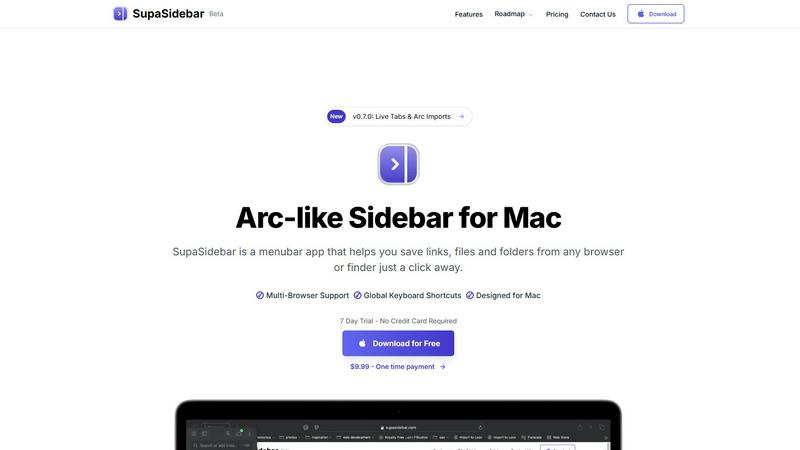
SupaSidebar is a Mac app that saves and organizes your links, files, and folders for instant access with keyboard.
Last updated: February 28, 2026
Visual Comparison
BarBrain

SupaSidebar
Feature Comparison
BarBrain
Streamlined Inventory Counting
BarBrain drastically reduces inventory counting time by allowing users to perform counts in minutes instead of hours. This efficiency helps free up valuable time for staff to focus on customer service and operational excellence.
Real-Time Waste Tracking
The software flags waste and shrinkage in real time, providing users with immediate insights into inventory loss. This feature helps operators maintain tighter control over their stock and improve overall profitability.
Comprehensive Product Catalog
With access to over 30,000 products, including spirits, wines, food items, and supplies, BarBrain allows for a complete inventory overview. This extensive catalog simplifies the counting process and ensures accurate record-keeping.
Automatic Inventory Reports
After each inventory count, BarBrain generates a detailed and automated inventory report. This eliminates the need for manual data entry and reduces errors, ensuring that users have reliable numbers at their fingertips.
SupaSidebar
Universal Command Center
SupaSidebar serves as a universal command center where users can access all their essential files, folders, and browser tabs without switching between multiple applications. This feature streamlines workflow and enhances productivity by keeping everything organized in one easily accessible location.
Global Keyboard Shortcuts
With global keyboard shortcuts, users can quickly save links or copy URLs directly to the sidebar using simple commands. Pressing CMD CTRL S saves the current page, while CMD CTRL C copies the link, allowing for a seamless and efficient way to gather resources without interrupting your workflow.
Recents Tracking
The Recents feature automatically tracks your activity, showing every website you've visited in the last 48 hours. This functionality ensures that you can quickly find and revisit important resources without the hassle of remembering specific URLs or searching through browser history.
Fast Search Functionality
SupaSidebar includes a powerful search function that lets users find any file, folder, website, or app instantly. By pressing CMD CTRL K and typing your query, you can locate what you need without navigating through multiple menus or windows, significantly speeding up your workflow.
Use Cases
BarBrain
Single Establishment Management
For independent bar and restaurant owners, BarBrain offers a streamlined inventory solution that simplifies stock management, allowing them to focus on enhancing customer experiences while keeping costs in check.
Multi-Location Oversight
For operators managing multiple venues, BarBrain provides the tools to maintain uniform inventory practices across all locations. This centralized approach enables better oversight and consistency in stock management.
Hotel F&B Inventory
Hotels can leverage BarBrain to conduct comprehensive inventory checks across various food and beverage departments. This ensures that all F&B products are accounted for, optimizing supply chain management and reducing waste.
Efficient Staff Training
BarBrain's user-friendly interface minimizes the need for extensive training, enabling new staff to quickly adapt to the inventory process. This ensures that businesses can maintain efficiency even with staff turnover.
SupaSidebar
For Students
Students can use SupaSidebar to keep track of research materials, important links, and study resources in one place. This organization enhances focus and ensures that they have quick access to all the materials needed for their academic success.
For Professionals
Professionals who juggle multiple projects will find SupaSidebar invaluable. It allows them to pin frequently used files and links, making it easy to switch between tasks without losing track of important resources or information.
For Researchers
Researchers can benefit from the Recents feature, which helps them revisit sources and articles they've recently accessed. This capability streamlines the research process and minimizes time wasted searching for previously viewed content.
For Content Creators
Content creators can utilize SupaSidebar to organize their favorite tools, websites, and research materials. By keeping everything accessible through a single interface, they can maintain their creative flow and focus on producing high-quality content.
Overview
About BarBrain
BarBrain is an innovative inventory management solution specifically designed for the hospitality industry. It addresses the common challenges faced by bar and restaurant owners, such as time-consuming stock counts and inaccurate data due to generic software that does not cater to the unique needs of food and beverage operations. With BarBrain, operators can efficiently manage their inventory, reducing the time spent on counts by over 75 percent, which translates to significant cost savings. The platform provides real-time insights into waste and shrinkage, ensuring that businesses have a clear understanding of their margins. Whether you manage a single bar or a multi-location restaurant, BarBrain’s intuitive design allows for seamless operation without the need for extensive training. This powerful tool helps hospitality operators take control of their inventory, maximizing profitability and minimizing losses.
About SupaSidebar
SupaSidebar is an elegantly designed menubar application for macOS that enhances digital workflow by providing a central hub for all your important links, files, folders, and browser tabs. Inspired by the sleek aesthetics of Arc, it is perfect for professionals, students, researchers, and multitaskers who need to manage various applications and browsers without the clutter typically associated with traditional workflows. The core value proposition of SupaSidebar is its ability to eliminate inefficiencies, allowing users to access everything they need with just a keyboard shortcut. No more searching through endless bookmarks or tabs; SupaSidebar organizes your digital life into a distraction-free sidebar. Compatible with all major browsers, including Safari, Chrome, Firefox, Arc, and Brave, it keeps your data private as everything is stored locally on your Mac. With features like a global command panel and live tab overview, SupaSidebar transforms how you interact with your Mac, making browsing faster, more efficient, and focused on what truly matters.
Frequently Asked Questions
BarBrain FAQ
How does BarBrain improve inventory accuracy?
BarBrain enhances accuracy by eliminating manual data entry and providing real-time tracking of stock levels. This results in reliable inventory figures without the guesswork.
Can BarBrain be used on multiple devices?
Yes, BarBrain allows for simultaneous counting on multiple iOS and Android devices, enabling teams to work together easily and efficiently during inventory tasks.
Is there support available for setting up BarBrain?
Absolutely. BarBrain offers assistance during the setup process, ensuring that users can seamlessly transition to the digital inventory system with expert guidance.
What types of establishments benefit from BarBrain?
BarBrain is designed for various hospitality sectors, including bars, restaurants, nightclubs, and hotels, making it a versatile solution for any food and beverage operation.
SupaSidebar FAQ
Is SupaSidebar a browser extension?
No, SupaSidebar is a standalone menubar application designed for macOS. It integrates with multiple browsers but operates independently, ensuring a seamless experience without being limited to a single browser.
Which browsers does SupaSidebar work with?
SupaSidebar is compatible with all major browsers, including Safari, Chrome, Firefox, Arc, and Brave. This flexibility allows users to maintain their preferred browsing environment while enjoying the benefits of the sidebar application.
What macOS version do I need?
SupaSidebar requires macOS version 13 or later to ensure optimal performance and compatibility with the latest features and updates.
Where is my data stored?
All data associated with SupaSidebar is stored locally on your Mac, ensuring your privacy and security. No information is sent to external servers, allowing you to manage your resources safely and privately.
Alternatives
BarBrain Alternatives
BarBrain is an innovative inventory management solution specifically designed for the hospitality industry. It addresses the challenges bar and restaurant owners face when counting bottles, managing stock, and ensuring accurate financial tracking. Unlike generic warehouse software, BarBrain understands the unique needs of hospitality operations, streamlining the process to save time and reduce inaccuracies. Users often seek alternatives to BarBrain for various reasons, including pricing concerns, specific feature requirements, or compatibility with existing systems. When choosing an alternative, consider factors such as ease of use, industry-specific features, integration capabilities, and customer support to ensure the solution meets your operational needs.
SupaSidebar Alternatives
SupaSidebar is an innovative Arc-style sidebar application designed for macOS, serving as a centralized hub for managing links, files, and folders. It falls under the productivity and management category, catering to professionals, students, and anyone who juggles multiple tasks across different applications and browsers. Users frequently seek alternatives to SupaSidebar for various reasons, including pricing, feature sets, and compatibility with different platforms. Finding the right alternative involves evaluating similar functionalities, ease of use, and how well an option integrates into your existing workflow. When choosing an alternative, it’s essential to consider factors such as the user interface, the ability to handle multiple browsers, and how effectively it helps streamline your digital organization. Additionally, look for features that enhance productivity, like quick access to resources, customizable settings, and privacy assurances. These elements will ensure that the alternative meets your specific needs while enhancing your overall experience.