
audiovideogenerator vs Mp3ToMidi
Side-by-side comparison to help you choose the right AI tool.

audiovideogenerator
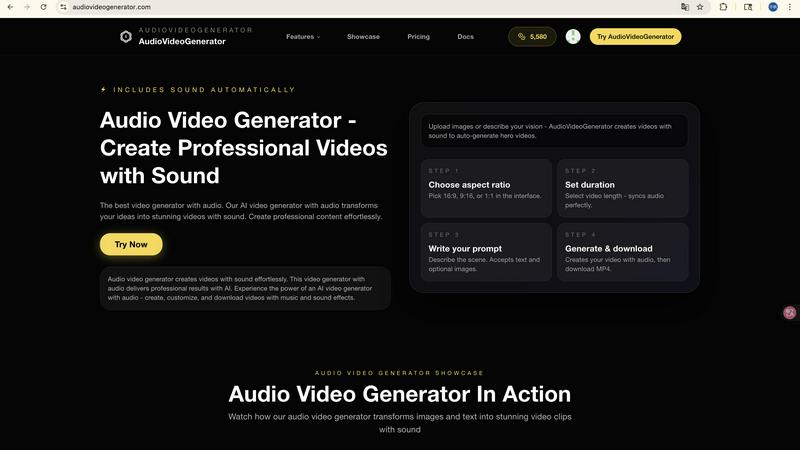
Effortlessly create stunning videos with synchronized audio using our AI-powered video generator for all your content...

Mp3ToMidi
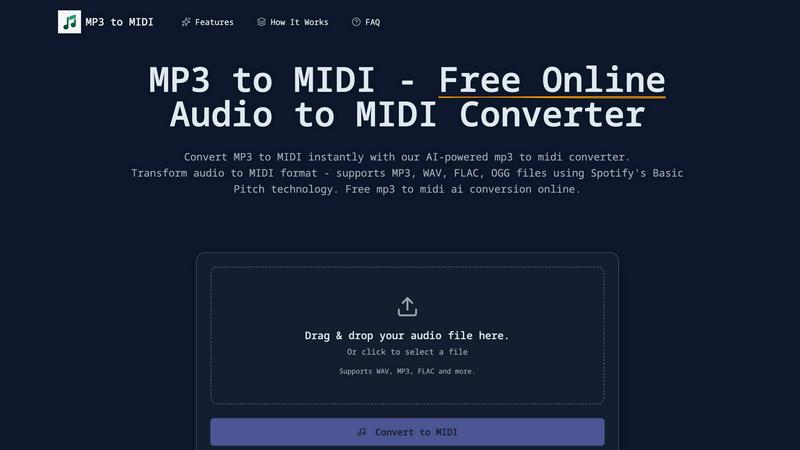
Convert MP3, WAV, FLAC, and OGG files to MIDI instantly and accurately with our free AI-powered converter.
Last updated: March 4, 2026
Visual Comparison
audiovideogenerator
Mp3ToMidi
Feature Comparison
audiovideogenerator
Text to Video with Audio
Transform your written content into compelling videos effortlessly. This feature uses AI to generate videos directly from text descriptions, automatically incorporating background music and sound effects to enhance the narrative.
Image to Video with Audio
Convert static images into dynamic video content. This feature allows users to create engaging videos from individual images, enriching them with synchronized audio that includes background music and sound effects, elevating the overall viewing experience.
Automatic Audio Generation
Eliminate the hassle of manual audio editing. This feature automatically adds background music, sound effects, and ambient audio to your videos, ensuring a polished and professional sound quality that perfectly complements the visuals.
Support for Multiple Video Styles
Whether you need a marketing video, educational content, or social media posts, AudioVideoGenerator accommodates various video styles. This versatility ensures that all types of content can be produced efficiently, catering to the unique needs of different audiences and platforms.
Mp3ToMidi
AI-Powered Technology
Mp3ToMidi employs advanced AI technology based on Spotify's Basic Pitch to deliver high-precision audio-to-MIDI conversion. This feature ensures accurate detection of notes, rhythms, and instrumental nuances from various audio files, enhancing the quality of the output.
Multi-Format Audio Support
The converter supports a wide range of audio formats, including MP3, WAV, FLAC, and OGG. This flexibility allows users to upload virtually any audio file and convert it to MIDI instantly, catering to different needs and preferences.
Instant MIDI Download
After processing, users can download their converted MIDI files immediately. This feature eliminates waiting times, enabling users to import their MIDI files into their favorite DAWs like Ableton, FL Studio, and Logic Pro without any hassle.
Accurate Note Detection
Mp3ToMidi is known for its industry-leading accuracy in note detection, capturing every detail of chords and melodies from audio recordings. This precision ensures that musicians can work with reliable MIDI data for their projects.
Use Cases
audiovideogenerator
Social Media Content Creation
Create engaging videos tailored for platforms like Instagram, TikTok, and YouTube. The tool optimizes videos for perfect aspect ratios and audio quality, making it easy to capture audience attention and drive engagement across social media channels.
Marketing Video Production
Generate impactful promotional videos effortlessly. Utilize the AI capabilities to produce advertisements and product showcases that integrate effective background music and sound effects, enhancing the overall appeal and effectiveness of your marketing campaigns.
Educational Video Development
Transform traditional learning materials into interactive and engaging videos. Ideal for online courses and tutorials, AudioVideoGenerator enriches educational content with relevant audio, making it easier for learners to absorb information.
Event Recap Videos
Capture the essence of events through highlight reels. This use case allows you to create memorable recap videos featuring dynamic audio that reflects the excitement and emotion of the event, making it perfect for sharing with attendees and on social media.
Mp3ToMidi
Music Production
Producers can utilize Mp3ToMidi to convert audio samples into MIDI tracks, making it easier to manipulate and remix melodies in their DAWs. This streamlines the creative process and enhances workflow efficiency.
Educational Purposes
Music educators can use the converter to create sheet music from audio recordings. This allows students to practice a wider repertoire, providing more opportunities for learning and skill development.
Composition and Arranging
Composers can quickly convert their recorded ideas into MIDI format, enabling them to arrange and orchestrate their compositions effectively. This feature is particularly useful for testing different arrangements and instrumentations.
Sampling and Remixing
DJs and remix artists can extract melodies and harmonies from existing tracks, allowing them to remix songs and create new compositions. This functionality is essential for anyone involved in music production and remix culture.
Overview
About audiovideogenerator
AudioVideoGenerator is an innovative AI-powered platform that simplifies the process of creating high-quality videos with integrated audio. Designed for a diverse audience, including content creators, educators, marketers, and hobbyists, this tool empowers users to generate professional-grade videos effortlessly. By utilizing advanced AI technologies, AudioVideoGenerator allows you to add background music, voiceovers, and sound effects that are automatically synchronized with your visuals. The platform supports various video styles, making it ideal for promotional clips, social media content, tutorials, and storytelling. With a focus on speed, creativity, and user-friendliness, AudioVideoGenerator helps you transform your ideas into captivating videos in minutes, enhancing viewer engagement and saving valuable time. Experience the future of video creation with AI and ensure every video you produce is not only visually appealing but also sonically engaging.
About Mp3ToMidi
Mp3ToMidi is a free online audio-to-MIDI converter that harnesses the power of AI to instantly transform audio files into editable MIDI tracks. This tool is designed for musicians, producers, composers, and students who need quick and accurate music transcription. Supporting multiple audio formats including MP3, WAV, FLAC, and OGG, Mp3ToMidi utilizes advanced AI technology powered by Spotify's Basic Pitch to analyze melodies, harmonies, and rhythms. Users can upload their audio files effortlessly, and within seconds, download high-quality MIDI files ready for editing in any Digital Audio Workstation (DAW). With no software installation required, Mp3ToMidi simplifies the process of converting audio into creative possibilities, making it an invaluable resource for anyone working with music.
Frequently Asked Questions
audiovideogenerator FAQ
How does AudioVideoGenerator work?
AudioVideoGenerator employs advanced AI algorithms to generate videos from text or images. Users can input their content, and the platform automatically produces videos with synchronized audio, streamlining the creation process.
What types of audio can I add to my videos?
You can incorporate background music, voiceovers, and sound effects into your videos. The platform automatically synchronizes these audio elements with your visuals for a cohesive viewing experience.
Is there a limit to the length of videos I can create?
While the platform supports various video lengths depending on the selected AI model, most videos can range from 1 to 8 minutes. Choose the model that best fits your project needs.
Can I use AudioVideoGenerator for commercial purposes?
Yes, AudioVideoGenerator is suitable for commercial use. You can create marketing videos, promotional content, and other commercial projects using the tool, making it a versatile choice for businesses.
Mp3ToMidi FAQ
How does Mp3ToMidi work?
Mp3ToMidi works by analyzing your audio file using AI technology from Spotify's Basic Pitch. It detects notes, rhythms, and instruments and converts them into a MIDI file that you can download and edit.
What audio formats are supported for conversion?
Mp3ToMidi supports multiple audio formats including MP3, WAV, FLAC, and OGG. This broad compatibility ensures you can upload a variety of audio files for conversion.
Is there a limit to the size of audio files I can upload?
While specific file size limits may vary, Mp3ToMidi is designed to handle typical audio file sizes efficiently. However, for optimal performance, it's recommended to keep files within a reasonable size range.
Do I need to install any software to use Mp3ToMidi?
No, Mp3ToMidi is a web-based platform, meaning you can access it directly through your browser without any software installation. Just upload your audio file and start converting.