
AI Formatter vs Nabbed
Side-by-side comparison to help you choose the right AI tool.

AI Formatter instantly creates professional documents from your raw text or files.
Last updated: March 1, 2026

Nabbed is your career CRM that helps sales professionals track jobs, contacts, and AI tools to manage their job search like a sales pipeline.
Last updated: April 13, 2026
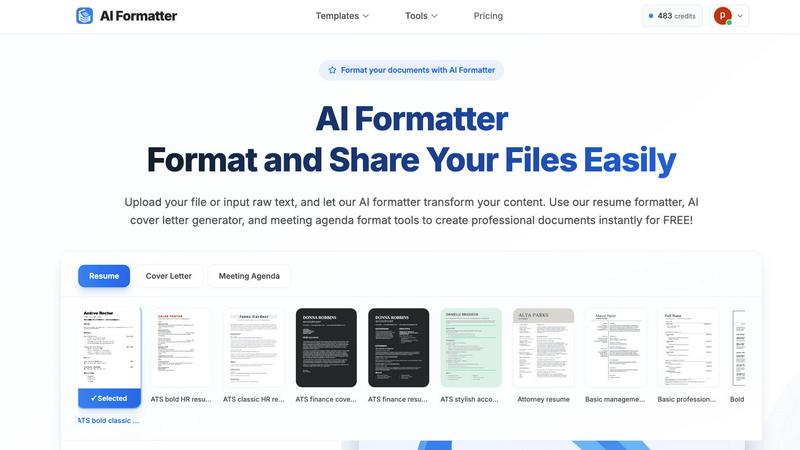
Visual Comparison
AI Formatter
Nabbed

Feature Comparison
AI Formatter
AI-Powered Formatting Engine
The core AI engine intelligently analyzes uploaded text or documents, understanding context and content hierarchy. It then automatically applies perfect professional formatting, aligning text, adjusting fonts, creating consistent spacing, and structuring layouts according to the chosen template, all without manual intervention.
Extensive Professional Template Library
Access over 162 ATS-optimized and professionally designed templates for various document types. The library includes modern resume formats, compelling cover letter designs, structured meeting agendas, polished invoices, and business reports, providing a perfect starting point for any professional need.
Real-Time Editing & Customization
After the AI formats your document, take full control with the built-in intuitive editor. Make adjustments to text, fonts, colors, and layout in real-time. This allows for personalization and fine-tuning to ensure the final document meets your exact specifications before sharing or downloading.
Multi-Format Export & Sharing
Download your perfectly formatted document in the format you need, including Microsoft Word (.docx), PDF, and plain text. The platform also facilitates easy sharing directly from the editor, enabling you to send professional documents to clients, recruiters, or team members instantly and securely.
Nabbed
Dual Sales Pipelines
Manage your entire search with two interconnected Kanban boards: one for job applications and one for networking contacts. Drag and drop roles through stages like Outreach, Discovery, and Closed Won, while simultaneously tracking your relationship pipeline with potential referrals and hiring managers. This provides clear momentum tracking and velocity analytics for your career move.
AI Career Suite
Access four integrated AI tools that accelerate the most time-consuming parts of a job search. Generate tailored cover letters, optimize your resume for specific postings, prepare for interviews with simulated coaching, and compose professional outreach emails. The AI is trained to write in your tone, saving hours of manual work.
Chrome Extension with Autofill
The free browser extension is the engine of your search. With one click, save jobs from any site to your pipeline. It then autofills application fields across 25+ ATS platforms like Greenhouse and Workday, using your stored profile. It also captures contact details from LinkedIn and enables stealth application mode.
Company Intelligence Dashboard
Get instant, enriched profiles on every company you target. The dashboard automatically displays key data like recent funding rounds, employee headcount, tech stack, Glassdoor ratings, and open positions. This eliminates manual research, allowing you to quickly assess company fit and stability.
Use Cases
AI Formatter
Job Seekers Optimizing Application Materials
Job applicants can upload their existing resume or raw career history. AI Formatter's resume formatter and AI cover letter generator transform this content into ATS-friendly, visually striking documents designed to pass automated screenings and impress hiring managers, significantly improving interview callback rates.
Professionals Standardizing Business Documents
Business professionals, freelancers, and teams use the tool to quickly create consistent, on-brand documents. From transforming meeting notes into a formal agenda format to generating polished invoices and client reports, it ensures all external and internal communications maintain a high standard of professionalism.
Academics and Students Formatting Papers
Students, researchers, and academics can input draft text or upload documents to adhere to specific formatting guidelines for essays, research papers, or thesis documents. The AI applies consistent citation styles, margins, headings, and structure, saving hours of manual formatting work.
Career Changers Revamping Their Profile
Individuals transitioning to a new industry can overhaul their existing documents to align with new standards. By using relevant templates and the AI's formatting intelligence, they can effectively rebrand their experience into a format that resonates with recruiters in their target field.
Nabbed
Strategic Career Transition for Sales Leaders
A VP of Sales planning a move to a larger company uses Nabbed to identify and track 50 target accounts. They use the company intelligence to prioritize well-funded, growing startups, and the contact CRM to map warm introductions through their network, managing all outreach sequences within the platform.
Active Job Seeker Maximizing Efficiency
An Account Executive actively applying for roles uses the Chrome extension to one-click save 10 jobs per day and autofill all applications in seconds. They use the AI tools to tailor each resume and cover letter, and rely on email open tracking to prioritize follow-ups with engaged recruiters.
Passive Candidate Monitoring the Market
A content professional happy in their role uses Nabbed to maintain a "always-on" pipeline. They save interesting roles occasionally and use hiring signal alerts to be notified when dream companies start expanding their team, allowing them to strike at the perfect moment with a prepared application.
Networking-Focused Role Acquisition
A professional seeking a role through referrals rather than cold applications uses the Contact CRM exclusively. They log every coffee chat, track follow-up dates, and move contacts through a dedicated networking pipeline from "Intro" to "Referral Secured," ensuring no connection falls through the cracks.
Overview
About AI Formatter
AI Formatter is a cloud-based, AI-powered platform designed to eliminate the tedious and time-consuming task of manual document formatting. It transforms unformatted text and raw documents into polished, professional files in seconds, saving users an average of over two hours per document. The tool's core value is its ability to instantly apply industry-standard formatting and structural best practices, ensuring every document is not only visually appealing but also functionally optimized for its purpose. This is especially critical for job seekers, as AI Formatter's templates are engineered for a 95%+ pass rate on Applicant Tracking Systems (ATS), dramatically increasing the chances of a resume being seen by a human recruiter. Users simply upload existing files (Word, PDF, TXT) or input raw text, and the AI intelligently processes the content. With a vast library of over 100 professional templates for resumes, cover letters, meeting agendas, invoices, and more, it serves a wide audience including professionals standardizing business documents, academics, teams boosting productivity, and anyone in a career transition. The platform completes the workflow with a real-time editor for fine-tuning and secure export in multiple formats, delivering a complete, efficient solution for creating impressive and effective documents.
About Nabbed
Nabbed is the first Career CRM, built specifically for sales and revenue professionals to manage their job search with the same precision they manage their sales pipeline. It transforms a chaotic, reactive job hunt into a strategic, data-driven process. The platform provides a centralized dashboard to track job applications in a visual pipeline, build a contact CRM for networking, and gain AI-powered intelligence on target companies. Its powerful Chrome extension automates the application process across 60+ ATS platforms and enables email tracking to see when recruiters open your messages. Nabbed is designed for those who understand that finding a top role is a sales process: it involves targeting the right accounts (companies), nurturing leads (contacts), and moving opportunities (job applications) through a pipeline to a successful close. With a free tier available and a Core plan starting at $19/month, it provides enterprise-grade search tools for individual professionals.
Frequently Asked Questions
AI Formatter FAQ
What file formats can I upload to AI Formatter?
AI Formatter supports a range of common file formats for upload, including PDF, DOC, DOCX, and TXT files. This allows you to start from an existing document you already have. There is a maximum file size limit of 10MB per upload.
How does AI Formatter help with ATS compatibility?
The platform's resume and cover letter templates are specifically designed and tested for Applicant Tracking System compatibility. They use clean layouts, standard headings, and correct parsing structures that ATS software can read accurately, leading to a documented 95%+ pass rate.
Can I edit the document after the AI formats it?
Yes, absolutely. Once the AI processes your content into the selected template, it opens in a full-featured, real-time editor. You can freely customize all text, adjust formatting, rearrange sections, and personalize the design to your liking before finalizing your document.
Is there a free version of AI Formatter?
Yes, you can start using AI Formatter for free. The platform offers free access to its core formatting tools, including the ability to upload files, use AI formatting, and access templates to create professional documents instantly without an initial cost.
Nabbed FAQ
How does the email tracking work?
Nabbed adds a secure, invisible tracking pixel to the emails you send through its integrated Gmail sync or templates. When the recipient opens the email, the pixel loads, and you receive an instant notification in your Nabbed dashboard. This provides real-time intent signals without the recipient knowing.
What is the Job Fit Score?
The Job Fit Score is an AI-powered analysis that matches your profile (resume, skills, experience) against a specific job listing. It provides a percentage score and highlights key matches and gaps, helping you understand your competitiveness and what to emphasize in your application before you apply.
Which job boards does Nabbed search?
Nabbed aggregates listings from 11 major job sources in one search, including Google Jobs, Indeed, LinkedIn, Glassdoor, AngelList, and company career pages. This saves you from having to visit each site individually, ensuring you see all relevant opportunities in one place.
Is my data safe and private?
Yes. Nabbed uses enterprise-grade security protocols to protect your data. You control your information, and it is never sold. The platform uses cookies and similar technologies for core functionality, analytics, and to improve your experience, as detailed in its Privacy Policy and Cookie Policy.
Alternatives
AI Formatter Alternatives
AI Formatter is a cloud-based productivity tool that uses artificial intelligence to instantly format raw text and documents into professional, polished files. It automates the tedious process of applying structure and style, saving users significant time and effort. Users may seek alternatives for various reasons, such as budget constraints, a need for different features, or a preference for a different platform or workflow. Some may require more advanced design control, while others prioritize simplicity or a one-time purchase over a subscription model. When evaluating alternatives, consider your primary needs. Key factors include the quality and range of templates, the level of automation versus manual control, export options, security of your data, and overall value for the price. The right tool should efficiently solve your specific document formatting challenges.
Nabbed Alternatives
Nabbed is a specialized productivity tool designed as a CRM for job seekers and sales professionals managing their career search. It combines job tracking, contact management, and AI-powered intelligence into a single platform. Users may seek alternatives for various reasons, such as budget constraints, a need for different feature sets, or a preference for a platform that integrates with their existing workflow. Some may require a simpler tool or one focused on a specific aspect of the job search process. When evaluating alternatives, consider your primary needs: Is it robust application tracking, deep company research, or seamless application autofill? Also, assess pricing models, platform compatibility, and the quality of integrations with email and job boards to find the best fit.