
AI Formatter vs AIWriteBook
Side-by-side comparison to help you choose the right AI tool.
AI Formatter instantly creates professional documents from your raw text or files.
Last updated: March 1, 2026

AIWriteBook
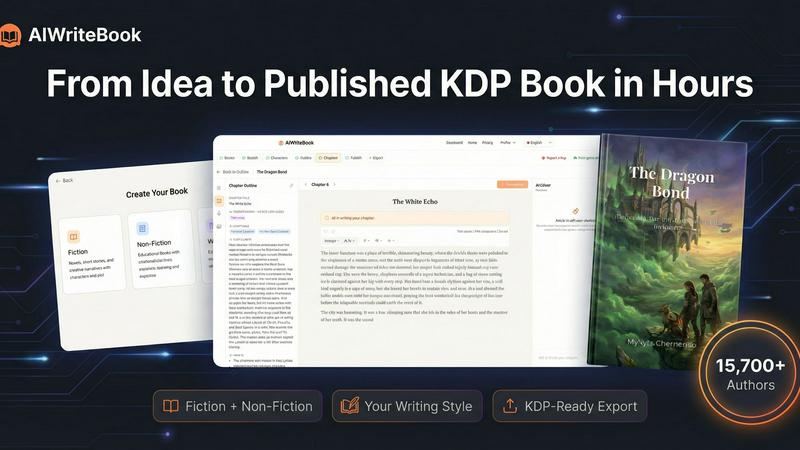
AIWriteBook lets you quickly turn your ideas into a polished book, from concept to KDP-ready, in just hours.
Last updated: April 13, 2026
Visual Comparison
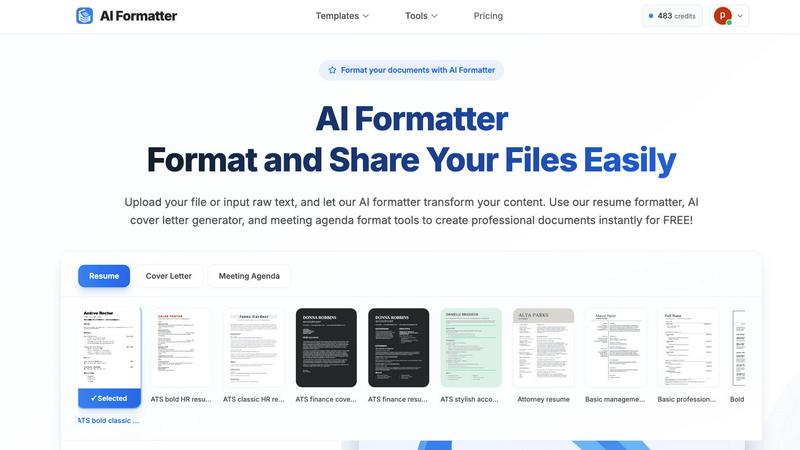
AI Formatter
AIWriteBook
Feature Comparison
AI Formatter
AI-Powered Formatting Engine
The core AI engine intelligently analyzes uploaded text or documents, understanding context and content hierarchy. It then automatically applies perfect professional formatting, aligning text, adjusting fonts, creating consistent spacing, and structuring layouts according to the chosen template, all without manual intervention.
Extensive Professional Template Library
Access over 162 ATS-optimized and professionally designed templates for various document types. The library includes modern resume formats, compelling cover letter designs, structured meeting agendas, polished invoices, and business reports, providing a perfect starting point for any professional need.
Real-Time Editing & Customization
After the AI formats your document, take full control with the built-in intuitive editor. Make adjustments to text, fonts, colors, and layout in real-time. This allows for personalization and fine-tuning to ensure the final document meets your exact specifications before sharing or downloading.
Multi-Format Export & Sharing
Download your perfectly formatted document in the format you need, including Microsoft Word (.docx), PDF, and plain text. The platform also facilitates easy sharing directly from the editor, enabling you to send professional documents to clients, recruiters, or team members instantly and securely.
AIWriteBook
AI Outline Generation
AIWriteBook’s AI outline generation feature creates detailed outlines based on your book idea. It is customizable for fiction or non-fiction, helping you organize characters, plot arcs, and chapter structures effectively.
Character Builder
The character builder generates rich, multidimensional characters complete with personalities, arcs, and motivations. This feature ensures that each character drives the story forward, enhancing the narrative's depth.
Voice-Matched Chapter Writing
This feature allows the AI to produce chapters that reflect your unique writing style. By analyzing your past writings, the AI generates content that sounds like you, maintaining your voice throughout your book.
Integrated Audiobook Generation
AIWriteBook offers professional audiobook narration in over 30 languages. This feature enables authors to reach wider audiences by providing an audio format of their work seamlessly integrated into the publishing process.
Use Cases
AI Formatter
Job Seekers Optimizing Application Materials
Job applicants can upload their existing resume or raw career history. AI Formatter's resume formatter and AI cover letter generator transform this content into ATS-friendly, visually striking documents designed to pass automated screenings and impress hiring managers, significantly improving interview callback rates.
Professionals Standardizing Business Documents
Business professionals, freelancers, and teams use the tool to quickly create consistent, on-brand documents. From transforming meeting notes into a formal agenda format to generating polished invoices and client reports, it ensures all external and internal communications maintain a high standard of professionalism.
Academics and Students Formatting Papers
Students, researchers, and academics can input draft text or upload documents to adhere to specific formatting guidelines for essays, research papers, or thesis documents. The AI applies consistent citation styles, margins, headings, and structure, saving hours of manual formatting work.
Career Changers Revamping Their Profile
Individuals transitioning to a new industry can overhaul their existing documents to align with new standards. By using relevant templates and the AI's formatting intelligence, they can effectively rebrand their experience into a format that resonates with recruiters in their target field.
AIWriteBook
Fiction Writing
Fiction authors can leverage AIWriteBook to create intricate plots with well-developed characters, ensuring a compelling narrative. The AI assists in brainstorming ideas and generating chapters that resonate with readers.
Non-Fiction Manuscripts
Non-fiction authors can upload research and reference materials to create structured content, complete with citations and actionable insights. This feature streamlines the process of organizing complex information into digestible chapters.
Audiobook Production
With integrated audiobook generation, authors can easily convert their written content into audio format, making it accessible to a broader audience. This enhances market reach and caters to diverse reading preferences.
Comprehensive Publishing
Authors looking to publish can manage every aspect of the writing process in one platform, from outline generation to final export. This all-in-one solution eliminates the need for multiple tools, simplifying the publishing journey.
Overview
About AI Formatter
AI Formatter is a cloud-based, AI-powered platform designed to eliminate the tedious and time-consuming task of manual document formatting. It transforms unformatted text and raw documents into polished, professional files in seconds, saving users an average of over two hours per document. The tool's core value is its ability to instantly apply industry-standard formatting and structural best practices, ensuring every document is not only visually appealing but also functionally optimized for its purpose. This is especially critical for job seekers, as AI Formatter's templates are engineered for a 95%+ pass rate on Applicant Tracking Systems (ATS), dramatically increasing the chances of a resume being seen by a human recruiter. Users simply upload existing files (Word, PDF, TXT) or input raw text, and the AI intelligently processes the content. With a vast library of over 100 professional templates for resumes, cover letters, meeting agendas, invoices, and more, it serves a wide audience including professionals standardizing business documents, academics, teams boosting productivity, and anyone in a career transition. The platform completes the workflow with a real-time editor for fine-tuning and secure export in multiple formats, delivering a complete, efficient solution for creating impressive and effective documents.
About AIWriteBook
AIWriteBook is a comprehensive AI-driven book creation platform designed for authors looking to streamline the writing and publishing process. With over 15,700 authors using the tool, it transforms ideas into fully realized books in a matter of hours instead of months. It allows users to start from scratch or import existing manuscripts in various formats, including .docx, .pdf, and .epub. The AI analyzes your writing style, ensuring that generated chapters reflect your unique voice rather than sounding generic. The platform supports both fiction and non-fiction authors, offering deep character development, structured outlines, and a cohesive story bible for plot consistency. Authors can also utilize a built-in editor for seamless writing, editing, and illustration generation, all without switching tools. Upon completion, users can create professional book covers, optimize KDP keywords, and export their work in multiple formats, ready for publishing on major platforms like Amazon, Apple Books, and Google Play.
Frequently Asked Questions
AI Formatter FAQ
What file formats can I upload to AI Formatter?
AI Formatter supports a range of common file formats for upload, including PDF, DOC, DOCX, and TXT files. This allows you to start from an existing document you already have. There is a maximum file size limit of 10MB per upload.
How does AI Formatter help with ATS compatibility?
The platform's resume and cover letter templates are specifically designed and tested for Applicant Tracking System compatibility. They use clean layouts, standard headings, and correct parsing structures that ATS software can read accurately, leading to a documented 95%+ pass rate.
Can I edit the document after the AI formats it?
Yes, absolutely. Once the AI processes your content into the selected template, it opens in a full-featured, real-time editor. You can freely customize all text, adjust formatting, rearrange sections, and personalize the design to your liking before finalizing your document.
Is there a free version of AI Formatter?
Yes, you can start using AI Formatter for free. The platform offers free access to its core formatting tools, including the ability to upload files, use AI formatting, and access templates to create professional documents instantly without an initial cost.
AIWriteBook FAQ
How does AIWriteBook learn my writing style?
AIWriteBook learns your writing style by analyzing previous works you upload to the platform. This enables the AI to generate content that reflects your unique voice and style throughout the book.
Can I edit the content generated by AIWriteBook?
Yes, the built-in editor allows you to edit any generated content inline. You can refine paragraphs, regenerate sections, and add illustrations all within the same platform, ensuring a smooth editing process.
What formats can I export my book to?
AIWriteBook supports multiple export formats, including KDP-ready EPUB, print PDF (in various trim sizes), DOCX, and audiobook formats. This versatility allows you to publish across major platforms easily.
Is there a free version of AIWriteBook?
Yes, AIWriteBook offers a free tier that allows you to create an outline and generate the first chapter of your book. This lets potential users explore the platform's capabilities without any financial commitment.
Alternatives
AI Formatter Alternatives
AI Formatter is a cloud-based productivity tool that uses artificial intelligence to instantly format raw text and documents into professional, polished files. It automates the tedious process of applying structure and style, saving users significant time and effort. Users may seek alternatives for various reasons, such as budget constraints, a need for different features, or a preference for a different platform or workflow. Some may require more advanced design control, while others prioritize simplicity or a one-time purchase over a subscription model. When evaluating alternatives, consider your primary needs. Key factors include the quality and range of templates, the level of automation versus manual control, export options, security of your data, and overall value for the price. The right tool should efficiently solve your specific document formatting challenges.
AIWriteBook Alternatives
AIWriteBook is an innovative AI book creation platform designed to streamline the writing, designing, and publishing process for authors. It caters to both fiction and non-fiction writers by providing tools that enable users to develop characters, generate outlines, and produce professional-quality books in a fraction of the time typically required. With over 15,700 authors already utilizing the platform, it's clear that AIWriteBook is a popular choice for those serious about getting their work published efficiently. Users often seek alternatives to AIWriteBook due to various reasons such as pricing, specific features, or compatibility with different platforms and workflows. When considering an alternative, it’s important to evaluate factors like usability, the quality of AI-generated content, available support, and integration with other writing tools. A good alternative should ideally meet the unique needs of your writing style and project requirements while offering a seamless user experience.