

xyOps
xyOps automates, monitors, and responds across your entire infrastructure with visual workflows and smart job scheduling.
AI tool Details
Explore More
Alternatives
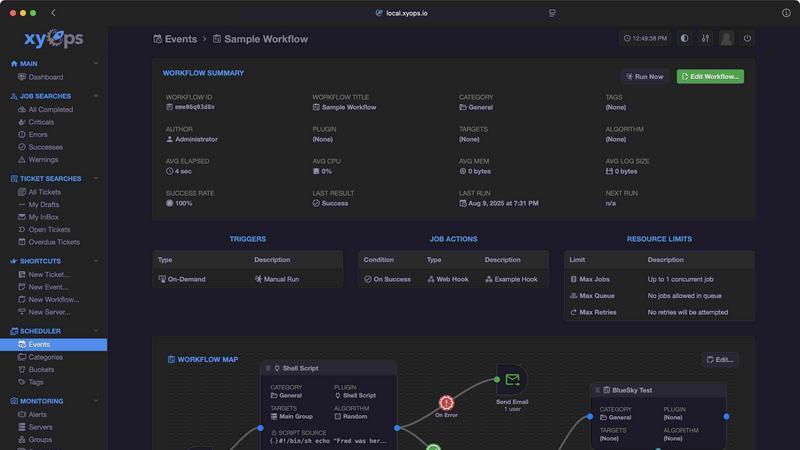
About xyOps
xyOps is a next-generation, open-source platform that unifies job scheduling, workflow automation, server monitoring, alerting, and incident response into a single, cohesive system. Built for developers and operations teams, xyOps gives you complete control over your automation stack without sacrificing data privacy, operational freedom, or visibility into your infrastructure. Unlike proprietary tools, xyOps hides no features behind paywalls and pushes no telemetry back to external servers. It is fully open, extensible, and designed to run anywhere from a single laptop to a fleet of thousands of servers across macOS, Linux, and Windows.
At its core, xyOps reimagines job scheduling beyond traditional cron, offering a flexible scheduler that targets individual servers or groups, supports multiple schedules per event, blackout ranges for holidays, crontab import, and one-time jobs. Its visual workflow builder allows you to chain multiple jobs with conditional logic, pass data and files between steps, assign actions to events, and attach limiters like timeouts and memory caps. The platform also includes active job tracking with real-time progress updates, parallel execution, and enforcement of CPU and memory limits per job.
Beyond scheduling, xyOps provides comprehensive server monitoring with dashboards for servers and groups, custom monitors and alerts, and historical performance graphs. Its smart alerting system features flexible trigger expressions, email and webhook notifications, and the ability to create tickets or run jobs from alerts. An integrated ticketing system supports incident response, with alerts and failed jobs automatically creating tickets that can attach files and trigger CI/CD pipelines. All of this is backed by a plugin architecture that supports any language via a simple JSON over STDIO API, a growing plugin marketplace with integrations for tools like GitHub, Slack, Discord, and OpenAI, and a BSD 3-Clause license that guarantees the software remains free and open source forever.
Features
Visual Workflow Builder
The graphical workflow editor lets you chain multiple jobs with conditional logic, passing data and even files between workflow steps. You can assign actions to specific events, such as sending notifications or triggering webhooks, and attach limiters like timeouts, memory caps, and log size caps. The builder also supports running jobs in parallel or creating custom queues, giving you full control over complex automation pipelines without writing code.
Flexible Job Scheduler
xyOps brings superpowers to job scheduling, going far beyond traditional cron. You can target individual servers or groups, set multiple schedules per event, define blackout ranges for holidays or downtime, and import existing crontab configurations. The scheduler also supports one-time jobs for single-shot executions and includes plugin-based extensions, making it adaptable to any scheduling need across your entire fleet.
Active Job Tracking
Run any number of jobs in parallel with optional max parallel limits that queue the rest. The system provides real-time progress updates along with estimated time remaining, and enforces per-job limits on CPU and memory usage. Jobs can emit their own progress and stats, and you can run custom actions based on job results, giving you granular visibility and control over every execution.
Smart Alerts and Integrated Ticketing
The alerting system uses trigger expressions with flexible rules and supports email, webhook, and custom notifications. Every alert includes a snapshot of the server at the time of the event. Alerts can automatically create tickets or run jobs, and active alerts can prevent new jobs from launching. The built-in ticketing system handles incident response end-to-end, with tickets that can attach files and run jobs for CI/CD systems, all fully scriptable via API.
Use Cases
Automating CI/CD Pipelines Across a Fleet
Development teams can use xyOps to orchestrate complex CI/CD pipelines that span hundreds or thousands of servers. The visual workflow builder chains build, test, and deployment jobs with conditional logic, while the smart alerting system notifies teams immediately on failure. Integrated ticketing automatically creates incident tickets for failed builds, and the plugin marketplace provides ready-made integrations with GitHub, Docker, and other DevOps tools.
Server Health Monitoring with Automated Response
Operations teams can monitor CPU, memory, network, disk, and custom metrics across their entire infrastructure using xyOps server dashboards. When thresholds are breached, smart alerts trigger notifications via email or webhook, and can automatically run remediation jobs or create support tickets. Historical performance graphs from hourly to yearly help teams identify trends and plan capacity upgrades proactively.
Scheduled Data Processing and ETL Workflows
Data engineers can schedule complex ETL (Extract, Transform, Load) pipelines using xyOps flexible job scheduler. Multiple jobs can run in parallel with enforced CPU and memory limits, and data or files can be passed between workflow steps. The plugin architecture supports custom data sources and destinations, while blackout ranges prevent processing during maintenance windows or holidays.
Incident Response and Ticketing Automation
IT support teams can leverage xyOps integrated ticketing system to streamline incident response. Alerts from failed jobs or server monitoring automatically create tickets with full server snapshots attached. Tickets can trigger remediation jobs, attach logs, and integrate with external systems via the API. This reduces manual triage time and ensures every incident is tracked and resolved systematically.
Frequently Asked Questions
Is xyOps truly free and open source?
Yes, xyOps is 100% free and open source under the BSD 3-Clause license, and it always will be. The license will never be modified, split, or amended with additional restrictive terms. No new code or contributions will ever be accepted under a non-OSI-approved license. All current and future app features will be open source forever. Professional and enterprise support plans are available separately.
What platforms does xyOps support for agents?
xyOps agents can be easily installed on macOS, Linux, and Windows operating systems. The platform scales from five servers to thousands, and servers can be grouped manually or automatically based on hostname. This cross-platform support ensures you can monitor and orchestrate workloads across heterogeneous environments without compatibility issues.
How does the Plugin API work?
xyOps uses a simple JSON over STDIO Plugin API that requires no SDK and supports all programming languages. You can define custom parameters with UI form fields for easy configuration. Multiple plugin types are available, including Event, Action, Monitor, and Trigger. The Plugin Marketplace offers a growing library of ready-made plugins, both official and community-based, including integrations with tools like GitHub, Slack, Discord, OpenAI, and more.
Can xyOps handle high availability and failover?
Yes, xyOps supports running multiple hot backups that can take over instantly on power loss, with no jobs interrupted during primary failover. The platform scales to thousands of worker servers in your cluster and supports both manual and automatic server grouping. This architecture ensures your automation and monitoring remain operational even during infrastructure failures.
Similar to xyOps

AudioVideo
Turn podcasts, narration, voice recordings, or music into visual content with an Audio to Video AI generator.

Reelslaunch
AI-driven workflow for faceless Instagram Reels & YouTube Shorts: H3 Max text-to-video with native audio plus automated batch publishing.

amaze.directory
A directory of AI tools where every listing was opened and used by a person.

benchmark.directory
146 AI tools, grouped by the job you hire them to do. We paid for every one, used it on real work, and wrote down where it stops.

Lahjty
Write, design, and voice Arabic campaigns in the dialect your customer


Tools Network
Tools Network is a curated directory of the best AI tools across 25+ categories — compare ratings, pricing, and features to find the right one fast.

Productify
Drop in up to 50 designs and get one finished Printify product per design, with a review of the whole batch before anything is created.