Sorry Hundred Times
Generate perfectly formatted sorry messages and copy them 100 to 10,000 times instantly for WhatsApp or Instagram.
About Sorry Hundred Times
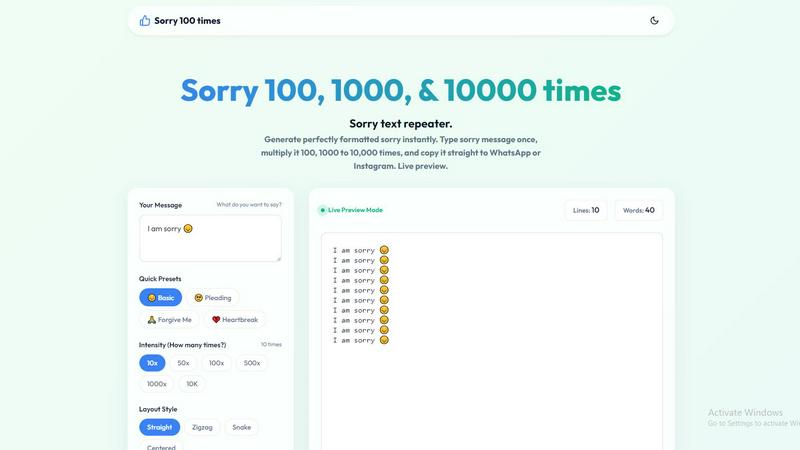
Sorry Hundred Times is a free, browser-based utility designed to generate repeated apology messages instantly. It addresses a specific communication gap: when a single "sorry" feels inadequate, this tool amplifies your message by repeating it hundreds or thousands of times in a formatted, visually impactful way. The product is for anyone who needs to express sincere regret in a digital conversation, whether on WhatsApp, Instagram, iMessage, or any other messaging platform. Its main value proposition is simplicity and speed. Users type their apology message once, choose a repetition count from 10 to 10,000, pick a layout style and formatting options, and generate the complete text in seconds. The tool runs entirely in the user's browser with zero lag, meaning even 10,000 repetitions appear instantly without crashes. It supports fully personalized messages, including names and emojis, and offers quick presets for common apology tones like basic, pleading, forgive me, and heartbreak. The one-click copy function optimizes the text for sharing, ensuring the final message is ready to paste directly into any chat window. This tool eliminates the tedious manual process of copying and pasting the same word repeatedly, turning a simple act into a meaningful gesture that demonstrates effort and sincerity.
Features
Instant Generation with Zero Lag
The tool runs entirely within your browser, processing all text generation locally. You can select 10,000 repetitions and see the complete output appear in the preview window instantly, with no loading screens, server delays, or browser crashes. This performance is critical because it allows you to generate and send your apology in under thirty seconds, which is often the difference between a timely response and a missed opportunity to reconnect. The local processing also ensures your message never leaves your device, providing complete privacy.
Flexible Repetition Count and Custom Numbers
You are not limited to preset options. While the tool offers quick selection buttons for 10x, 50x, 100x, 500x, 1000x, and 10,000x, you can also type any custom number you need. This flexibility lets you match the intensity of your apology to the severity of the situation. A casual slip-up might warrant 10 repetitions, while a major argument could demand 1,000 or more. The live preview updates instantly as you change the count, letting you see exactly how the final message will look before you copy it.
Multiple Layout Styles and Formatting Options
The tool provides four distinct layout styles: straight, zigzag, snake, and centered. Each style changes the visual presentation of the repeated text, adding a layer of effort and creativity to your apology. Additionally, you can toggle formatting options such as adding a new line for each repetition, showing line numbers to make the count visible, and adding a separator like a pipe character between repetitions. These options allow you to tailor the message's appearance to match the mood and platform you are using.
Quick Presets and Full Personalization
For users who want to save time, the tool offers four ready-made apology presets: Basic, Pleading, Forgive Me, and Heartbreak. Each preset comes with a pre-written phrase and an appropriate emoji. However, every preset is fully editable before you generate the final text. You can add the recipient's name, change the emoji, or write a completely custom message. This combination of speed and personalization ensures your apology feels genuine and specific to the situation, not like a generic copy-paste.
Use Cases
Casual Slip-Up or Minor Mistake
For small errors like forgetting to text back, eating the last slice of pizza, or arriving a few minutes late, a lighthearted apology is appropriate. Using the tool with a count of 10 to 50 repetitions, a simple "sorry" message, and a playful layout like zigzag or centered creates a humorous yet sincere gesture. The recipient sees that you acknowledged the mistake and put in a little extra effort, which often diffuses tension and invites a forgiving response. This use case is common among friends and partners in casual chat settings.
Major Argument or Serious Disagreement
After a significant fight or a serious mistake, a single apology can feel hollow. Setting the repetition count to 1,000 or more, using a pleading or heartbreak preset, and adding the recipient's name shows a level of dedication that words alone cannot convey. The sheer volume of the apology signals that you understand the gravity of the situation and are willing to go to great lengths to make things right. This use case is best for romantic relationships, close friendships, or family dynamics where trust needs to be rebuilt.
Public Apology or Group Chat Context
In a group chat or public forum, a repeated apology can serve as a visible acknowledgment of a mistake that affected multiple people. Using line numbers and a straight layout makes the message easy to read and demonstrates that you are taking responsibility publicly. The tool allows you to generate a formatted apology quickly, avoiding the awkwardness of typing the same word manually or sending multiple separate messages. This use case is relevant for workplace teams, friend groups, or online communities.
Creative or Humorous Expression
Beyond sincere apologies, the tool can be used for creative or humorous purposes. For example, sending "sorry" 100 times in a snake layout with emojis can be a playful way to apologize for a minor annoyance or to make a friend laugh. The tool's flexibility allows you to experiment with different messages, layouts, and counts to create a unique and memorable text. This use case is ideal for social media posts, Instagram stories, or lighthearted interactions where the goal is to entertain as much as to apologize.
Frequently Asked Questions
Is Sorry Hundred Times completely free to use?
Yes, the tool is entirely free. There are no hidden charges, subscription fees, or sign-up requirements. You can access it from any browser on any device and generate unlimited apologies without any cost. The tool runs locally in your browser, so there are no server costs passed on to users.
Can I use names and emojis in my apology message?
Absolutely. The tool fully supports custom text, including names, emojis, and any other characters you can type. You can write "sorry [name] 🙏" or any other phrase, and it will be repeated exactly as entered. The quick presets also include emojis, and you can edit them before generating the final text.
Will the tool crash if I select 10,000 repetitions?
No. The tool is designed to run locally in your browser with zero lag. It generates 10,000 lines instantly without crashing or slowing down your device. This performance is achieved through efficient client-side processing that handles large text generation smoothly. You can test any count without worrying about browser performance issues.
How do I copy the generated message to WhatsApp or Instagram?
After generating your message, click the "Copy Apology" button. This copies the entire text to your clipboard in one click. Then, open your messaging app, navigate to the chat, long-press the message input field, and select "Paste." The formatted apology will appear exactly as you designed it. If the copy button does not respond, you can use the Select All option and then press Ctrl+C (Windows) or Cmd+C (Mac) to copy manually.
Similar to Sorry Hundred Times
Aptitude Test Prep
Free timed practice for real employer aptitude tests

Solve Game Prep
Practice the McKinsey Solve game before it practices you.

Interview Practice
Rehearse behavioral interview answers out loud on a timer, then an AI mock scores each answer and shows a stronger one.

X Growth Engine
The only app that uses your unique X feed to surface leads, opportunities, and customers - no searching, no manual lists

Delta Report
Free, Live 3D Satellite, Space Weather & Climate Tracker in real time on an interactive globe alongside articles and insights.

The French Corner
Learn French through visual stories told by a native speaker. Words you meet come back on their own, right before you'd forget them.

AccsTrust.com
AccsTrust is a proxy infrastructure service providing mobile and static IPv6 proxies for businesses, developers, automation, web scraping.