Sketch To
Transform your images into stunning sketches instantly with Sketch To's advanced AI technology for all creative needs.
AI tool Details
Explore More
Alternatives
About Sketch To
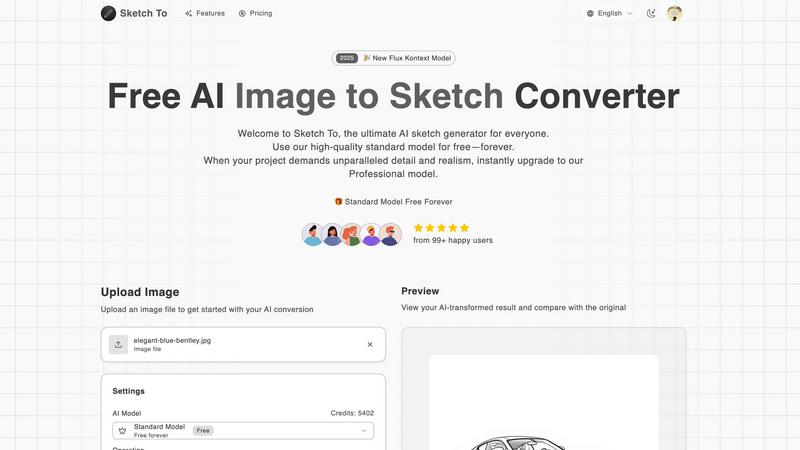
Sketch To is a cutting-edge, web-based AI tool that seamlessly integrates the worlds of photography and drawing. It offers users the ability to convert any uploaded photo into a striking artistic sketch while simultaneously allowing hand-drawn sketches to be transformed into photorealistic images. Designed for a diverse audience, including casual hobbyists, social media enthusiasts, and professional artists, Sketch To stands out due to its advanced AI technology that facilitates instant, high-quality artistic conversions without the need for complex software or ongoing subscriptions. Users can start for free, exploring the robust standard model, and can easily upgrade to a professional-grade AI for projects demanding exceptional detail and realism. The platform ensures that creators can obtain stunning artistic results tailored to their specific needs, paying only for what they require.
Features
Image to Sketch Conversion
Convert photos into beautiful, detailed pencil sketches using advanced AI technology. This feature is tailored for artists and designers looking to enhance their creative projects effortlessly.
Sketch to Image AI
Transform your hand-drawn sketches into realistic images with superior detail and accuracy. This feature is particularly beneficial for professional projects that require a high level of realism.
Trial Credits Model
New users can take advantage of trial credits with the standard model, allowing them to explore features without initial investment. This is ideal for hobbyists and personal use.
Professional Quality Output
Users can upgrade to the Pro model, which delivers commercial-grade quality with exceptional detail, texture, and realism. Perfect for those needing top-tier results for professional applications.
Use Cases
Social Media Content Creation
Create eye-catching sketches from photos to enhance your social media presence. This feature is perfect for influencers and marketers seeking unique visuals to engage their audience.
Artistic Projects for Hobbyists
Hobbyists can transform their photographs into artistic sketches or elevate their hand-drawn illustrations into photorealistic images, adding a professional touch to personal projects.
Commercial Design Applications
Graphic designers can utilize the Pro model to convert images into sketches for branding, advertising, or product mock-ups, ensuring high-quality deliverables for clients.
Educational Use in Art Classes
Teachers and students can leverage Sketch To in art classes to visualize concepts and enhance learning through interactive image transformations, making art more accessible and engaging.
Frequently Asked Questions
How does Sketch To work?
Sketch To utilizes advanced AI algorithms to analyze images and sketches, converting them into artistic styles in just a few clicks. Users simply upload their files, select a style, and generate their desired output.
What formats does Sketch To support for uploads?
Sketch To supports multiple image formats, making it easy for users to upload their images or sketches. This versatility allows for a wide range of creative applications.
Is there a cost to use Sketch To?
Sketch To offers a free trial model for new users, with the option to upgrade to a professional model for advanced features. Users only pay for the credits they need, making it budget-friendly.
Can I compare the original image with the converted sketch?
Yes, Sketch To provides a preview feature that allows users to compare their original images with the AI-transformed results side by side, ensuring satisfaction before downloading.
Similar to Sketch To
screenRIG
Signage and kiosk infrastructure for AI agents. Your agent publishes images, video, streams, web pages and apps to screens via one plugin.screenRIG is